
How to pick the best photos from a shoot as a photographer


To select the best photos from a shoot, remove unusable frames, compare similar images, then choose the photographs that cover the brief with clear subjects, strong expressions and distinct moments. Review the shortlist as a complete story before editing, and check rejected frames for important people or moments you have missed.
TL;DR
- Learning how to select best photos from a shoot starts with separating technical rejects from meaningful photographs.
- Compare similar frames together; keep different expressions, actions or viewpoints only when they add something.
- Fotoowl supports assisted photo culling, but photographers must review the shortlist before export.
- Judge the final selection against your client brief, not an arbitrary keeper percentage.
Why this matters
A technically strong photograph is not automatically the right photograph to deliver. A sharp portrait does not replace a missing family group, and repeated dance-floor frames do not make up for an omitted ceremony moment.
For your 2026 wedding and event workflow, separate selection from editing. Decide which photographs deserve work before you start correcting colour or retouching details. Otherwise, the time invested in an edit becomes another reason to keep a redundant frame.
Start by understanding the difference between duplicate and weak frames in photo culling. Identical files, near-identical captures and technically unsuccessful photographs need different decisions.
How do you pick the best photos from a shoot as a photographer?
Use a staged review rather than trying to judge technical quality, emotion and complete coverage simultaneously. Follow this order, then return to questionable frames with the full selection in view.
- Confirm the brief. List the people, moments and deliverables the selection must cover.
- Organise the shoot. Separate functions or sessions, and bring related captures together.
- Flag clear rejects. Set aside accidental captures and photographs that cannot serve the brief.
- Compare similar frames. Choose the strongest expression, gesture and composition within each sequence.
- Build the story. Check that the selected photographs cover the event without unnecessary repetition.
- Review before export. Inspect important details, revisit uncertain rejects and confirm the handoff.
Do not permanently delete photographs while making these decisions. Keep your selection process reversible until you have checked the shortlist and followed your studio’s backup and retention procedure.
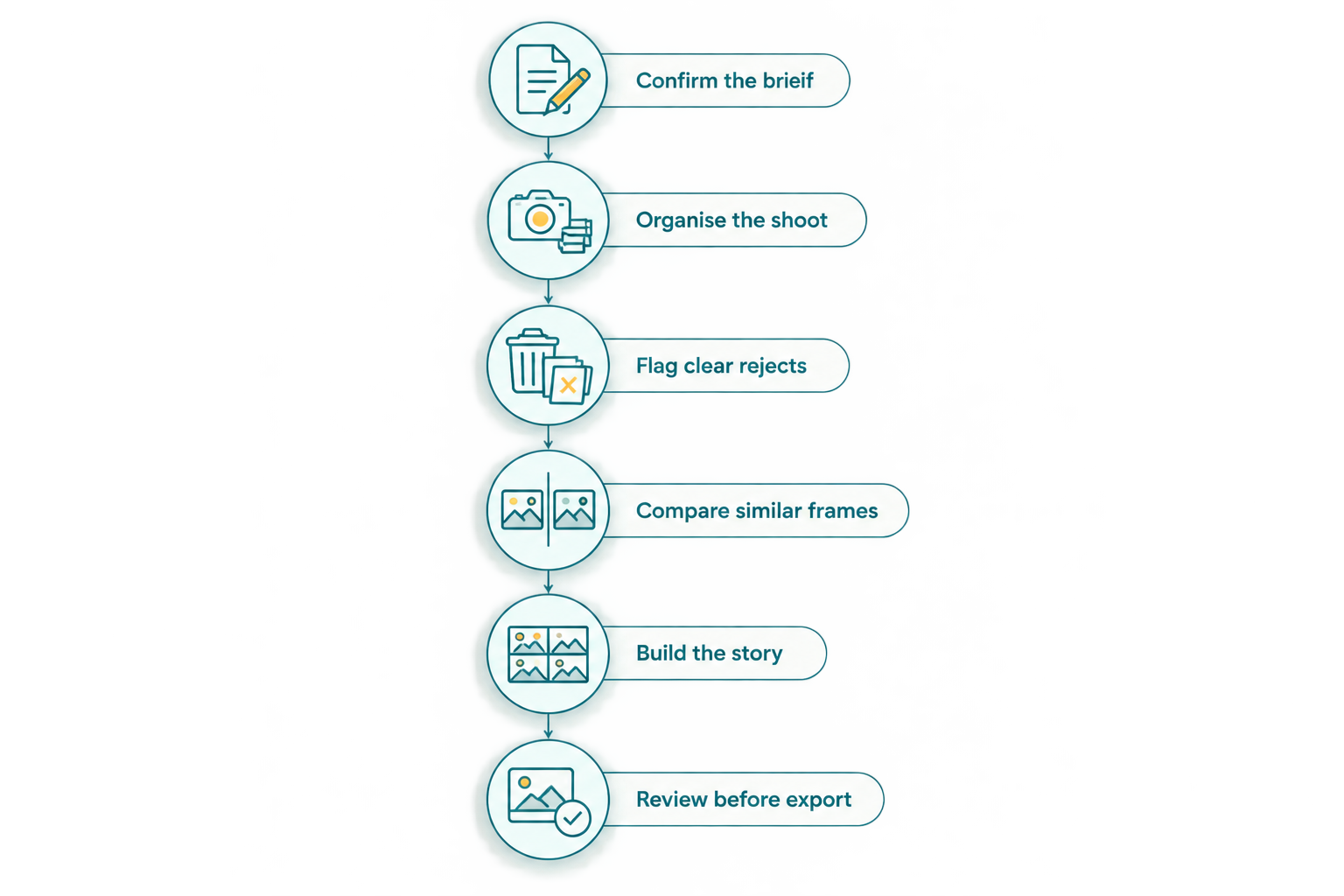
Technical rejection comes before comparison, but complete coverage needs a separate review.
Confirm what the photographs must achieve
Read the agreed brief before opening the first sequence. For an Indian wedding, that means checking the functions you covered and the family groups or rituals the client identified as important—not assuming every wedding needs the same selection.
For a corporate assignment, check the requested speakers, presentations, audience interactions and sponsor coverage. For school or sports work, use the participant and coverage requirements supplied for that assignment.
Your brief sets the minimum coverage; your judgement determines the strongest treatment. Keep a reference list beside the selection so that visually dramatic photographs do not push quieter obligations out of view.
Organise related captures before judging them
Review each function or session as a recognisable unit. Within it, place related bursts and overlapping camera coverage together so you can compare alternatives instead of repeatedly rediscovering them.
Preserve source filenames or another reliable way to trace a selected photograph back to its original. If camera clocks differ, account for that when reviewing the sequence; do not assume filename order represents the event accurately.
For a multi-function wedding, review haldi, sangeet, ceremony and reception coverage separately where those functions were photographed. Then check the combined set for balance across the assignment.
Flag technical problems without losing context
Inspect focus on the intended subject, unwanted movement, exposure and obstructions. Reject an accidental floor capture when it contributes nothing, but pause before rejecting an imperfect photograph of an unrepeatable moment.
Check critical detail at 100% magnification when judging focus. Then return to a fit-to-screen view to assess composition and the overall impression; neither view answers every selection question.
Closed eyes are a problem in a posed group portrait, not an automatic failure in every image. A person laughing or receiving a blessing needs a different judgement from someone blinking during a formal photograph.
Compare the nearest alternatives
Compare photographs that solve the same visual problem: the same pose, action or moment. Choose between those before comparing unrelated images from elsewhere in the shoot.
Look at the main subject first. Check expression, eye direction, hands, body position and distractions around the subject. In a group photograph, inspect everyone rather than accepting the frame because the central couple looks good.
Keep an alternative only when you can explain what it adds. A changed expression or a meaningful reaction is a reason; a barely different hand position is not necessarily one.
What should you keep, hold or reject?
Use a decision table to make your selection rules consistent across a 2026 studio team. Treat these as editorial instructions, not automatic deletion rules: the same technical flaw has different consequences in a repeatable portrait and a unique documentary moment.
| Decision | Best for | Reason to use it | Limitation | Action |
|---|---|---|---|---|
| Keep | Strong frames that meet the brief | Preserves a clear moment, useful detail or required subject | A strong frame can still repeat another selection | Retain, then check against neighbouring picks |
| Hold | Important but uncertain frames | Protects unique coverage while you assess alternatives | Unresolved holds leave the selection unfinished | Revisit before export |
| Reject | Unusable captures or weaker repeats | Removes photographs that add no useful coverage | A rushed decision can hide a unique moment | Flag without immediate deletion |
Avoid using your highest rating for every acceptable photograph. Separate deliverable images from personal portfolio favourites so that an understated but essential family portrait remains in the client set.
A hold category is particularly useful when another team member understands the people or ceremony better than the person culling. Resolve the question before the files reach editing rather than passing the uncertainty downstream.
Why the best photo selection varies by shoot
The selection method stays consistent, but the brief changes what deserves priority. These factors should guide your decisions:
- Coverage requirements: A requested family group or speaker photograph needs representation even when another scene is more visually striking.
- Repeatability: A posed portrait offers alternatives; an unrepeatable reaction needs closer consideration before rejection.
- Subject count: A group photograph requires checking each visible participant, not only the main subject.
- Action and movement: Intentional movement needs a different standard from an accidentally blurred formal portrait.
- Delivery purpose: A complete client set and a portfolio edit serve different purposes and need different selections.
- Overlapping coverage: Multiple photographers can capture either useful complementary viewpoints or unnecessary repetition.
Do not apply a fixed keeper percentage across these assignments. Select against coverage and quality, then use the resulting count to check the agreed deliverable—not to manufacture a target after the shoot.
Should you select photographs manually or use assisted culling?
Use manual judgement for meaning and assisted culling for the first technical shortlist. Your 2026 workflow still needs a photographer to decide which people, relationships and moments matter to the assignment.
| Approach | Best for | Advantage | Limitation |
|---|---|---|---|
| Manual selection | Context-led decisions and final storytelling | You assess meaning alongside technical quality | You must inspect and compare the captures yourself |
| Assisted culling with human review | Grouping similar captures and reviewing technical candidates | Software handles supported sorting and ranking tasks | Its ranking is not approval for client delivery |
Fotoowl AI Culling is best for wedding and event photographers who want offline desktop culling followed by human review. It rejects duplicate and weak frames, groups similar photographs, and ranks images by composition, exposure and blur, with a second human pass before export to Lightroom or the gallery.
Fotoowl’s culling workflow does not remove your responsibility for coverage. Check unique moments among rejected frames, inspect shortlisted group photographs and approve the selection yourself. Offline desktop software is also the wrong fit when your requirement is browser-based culling.
How many photos should you keep from a shoot?
Keep enough photographs to meet the agreed deliverable and cover the assignment without unnecessary repetition. There is no universal count that determines whether your selection is strong.
If the agreement specifies a quantity, check the shortlist against it before editing. When coverage or quality creates a problem, resolve that with the client rather than filling the set with weaker duplicates.
For your 2026 selection checklist, make every retained photograph answer a question: does it document a required person, preserve a distinct moment, explain the setting or add a useful viewpoint? If it does none of those, compare it with the strongest neighbouring selection again.
Should you keep a slightly blurry photo of an important moment?
Keep a slightly blurry photograph for review when it preserves an important moment without a stronger alternative. Technical imperfection and lack of value are not the same thing.
Judge whether the subject and action remain readable, whether the image serves the intended delivery, and whether another camera captured a better version. Do not treat an exceptional save as permission to retain every unsuccessful frame.
The final decision belongs to you, not a sharpness ranking. Be especially deliberate when the photograph records something that cannot be repeated.
Should you edit photos before selecting them?
Select first, then edit the photographs that survive the review. Use a limited correction only when you need it to decide whether an important frame is usable.
An exposure adjustment can help you assess a questionable capture. Detailed retouching should wait until you know that the photograph adds something to the final set.
Keep the stages distinct: selection decides what belongs; editing determines how the approved photographs should look. Revisit the selection after editing if a frame still fails its intended purpose.
Check the whole set before export
A sequence of individually good photographs can still leave gaps. Review the 2026 delivery as a complete assignment, first for coverage and then for repetition.
- People: Confirm the required individuals and groups are represented.
- Moments: Check the event’s important actions and transitions against the brief.
- Variety: Keep useful changes in scale, viewpoint and expression without padding.
- Continuity: Arrange the photographs so the viewer can follow the event.
- Handoff: Confirm that the intended selected files—not an earlier shortlist—are ready for editing or delivery.
For a team handoff, include unresolved questions before anyone starts work. A note identifying an uncertain family grouping is more useful than silently rejecting it or expecting the editor to discover the gap.
FAQ
What's the best way to select photos after a wedding shoot?
Select wedding photographs by reviewing technical quality, comparing similar frames and checking complete coverage against the client brief. Review family groups and important rituals separately before approving the final set.
How do I choose between nearly identical photos?
Choose the photograph with the strongest expression, gesture and composition for the intended purpose. Keep another version only when it adds a meaningful difference, such as a distinct reaction or useful viewpoint.
Should I delete rejected photos while culling?
Flag rejected photographs instead of permanently deleting them during culling. Review important rejected moments and follow your studio’s backup and retention procedure before making deletion decisions.
Can Fotoowl select the final photos without my review?
Fotoowl’s assisted culling workflow includes a second human pass before export. The photographer must confirm important moments, group expressions and complete coverage rather than treating a software ranking as final approval.
How many photos should I deliver from an event?
Deliver the quantity and coverage agreed with your client, using distinct photographs that meet your quality standard. Do not apply a universal keeper percentage or add weaker duplicates simply to increase the count.
Should every photo in my final selection be perfectly sharp?
Judge sharpness against the photograph’s purpose and the alternatives you captured. Formal portraits need careful focus checks, while intentional movement or a unique documentary moment needs a context-led decision.
How can my studio make photo selection more consistent?
Give everyone the same brief, decision categories and final-review checklist. Resolve uncertain frames before editing, and assign a photographer to approve coverage across the complete set.
One last thing
Review what you rejected, not just what you selected. A polished shortlist tells you what looks good; a targeted check of uncertain rejects helps you find the important photograph that almost disappeared.
Make that your final selection habit in 2026. Revisit the frames attached to missing people or moments, resolve the holds, and only then hand over the approved set.