
10 ChatGPT prompts for Indian wedding couple photos

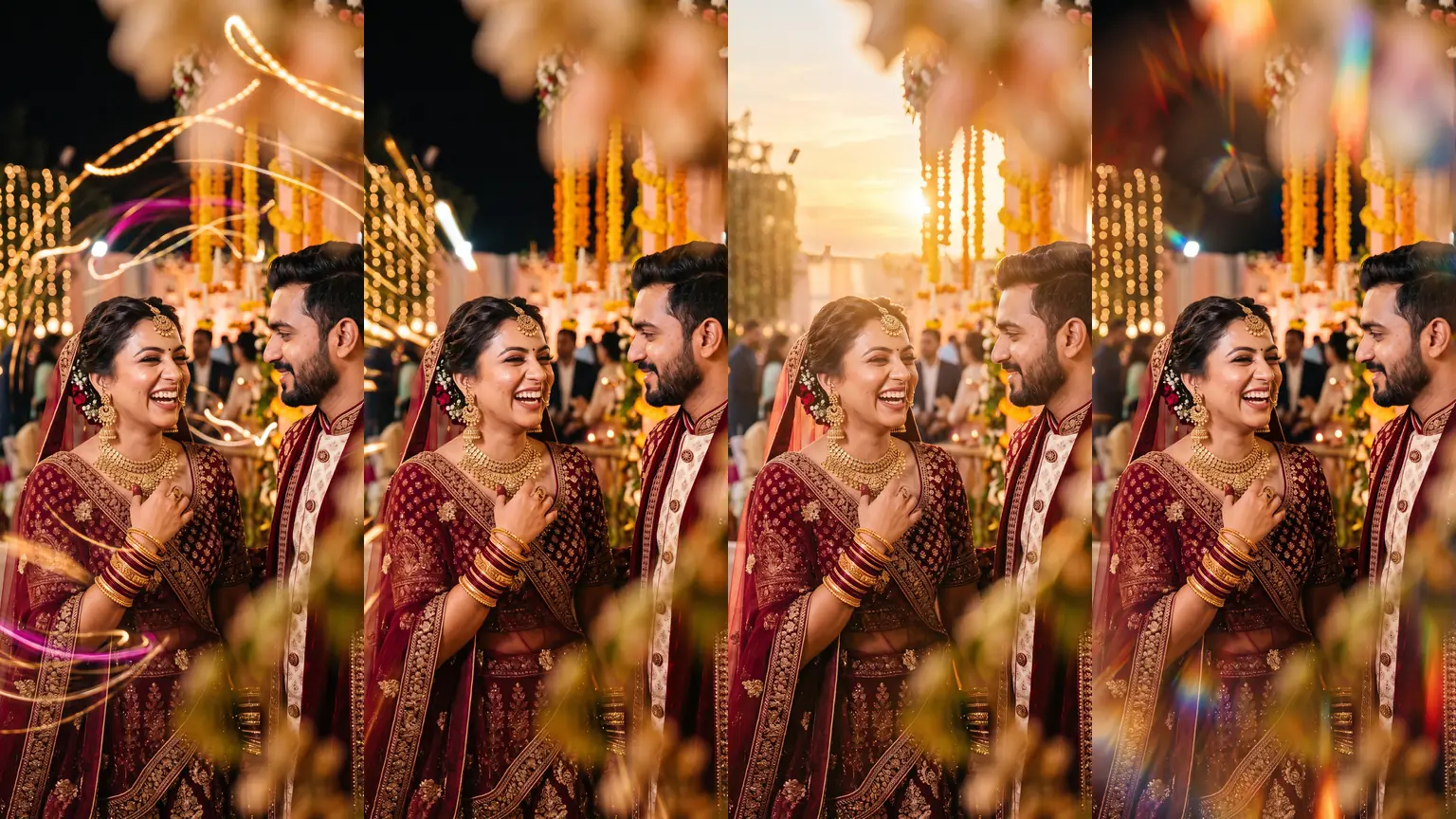
These 10 ChatGPT prompts take one Indian wedding couple photo and restyle it in 10 different ways, from slow-shutter light trails and a paparazzi flash to Portra film, a mandap double exposure and a prism flare. The couple, pose, outfits and framing stay the same. Only the photographic look changes, so you can compare them and paste the one you want.
TL;DR
- Upload a couple photo in ChatGPT, then paste one prompt below. Each prompt locks the faces, pose, outfits and framing, then describes only the new look.
- Use one prompt per message. Stacking several looks in one request makes ChatGPT change the people as well as the style.
- Every example on this page is the same photograph, so the difference you see is the prompt.
- For lighting-only changes that keep the mandap untouched, use the 24 AI lighting prompts.
How to use these prompts in ChatGPT
- Open ChatGPT and start a new chat.
- Upload the couple photo you want to restyle.
- Copy one prompt below and paste it into the same message.
- Send it. If the faces drift, reply: "Keep their faces, outfits and pose exactly the same, and change only the look described in the prompt."
Tip
Send the photo and the prompt together. A follow-up message that only contains the prompt often makes ChatGPT generate a new couple instead of editing the upload.
How each prompt is built
Every prompt has two parts. Keep the first part, and change the second if you want a variation.
1. The lock. It tells ChatGPT what must not change: faces, features, skin tone, expressions, hair, jewellery, makeup, pose, outfits and framing. It also says not to invent a different couple. Without this, a short request like "golden hour" often replaces the people.
2. The look. It describes only the photographic effect: light trails, direct flash, film grain, a double exposure, and so on. It ends by asking for a photorealistic photograph, not an illustration.
All 10 prompts at a glance
The 10 ChatGPT prompts
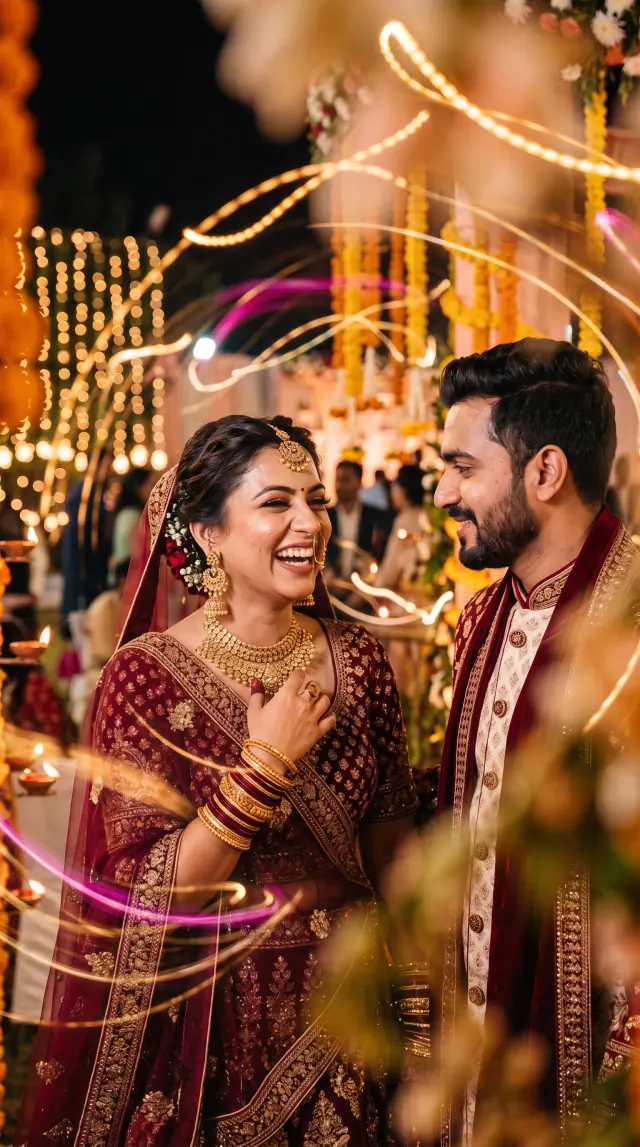
1. Slow shutter light trails
The look: Long, glowing trails of gold, amber, magenta and white sweep around the couple, as if fairy lights moved during a long exposure. Their faces, hands and jewellery stay sharp.
When to use it: Reception and sangeet posts, reel covers and album openers where you want energy in the lights without blurring the couple.
Prompt
Keep the couple's faces, facial features, skin tone, expressions, hairstyles, jewellery, makeup, pose, body positions, outfits and framing exactly the same as the uploaded photo. Do not change who they are or invent a different couple. Make this photograph look as if it was shot with a slow shutter at a night wedding: long, glowing, colourful light trails and bokeh streaks in warm gold, amber, magenta and soft white sweeping across the frame around the couple, as if fairy lights and festive string lights moved during a long exposure. The couple themselves must stay tack-sharp and perfectly still, with no motion blur on their faces, hands, jewellery or clothing. Keep the night wedding setting, marigold florals and background guests, but let the light trails weave through the background and around the edges of the frame. Photorealistic photography, not illustration or painting.
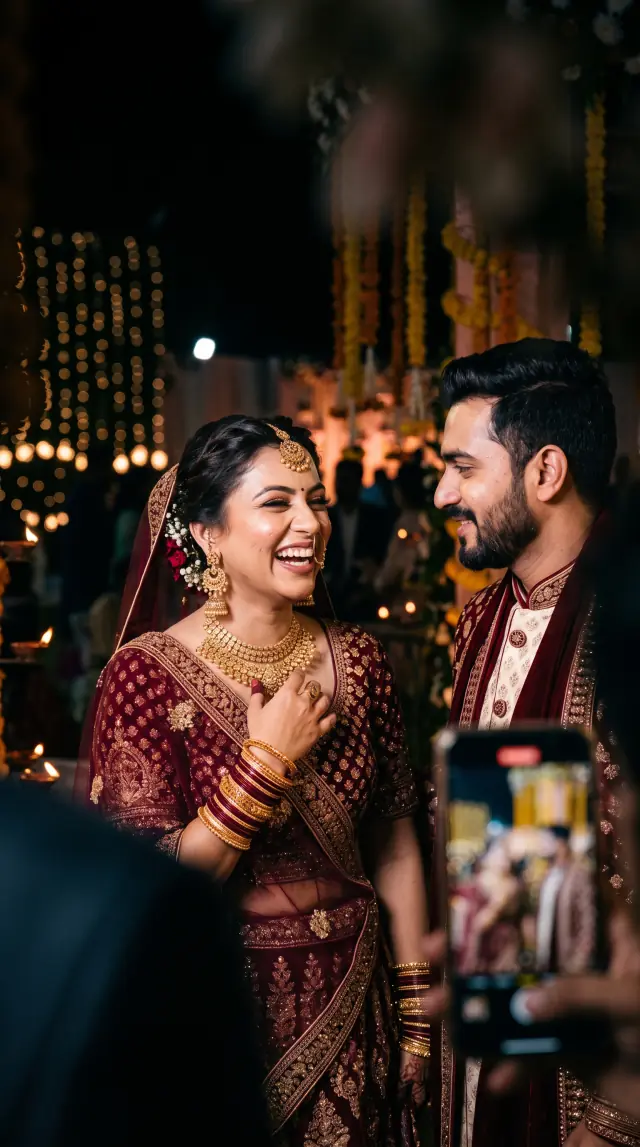
2. Paparazzi direct flash
The look: Harsh on-camera flash on the faces and gold jewellery, a darker venue behind them, and a slightly soft phone at the edge of the frame as if another guest is shooting.
When to use it: Behind-the-scenes stories and candid carousels. It reads as a caught moment rather than a posed portrait.
Prompt
Keep the couple's faces, facial features, skin tone, expressions, hairstyles, jewellery, makeup, pose, body positions, outfits and framing exactly the same as the uploaded photo. Do not change who they are or invent a different couple. Transform the photograph into a candid paparazzi shot at a night wedding: harsh on-camera direct flash lighting the couple's faces and jewellery, slight camera shake and a hint of motion in the lights, a darker underexposed background behind them, and a slightly out-of-focus phone or camera visible at the foreground edge as if another guest is also shooting. Keep the couple sharp enough to recognise, with the direct-flash look — hot specular highlights on skin and gold jewellery, and quick falloff into a darker venue. Photorealistic photography, not illustration or painting.
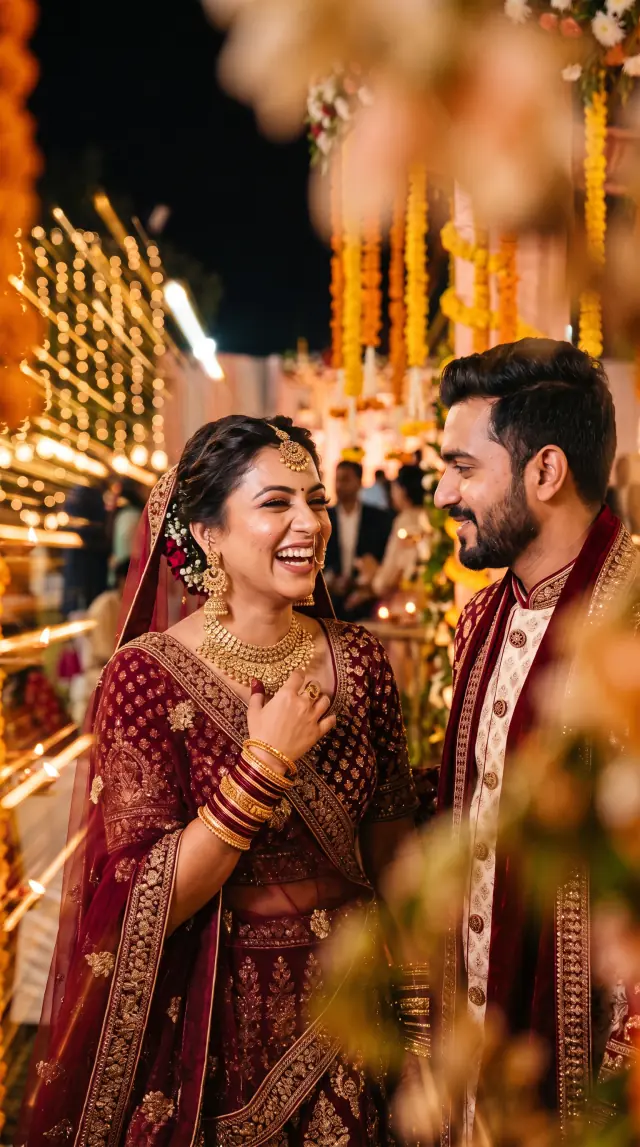
3. Zoom burst
The look: A strong radial zoom-burst: warm streaks shoot out from the couple's faces toward the edges. Only the faces stay tack-sharp.
When to use it: Baraat, couple entry and dance-floor frames. Use it when the photo should feel like motion, not a still portrait.
Prompt
Keep the couple's faces, facial features, skin tone, expressions, hairstyles, jewellery, makeup, pose, body positions, outfits and overall framing exactly the same as the uploaded photo. Do not change who they are or invent a different couple. Apply a dramatic, unmistakable zoom-burst / radial zoom-blur effect, like a classic photograph where the lens was zoomed during a long exposure. Strong streaks of warm gold, white and festive colour must radiate from the couple's faces toward every edge of the frame. The background fairy lights, marigold hangings and foreground flowers should stretch into long, obvious radial streaks. This zoom-burst must be obvious at a glance, not a subtle blur. Keep only the couple's faces tack-sharp in the centre of the burst; a little radial streaking on their shoulders, outfits and the edges of the frame is acceptable. Slight wide-angle feel. Photorealistic cinematic zoom-burst photography, not illustration or painting.
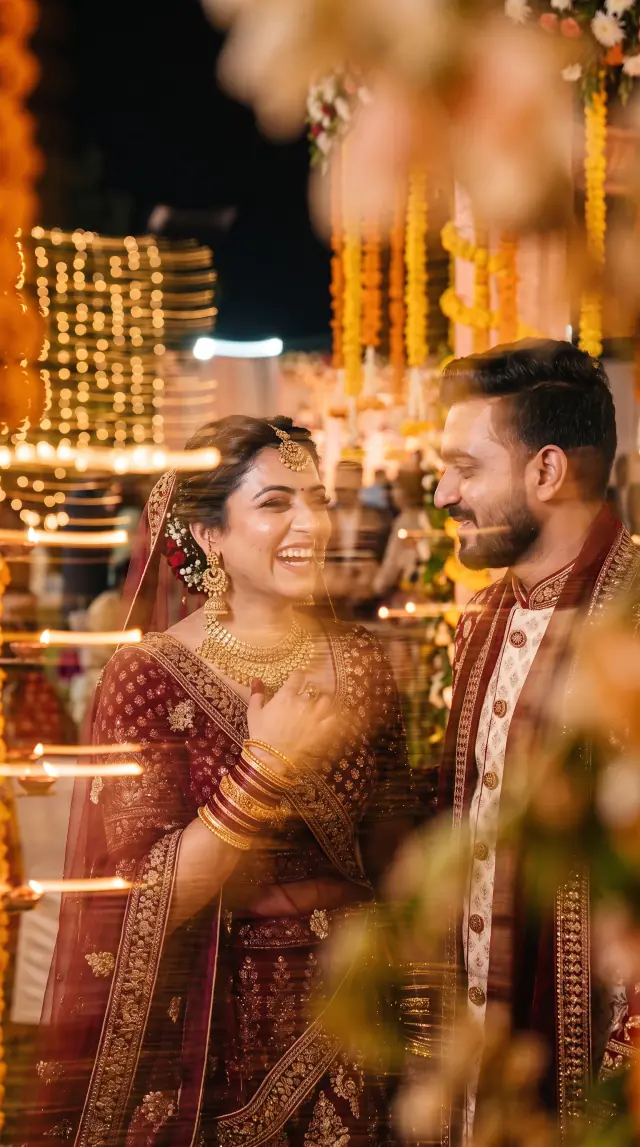
4. Artistic long exposure
The look: A single soft, directional ghost trail, as if the couple moved slightly during one long exposure. Faces stay recognisable, without extra eyes, limbs or stacked copies.
When to use it: One or two fine-art album frames. It is a mood piece, so keep it out of the main portrait set.
Prompt
Keep the couple, their outfits, pose and framing the same as the uploaded photo. Do not change who they are or invent a different couple. The bride should still be recognisable as the same laughing woman, and the groom as the same man looking at her with a soft smile. Give the photograph a dreamy fine-art long-exposure look, as if the couple themselves moved slightly during a single long exposure. Apply a smooth, deliberate motion blur across both of their faces and bodies, with one clean, graceful directional ghost trail — a single soft afterimage stretching slightly in one direction, like a dancer's movement captured on film. The trail must be continuous, translucent and painterly, blending out of the original pose, not a second sharp face sitting beside them. Important: do not create chaotic duplicate eyes, mouths, noses or jewellery; do not add extra limbs, hands, arms or bodies; do not use messy glitchy smears or stacked copies of the face. Faces should be softly blurred and slightly streaked by the motion, yet still clearly recognisable as the same couple. Keep the night wedding setting, marigold florals, fairy lights and warm gold jewellery, and let the background lights streak softly in the same direction. Photorealistic artistic long-exposure photography, not illustration or painting.
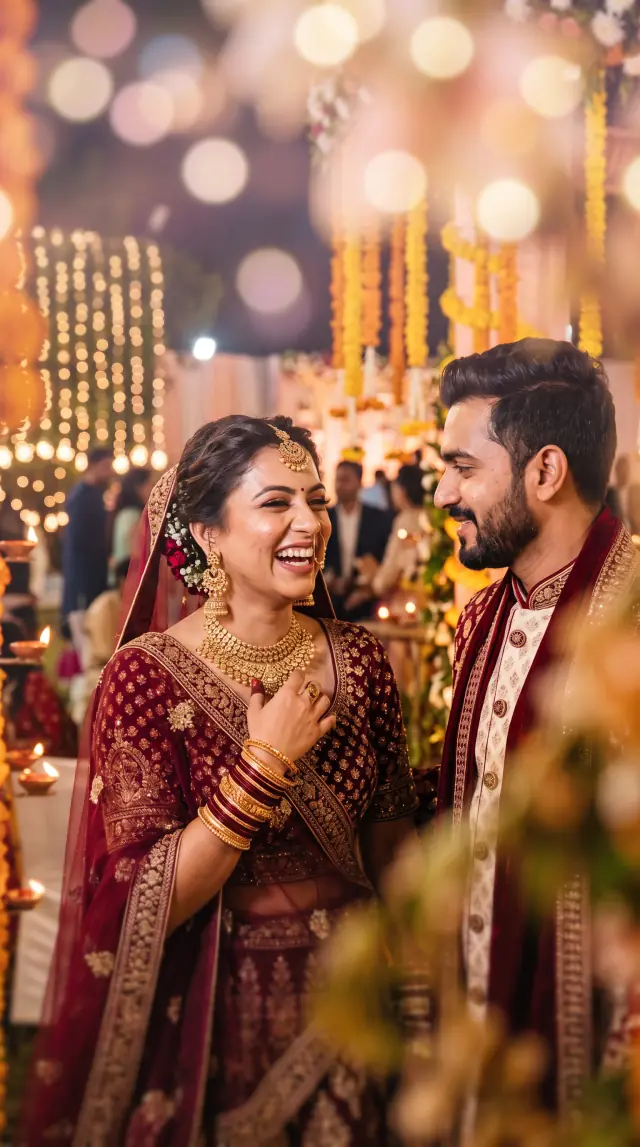
5. Tilt-shift miniature
The look: A narrow band of sharpness through the faces, with heavy creamy blur above and below, so the wedding looks like a tiny diorama.
When to use it: Playful save-the-date posts and social crops. The faces stay clear while the venue falls into a dreamy blur.
Prompt
Keep the couple's faces, facial features, skin tone, expressions, hairstyles, jewellery, makeup, pose, body positions, outfits and framing exactly the same as the uploaded photo. Do not change who they are or invent a different couple. Apply a tilt-shift miniature effect: heavy, creamy optical blur across the top and bottom of the frame, with only a narrow band of sharpness through the couple's faces. Add a soft dreamy pastel glow to the out-of-focus lights and florals, as if the wedding scene were a tiny diorama. Faces must stay sharp and clearly the same people. Photorealistic tilt-shift photography, not illustration or painting.
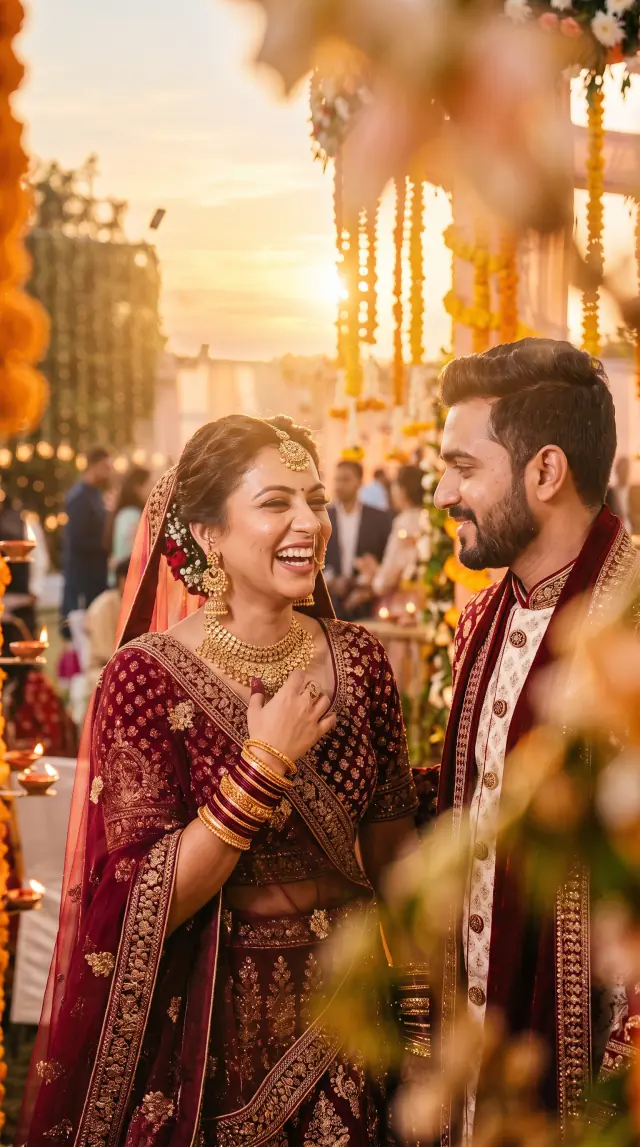
6. Golden hour sun flare
The look: Late-afternoon sun from behind, with a natural flare and rim light on the bride's hair, the maroon lehenga and the groom's outfit. Night venue light becomes honey, amber and peach.
When to use it: Couple portraits and pre-wedding style posts, including night photos you want to feel like sunset.
Prompt
Keep the couple's faces, facial features, skin tone, expressions, hairstyles, jewellery, makeup, pose, body positions, outfits and framing exactly the same as the uploaded photo. Do not change who they are or invent a different couple. Transform the lighting into a magical golden-hour wedding portrait: warm late-afternoon sunlight from behind and slightly to the side, with a natural sun flare and soft rim light catching the bride's hair, the edge of her maroon lehenga and the groom's outfit. The sky and background should feel like golden hour — honey-gold, amber and soft peach — while the night venue lighting is replaced by warm sunlight and gentle backlight through the florals. Keep a few soft, realistic lens flares and a glowing haze, but do not hide or distort the couple's faces. Photorealistic wedding photography, not illustration or painting.
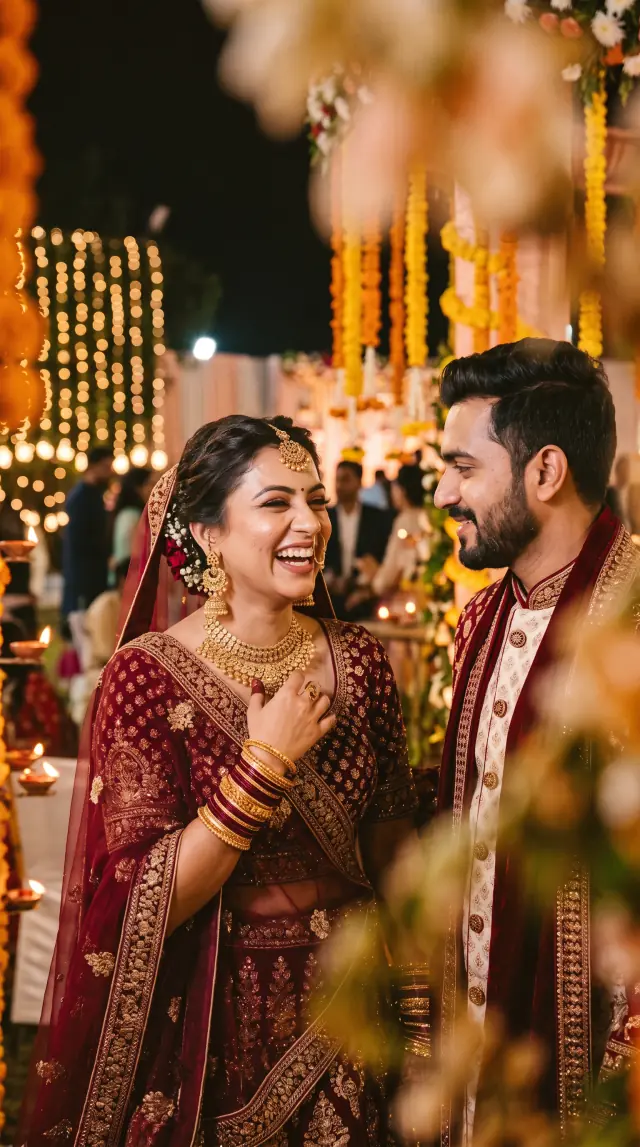
7. Kodak Portra 400
The look: A 35mm Portra 400 scan: fine grain, lifted shadows, creamy highlights, warm skin, and slightly dusty colour in the florals. No frame, border or text.
When to use it: A whole set that should feel like one film roll. Skin stays flattering and the night wedding still reads as night.
Prompt
Keep the couple's faces, facial features, skin tone, expressions, hairstyles, jewellery, makeup, pose, body positions, outfits and framing exactly the same as the uploaded photo. Do not change who they are or invent a different couple. Give the photograph the look of a 35mm Kodak Portra 400 film photograph: fine organic film grain across the frame, slightly lifted shadows, soft creamy highlights, gentle halation around the fairy lights, and the characteristic Portra colour science — warm, flattering skin tones, muted slightly dusty greens in the florals, and rich but not oversaturated maroon and gold. Keep the night wedding setting, but let it feel like a nostalgic film scan rather than a clean digital file. No instant-camera frame, no borders, no text. Photorealistic 35mm film photography, not illustration or painting.
8. Black and white editorial
The look: High-contrast black and white, with bright highlights on jewellery and embroidery and silver bokeh in the background. No colour tint and no border.
When to use it: Album dividers, a monochrome carousel, or one editorial frame next to the colour set.
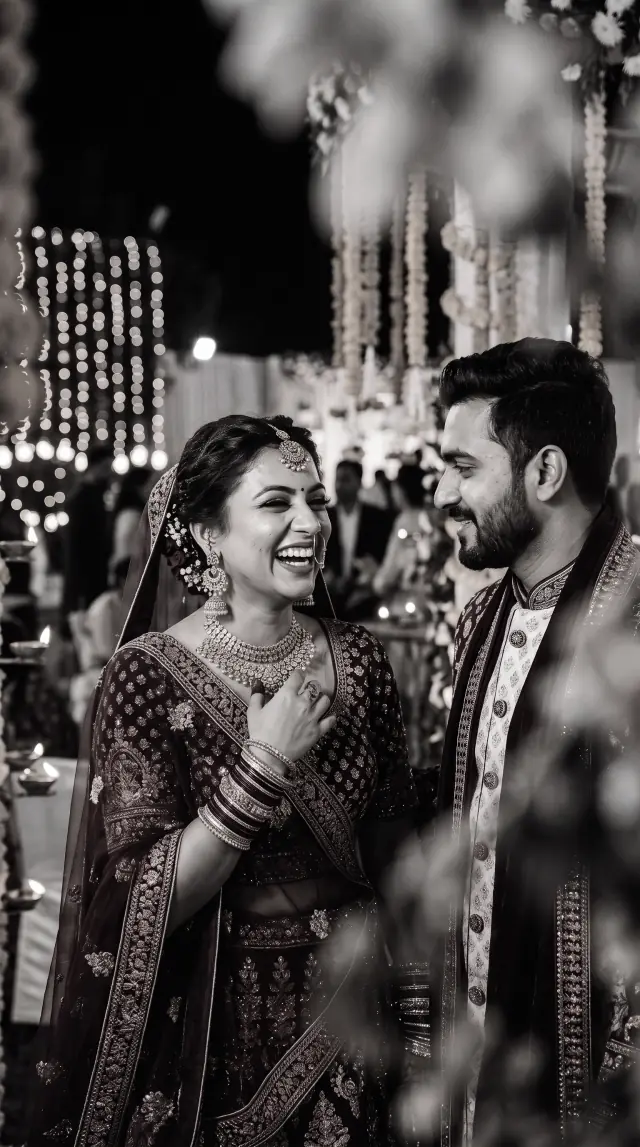
Prompt
Keep the couple's faces, facial features, skin tone, expressions, hairstyles, jewellery, makeup, pose, body positions, outfits and framing exactly the same as the uploaded photo. Do not change who they are or invent a different couple. Convert the photograph into a dramatic black-and-white editorial wedding portrait: rich, inky blacks, bright clean highlights on the jewellery, lehenga embroidery and laughing expressions, and strong midtone contrast like a high-end magazine fashion photograph. Preserve fine texture in skin, fabric and flowers. The background lights should become elegant silver-white bokeh. No colour tint, no split toning, no borders or text. Photorealistic black-and-white editorial photography, not illustration or painting.
9. Double exposure mandap
The look: The couple stays the clear subject while a second exposure of marigold garlands, drapery and fairy lights blends into the darker background, like two film frames sandwiched together. Faces stay uncovered.
When to use it: Ceremony storytelling, when you want the mandap in the frame without hiding the couple.
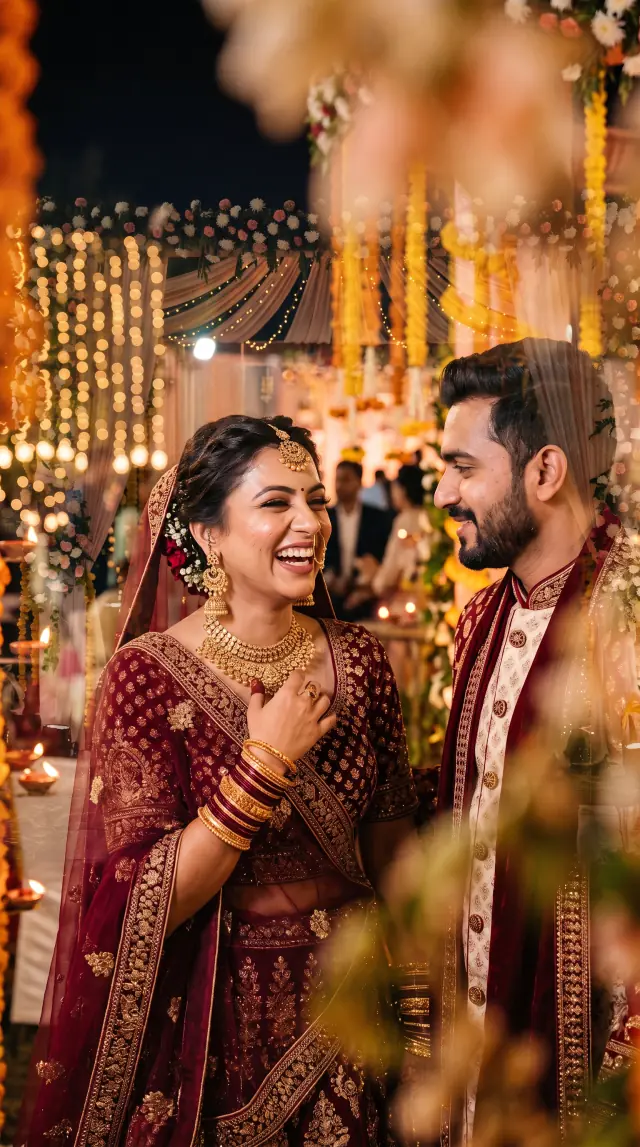
Prompt
Keep the couple's faces, facial features, skin tone, expressions, hairstyles, jewellery, makeup, pose, body positions, outfits and framing exactly the same as the uploaded photo. Do not change who they are or invent a different couple. Create a beautiful photographic double-exposure: the couple remains the clear, recognisable subject, while a second exposure of a richly decorated Indian wedding mandap — marigold and rose garlands, floral hangings, soft drapery and warm fairy lights — is softly blended into the darker areas of the background, the edges of the frame and parts of the sky, as if two film frames were sandwiched together. Do not cover or replace the couple's faces, eyes or expressions with flowers; their faces must stay sharp and fully visible. Photorealistic double-exposure wedding photography, not illustration, collage or painting.
10. Prism lens flare
The look: Rainbow light leaks and crystal flares wrap the edges of the frame, as if a prism was held in front of the lens. Eyes and mouths stay clear.
When to use it: Trendy reception and sangeet posts. The colour sits around the couple, not on their faces.
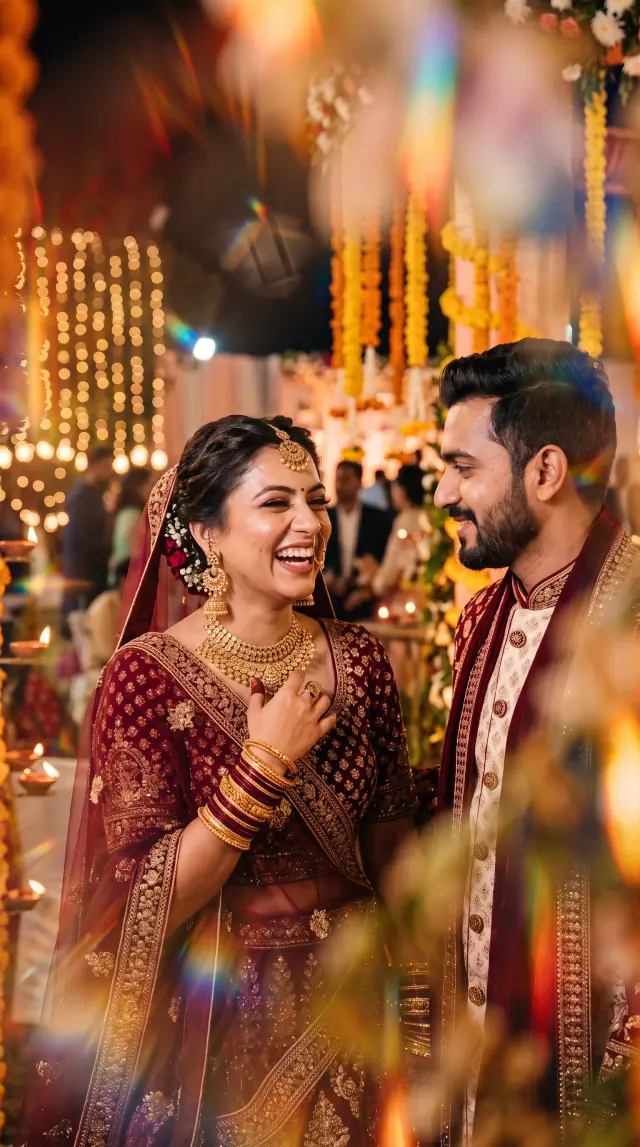
Prompt
Keep the couple's faces, facial features, skin tone, expressions, hairstyles, jewellery, makeup, pose, body positions, outfits and framing exactly the same as the uploaded photo. Do not change who they are or invent a different couple. Add a trendy wedding-photographer prism and crystal lens-flare effect: rainbow light leaks, refracted colour streaks and soft spectral highlights dancing across the edges and foreground of the frame, as if a prism or crystal was held in front of the lens. Keep the couple's faces clear and unobstructed — the rainbow flares should wrap around them, not sit on top of their eyes or mouths. Keep the night wedding setting, florals and fairy lights. No text, no logos, no frames. Photorealistic prism-filter photography, not illustration or painting.
Tips for better ChatGPT photo edits
- Start from a sharp photo. Blurry faces give ChatGPT less to lock onto, so the edit drifts.
- One look per message. If you want light trails and a film look, run them as two edits and pick one.
- Keep the lock paragraph. Editing that part is what makes faces, jewellery and clothing change.
- Check faces at full size. Compare eyes, smile and jewellery with the original before you post or show a client.
- Regenerate once or twice. The same prompt does not return the same image. Two or three tries usually produce one clean frame.
- Say when a photo is AI-edited. These prompts are useful for mood boards, previews and social posts. Be clear about which frames were shot and which were restyled.
FAQ
Do these prompts work in ChatGPT?
Yes. Upload a photo and paste one full prompt into the same message. ChatGPT needs an image in the chat so it edits that photo instead of inventing a new couple.
Can I use these prompts on my own client photos?
Yes. Upload your own couple photo and paste the prompt. The wording says couple, bride and groom, so change those words if the photo shows someone else.
Why does ChatGPT change the faces?
Short prompts leave the people unspecified, so the model draws a new couple. Each prompt here starts by locking faces, pose, outfits and framing. If a result still drifts, ask ChatGPT to keep the faces exactly the same and run it again.
Can I use the same prompts outside ChatGPT?
Yes. Any editor that accepts a reference photo and a text instruction can run them, including Gemini image editing. Paste the full prompt, not a shortened version.
Which prompt should I use first?
Slow shutter light trails and golden hour are the easiest to judge, because the couple stays sharp and the change is obvious. Use the artistic long exposure last if you want a softer, less literal frame.
Do these prompts replace shooting the wedding?
No. Use them for previews, social posts and album concepts. A photograph made on the day still holds the real light, skin and jewellery detail your clients hired you for.
Deliver the final photos faster
Once the real edits are ready, Foto Owl AI Gallery lets guests find their own wedding photos with a selfie, so you don't have to sort and send images one by one.