
How to separate duplicate and weak frames during photo culling


Separate duplicate and weak frames by asking different questions: does this photograph repeat a better image, and does this photograph fail technically or visually? Group similar moments first, compare expression and image quality within each group, then review unique but imperfect photographs separately. For your 2026 culling workflow, keep rejection reversible until a human has checked the shortlist and the important moments left behind.
TL;DR
- Duplicate vs weak frames photo culling separates repeated content from technical or visual failures.
- Compare similar frames before rejecting them; a changed expression can make an image worth keeping.
- Fotoowl AI Culling suits photographers who want offline desktop sorting with human review before export.
- Protect unique wedding moments from blanket rejection, even when a technically stronger alternative does not exist.
How do you separate duplicate and weak frames during photo culling?
Use 2 review passes: compare repeated moments first, then assess technical quality and story coverage. Keep those decisions separate rather than treating every unselected photograph as the same kind of reject.
- Group similar frames. Bring photographs of the same action or pose together. Compare the actual content, not filenames alone.
- Choose the keeper. Check expression, gesture, subject visibility, focus and framing against the alternatives.
- Flag weak frames. Identify missed focus, unwanted blur, unusable exposure or distracting composition.
- Review exceptions. Revisit unique moments, important people and deliberate creative effects before export.
For the delivery-stage cleanup, see how to find and remove duplicate event photos before delivery. That task should follow your editorial selection, not replace it.
Use this comparison when a photograph fits more than one category:
| Category | What makes it different | Benefit of separating it | Risk to check | Best use |
|---|---|---|---|---|
| Exact duplicate | Repeated image content rather than a different captured moment | Removes unnecessary repetition | Different files can have different editing or delivery purposes | File cleanup after verification |
| Near-duplicate | Similar capture with a small change in expression, gesture or framing | Lets you choose the strongest version | A small change can carry meaningful emotion | Comparing bursts and repeated poses |
| Weak frame | Technical or visual problems reduce its usefulness | Keeps avoidable failures out of the shortlist | The image might document an unrepeatable moment | Quality review with context |
| Distinct keeper | Adds a useful person, action, perspective or story detail | Protects coverage and variety | Being different does not make an image usable | Final story selection |
A duplicate is redundant relative to another image; a weak frame is unsuccessful relative to its intended use. A photograph can be both, but the reasons should remain clear.
Why this matters
For an Indian wedding studio, repeated photographs and missing coverage create different problems. A long sequence of nearly identical stage portraits adds repetition, while rejecting the only photograph of a family interaction removes part of the story.
Your 2026 culling checklist should therefore protect coverage as well as quality. The goal is a useful selection, not the smallest possible folder.
Separate rejection reasons also make team handovers clearer. An editor can understand whether a frame was excluded because a better version exists or because the photograph itself needs another look.
Duplicate frames: compare the moment before rejecting it
An exact duplicate and a near-duplicate require different decisions. Repeated image content is a file-management question; neighbouring captures from a burst are an editorial question.
Start with the subject's expression and gesture. Then compare focus, framing and distractions. A frame with a relaxed expression can be the better keeper even when another has slightly cleaner composition.
Check what actually changed
Look for changes that matter to the photograph's purpose:
- Expression: a natural smile, an attentive face or an emotional reaction.
- Gesture: joined hands, a completed action or a clearer interaction.
- Visibility: an unobstructed face or a person no longer hidden behind someone else.
- Framing: a useful wider view, cleaner edges or more complete body positioning.
- Action: a different phase of movement that adds to the sequence.
Do not retain every tiny variation. Keep an alternative when you can explain what it adds to the final selection.
Avoid filename-based decisions
Matching filenames do not establish matching image content, especially when you combine work from different cameras. Likewise, different filenames do not establish different photographs.
Preserve the source context while comparing files. Keep RAW files and their JPEG counterparts distinct from accidental repeated copies; different formats can serve different workflow purposes.
Reject a near-duplicate because a better version covers the same purpose, not simply because the photographs look similar.
Weak frames: judge the intended result
A weak frame has a problem that reduces its usefulness for the intended photograph. That judgement depends on the subject, the assignment and whether another usable version exists.
Inspect critical detail at 100% magnification when checking focus. Return to the whole-image view to judge composition and storytelling; a close-up alone does not show whether the frame works.
Missed focus and unwanted blur
Check the intended point of attention. In a portrait, that usually means inspecting the subject's face and eyes rather than judging sharp clothing or background detail.
Separate unwanted blur from deliberate movement. A blurred dance-floor photograph can communicate energy, while a blurred formal group portrait can fail its purpose. Intent matters, but it does not excuse an unreadable subject.
Exposure problems
Do not reject a photograph only because the preview looks dark or bright. Examine whether the important detail remains usable and whether a realistic editing adjustment supports the intended result.
Check critical areas rather than irrelevant highlights. A bright light in the background and lost detail across a subject's face do not carry the same consequence.
Expression and composition
Closed eyes are not automatically a failure. During a prayer or an emotional embrace, closed eyes can fit the moment; during a posed group photograph, an accidental blink needs comparison with neighbouring frames.
Check distracting foreground objects, awkward crops and blocked faces. Keep an imperfect but meaningful photograph under review when there is no equivalent alternative.
A repeatable culling workflow for wedding and event teams
Use 3 working labels: Keep, Reject and Review. These are suggested decision labels, not a requirement for any particular software.
For your 2026 studio workflow, define what each label means before handing the job to another editor. Keep means selected for the next stage; Reject means excluded from the working selection; Review means the decision needs context or closer inspection.
Group similar frames
Compare bursts, repeated poses and overlapping coverage within the relevant event segment. Avoid treating photographs from different functions as interchangeable simply because they show the same people.
For a multi-function wedding, separate the ceremonies before comparing their images. The guide to organising photos for multi-function Indian weddings covers that broader organisational step.
Choose the keeper
Select the photograph that best serves the moment. Compare the main subject first, then other important faces, background distractions and frame edges.
Keep an additional frame when it contributes a different reaction or perspective. Do not force every group down to a single image when the sequence tells a useful story.
Flag weak frames
Mark clear technical failures separately from repeated content. For uncertain photographs, record the issue in your review notes: missed focus, blocked face, unwanted blur or repetition.
Avoid turning a tentative judgement into permanent deletion. The working selection and the source archive serve different purposes.
Review exceptions
Check unique moments and important people before finalising the shortlist. Compare the selected photographs with the coverage you were expected to capture.
Review the rejected group as well as the keepers. Looking only at selected images cannot reveal a meaningful photograph excluded by mistake.
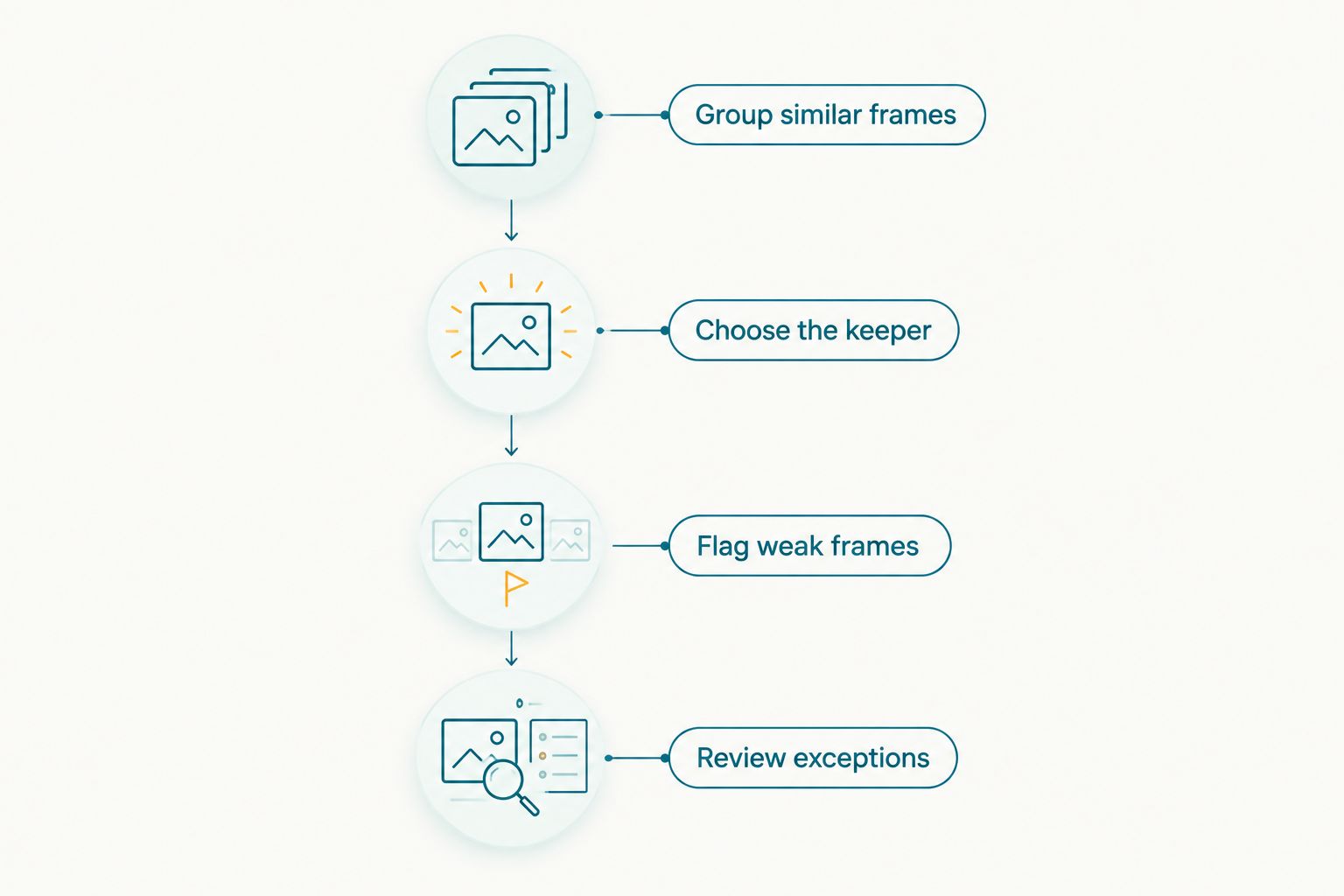
Compare repetition first, then check quality and protect unique moments.
Why duplicate and weak-frame decisions vary
A useful culling rule must account for the assignment. Apply these factors consistently instead of copying a rejection threshold from an unrelated shoot:
- Similarity: repeated image content needs a different check from separate captures of a similar moment.
- Composition: a wider view can add context even when a tighter photograph shows the same action.
- Exposure: judge whether the important subject detail supports a usable result.
- Blur: distinguish missed focus or camera movement from intentional motion.
- Event context: a unique ritual or reaction deserves closer review than a replaceable test frame.
- Human review: confirm that the shortlist preserves meaningful differences before export.
A school portrait, a sports sequence and a wedding ceremony do not need identical selections. Match the decision to the photograph's purpose while keeping your technical checks consistent.
Where offline culling software fits
Fotoowl AI Culling is best for wedding and event photographers who want offline desktop culling with human review before export. It rejects duplicate and weak frames, groups similar photographs, and ranks images by composition, exposure and blur.
Use Fotoowl AI Culling to organise the comparison work, not to surrender the final selection. The application supports a second human pass before export to Lightroom or the gallery.
For a 2026 studio workflow, its offline desktop format fits local culling work. The boundary is equally clear: it is not a browser or cloud culling feature, and the photographer still needs to check emotional significance, missing coverage and intentional creative choices.
Should I delete duplicate photos immediately?
Keep rejection separate from deletion. Exclude redundant photographs from your working selection first, then follow your studio's verified backup and retention process before removing source files.
Check whether an apparent duplicate has a different purpose, such as a RAW source and a JPEG delivery file. Visual similarity alone is not permission to delete both.
Should I keep a weak photo if it captures an important moment?
Keep a unique weak photograph under Review until you have checked the alternatives and its intended use. A technically imperfect image can document something no other frame captures.
That does not mean every important moment belongs in the delivered set regardless of quality. Decide whether the photograph remains understandable and useful, then make a deliberate editorial choice.
How do I choose between similar group photographs?
Compare the important faces before choosing the cleanest composition. Check expressions, blinks, visibility and focus across the group rather than judging only the person in the centre.
If no frame works for everyone, retain the relevant alternatives for closer editing review. Do not assume that a later editing step will solve every problem.
FAQ
What's the difference between duplicate and weak frames in photo culling?
Duplicate frames repeat content already covered by another photograph; weak frames have technical or visual problems that reduce their usefulness. A photograph can fit both categories, so keep the rejection reasons separate.
Are burst photographs automatically duplicates?
Burst photographs are not automatically duplicates because expression, gesture and action can change between captures. Compare them as similar frames and retain differences that serve the final selection.
Should I reject every photo with closed eyes?
Do not reject every photograph with closed eyes. Closed eyes can fit prayer or emotion, while an accidental blink in a posed portrait needs comparison with the alternatives.
What zoom level should I use to check focus?
Use 100% magnification to inspect critical focus, then return to the whole-image view to judge composition and meaning. Check the intended subject rather than a sharp background detail.
Can offline software help separate duplicates from weak frames?
Fotoowl AI Culling supports offline desktop culling by rejecting duplicate and weak frames, grouping similars, and ranking composition, exposure and blur. Complete the second human review before export to Lightroom or the gallery.
Can I deliver several photographs from the same moment?
Deliver several photographs from the same moment when each adds a useful expression, perspective or action. Remove repetition that adds no meaningful difference.
Does rejecting a frame mean I should delete the original?
Rejecting a frame means excluding it from the working selection, not automatically deleting the original. Verify backups and follow your studio's retention process before permanent removal.
One last thing
Audit the rejects, not just the keepers. Before closing a 2026 wedding or event job, inspect excluded photographs for unique people, rituals and reactions.
A polished shortlist does not prove that your coverage is complete. The final check is whether every rejected photograph has a clear reason to stay out—and whether the remaining selection tells the event's story.