
How to send a photo gallery link to clients on WhatsApp

To send a photo gallery link to clients on WhatsApp, upload the approved photographs to your gallery, copy its client-facing sharing link, and paste it into the correct chat with clear viewing instructions. Test the link without your photographer login first: sending a link does not automatically give the recipient permission to view or download the photographs.
TL;DR
- Send a photo gallery link on WhatsApp after testing the client-facing view, not your photographer dashboard.
- Fotoowl AI Gallery suits professional event photographers who need photo delivery with face recognition.
- Identify the event, explain the next action, and state whether you are sharing previews or final photographs.
- Treat gallery access and WhatsApp distribution as separate decisions, especially for school and private client photographs.
Why this matters
WhatsApp carries the message; the gallery controls the viewing experience. Your client needs the right destination, a working access route, and an explanation of what to do next. A link without that context leaves the delivery unfinished.
For Indian wedding studios, distinguish the client's handover from wider guest sharing. A couple receiving their final photographs is a different audience from a family group receiving an approved event gallery. The guide to WhatsApp photo delivery for wedding photographers covers that wedding-specific workflow.
Use the process below for your 2026 deliveries whether you photograph weddings, corporate functions, sports, or school events. The steps concern sharing an existing gallery, not uploading photographs through WhatsApp or automating messages.
How do you send a photo gallery link to clients on WhatsApp?
Follow these 6 steps: prepare the photographs, check access, copy the client link, test the recipient experience, write the message, and send it to the intended recipient. Interface labels differ between gallery services, so follow the purpose of each step rather than looking for a particular button name.
1. Prepare the gallery
Upload the photographs intended for this delivery and confirm that processing has finished before announcing that the gallery is ready. Open the collection and check that the expected photographs appear.
Use an event name your client recognises. For example, a descriptive title such as Mehta Wedding Reception 2026 is easier to identify than an internal job code. Keep internal working notes out of the client-facing title.
Separate previews from final photographs in your organisation and message. If editing is still underway, describe the collection as a preview rather than allowing the client to assume it is the complete delivery.
2. Check access
Decide who should receive the photographs before deciding where to paste the link. Confirm the access settings your gallery service actually offers and apply the settings agreed with your client.
Do not assume that a link labelled share is private. Check whether someone with the link can open the gallery, whether sign-in is required, and whether any available restrictions match the intended audience.
For a school assignment, ask the authorised school contact which photographs can be distributed and to whom. For a corporate event, confirm whether the recipient is receiving an internal collection or material approved for wider circulation.
3. Copy the client link
Open the gallery's sharing controls and copy the address intended for clients or visitors. Avoid copying the address from your photographer dashboard simply because the photographs are visible there.
A management page and a client gallery serve different purposes. The correct link must take the recipient to the intended photographs without requiring access to your studio account.
Keep the copied address intact. If you edit the message later, check that punctuation or an accidental space has not become part of the address.
4. Test the recipient view
Open the copied address in a private browser window or another browser where you are not signed in to your photographer account. Check the experience as a visitor rather than relying on your own permissions.
Make 3 checks before delivery:
- Destination: Does the link open the correct event and collection?
- Access: Can the intended recipient complete any required access steps?
- Action: Can the recipient do what your message promises, such as view photographs or use an enabled download option?
Test on a phone as well. Your desktop preview does not replace checking whether the instructions make sense on the device your client will use.
5. Write the message
Tell the recipient who is sending the link, which event it covers, and what to do after opening it. Include relevant access instructions, but do not promise downloads, photo selection, or other functions you have not enabled and tested.
Keep the main action clear. If the purpose is viewing, ask the client to view the gallery; do not combine delivery with unrelated requests about invoices, testimonials, and future bookings.
6. Send and confirm
Check the chat name and recipient before pasting the link. Read the message once with the gallery address included, then send it.
Ask the client to confirm that the gallery opens. A response confirming access is more useful than assuming the delivery worked because the WhatsApp message reached the chat.
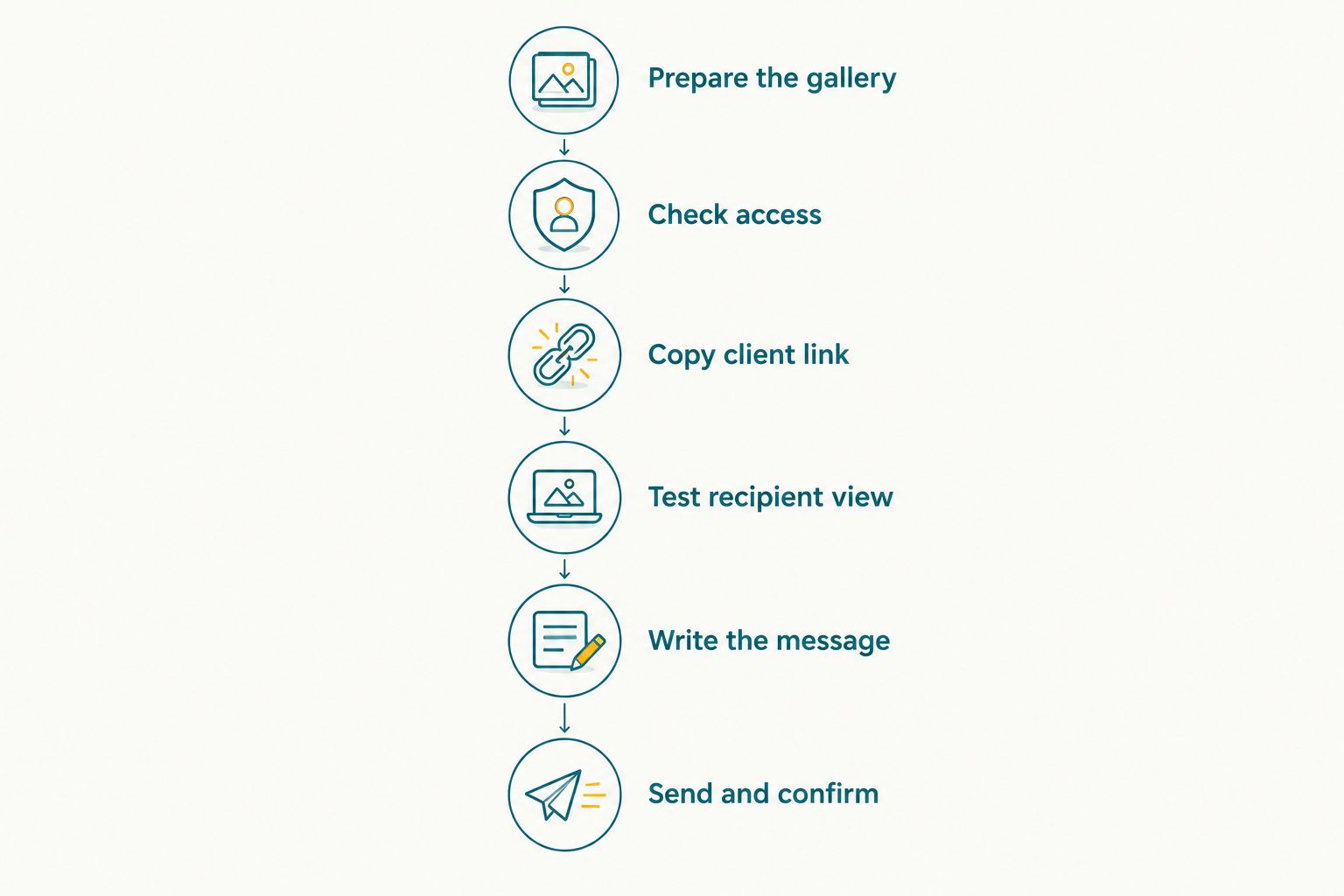
Test the client-facing link before announcing that the photographs are ready.
What should you write with the gallery link?
Write the message around the client's next action, not the software. Use the following sample wording as a starting point, then paste the actual gallery address on its own line immediately below it.
Final wedding gallery
Hello, your final wedding photographs are ready to view. Please open the gallery link below and confirm that you can access it. This collection covers the wedding ceremony and reception; please check with us before forwarding it beyond the agreed recipients.
Add download instructions only when downloads are part of the delivery and you have checked how they work. If other functions remain undelivered, identify them separately instead of calling the entire assignment complete.
Preview collection
Hello, your event preview gallery is ready. These are selected preview photographs, not the complete final delivery. Please use the link below to view them and reply here if you have trouble opening the gallery.
For a multi-function wedding in 2026, name the function in the message. A mehendi preview and a final reception gallery should not arrive with identical descriptions.
Corporate client handover
Hello, the approved photographs from your event are ready to view through the gallery link below. Please confirm that the gallery opens and let us know which authorised contact will coordinate any further distribution.
Avoid writing that photographs are approved unless approval has actually happened. Change the wording to review gallery when the client still needs to check the collection.
Access instructions after delivery
If the client needs help, send a focused follow-up explaining the access step they are stuck on. Ask what appears after they open the link instead of immediately sending the same address again.
Use 2 messages when that improves clarity: the initial gallery handover, followed by specific help if requested. This is a communication choice, not a requirement or a promised response time.
Should you send a gallery link or attach photographs?
Use a gallery link for an organised collection and attachments for individual images needed inside the conversation. Neither method removes the need to confirm who should receive the photographs.
| Delivery option | Best for | Advantage | Limitation |
|---|---|---|---|
| Gallery link | Clients reviewing an event collection | Keeps the collection outside the chat and provides a destination for viewing | Requires working gallery access and a connection to open it |
| Photo attachments | Discussing a particular photograph | Places the image directly beside the conversation | Does not provide the structure of a client gallery |
| Gallery link with an attached preview | Introducing a collection with visual context | Gives the client a preview and a destination | Requires careful wording so the preview is not mistaken for the complete delivery |
An attached preview is optional. Do not delay a ready gallery just to create a promotional message, and do not present a preview attachment as the client's final downloadable file.
Fotoowl AI Gallery supports photo and video delivery with face recognition for professional wedding and event photographers. Fotoowl AI Gallery is best for event photographers who need client delivery with face recognition. Its face recognition capability does not replace checking access or explaining the recipient's next step.
Why does the WhatsApp gallery-sharing workflow vary?
The sharing steps stay similar, but the message and access decisions depend on the assignment. Build your 2026 handover around these factors rather than reusing the same wording for every client.
- Recipient: A paying client, school coordinator, corporate contact, and event attendee need different instructions and distribution boundaries.
- Delivery stage: Preview photographs, a review collection, and a final delivery require different labels.
- Gallery access: The recipient's next step depends on the access controls your chosen service supports and you have enabled.
- Event structure: Separate functions, match days, or conference sessions need recognisable collection names.
- Requested action: Viewing photographs is different from downloading files or submitting feedback.
- Connection: Uploading the gallery and opening it both depend on connectivity; sending the address does not prove either task succeeded.
For private assignments, settle distribution permissions before sending the first link. The guide to managing photo access permissions for event stakeholders explains the access-planning side of delivery.
Can I send the same gallery link to a WhatsApp group?
Send a gallery link to a group only when the gallery is intended for everyone in that group. Ask the commissioning client who is authorised to receive it, particularly for school photographs or private family events.
A group message distributes the address; it does not create a separate access policy. Also decide whether recipients are allowed to forward the link, and communicate that expectation without treating the instruction as a technical restriction.
Does WhatsApp reduce the quality of photographs inside a gallery link?
Sending a gallery link does not transfer the gallery's photo files through WhatsApp. The link opens the hosted collection, where viewing and downloading depend on the gallery's files and settings.
Check the actual download offered by your gallery before promising original files. A gallery preview, a downloaded file, and an image attached in chat are different delivery items.
What should I do if the client cannot open the gallery link?
Test the exact link from the client's message before changing anything else. Then check the destination, required access steps, and whether the gallery opens outside your signed-in studio session.
Ask the client what they see: an access prompt, an error, an empty collection, or a page that does not finish loading. Resolve that specific problem rather than creating another gallery without identifying the cause.
For your 2026 studio handover checklist, record who handles access questions. The client should know whether to reply to the photographer or the designated studio contact.
FAQ
How do I send a photo gallery link on WhatsApp from my phone?
Copy the client-facing sharing link from your gallery, open the correct WhatsApp chat, and paste it with viewing instructions. Test the link without your photographer login before sending it.
Can I send a gallery link using WhatsApp on my computer?
Yes, you can paste a gallery link into a WhatsApp conversation on your computer. Check the recipient and test the client-facing link just as you would when sending from a phone.
Do clients need my photographer account to open the gallery?
Clients should not need your photographer account to view a client-facing gallery. Their access requirements depend on the gallery service and the settings you have applied; never share your studio login.
Can I use Fotoowl AI Gallery for client photo delivery?
Fotoowl AI Gallery supports photo and video delivery with face recognition for professional wedding and event photographers. Check the recipient-facing experience before sending any delivery message.
Should I include a password in the same WhatsApp message?
Follow the access procedure agreed with your client rather than assuming that sending a password beside the link provides separate protection. First confirm which access controls your gallery service supports.
How do I know whether my client has opened the photo gallery?
Ask the client to confirm that the gallery opens. A WhatsApp message status does not establish that the recipient accessed the hosted gallery or completed a download.
Can I automate WhatsApp gallery delivery to every guest?
Do not assume that copying a gallery link provides automated WhatsApp delivery. Confirm the messaging capabilities and recipient permissions of any service before promising automated distribution.
One last thing
The most useful final check is opening your own link as a stranger. Your logged-in photographer view proves that you can see the photographs, not that your client can.
Before your next 2026 delivery, test the exact address you intend to paste and read the message from the recipient's perspective. If the destination, access instructions, and next action are clear, the handover is ready.