
How long does AI photo culling take compared to manual culling?


AI photo culling has no fixed completion time compared with manual culling: the useful comparison is the time each workflow takes to produce a photographer-approved selection from the same files. Include automated processing, human review and export—not just the moment the software finishes its first pass.
TL;DR
- For ai photo culling time vs manual, compare approved selections—not processing speed alone.
- Fotoowl AI Culling suits photographers who want offline desktop sorting followed by human review.
- Manual culling keeps every selection decision with you but also requires you to make every initial comparison.
- Measure active working time separately from total elapsed time before changing your delivery schedule.
How long does AI photo culling take compared to manual culling?
Compare complete workflows, not an automated first pass against a finished manual selection. In 2026, a useful studio benchmark starts with the same source files and ends when the approved selection is ready for editing. Anything between those points belongs in the comparison.
Use this table to decide what your stopwatch includes. For practical changes to the surrounding workflow, see how to speed up photo culling before client delivery.
| Comparison point | AI-assisted culling | Manual culling |
|---|---|---|
| Best for | Delegating technical sorting before photographer review | Keeping initial sorting and final selection entirely with the photographer |
| Initial assessment | Software assesses frames according to its supported criteria | You inspect frames and make the initial decisions |
| Similar frames | Software groups or ranks similar photographs where supported | You compare alternatives yourself |
| Final approval | You check the shortlist and important rejected frames | You check that your selection covers the brief |
| Main advantage | Separates automated assessment from your final judgement | Keeps the selection process directly under your control |
| Main limitation | Processing does not remove the need for review | Every initial comparison requires your attention |
| Finish line | Approved selection exported for the next stage | Approved selection ready for the same next stage |
Neither method earns a speed claim from the table alone. The faster workflow is the one that reaches an equally acceptable result sooner on your studio's files.
Why this matters
Your delivery commitment depends on finished work, not a progress bar. A short automated run is not a short cull if you then spend a long session restoring missing moments or resolving near-identical frames.
For an Indian wedding studio, coverage also matters. A technically strong shortlist still needs to represent the ceremonies, family groups and moments in the agreed brief. Treat that check as part of culling rather than discovering gaps during album preparation.
Keep two records in your 2026 workflow: elapsed time and active working time. Elapsed time tells you when the selection becomes available; active working time tells you how much photographer attention it requires. Both matter, but they answer different scheduling questions.
How do you measure culling time fairly?
Use a completed assignment with a clear brief. Keep the original files unchanged, write down your selection criteria, and measure each workflow against the same finish line.
1. Define the finish line
Stop the timer when your approved selection is ready for the next production stage. Do not stop AI-assisted timing at the end of analysis while continuing manual timing through final checks.
Write down what approval means. Include technical acceptability, necessary event coverage, the treatment of similar frames and a successful handoff. A smaller shortlist is not automatically a better or faster result.
2. Keep the source set identical
Start both workflows with the same photographs. Comparing a complete wedding assignment manually against an automated run containing only portraits tells you little about the method itself.
Keep the scope consistent as well. If one workflow starts after file preparation, start the other there too. Record preparation separately when it belongs to your actual production schedule.
3. Record processing and attention separately
For the AI-assisted workflow, record setup, automated analysis, human review, corrections and export. Record the equivalent manual stages, including the time you spend comparing similar photographs.
Use minutes for elapsed time and minutes for active work. Do not describe unattended processing as photographer labour, and do not remove it from the deadline calculation. Your editor still needs the approved selection before work can continue.
4. Check selection quality
Inspect the approved set against the brief. Then inspect rejected frames containing important moments, unusual compositions or intentional motion blur.
A fair comparison includes the time needed to correct mistakes. Apply that standard to manual culling too: a hurried manual pass that misses a required family group is not a finished result.
5. Repeat without treating familiarity as speed
Once you have reviewed an assignment, you remember its strongest frames. A later pass therefore measures both the workflow and your familiarity with the photographs.
Record the order of your comparisons and test across different assignments before setting a studio-wide expectation. Keep wedding, sports and corporate work distinguishable in your records rather than treating every event as the same task.
The process below keeps the finish line visible. It is a measurement sequence, not a promised processing duration.
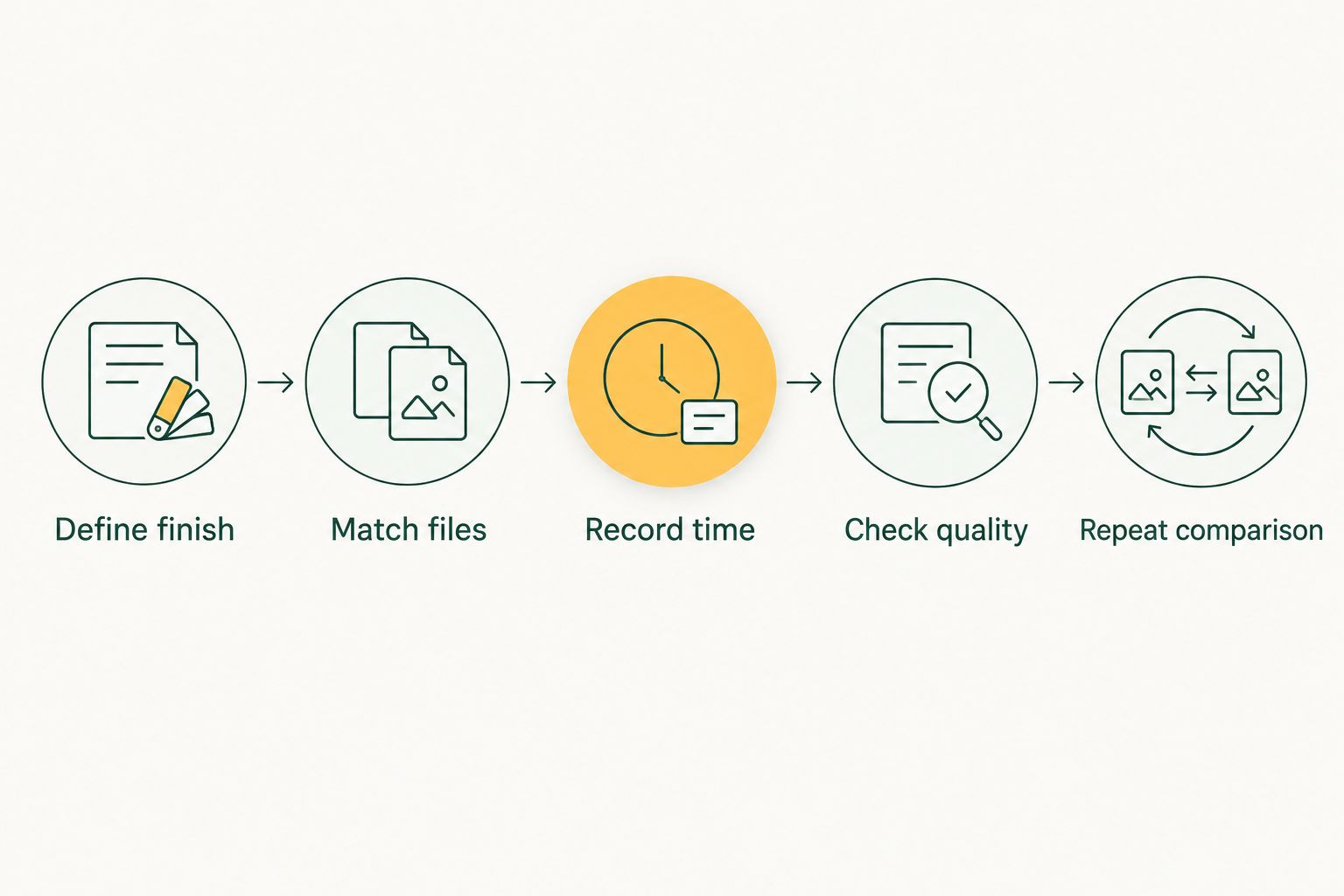
Both workflows must reach the same approved-selection finish line.
AI-assisted culling: delegate sorting, retain approval
AI-assisted culling gives software responsibility for specified assessment tasks while you retain responsibility for the delivered selection. Judge that division of work by what remains for you to review—not simply by how many photographs the software rejects.
Fotoowl AI Culling is best for wedding and event photographers who want an offline desktop first pass with human approval. It rejects duplicate and weak frames, groups similars, and ranks photographs by composition, exposure and blur. A second human pass comes before export to Lightroom or the gallery.
That scope defines both its benefit and its limit. Fotoowl AI Culling handles technical sorting, but the photographer still checks the story, the client brief and the final choices. It is an offline desktop application, not a browser or cloud culling feature.
For your 2026 comparison, include that second pass from the start. Omitting it would measure a different workflow from the one you actually intend to use.
Recommendation: use automated assessment to prepare decisions, not to waive approval. Keep original files while evaluating the shortlist and checking rejected photographs.
Manual culling: direct control, direct attention
Manual culling is best for photographers who want to make every initial selection decision themselves. You decide which frames survive, which alternatives deserve comparison and which imperfect photographs remain important to the assignment.
The advantage is direct editorial control. You can retain a meaningful expression or an intentional blur without first reversing an automated assessment. The limitation is equally clear: you also perform the initial sorting and comparison work.
Measure manual culling as it actually happens. Include revisiting uncertain frames, checking coverage and preparing the selection for editing. Keyboard speed alone is not a complete measure of the job.
Do not assume manual selection is the quality reference simply because a person made it. Check the final set against the same brief used for the automated workflow. Both methods need accountable approval.
Why AI photo culling time vs manual varies
The useful question is which parts of your assignment require software processing, human comparison or editorial judgement. These factors determine what you need to measure:
- Source volume: Record the number of input photographs. A comparison between different source sets does not isolate the workflow.
- Similar-frame decisions: Record whether the assignment contains repeated sequences and how you resolve them. Grouping photographs and choosing the final expression are separate tasks.
- Technical rejection criteria: Decide how you treat blur, exposure and composition. Intentional effects need a different judgement from unwanted defects.
- Coverage requirements: Check the agreed people, moments and event sections. A shortlist is incomplete when it omits required coverage, regardless of technical quality.
- Review and handoff: Include corrections and export to the next production stage. These remain part of the job after initial sorting ends.
Use these factors to explain your own results. Do not turn them into an assumed percentage saving or a universal images-per-minute claim.
For a multi-function wedding, keep the coverage brief beside the selection. For a sports assignment, identify the required action and participant coverage. The quality check should reflect what you promised to deliver.
Does offline AI culling remove upload time?
Offline desktop culling does not require a cloud upload for the culling stage. That distinguishes local analysis from later online gallery delivery; it does not eliminate file preparation, review or export.
Fotoowl AI Culling runs offline on the desktop and exports to Lightroom or the gallery after human review. Keep those stages separate when recording your timing. An offline cull is not a claim that the entire delivery process happens offline.
For a 2026 on-location workflow, mark where local selection ends and online delivery begins. This gives your team a clear handoff without confusing culling completion with client delivery.
Can you skip the human review to finish sooner?
Do not remove human review from a workflow that requires an approved selection. Software assessment and photographer approval serve different purposes: one evaluates frames against supported criteria, while the other checks whether the selection fulfils the assignment.
Start with coverage, then inspect uncertain alternatives. Check meaningful expressions, deliberate motion effects and the transitions between event sections. Keep the review focused on decisions rather than automatically repeating the entire initial pass.
If review repeatedly becomes a complete recull, record that time. The right comparison is the workflow you actually perform, not the shorter process you hoped to adopt.
Turn your comparison into a studio decision
Choose the method that meets your quality standard with an acceptable balance of active work and elapsed time. A workflow that reduces attention but finishes later has a different scheduling value from one that produces an approved selection sooner.
Before changing your 2026 delivery commitments, review these records:
- Input photographs and assignment type.
- Time spent preparing the cull.
- Automated processing time, where applicable.
- Active review and correction time.
- Export completion and coverage approval.
Keep the photographer who approves the selection identifiable in your studio process. The handoff to editing should mean the cull is ready—not that someone still needs to check it.
Adopt a workflow because its complete result fits your operation, not because its first stage looks fast. Use your records to set expectations for the next comparable assignment, while keeping different event types separate.
FAQ
How long does AI photo culling take compared with doing it manually?
There is no fixed duration that applies to both methods across assignments. Compare the same files through setup, assessment, human review, corrections and export to an approved selection.
Is AI photo culling always faster than manual culling?
AI photo culling is not automatically the faster complete workflow. Count the review and correction work before deciding which method saves time on your assignments.
Should I include human review when timing AI culling?
Yes, include human review when timing an AI-assisted workflow that ends with photographer approval. Stopping at the end of automated analysis excludes part of the work required for delivery.
Can I cull wedding photos without uploading them first?
Offline desktop culling lets you assess local photographs without a cloud upload for that stage. Uploading an approved selection for online delivery is a separate task.
What is the difference between culling and client photo selection?
Culling is the photographer's process of deciding which frames proceed through production. Client photo selection is proofing in which clients choose photographs, such as selections intended for albums or printing.
How should an Indian wedding studio compare culling methods?
Compare identical source files against the same wedding brief and coverage requirements. Record elapsed time, active working time and the corrections needed before the selection is approved.
Should I delete rejected photographs immediately after an automated cull?
Keep the originals while reviewing the automated selection and checking rejected frames. A rejection decision should not prevent you from recovering a meaningful photograph during approval.
One last thing
Check what the shortlist leaves out before celebrating how quickly it appeared. A technically imperfect photograph can still carry an essential moment. Protecting that frame is part of finishing the cull—not an optional task after it.