
Best photo culling software for photographers in 2026


Best overall for offline wedding and event culling: Fotoowl AI Culling. Best for manual selection before editing: Photo Mechanic. Best for an existing editing workflow: Adobe Lightroom Classic. Adobe Bridge suits folder-based review, while digiKam suits photographers who also need an organised photo library. This 2026 guide compares photo culling software by workflow fit, not unsupported speed claims.
TL;DR
- Fotoowl AI Culling is the best photo culling software fit for offline wedding and event workflows with human review.
- Photo Mechanic suits photographers who want manual selection and metadata preparation before editing.
- Adobe Lightroom Classic suits photographers who want culling and editing in the same catalogue.
- Adobe Bridge suits folder-based review; digiKam suits photo library organisation.
- Keep original files and review rejected frames before finalising your selection.
Why this matters
Culling decides which photographs deserve editing and delivery. It is not the same as colour correction, client proofing or face recognition. Mixing those jobs creates a confusing workflow: a photograph can be technically sharp yet fail to tell the story.
For an Indian wedding studio, the shortlist must preserve the important moments across mehendi, sangeet, ceremonies and receptions. For sports and corporate events, it must preserve useful action, participant coverage and the agreed deliverables. Technical quality is only part of that decision.
Start with a repeatable review process. The guide to speeding up photo culling before client delivery covers the workflow surrounding your software choice.
What makes the best photo culling software?
Use these criteria to choose photo culling software in 2026:
- Selection method: Decide whether you need an automated shortlist or a tool for making every decision yourself.
- Similar-frame handling: Look for a practical way to compare repeated compositions without losing meaningful differences.
- Human control: You need to inspect technical rejects and preserve important expressions, gestures and moments.
- Working environment: Match desktop, offline and catalogue requirements to the way your studio actually works.
- Editing handoff: Your selected photographs must reach the editing stage without confusing filenames or selection decisions.
- Organisation: Separate events, functions and photographers so that the final shortlist remains understandable.
The best tool is the one that supports your selection decisions without hiding the photographs you still need to judge. An automated first pass and a manual browsing tool solve different problems. Compare them on that basis.
Photo culling software at a glance
| Software | Best for | Standout capability | Key limitation |
|---|---|---|---|
| Fotoowl AI Culling | Offline automated shortlisting for weddings and events | Groups similar frames and ranks composition, exposure and blur | Desktop-only; requires a second human pass |
| Photo Mechanic | Manual selection and metadata preparation | Image browsing, tagging and metadata tools | Photographer makes the selection decisions |
| Adobe Lightroom Classic | Culling inside an editing catalogue | Flags, ratings, comparison and editing in one application | Catalogue-based workflow adds organisation decisions |
| Adobe Bridge | Reviewing files directly in folders | Visual browsing, ratings, labels and metadata | Does not replace a dedicated editing workflow |
| digiKam | Culling within an organised photo library | Albums, tags, ratings and image comparison | Library organisation requires deliberate setup |
These recommendations cover different use cases. The order is a decision tree for professional photographers, not a measured performance leaderboard.
1. Fotoowl AI Culling: best for offline event shortlisting
Fotoowl AI Culling is an offline desktop application that rejects duplicate and weak frames, groups similar photographs and ranks them by composition, exposure and blur. You complete a second human pass before exporting to Lightroom or the gallery.
Fotoowl AI Culling is best for wedding and event photographers who want an offline automated shortlist before making the final selection. That division of labour is its strongest fit: software handles the initial technical filtering, while you retain responsibility for the story.
For a wedding, inspect the ceremony and family interactions rather than accepting a technical ranking as the final answer. For sport, compare the decisive action within each sequence. A technically imperfect photograph can still contain the moment your client expects.
AI Culling pros:
- Offline operation supports culling without an internet connection.
- Similar-frame grouping supports comparison of repeated shots.
- Composition, exposure and blur rankings inform the first pass.
- Export connects the selection stage to Lightroom or the gallery.
AI Culling cons:
- Desktop-only operation does not suit a browser-only or mobile-only workflow.
- A second human pass remains necessary before export.
- Technical rankings do not establish the significance of a wedding ritual or expression.
Best for: Professional wedding and event studios seeking automated first-pass selection with human approval.
Verdict: Buy for offline automated shortlisting; skip if you need browser-based culling.
2. Photo Mechanic: best for manual selection before editing
Photo Mechanic is an image browsing and metadata application used to review, tag and organise photographs. Its role in a culling workflow is to help you identify keepers and prepare files before moving into your editor.
Choose Photo Mechanic when you want to make the selection decisions yourself. That distinction matters for photographers who prefer judging each sequence directly rather than reviewing an automated shortlist.
For corporate assignments, metadata preparation also belongs in the workflow. A carefully selected image still needs an identifiable subject, event and context when the brief calls for that information. Keep those requirements separate from technical quality.
Photo Mechanic pros:
- Supports manual browsing and tagging before editing.
- Includes tools for working with photographic metadata.
- Keeps selection separate from colour correction and retouching.
Photo Mechanic cons:
- You still judge the frames and make the keeper decisions.
- You need a separate application for the full editing stage.
- Moving between selection and editing applications requires a clear handoff.
Best for: Photographers who prioritise manual selection and metadata preparation before editing.
Verdict: Buy for a dedicated manual-review workflow; skip if automated rejection is your main requirement.
3. Adobe Lightroom Classic: best for culling where you edit
Adobe Lightroom Classic combines catalogue organisation, selection tools and photo editing. Flags and star ratings let you mark your decisions, while Compare and Survey views help you assess alternatives.
If Lightroom Classic already anchors your studio's editing workflow in 2026, begin there. Adding another culling application only makes sense when it solves a specific problem, such as the need for automated first-pass selection or a separate browsing stage.
Use a consistent rating system. A flag should mean the same thing across your team, and a rating should not switch between technical quality, album priority and editing status from one assignment to another.
Adobe Lightroom Classic pros:
- Keeps culling and editing in the same application.
- Provides flags, ratings and comparison views for manual decisions.
- Collections and catalogue tools support assignment organisation.
Adobe Lightroom Classic cons:
- The catalogue needs deliberate import and organisation choices.
- Manual selection still requires your attention to each relevant sequence.
- A mixed-purpose rating system creates confusion between selection and editing status.
Best for: Photographers already editing in Lightroom Classic who want fewer application handoffs.
Verdict: Hold your existing Lightroom Classic workflow unless another tool fixes a defined selection problem.
4. Adobe Bridge: best for folder-based photo review
Adobe Bridge browses files and folders, with previews, ratings, labels and metadata tools. It suits photographers who want to inspect an assignment through its folder structure rather than begin with a Lightroom Classic catalogue.
That approach works when your folders already separate functions or assignments clearly. You can review the files, mark decisions and then continue into the appropriate editing workflow.
Bridge is not an automated judge of the event story. Treat it as a manual browsing and organisation tool, and decide how your ratings or labels will be used after review.
Adobe Bridge pros:
- Supports visual review through existing folders.
- Offers ratings and labels for marking selection decisions.
- Provides metadata tools alongside image browsing.
Adobe Bridge cons:
- The photographer remains responsible for judging the shortlist.
- Folder-based review still needs consistent file organisation.
- Browsing and rating do not replace the editing stage.
Best for: Photographers who prefer folder-based review before editing.
Verdict: Choose Adobe Bridge for manual folder review; skip if you need automated technical shortlisting.
5. digiKam: best for culling inside an organised photo library
digiKam is an open-source photo management application with albums, tags, ratings and image comparison tools. It suits photographers whose selection work sits inside a broader library-management process.
Choose digiKam when finding, comparing and organising photographs matters alongside selecting the current assignment. Albums and tags can give your library structure, but you must define that structure yourself.
For a studio archive, distinguish event identity from selection status. The same photograph can belong to an assignment, carry subject tags and still require a separate decision about whether it belongs in the client delivery.
digiKam pros:
- Combines photo organisation with manual selection tools.
- Supports albums, tags and ratings for library structure.
- Provides comparison tools for reviewing alternatives.
digiKam cons:
- Library setup requires decisions about albums and tags.
- Organisation features do not replace judgement about important moments.
- A library-focused workflow is unnecessary if you only need a simple assignment shortlist.
Best for: Photographers who want manual culling within an organised photo library.
Verdict: Choose digiKam for library-led selection; skip if your only requirement is automated event culling.
How we ranked these options
The 2026 recommendations follow the criteria above: selection method, similar-frame review, human control, working environment, editing handoff and organisation. Each tool has a distinct recommended role.
AI Culling leads for offline automated event shortlisting. Photo Mechanic serves manual pre-edit review, Lightroom Classic keeps selection beside editing, Bridge follows folders, and digiKam follows the library. No processing-time, accuracy or image-volume benchmark determines this order.
Build a culling workflow you can repeat
Use 2 review passes: a technical pass followed by a story pass. The first identifies duplicates and weak frames; the second checks whether the shortlist covers the assignment. Keep the original photographs until you have reviewed the selection and completed your backup process.
Follow these 5 workflow steps when assessing photo culling software in 2026:
- Back up originals. Preserve the source files before changing your working selection.
- Separate functions. Organise a wedding by function or an event by meaningful activity before review.
- Technical pass. Compare similar frames and inspect focus, exposure and unwanted repetition.
- Story pass. Check rituals, expressions, participant coverage and the client's brief.
- Verify handoff. Confirm that the intended photographs reach editing with their identities intact.
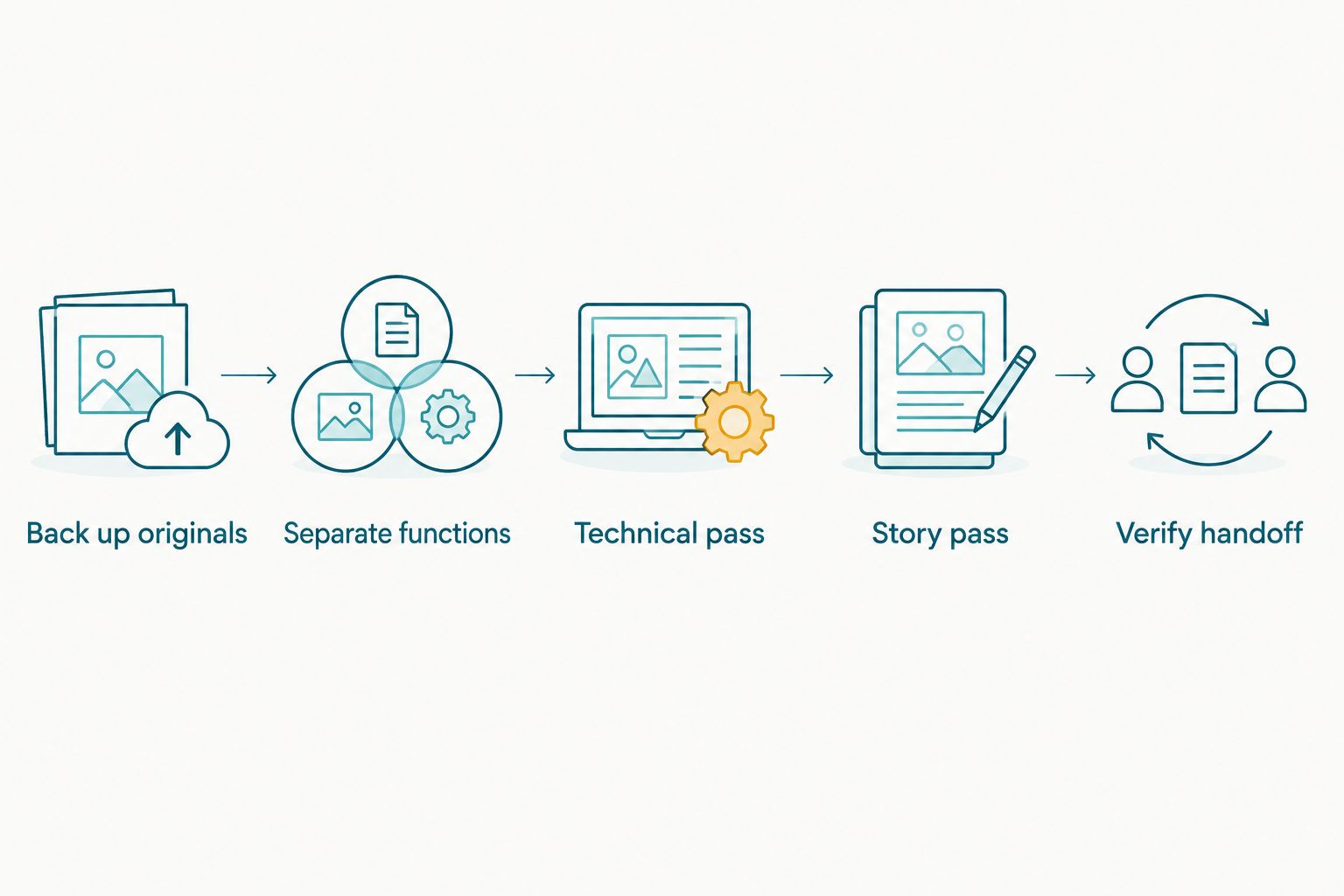
Technical selection comes before story review, not instead of it.
Before changing your studio workflow, perform 3 inspection checks on a completed assignment: examine rejected moments, compare similar-frame choices and verify the editing handoff. Use an assignment whose important photographs you already know. That gives you a reference for judging the software's decisions without inventing a speed target.
Record the reason whenever you restore a rejected photograph. A missed expression, deliberate motion blur and an essential ceremony frame are different problems. Your review should identify the problem rather than simply count how many images remain.
For multi-photographer weddings, agree on selection rules before the review begins. Otherwise, one photographer's keeper label can mean something different from another's.
Which photo culling software should you choose?
Choose Fotoowl photo culling software when your main requirement is offline automated shortlisting followed by human review. Choose Photo Mechanic for dedicated manual selection, Lightroom Classic for an existing editing catalogue, Bridge for folder review or digiKam for library-led organisation.
For your 2026 workflow, start with the bottleneck. If selection is manageable but editing is disorganised, another culling application does not fix the underlying issue. If repeated frames dominate the review, similar-frame handling deserves closer attention.
Do not confuse photographer culling with client proofing. You decide what is technically and editorially suitable first; the client then chooses among the photographs you present. Face recognition in a delivery gallery helps people find photographs, not decide which frames deserve editing.
FAQ
What's the best photo culling software for wedding photographers in 2026?
Fotoowl AI Culling is the best fit here for wedding photographers seeking offline automated shortlisting with human review. It groups similar frames and ranks composition, exposure and blur before a second human pass.
Is AI Culling a cloud or browser application?
AI Culling is an offline desktop application, not a cloud or browser culling tool. Its workflow includes a second human pass before export to Lightroom or the gallery.
Can I cull photographs in Adobe Lightroom Classic?
Yes, Adobe Lightroom Classic supports manual culling with flags, star ratings and comparison views. It suits photographers who want selection and editing inside the same catalogue.
Is Photo Mechanic better than Lightroom Classic for culling?
Photo Mechanic suits a separate manual-selection and metadata stage, while Lightroom Classic suits selection within an editing catalogue. Choose according to where you want the review to happen, rather than assuming one workflow fits every studio.
Should I delete every photograph rejected during culling?
No, review rejected photographs before making deletion decisions. Preserve original files and check important moments, intentional blur and similar-frame alternatives before finalising the shortlist.
What's the difference between photo culling and client photo selection?
Photo culling is the photographer's decision about which frames deserve editing and delivery. Client photo selection happens after you present a suitable set for choices such as albums or printing.
Does face recognition replace photo culling software?
No, face recognition and photo culling serve different purposes. Face recognition helps locate people in a gallery, while culling evaluates which photographs belong in the editing and delivery workflow.
One last thing
Review what the software rejected, not just what it kept. A polished shortlist can still omit the photograph that makes the assignment complete: a parent's reaction, a key ritual or the decisive sporting moment.
Judge your culling workflow by whether you can explain the final selection. Technical scores support that decision. They do not own it.