
How to choose photo download sizes for a client gallery

Choose your photo gallery download size by the client's intended use: reduced-resolution files for screen sharing, and full-resolution edited files for printing, cropping and long-term delivery. Check pixel dimensions, compression and the downloaded file itself before sharing the gallery; a large file in megabytes does not guarantee a print-ready image.
TL;DR
- Choose photo gallery download size by intended use, not file weight alone.
- Keep full-resolution edited files for printing; use smaller copies for convenient screen sharing.
- Fotoowl AI Gallery suits professional wedding and event photographers delivering client photos with face recognition.
- Test actual downloads before delivery; gallery previews do not prove download quality.
How do you choose photo download sizes for a client gallery?
Start with the final use, then choose the export dimensions and verify the downloaded result. Do not start with a megabyte target and squeeze every photograph into it.
For an Indian wedding studio, the same photograph can serve a guest's phone, a couple's album and a designer's layout. Those uses need different delivery decisions. Keep the files identifiable across versions so your client does not mistake a sharing copy for the album source.
If you are also deciding how to hand over the files, separate size decisions from your client photo-sharing workflow. Choosing a delivery channel does not establish whether its downloaded image has enough pixels.
Use this sequence for your 2026 delivery workflow:
- Confirm the use. Ask whether the client needs screen sharing, prints, an album, publication or an archive.
- Identify the recipient. A guest saving a portrait and a designer preparing an album need different instructions.
- Set the dimensions. Work from the required screen output or the print lab's specifications, preserving the intended aspect ratio.
- Check compression. Inspect faces, fine detail and gradients in the exported image, not just its file weight.
- Test the download. Download through the recipient's route and confirm dimensions, appearance and filenames.
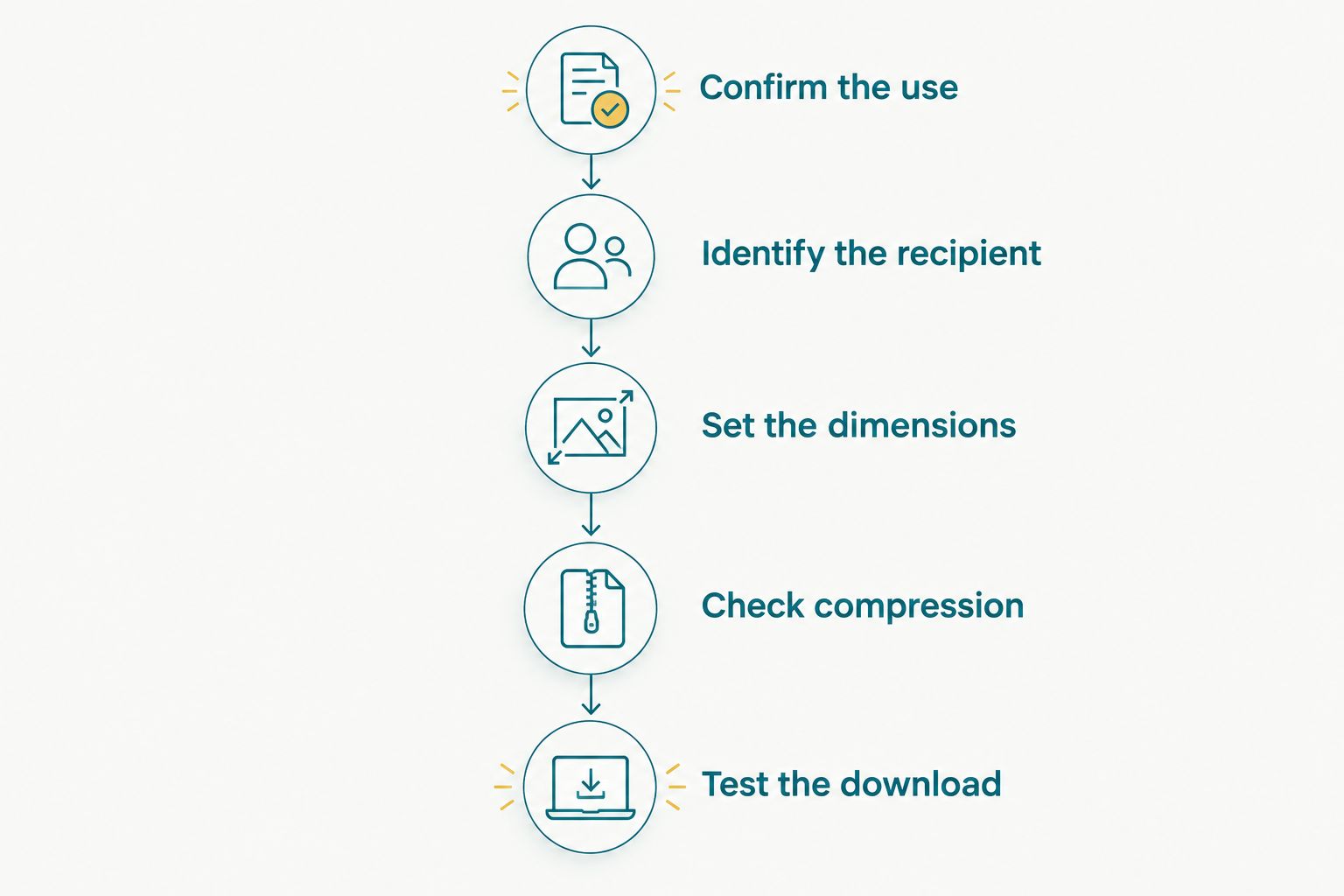
Choose dimensions from the intended use, then verify the file your client actually receives.
Why this matters
A gallery preview and a delivered photograph have different jobs. The preview helps a client browse; the download must support the use you promised.
If you deliver only reduced copies, your client loses flexibility for later crops and prints. If every casual download uses the largest edited file, recipients transfer more data than a smaller sharing copy requires. Keep convenience separate from the final deliverable.
Write that distinction into your 2026 delivery instructions. Name the purpose of each version rather than expecting clients to interpret technical labels.
Which download version fits each client need?
The following are delivery categories, not claims about settings offered by any particular gallery platform. Check the controls your chosen platform actually provides before promising selectable versions.
| Download version | Best for | Main advantage | Main limitation |
|---|---|---|---|
| Preview copy | Reviewing images before final delivery | Keeps review files separate from finished deliverables | Does not establish final print quality |
| Screen-sharing copy | Phone viewing and everyday digital sharing | Transfers less data when reduced appropriately | Leaves less room for substantial crops or large prints |
| Print-specific export | A known print or album requirement | Matches the lab's requested dimensions and preparation | Needs checking again when the output size or crop changes |
| Full-resolution edited file | Client archives and later production work | Preserves the edited image's available pixel dimensions | Usually carries more data than a reduced copy of that image |
Avoid presenting every category as a compulsory choice. A straightforward job needs only the versions required by the agreement, clearly labelled and checked.
Screen-sharing copies: best for everyday digital use
Use a reduced copy when the purpose is viewing and sharing rather than print production. Choose dimensions from the actual destination's requirements and test the result on the intended device.
The benefit is a smaller transfer without sending the largest edited file for every casual use. The trade-off is reduced flexibility: a client cannot recover discarded image detail simply by enlarging the file later.
Do not describe a sharing copy as unsuitable for every print. Suitability depends on its remaining pixels, the proposed print dimensions and the lab's requirements. Give a clear use label instead of an absolute quality claim.
Print-specific exports: best for a confirmed output
Prepare a print-specific export when the lab or designer has supplied the required dimensions, crop and file specifications. Follow that brief rather than assuming a universal gallery preset will fit.
A print-ready crop is not automatically a reusable master. A tightly cropped portrait prepared for an album panel can be unsuitable for a differently shaped frame, even when the image looks sharp.
For your 2026 print handovers, confirm the output before export. Keep the uncropped edited source separately so a later layout change does not force you to work from an already restricted crop.
Full-resolution edited files: best for the final archive
Full resolution should refer to the edited image's available pixel dimensions after your chosen crop. It does not mean the untouched camera file, and it does not automatically mean RAW delivery.
These files give clients and authorised production partners more flexibility for future uses. Their limitation is transfer weight: downloading the whole collection demands more data than downloading reduced versions of those same images.
Keep your edited master separate from delivery copies. Resizing a copy for a gallery should not replace the file you need for later production.
How do pixels, megabytes and print resolution differ?
Pixel dimensions describe the image grid. Megabytes describe the file's stored data. Print resolution connects that pixel grid to a physical output size.
A detailed photograph and a simple background can produce different JPEG file weights even when their pixel dimensions match. Compression settings and image content both affect the result. That is why a megabyte target alone cannot establish quality.
For print planning, use this relationship:
Required pixels = print dimension in inches × requested pixels per inch.
For example, a 6 × 4-inch print prepared at 300 pixels per inch requires 1800 × 1200 pixels. This is a calculation for that specified output, not a universal minimum for every photograph or print process.
A 10 × 8-inch output at the same 300 pixels per inch requires 3000 × 2400 pixels. Check the crop as well: having enough pixels does not guarantee that the image's shape matches the paper.
Changing a file's resolution metadata without resampling does not add pixels. If a lab asks for a particular specification, inspect the actual dimensions rather than relying on a resolution label alone.
Why photo gallery download size varies
Your export decision changes with the image and its destination. These factors explain the differences without relying on an arbitrary file-size rule:
- Intended use. Screen viewing, print production and archiving require different preparation.
- Pixel dimensions. Resizing changes the available image grid and limits later enlargement or cropping.
- Compression. Stronger JPEG compression reduces file weight but can introduce visible artefacts.
- Image content. Fine textures and visual detail affect compressed file size.
- Crop and aspect ratio. A crop removes pixels and changes which print shapes fit without further trimming.
- Download scope. An individual photo and a whole-gallery download involve different total amounts of data.
Do not solve every difference by increasing compression. If the problem is an unnecessarily large batch, changing which images the recipient downloads is a separate decision from changing each photograph's quality.
How should you test a gallery before client delivery?
Run this 2026 quality check through the actual recipient experience. An export that looks correct on your editing computer still needs checking after upload and download.
Check the downloaded file
Open a downloaded image and inspect its pixel dimensions. Confirm that the file matches the delivery version you intended, rather than assuming the gallery preview represents the downloadable original.
Check a portrait, a detailed group photograph and an image with smooth tonal transitions. Look for damaged fine detail, compression artefacts and unintended crops. These are inspection examples, not a substitute for reviewing the delivered collection.
Check the mobile experience
Use the route your client will follow on a phone. Confirm where the download is saved and whether the recipient can distinguish the sharing copy from the print or archive version.
Do not judge quality from a screenshot. Inspect the saved photograph itself; a screenshot records the display, not the original downloaded file.
Check a bulk download separately
If you offer a batch download, test it independently from individual image downloads. Open the delivered collection and confirm that filenames, versions and contents are understandable.
For larger handovers, your bulk photo download process deserves its own instructions. A correctly sized individual photograph does not make the whole collection easy to manage.
Check the handover message
Tell clients which version to use for sharing and which to send to their print lab or designer. State whether the final delivery includes edited JPEGs, another agreed format or source files, using the terms in your agreement.
Avoid vague promises such as unlimited print quality. Explain that print suitability depends on dimensions, crop and production requirements.
Where does Fotoowl AI Gallery fit?
Fotoowl AI Gallery suits professional wedding and event photographers delivering client photos with face recognition. It supports photo and video delivery; choosing suitable export dimensions remains part of your studio's preparation.
The benefit is a gallery built around professional event delivery and helping recipients find photographs. The boundary is equally important: face recognition does not establish print readiness, and finding the right image does not prove that its downloaded version meets a lab's brief.
Before promising a specific download-size selector, compression control or file limit, verify the current controls. Keep your delivery instructions tied to the behaviour you have checked rather than to an assumed feature.
Should I give clients full-resolution photographs?
Give clients full-resolution edited photographs when that is the agreed final deliverable. Keep smaller sharing copies separate and make the distinction clear at handover.
For an Indian wedding studio, discuss album production and family printing before delivery. Do not assume that a guest-facing sharing version also satisfies the couple's final archive requirements.
Can clients print from a smaller gallery download?
Clients can print a smaller download when it contains enough pixels for the intended output. Compare its dimensions with the lab's requirements and inspect the crop before approving it.
Do not approve or reject a file based only on its megabyte count. A compressed file's weight does not tell you its exact printable dimensions.
Is the largest download always the best choice?
The largest download is not always the best choice for the task. Preserve full-resolution edited files for agreed final delivery, but use appropriately prepared smaller copies when the purpose is screen sharing.
Your 2026 delivery policy should make the choice obvious. Clients need a useful label and a clear instruction, not a lesson in export settings.
FAQ
What's the best photo gallery download size for wedding clients?
The best photo gallery download size depends on whether wedding clients need screen sharing, prints or a final archive. Provide clearly labelled sharing copies and full-resolution edited files where those deliverables are agreed.
How many pixels do I need for a small photo print?
A 6 × 4-inch print at 300 pixels per inch requires 1800 × 1200 pixels. Confirm the lab's requested resolution and crop before preparing the file.
Does a larger JPEG file always have better quality?
A larger JPEG file does not always have better quality. Pixel dimensions, compression, source quality and image content matter more than file weight alone.
Should I deliver RAW files as the full-resolution option?
Full-resolution delivery does not automatically mean RAW delivery. State the agreed file format explicitly and distinguish finished edited photographs from camera source files.
Can I change the resolution label to make a photograph print-ready?
Changing resolution metadata without resampling does not add pixels. Check actual pixel dimensions against the intended print size and the lab's requirements.
Does Fotoowl AI Gallery decide which photos are print-ready?
Fotoowl AI Gallery supports photo delivery with face recognition; print readiness still requires checking the downloaded image against the intended output. Verify dimensions, crop and the production brief before approving a print file.
Should clients print a screenshot from the gallery?
Clients should download the photograph rather than print a screenshot. A screenshot captures the displayed view, not the original downloadable file.
One last thing
Give clients the download instruction before they need the file. A clear label such as screen sharing or full-resolution edited files is more useful than expecting recipients to understand an unexplained quality setting.
Add that instruction to your gallery handover template. Keep the edited master, verify the recipient's download and make the intended use unmistakable.