
Best free photo culling software for photographers 2026


Best for offline AI culling: Fotoowl AI Culling. Best free manual option: digiKam. Best for culling and RAW editing together: darktable. Best for folder-based RAW review: RawTherapee. Fotoowl reports that AI Culling culls 2,000 RAW photos in 4 minutes. This guide puts automated shortlisting first, followed by free manual alternatives; Fotoowl AI Culling is not listed as a confirmed free tool.
TL;DR
- Fotoowl AI Culling leads for offline automated shortlisting; Fotoowl reports 2,000 RAW photos culled in 4 minutes.
- digiKam is the best free photo culling software option for manual selection and library organisation.
- Choose darktable for manual culling and RAW editing, or RawTherapee for folder-based review.
- Fotoowl AI Culling is desktop-only and requires human review; confirm current terms rather than assuming it is free.
Why this matters
For an Indian wedding studio, culling is not just deleting blurred frames. You need to preserve ceremony coverage, family combinations and expressions while removing unnecessary repetition. A technically sharp photograph is not automatically the photograph your client needs.
Free manual culling and automated culling solve different problems. A browser with ratings helps you record decisions; an automated tool helps propose those decisions. Neither removes your responsibility for the delivered set.
Choose your handoff before choosing your application. The guide to the AI Culling to Lightroom workflow covers the next stage; for any tool, check that your selected files reach the editor correctly.
What makes the best free photo culling software?
Use these criteria for your 2026 shortlist. The strongest choice is the one that fits your review process, not the application with the longest feature list.
- Clear selection controls: Ratings, labels or rejection marks must make your decisions easy to find again.
- Useful image inspection: Check expressions, focus and similar frames without relying entirely on small thumbnails.
- A suitable organisation model: Decide whether you want a managed photo library or direct folder browsing.
- A practical editing handoff: Verify how selected originals, ratings and sidecar files move into your next application.
- Local working: Assess whether you can review images stored on your computer without uploading the shoot.
- Recoverable decisions: Keep rejection separate from permanent deletion, especially before client delivery.
Camera support deserves its own check. Open files from your actual camera and confirm that previews and RAW files behave as expected before committing a live assignment.
If you only need JPG previews for sharing, use the browser-based Sony ARW to JPG converter, Nikon NEF to JPG converter or Canon CR3 to JPG converter. These convert files on your device; they do not select keepers or replace your RAW editor. Keep the original RAW files for culling and editing.
Free photo culling software at a glance
Fotoowl AI Culling leads this comparison as an offline automated option, followed by three free open-source applications for manual review. Fotoowl's stated speed is a brand-reported claim, not an independently timed result from this comparison.
| Rank | Application | Best for | Standout capability | Key limitation |
|---|---|---|---|---|
| 1 | Fotoowl AI Culling | Wedding and event photographers seeking offline automated shortlisting | Fotoowl reports 2,000 RAW photos culled in 4 minutes | Desktop-only; human review required; not a confirmed free recommendation |
| 2 | digiKam | Studios organising a growing photo library | Library management with ratings, labels and image comparison | Organisation needs setup; you still make the culling decisions |
| 3 | darktable | Photographers culling and editing in one application | Lighttable selection followed by non-destructive RAW editing | More application to learn if you only need a shortlist |
| 4 | RawTherapee | Photographers reviewing folders before RAW development | File-browser ratings and labels alongside RAW processing | Not a substitute for a library-management system or automated shortlist |
In 2026, test the current release against your camera files and computer. Fotoowl's reported processing time covers automated culling, not your final human review or editing handoff.
1. Fotoowl AI Culling: best for offline automated shortlisting
Fotoowl AI Culling is best for wedding and event photographers who want offline automated shortlisting with a human review before export. It is an offline desktop application, not a browser or cloud culling feature.
Fotoowl reports that AI Culling culls 2,000 RAW photos in 4 minutes. Treat that as a brand-reported processing claim, not an independently measured result or a promise of total review time; test it on your own computer and shoot.
AI Culling rejects duplicate and weak frames, groups similar photographs and ranks images using composition, exposure and blur. You then complete a second human pass before exporting to Lightroom or the gallery.
Fotoowl AI Culling pros
- Offline desktop processing keeps the culling workflow local.
- Similar-image grouping helps you review repeated frames.
- Composition, exposure and blur ranking provides a proposed shortlist to inspect.
Fotoowl AI Culling cons
- Desktop-only operation does not suit browser-only working.
- Human review remains necessary before export.
- Automated ranking cannot decide which family relationship or ceremony moment matters to your client.
Best for: Professional wedding and event photographers who want assistance with the first shortlist rather than only manual rating controls.
Verdict: Choose Fotoowl AI Culling for offline automated shortlisting, then review the results yourself. Confirm the current terms before choosing it; this guide does not classify it as a confirmed free tool.
2. digiKam: best free culling tool for library organisation
digiKam is the default recommendation when your selection work also needs better organisation. It manages photo collections and provides ratings, colour labels and comparison tools, including its Light Table. You choose the keepers; the application helps you organise and inspect them.
That distinction matters for a studio covering weddings, school assignments and corporate events. A library-first application gives you somewhere to maintain selections after the immediate editing job ends. It also introduces decisions about albums, metadata and how your collection is arranged.
digiKam pros
- Ratings and labels support a repeatable selection system.
- Light Table comparison helps you inspect alternatives together.
- Collection-management features extend beyond the first cull.
- Local photo management does not require a gallery upload.
digiKam cons
- Library and metadata setup add work before the workflow feels settled.
- You still judge expressions, storytelling and which similar frames deserve retention.
- Compatibility between your saved metadata and another editor needs verification.
Best for: Small studios that want culling decisions to remain part of an organised photo archive.
Start with a working collection rather than reorganising your entire archive immediately. Establish what each rating means, complete an assignment and confirm that another team member can understand the result.
Verdict: Buy into the digiKam workflow for library-led manual culling. Skip it if you want automated frame ranking rather than a system for making and storing your own decisions.
3. darktable: best free culling tool for editing in one application
darktable suits photographers who want to select and develop RAW photographs in the same application. Its lighttable provides selection, rating and filtering functions, while its darkroom handles non-destructive image development. The useful connection is between your shortlist and your editing workspace.
For a solo wedding photographer, that keeps the review and development stages together. The trade-off is learning an editing application even when your immediate problem is simply choosing photographs.
darktable pros
- Ratings and rejection controls support a manual culling pass.
- Filters help isolate the images you want to work on next.
- RAW development follows selection within the same application.
- Non-destructive editing keeps development instructions separate from the original image.
darktable cons
- The editing workspace adds a learning commitment beyond basic image review.
- Selection remains a photographer-led task rather than an automated event shortlist.
- Moving decisions to a different editor requires a handoff check.
Best for: Photographers willing to use darktable for both manual selection and RAW development.
Do not choose darktable solely because it combines tasks. Choose it if you also want its editing workflow. If your studio already has an established editor, confirm whether adding darktable reduces work or creates another transfer step.
Verdict: Buy into darktable when culling and RAW development belong together. Skip it as an extra review application if you have no intention of using its editor.
4. RawTherapee: best free culling tool for folder-based RAW review
RawTherapee fits photographers who prefer browsing folders before developing selected RAW images. Its file browser provides ratings, colour labels and filtering alongside its RAW-processing tools. It supports a manual selection workflow without making archive management the main task.
This approach suits an assignment organised into clear working folders. You inspect the shoot, mark your choices and move towards development. Keep your folder structure understandable, because that structure remains important to the workflow.
RawTherapee pros
- Folder browsing supports direct access to an assignment's working files.
- Ratings and colour labels help separate review decisions.
- RAW development tools are available after selection.
RawTherapee cons
- It does not replace a dedicated collection-management workflow.
- You still compare similar photographs and decide which moments matter.
- Its processing profiles should not be treated as universal metadata for other editors.
Best for: Photographers who want manual folder-based review followed by RAW development.
Keep file selection and processing instructions distinct. A rating that makes sense inside RawTherapee is not proof that another application will interpret your entire review state identically.
Verdict: Buy into RawTherapee for a folder-first RAW workflow. Skip it when your main requirement is studio-wide archive organisation or automated culling.
Test your shortlist before using it on a wedding
Use this suggested evaluation for your 2026 workflow. The quantities below define a practical exercise, not a performance claim about any application.
Prepare copies
Create a test folder of 100 photos from a completed assignment. Include repeated frames, difficult light, group portraits and an important moment you would keep despite a technical flaw.
Keep 2 copies of the test set: an untouched reference and a working copy. Do not experiment with deletion behaviour on your only originals.
Mark decisions
Spend 10 minutes using ratings, labels or rejection marks. This is a fixed comparison window, not a claim that a complete shoot takes that long.
Use the same selection rules in each application. Record where you hesitate, lose your place or need to open another view.
Inspect rejects
Review the rejected set before removing anything. Look for meaningful expressions, background interactions and coverage gaps, not just focus errors.
For Indian wedding work, inspect each function separately. A strong reception selection does not compensate for a missing ritual or family group.
Verify handoff
Open your selected originals in the application you actually use next. Confirm filenames, selected-file counts and any ratings you expect to carry over.
Then reopen the culling application. Your workflow needs understandable decisions after a restart, not only during the first session.
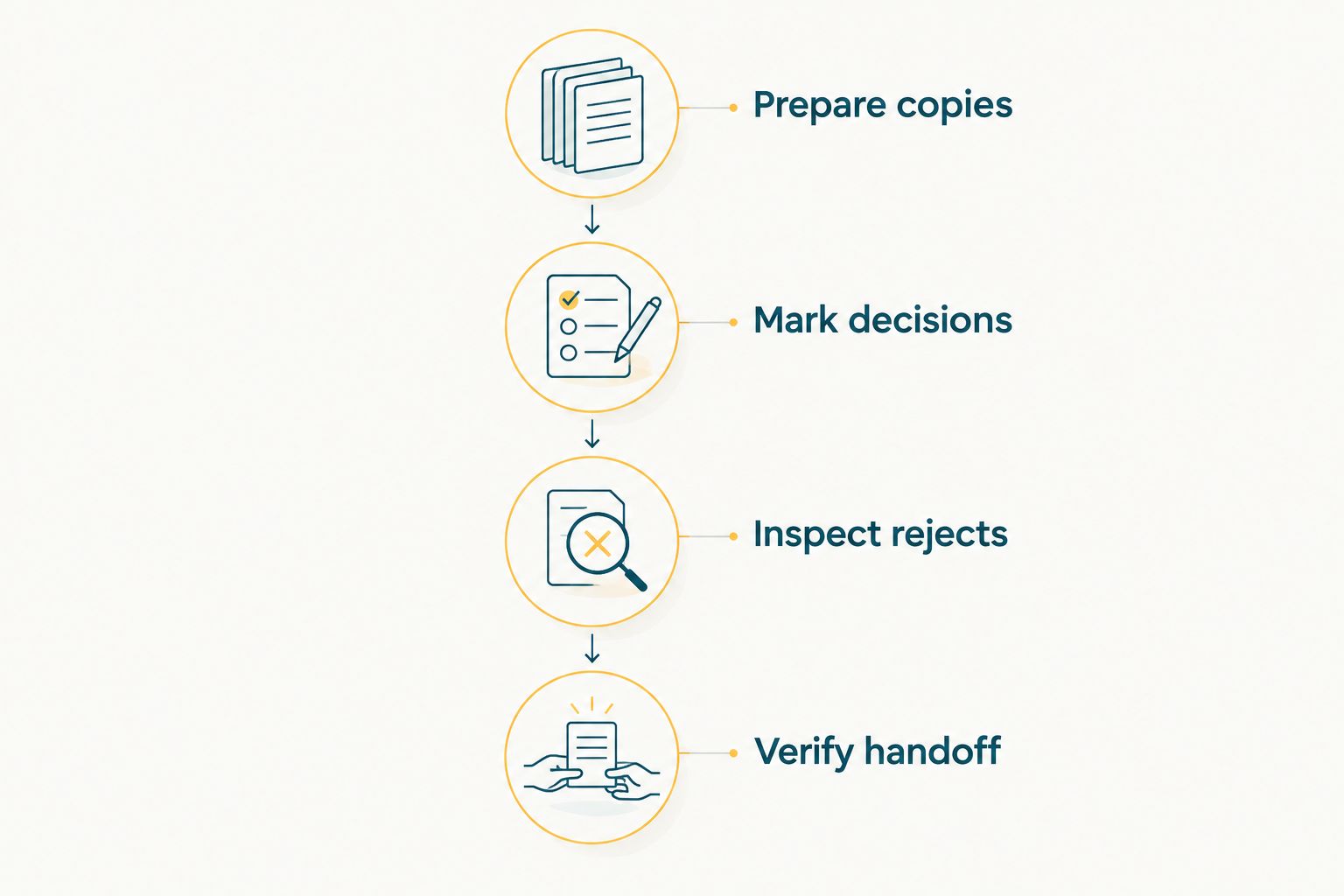
Judge the complete review-to-edit workflow, not just the first selection pass.
How the recommendations are ranked
The order reflects workflow fit: Fotoowl AI Culling for offline automated shortlisting, digiKam for free manual selection and library organisation, darktable for selection plus editing, and RawTherapee for folder-based RAW review. Each recommendation follows the selection controls, organisation model and handoff criteria above.
This is a feature-and-workflow comparison, not a timed laboratory test. The 2,000-RAW-photos-in-4-minutes figure is reported by Fotoowl, not independently measured here. No automatic-selection accuracy or camera-specific compatibility result is implied. For your 2026 decision, the test on your own files is the deciding step.
Which free photo culling software should you choose?
Choose Fotoowl AI Culling when your priority is offline automated shortlisting followed by human review. For a confirmed free manual option, choose digiKam for library organisation, darktable for selection plus RAW editing, or RawTherapee for folder-based review.
Choose a different category when manual review is the bottleneck you want to address. Automated shortlisting deserves its own evaluation, including inspection of rejected photographs and a verified export.
Do not change applications halfway through an active wedding delivery without a clear reason. Complete the comparison on a finished assignment, document your selection rules and introduce the chosen workflow on the next suitable job.
FAQ
What's the best free photo culling software for photographers in 2026?
digiKam is the best default choice for manual culling combined with photo-library organisation. Choose darktable for selection and RAW editing together, or RawTherapee for folder-based RAW review.
Is free photo culling software the same as automated culling?
No. Ratings, labels and rejection controls help you record manual decisions; automated culling proposes selections or rankings for you to review.
Is darktable better than digiKam for wedding photography?
darktable is the better fit when you want manual selection and RAW development in one application. digiKam is the better fit when organising and comparing photographs across a collection is your priority.
Can I cull RAW photographs without uploading a wedding shoot?
Yes. digiKam, darktable and RawTherapee support local photo workflows. Check your camera files in the current application release before using it for a live assignment.
Is Fotoowl AI Culling free photo culling software?
Fotoowl AI Culling is not included as a confirmed free recommendation here. Check its current terms before choosing it; its stated workflow is offline desktop culling followed by human review before export.
Will my ratings transfer correctly to Lightroom?
Do not assume that ratings and rejection states transfer identically between applications. Test selected originals and sidecar handling in your exact workflow before processing a client assignment.
Should I delete rejected wedding photographs immediately?
No. Review the rejected set and verify your backups before permanent deletion. A technically weak frame can still contain an important expression or an otherwise missing moment.
One last thing
Inspect what the software rejects, not only what it keeps. A polished shortlist can hide an omission. Before adopting any culling workflow in 2026, check that the rejected set does not contain the only photograph of an important person or moment.