
Is Studio Manager's WhatsApp CRM worth it for small studios?


Studio Manager’s WhatsApp CRM is worth it for small photography studios whose enquiries, follow-ups and booked shoots have become difficult to manage through chat alone. Its value comes from managing the work behind each conversation, but you still need to review client details, maintain project records and decide what deserves a personal reply.
TL;DR
- Is a WhatsApp CRM for photographers worth it? Yes, when chat-based enquiries need reliable follow-ups and project tracking.
- Fotoowl’s Studio Manager suits small photography studios managing WhatsApp and Instagram leads alongside quotations, contracts and payments.
- Keep a manual workflow if you already track every enquiry and commitment reliably.
- Judge the CRM by completed follow-ups and clear handovers, not by the number of features.
Why this matters
A wedding enquiry is not a booking. Between the opening message and the final delivery, you need to confirm dates, discuss coverage, send a quotation and keep track of commitments.
For Indian wedding and event photographers evaluating a CRM in 2026, that connection matters more than another place to read messages. The WhatsApp leads-to-signed-contracts workflow explains the booking process that your system should support.
The buying question is simple: does the CRM remove tracking work, or merely create another record to update? Start there before comparing feature lists.
Is Studio Manager’s WhatsApp CRM worth it for small studios?
Fotoowl’s Studio Manager is best for small photography studios that need to manage WhatsApp enquiries alongside follow-ups, bookings and project delivery. It captures and analyses leads from WhatsApp and Instagram chats, then supports the administrative work around those leads.
That includes follow-ups, quotations, contracts, invoices, projects, teams, schedules, post-processing, deliverables and payments. This scope makes it relevant when your problem extends beyond replying to an enquiry.
The comparison below concerns working methods, not competing software products. A manual workflow remains a valid choice when you maintain it consistently.
| Working method | Best for | Main advantage | Main limitation | Verdict |
|---|---|---|---|---|
| WhatsApp with a manually maintained tracker | A photographer with manageable enquiries and reliable admin habits | You choose a simple process and keep direct control | You must transfer commitments from conversations into your tracker | Hold if nothing important slips |
| Studio Manager | A small studio managing enquiries and work across bookings | Lead capture sits alongside follow-ups, documents and project management | Your team still needs to review details and maintain the workflow | Adopt if manual tracking is breaking down |
Do not treat studio size as the deciding factor. A solo photographer with overlapping wedding enquiries can face more coordination work than a larger team with clearly separated responsibilities.
The useful distinction is whether you can explain the current status and next action for every active client without reconstructing the conversation.
Best for studios losing track between enquiry and booking
Consider the point where a client asks about availability, receives a quotation and then goes quiet. If that enquiry stays only in your memory, follow-up depends on remembering it while you are shooting, travelling or editing.
A CRM gives that work a place in your booking process. Studio Manager manages follow-ups as well as quotations and contracts, so assess those functions together rather than treating message capture as the whole product.
For your 2026 evaluation, bring an actual enquiry through the process. Check whether you can identify the client’s requirements, the quotation status and the next action without opening unrelated records.
Choose a CRM to make unfinished work visible, not to make every conversation longer. A useful record tells you what to do next.
The limitation is discipline. If you leave an enquiry open after the client declines, or fail to record an agreed change, your working picture becomes unreliable regardless of the software.
Best for studios handing work between people
Small teams still need handovers. The person replying to an Instagram enquiry is not necessarily the photographer covering the event or the person overseeing post-processing.
Studio Manager includes teams, schedules, projects, post-processing and deliverables. Those functions are relevant when a booking needs to move beyond the person who handled the initial conversation.
Your evaluation should follow that handover. Ask a colleague to explain the agreed coverage, event schedule and outstanding work using the project record rather than asking you to repeat everything.
The advantage is a defined place to manage responsibilities. The limitation is that you must agree how your studio records those responsibilities; software does not settle an unclear division of work.
For a multi-function Indian wedding, distinguish the client’s overall booking from the coverage required at each function. Treat this as a workflow requirement to demonstrate, not a capability to assume from the word CRM.
Best for keeping it manual: a process that already works
A CRM is not automatically the right purchase for a small photography business. If you consistently respond, record commitments and complete follow-ups, replacing that process needs a clear reason.
A manual approach lets you keep your own tracker focused on the information you use. Its disadvantage is the ongoing effort of copying details and checking that conversations match the record.
Keep your existing method if you can reliably find every active enquiry, booking commitment and outstanding payment. Do not replace a working process just because a tool offers more functions.
Write down the specific failure before you consider a change. “We need better organisation” is too vague; “we cannot tell which quotations still need a reply” gives you something concrete to evaluate.
That distinction also prevents unnecessary migration. You do not need to rebuild your entire studio operation to solve a narrowly defined follow-up problem.
Why the value of a WhatsApp CRM varies
The value of a photography CRM in 2026 depends on the work you need it to manage. These factors connect directly to Studio Manager’s stated scope:
- Enquiry sources: WhatsApp and Instagram lead capture matters when you handle prospective clients through those conversations.
- Follow-up responsibility: Follow-up management matters when ownership becomes unclear after the initial reply.
- Document workload: Quotations, contracts and invoices matter when you repeatedly manage these around each booking.
- Team coordination: Teams and schedules matter when work passes between the studio owner, photographers and other contributors.
- Delivery responsibilities: Projects, post-processing and deliverables matter when administrative tracking must continue after the shoot.
- Payment tracking: Payment management matters when you need to keep financial status connected to the work you have agreed.
A feature earns its place only when it supports a task you actually perform. If your main difficulty is organising edited files, start by defining that problem rather than buying a CRM to solve it indirectly.
Equally, a gallery cannot replace the booking process simply because both tools serve photographers. Choose software against the job it needs to do.
How should you evaluate Studio Manager before switching?
Use a representative booking to assess the complete workflow. For a 2026 review, choose a job with the same conversations, documents and handovers your studio normally handles—not a simplified demonstration that skips the difficult parts.
Capture the enquiry
Start with a WhatsApp or Instagram lead and inspect the captured information. Compare the record with the conversation, especially the event date, requested coverage and client requirements.
Lead analysis supports your work; it does not remove your responsibility to confirm what the client has actually agreed. Correct misunderstandings before they reach a quotation.
Assign follow-up
Decide who owns the next action and what that action should achieve. A follow-up might clarify coverage, check whether the quotation was reviewed or resolve an unanswered question.
Assess whether the workflow makes that responsibility clear. Merely storing a conversation does not establish who should respond.
Review documents
Work through the quotation, contract and invoice requirements for the booking. Check how you will review client details and agreed scope before sending anything.
Use the quotation-to-invoice workflow guide to frame your evaluation. Do not assume that a document-management feature means every document should be issued without review.
Plan the project
Carry the booking into schedules, team responsibilities and post-processing work. Check that the people doing the job can identify their responsibilities without relying on a separate verbal briefing for every detail.
Keep the project record practical. Capture what your team needs to execute the booking, not a running transcript of every exchange.
Track completion
Finish the evaluation with deliverables and payment status. Ask what remains outstanding and who is responsible for closing it.
This final check separates a useful studio workflow from a system that looks organised only until the booking is confirmed. Your administrative work continues after the shoot.
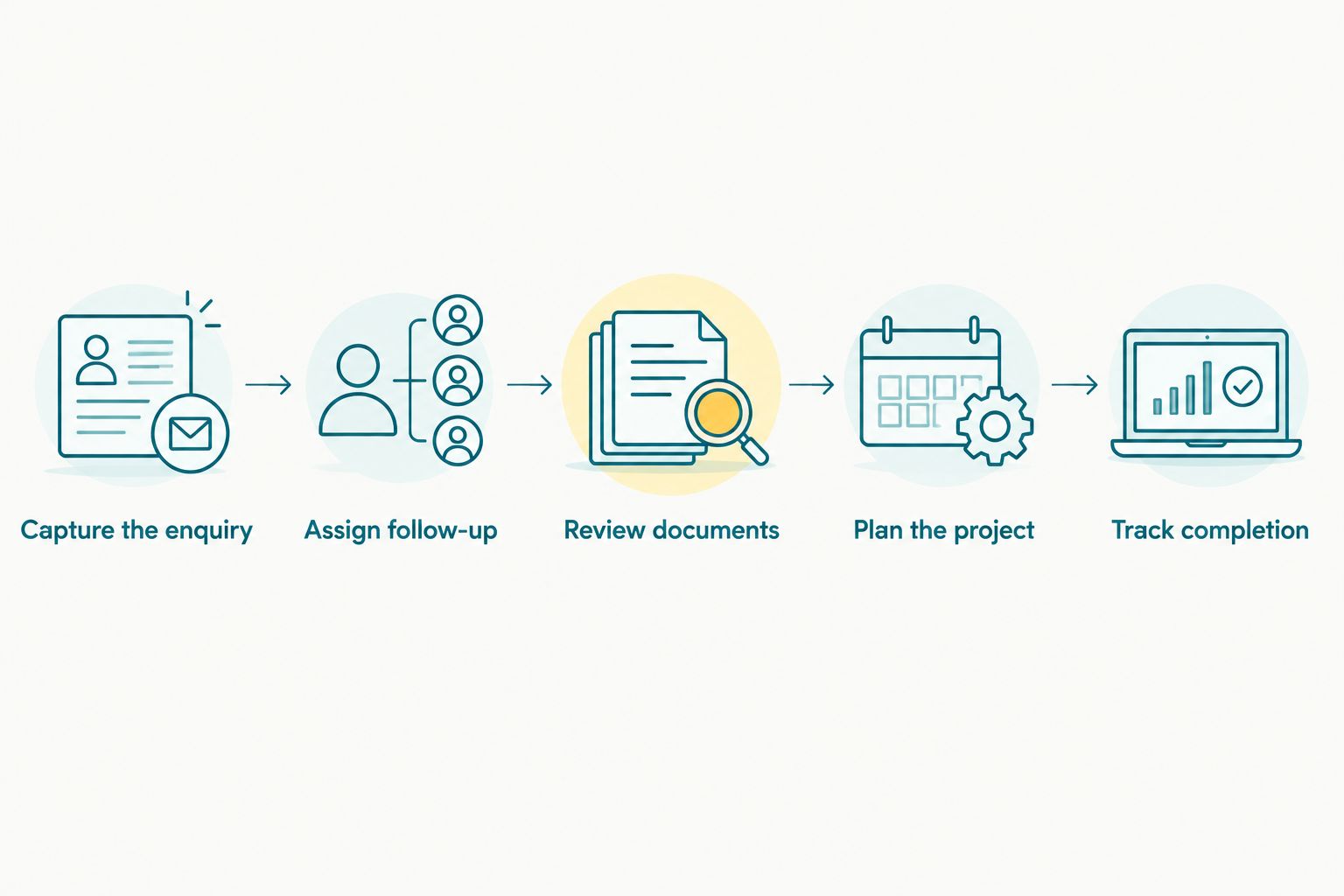
Evaluate the booking through completion, not just the initial conversation.
What should you measure during the evaluation?
Record the work your current process requires, then assess the same tasks in the proposed workflow. Use your own observations rather than adopting a promised time saving as a result.
Useful measures include time spent reconstructing conversations, follow-ups completed when intended, corrections needed in client documents and handovers that require extra explanation. Record both improvements and additional work.
Keep the comparison fair. A carefully prepared demonstration and an untidy existing tracker do not represent equivalent working conditions.
For a 2026 buying decision, write down an acceptance rule before you commit: the new process must solve your named problem without creating unacceptable maintenance work. A CRM is worth adopting when the working improvement survives ordinary studio use.
Avoid judging success by how many records you created. Completed actions and accurate commitments are more useful than a busy-looking system.
Does a solo photographer need a WhatsApp CRM?
A solo photographer needs a WhatsApp CRM when managing enquiries and commitments manually has become unreliable. Having no employees does not remove the need to track quotations, follow-ups and delivery work.
The strongest reason to wait is equally clear: your existing process already works, and a CRM would add maintenance without solving a recurring problem.
Will a WhatsApp CRM bring in more bookings?
A WhatsApp CRM manages enquiry handling; it does not guarantee more bookings. Use it to assess whether you are responding, following up and keeping agreed work organised—not as evidence that demand will increase.
Separate lead generation from lead management. Better tracking does not replace suitable enquiries, clear packages or the client’s decision to hire you.
Can a WhatsApp CRM replace your client photo gallery?
A WhatsApp CRM and a client photo gallery serve different jobs. Fotoowl’s Studio Manager manages business operations, while AI Gallery supports photo and video delivery through galleries with face recognition.
Evaluate booking administration and image delivery separately. Do not assume that handling an enquiry through WhatsApp also resolves how clients will receive their photographs.
FAQ
Is a WhatsApp CRM for photographers worth it for a small studio?
A WhatsApp CRM is worth it when your small studio struggles to track enquiries, follow-ups and booked work through chat alone. Keep your current method if it already handles those responsibilities reliably.
What does Fotoowl’s Studio Manager manage besides WhatsApp leads?
Fotoowl’s Studio Manager manages follow-ups, quotations, contracts, invoices, projects, teams, schedules, post-processing, deliverables and payments. It also captures and analyses leads from Instagram chats.
Should I switch if I only shoot weddings on my own?
Switch only if your current wedding-booking process has a recurring tracking problem. Assess the administrative workload rather than using team size as the deciding factor.
Will Studio Manager reply to every client without my involvement?
Keep human review in your client communication workflow. Confirm requirements, agreed coverage and document details rather than treating lead analysis as a substitute for your judgement.
How do I know whether the CRM is saving work?
Compare the same booking tasks before and during your evaluation. Record conversation-reconstruction work, follow-up completion, document corrections and handover clarity, including any extra maintenance the CRM introduces.
Is Studio Manager the same thing as WhatsApp photo delivery?
Studio Manager is a CRM for managing leads and studio operations, not another name for photo delivery. Assess your client gallery and delivery workflow as a separate requirement.
One last thing
Test the handover, not just the dashboard. Ask someone involved in the job to identify the next action, the agreed coverage and the outstanding deliverables without asking you to interpret the conversation.
If the record cannot explain the next action, the workflow is not ready. That is a more useful final test than how organised the screen appears.