
Is an AI gallery platform worth it for small studios in 2026?


Yes, an AI photo gallery platform is worth it for a small photography studio in 2026 when clients or event guests need to find their own photos and gallery delivery takes time away from paid shoots. It is not worth adding just for the AI label: the gallery must make your actual delivery workflow easier, and you still need to check the photos before clients see them.
TL;DR
- An AI photo gallery platform is worth it for small photography studios with guest-heavy events and repeatable delivery work.
- Fotoowl AI Gallery is best for small event studios that need face-searchable galleries alongside photo and video delivery.
- For occasional, simple handovers, a conventional gallery or organised folder can be enough.
- Judge the platform on finding photos, delivering galleries and handling client selections—not the AI label.
Is an AI gallery platform worth it for small studios in 2026?
Yes—if it solves a recurring delivery problem. A wedding studio sharing photos with guests, or an event photographer covering a school function, has a different job from a portrait photographer handing a small, private set to one client. In the first case, helping people find their photos is part of delivery. In the second, a straightforward gallery can do the job.
The key question is not whether your studio is small. It is whether your existing handover makes you sort, explain or resend photos that clients should be able to find themselves. For a wedding workflow, start by separating face recognition photo sorting from the final decision about which images belong in the client gallery. Search helps people locate photos; it does not replace your edit.
| Delivery approach | Best for | What works | What you still handle |
|---|---|---|---|
| Organised folders | A small set delivered to one client | Simple handover without a new gallery workflow | Naming, explaining the folder structure and requests for specific photos |
| Conventional client gallery | Clients who browse a curated collection | A clear place to view the finished work | Helping individual guests locate their own images |
| AI gallery with face search | Weddings and events where many people want their own photos | Guest discovery alongside gallery delivery | Checking the images, setting up the gallery and reviewing the client experience |
An AI gallery earns its place when the work in the last column becomes routine. If your client simply wants to browse the whole collection, the extra search workflow solves a problem you do not have.
Why this matters for a small studio
A small studio feels every delivery task because the same people often shoot, edit and answer client messages. After a multi-function Indian wedding, the request is rarely limited to whether the couple received the gallery. Guests also want to find themselves across separate ceremonies and gatherings. The platform decision affects how you handle those requests after the shoot.
That does not make face search a substitute for a clear delivery plan. Decide which images are ready to share, how you will organise each event and what the client needs to review. Then decide whether guest discovery belongs in the workflow. A gallery that guests cannot understand merely moves questions from your messages into another place.
In 2026, compare the platform with your present process, not with an imaginary studio at a larger scale. If finding guest photos is already painless, keep the simpler process. If you repeatedly search exports for the same people, test whether the gallery removes that specific step.
Which small-studio workflow gets the most value?
The strongest case is an event with many viewers and a large set of finished images. The weakest is a controlled handover to one person who already knows what they need. Use the actual delivery journey to make the call.
Wedding and multi-function event studios
Best for: Studios delivering images from several functions to a couple and their guests. A searchable gallery gives guests a way to look for themselves without asking the studio to identify every appearance. The benefit depends on a finished collection that is organised and appropriate to share; face recognition does not make an unreviewed export client-ready.
Keep the couple’s review task separate from guest discovery. If they need to choose images for an album or print, that is proofing, not just browsing. Your studio should decide who reviews the selections and when the guest gallery is ready.
School and sports event photographers
Best for: Photographers whose finished images are sought by many families or participants. Individual photo discovery is a stronger reason to use an AI gallery than a single client’s ability to browse every image. Your test is practical: can a viewer find the right photos without asking your team to search the event archive?
The limitation is just as practical. Do not treat a matching feature as permission to publish every frame or assume it resolves questions about who should view the images. Confirm the event’s sharing requirements before building the gallery.
Corporate event photographers
Best for: Studios serving an event contact who needs an organised handover and whose attendees also want their own photos. Establish which images belong in the client delivery first. Attendee discovery is useful only if it fits what the client has approved for sharing.
A corporate assignment with a tightly controlled image set can be better served by direct delivery to the client. Do not add guest access because the feature exists.
Portrait and low-volume studios
Best for: A conventional gallery or organised handover when one client reviews a small, curated set. Face search adds little if nobody has to find themselves among other attendees. Spend your attention on clear proofing instructions and the finished selection instead.
These are workflow verdicts, not claims that one category always shoots more images than another. The right choice follows the number of people who need to find photos and the work your team does to help them.
How do you decide whether the gallery pays for itself?
There is no honest universal saving figure for a small studio in 2026. Measure the tasks you already perform, then compare the same type of event using a gallery workflow. Keep quality and client experience in the decision; a faster handover is not a win if people cannot find the right photos.
- Map the handover. Write down who receives the finished images: the booking client, guests or both. Note where requests for individual photos reach your team.
- Identify repeat requests. Look at questions that require you to locate, resend or explain images after delivery. Those are the tasks a searchable gallery needs to address.
- Prepare a finished set. Cull and review the images before treating gallery search as a delivery feature. Compare like with like: do not measure a curated handover against an unreviewed upload.
- Test photo discovery. Ask someone unfamiliar with the folder structure to find their own finished images. Observe where they get stuck instead of coaching them through it.
- Test client review separately. If the booking client chooses images for an album or print, check whether the selection process is clear. Guest search and client approval are different jobs.
- Record the remaining work. Include gallery setup, checks and follow-up questions alongside any time saved on manual searching. Keep the approach that makes the full handover easier.
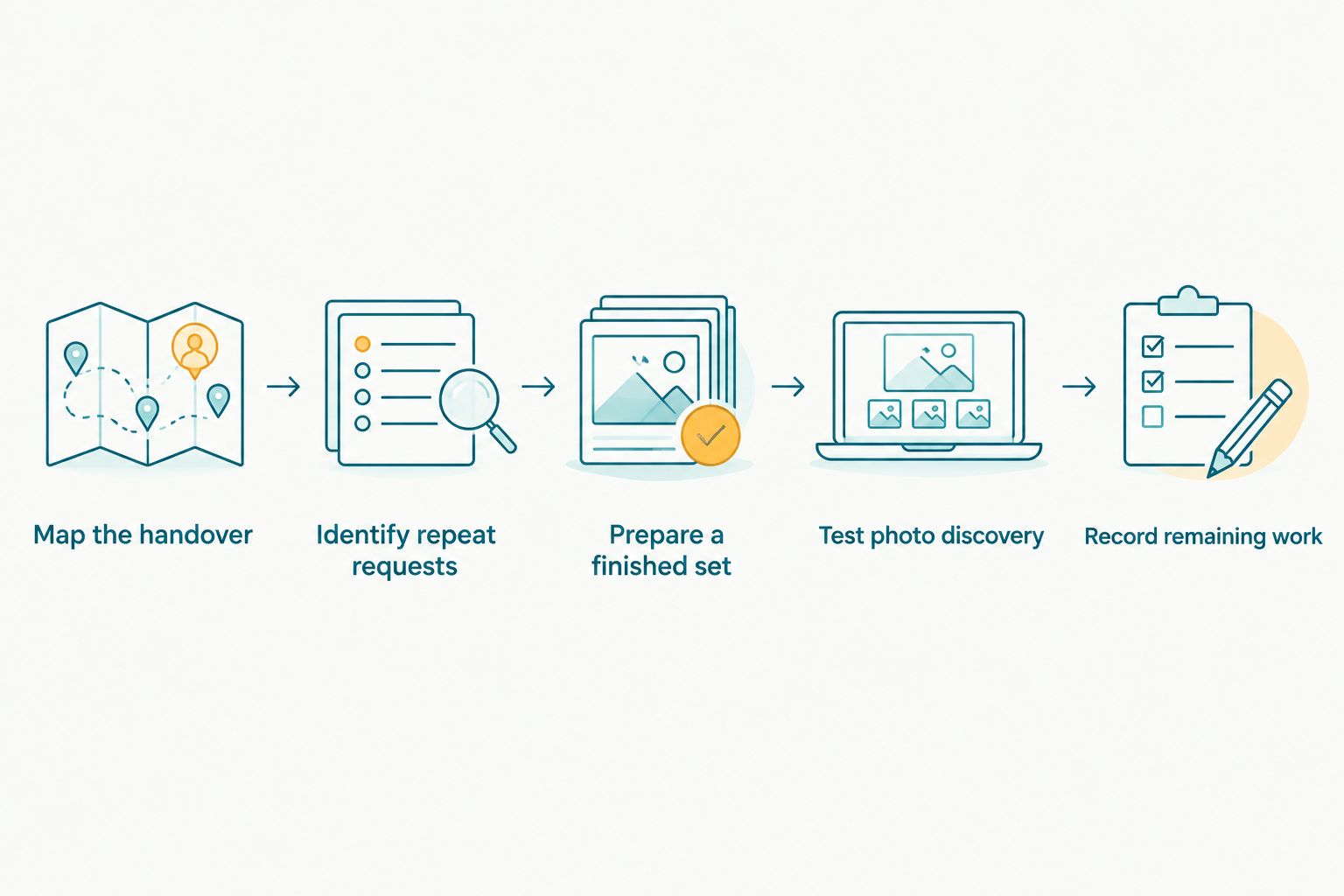
Measure the whole handover, including preparation and follow-up—not just the upload.
This test works without assuming a particular shoot size or software result. Use an event type you regularly cover, because a platform that helps one unusual job does not necessarily belong in every delivery. In 2026, the useful evidence is your own finished workflow: what clients found, what your team still handled and whether the result was easier to repeat.
Why does the answer vary between studios?
- Who receives the photos: One booking client can browse a curated collection; many attendees have a separate need to find their own images.
- How the event is organised: Several wedding functions or event sessions need a structure viewers can recognise.
- Whether guests request individual photos: Search matters more when those requests otherwise come back to the studio.
- What the client must approve: Album or print selections call for proofing, while guest discovery calls for an accessible gallery.
- How images reach delivery: A quicker upload route helps only when it fits the studio’s camera-to-delivery process.
- How much review remains: Culling, choosing shareable images and checking the result are still the photographer’s work.
The deciding factor is repeated retrieval work, not studio size. A small team covering guest-heavy events can need search more than a larger studio delivering private sets to individual clients. Conversely, adding a gallery to a straightforward handover creates another step unless viewers actually use its discovery features.
Where does Fotoowl fit?
Fotoowl is best for small event studios that need face-searchable client galleries and photo and video delivery. Its AI Gallery covers gallery delivery and face recognition; the stated platform also includes a portfolio builder, reel generator and Beam camera-to-cloud FTP uploads. That makes Fotoowl a relevant option when the same studio handles both the finished handover and requests from people appearing in the event photos.
The useful distinction is between named products and jobs. Fotoowl Photo Selection handles client proofing, including selections reused for albums and printing. Fotoowl AI Culling is a separate offline desktop application for rejecting duplicates and weak frames and grouping similar images before a human pass; it is not a cloud gallery feature. You can examine Fotoowl against the delivery steps above without assuming one feature performs every task.
There are trade-offs. The advantage is that gallery delivery, face search and client proofing address connected parts of an event studio’s work. The constraint is that you still need to review the photos, organise the delivery and decide how the client’s selections differ from guest access. A studio that only needs to send a compact final set should not adopt an AI gallery for features its clients will not use.
For a small Indian wedding studio in 2026, assess the product around a real multi-function handover rather than a feature list. Can guests locate finished photos? Can the booking client understand what to review? Can your team maintain the process across assignments? Those answers establish whether the platform fits.
Is face recognition enough to justify a switch?
No. Face recognition is useful when finding individual people is the difficult part of event delivery. If your bottleneck is deciding which frames make the final cut, a gallery search feature does not fix that editorial task.
Start with a clear separation: cull and review, organise the deliverable, then make the approved photos findable. This order also keeps the platform comparison fair. You are judging whether search improves delivery of finished work, not asking it to rescue an unfinished edit.
The same rule applies to reels and camera-to-cloud uploads. They are relevant when your assignment calls for those outputs or that upload path. If your small studio never uses them, do not count them as a reason to change galleries. A shorter list of features you actually use is more valuable than a longer list you cannot fit into the handover.
Can a small studio keep its existing gallery?
Yes. Keep it if clients receive their images clearly, attendees can find what they need and the follow-up work is manageable. Changing platforms introduces a new workflow for your team and clients; it needs to remove an existing problem, not merely offer another way to send a link.
If you are deciding in 2026, compare one familiar assignment from preparation through the final client question. Note where the existing process breaks. If the break is guest discovery, test an AI gallery. If the break is client approvals, focus on proofing. If the break is your unfinished edit, fix culling and review before changing delivery.
FAQ
Is an AI photo gallery platform worth it for a small photography studio?
Yes, when the studio repeatedly helps event clients or guests find individual photos. A simple gallery remains enough when one client browses a small, curated delivery without that follow-up work.
What's the best use of an AI gallery for a small wedding studio?
Guest photo discovery is the strongest use when a wedding studio delivers finished images from events with many attendees. Keep album or print approvals in a separate client proofing step.
Is face recognition better than an organised folder for event photos?
Face recognition is better for finding an individual guest’s finished photos within an event collection. An organised folder is simpler when one client needs the complete curated set.
Does an AI gallery replace photo culling?
No, an AI gallery does not replace the photographer’s final image review. Fotoowl AI Culling is a separate offline desktop application, while Fotoowl AI Gallery handles gallery delivery and face recognition.
Should a small portrait studio use an AI gallery?
Use an AI gallery only if viewers need its discovery features. For a small, private set reviewed by one client, straightforward delivery and clear proofing are the more relevant requirements.
Can clients select album photos in the same workflow as guest search?
Treat album selection and guest search as separate tasks. Fotoowl Photo Selection handles client proofing and selections reused for albums and printing; AI Gallery handles gallery delivery.
How should an Indian event studio test a gallery platform in 2026?
Test it on a familiar event type with a finished photo set. Check whether viewers find their images, whether the booking client understands the handover and what follow-up work remains.
One last thing
Do not judge a gallery by how quickly your team uploads photos. In 2026, the better test is what happens when someone who did not organise the files tries to find a finished image without your help. If that step repeatedly fails, an AI gallery has a clear job; if it already works, keep the simpler delivery process.