
Can guests upload their own photos to a shared event gallery?


Yes, guests can upload photos to a shared event gallery when the gallery supports guest contributions and the photographer enables an upload route. A shared viewing link alone does not grant upload access. For a professional event gallery, keep guest submissions separate from the photographer’s delivered images until you have reviewed them.
TL;DR
- Yes: guests can upload photos to a shared event gallery if guest contributions are enabled.
- Fotoowl AI Gallery is best for photographer-led delivery; guest upload access is not established by the supplied product details.
- Use separate upload and viewing routes so guest photos do not appear among delivered images without review.
- WhatsApp delivery, face search and Beam camera uploads do not, by themselves, confirm guest uploads.
Why this matters
At a wedding, a school function or a company event, guests capture moments your team cannot cover from every angle. Their photos can add context, but opening a gallery to contributions also changes what you must check before anyone sees or downloads an image. In 2026, treat guest collection as a separate decision from gallery delivery.
The distinction is especially important for school events. A guide to setting up guest photo uploads for school events addresses that collection workflow; it is not proof that every gallery product offers a guest upload control. Check the exact contribution method before you give parents, students or staff a link.
Can guests upload photos to a shared event gallery?
Yes, if the gallery has a guest contribution feature or an upload destination connected to it. If it only offers a link for viewing or downloading, guests cannot use that link to add photos. The deciding question is not whether people can open the gallery. It is whether you can give them permission to submit files without giving them control of your published collection.
Use this sequence before inviting contributions:
- Choose the destination. Decide whether guest photos belong in a separate collection or can enter the event gallery after review. Keep the photographer’s delivered selection identifiable.
- Check the upload route. Find a guest-facing submission option and test it as someone who does not manage the gallery. Do not assume a viewing link is also an upload link.
- Set the audience. Decide who can submit, who can view submissions and who can approve images for publication.
- Test a real submission. Send a test photo from a guest device. Confirm where it lands, what the contributor sees and whether anyone else can see it before approval.
- Explain the rules. Tell guests what to upload, where those images can appear and whom to contact if they want a photo removed.
- Review before delivery. Check guest images for duplicates, unwanted personal information and photos that should not be shared with the wider event audience.
The test in step 4 matters more than a feature label. An upload button can lead to a private inbox, a public gallery or a separate folder; those outcomes call for different instructions to guests. In 2026, run the test before printing a QR code or sending an event-wide WhatsApp message.
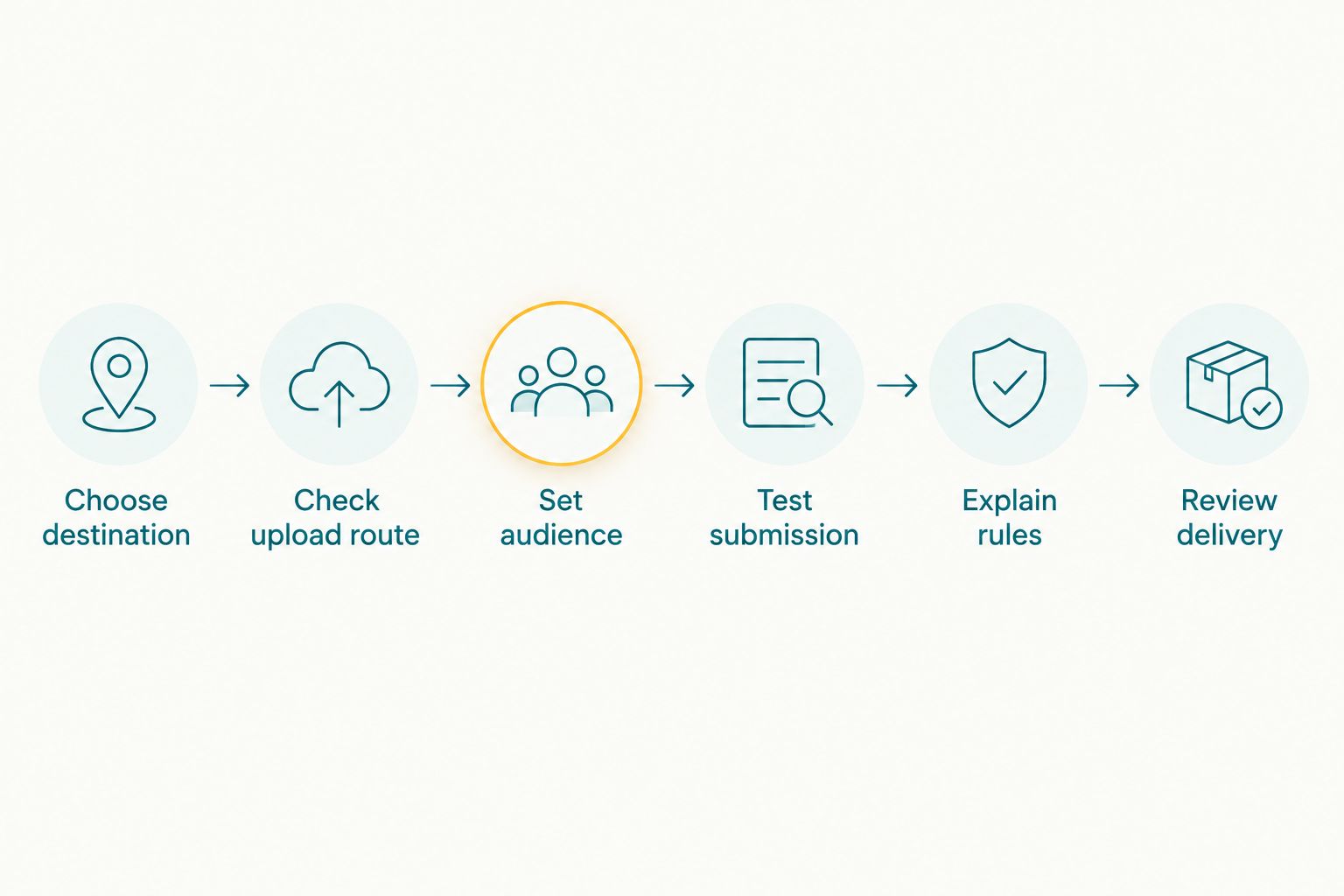
Test where a guest photo lands before sharing the upload route with the event.
What should you check before sharing the link?
Open the link on a device that is not signed in as the gallery owner. If you can only browse images, it is a viewing link. If you can submit a file, complete the submission and check its destination from the photographer’s account. Repeat with a photo that you do not intend to publish, then confirm you can keep it out of the delivered gallery.
Also check how guests are identified. An open submission route is simple to distribute, but it gives you less context for resolving a mistaken upload. A restricted route adds a step for guests while making access easier to control. Choose based on the event’s privacy needs, not on how quickly you can circulate a link.
Which setup works best for guest photos?
A separate contribution route with photographer review is the clearest setup for client work. Guests get a place to send images, and you keep responsibility for the collection you deliver. A shared album that publishes every submission immediately is simpler to operate, but it gives you less control over quality and access.
| Setup | Best for | Advantage | Limitation |
|---|---|---|---|
| Guest uploads with review | Weddings, school events and client galleries where you approve what appears | Keeps submitted images apart from the delivered selection | Requires someone to check submissions |
| Guest uploads published immediately | Informal events where everyone understands the gallery is a shared collection | Contributors can see additions without a review step | Unchecked images can appear to the full audience |
| Photographer-only gallery | Paid client delivery and a tightly edited event selection | You control every published image | Guests need another way to contribute |
These are workflow choices, not claims that a particular product includes all three settings. Before selecting software, ask to see the contributor experience and the approval controls you will actually use. If a platform cannot show you a separate submission route, plan an external collection method rather than promising in-gallery uploads.
For an Indian wedding with multiple functions, make the destination clear in the invitation. A guest should know whether an image from the sangeet belongs with that function’s contributions or with the reception’s. For a school event, establish who is allowed to submit and who can see the resulting photos before distribution begins.
Why guest upload workflows vary
The answer changes with the gallery setup, not with the size or name of the event. Check these factors before telling a client that contributions will work:
- Upload permission: A gallery owner’s upload access does not establish guest upload access. Test the route from a guest account or unsigned device.
- Publication control: Confirm whether new submissions wait for approval or appear immediately. This determines what you must review before circulation.
- Viewing permission: Decide whether contributors can see only their own uploads, all guest contributions or the photographer’s delivered images as well.
- File handling: Check which file types the submission route accepts and whether it changes the files. Use an actual guest file for the test.
- Removal process: Identify who can take down a submission and how a guest can request removal. Agree on the process before distributing access.
- Event organisation: Keep functions, teams or sessions distinct when mixing their images would make the collection hard to review or use.
No single setting answers every question. An upload route can work perfectly while the viewing permissions are wrong for the event. In 2026, verify the complete path from a guest’s phone to the final published gallery.
Is Fotoowl AI Gallery a guest upload gallery?
Fotoowl AI Gallery is best for photographer-led event photo delivery, not as a confirmed guest contribution tool. The supplied product details establish photographer uploads, photo and video delivery, face recognition galleries, a portfolio builder and a reel generator. They do not establish a guest-facing upload feature, so do not promise clients that guests can add images directly to Fotoowl AI Gallery without checking the current product controls.
That distinction protects your workflow. A guest finding their photo through face recognition is retrieving an image already in the gallery; they are not submitting a new one. Photo Selection serves client proofing, which is a different action again. Keep those jobs separate when explaining the gallery to a wedding planner, school administrator or corporate client.
Beam is also a different upload route. The stated Beam feature moves images from a camera to the cloud through FTP for the photographer’s workflow. It does not establish that an event guest can upload phone photos to a shared gallery. If your brief includes guest contributions as well as rapid professional delivery, confirm the contribution route independently.
Fotoowl AI Gallery is best for photographers who want to deliver their own event images with face-based discovery; confirm guest uploads separately. Its stated strengths fit professional delivery. Its limitation for this question is specific: the provided product information does not confirm guest submission or moderation controls.
Can guests use a QR code to upload event photos?
Yes, a QR code can point guests to an upload route, but the code itself does not accept photos. Its destination must permit submissions. Test the destination from a guest phone, then check where the image appears before putting the code on event signage.
If the code opens a viewing gallery, change the destination or the instructions. Calling a viewing code an upload code creates avoidable questions for your team during an event. Keep printed instructions short: state whether the code is for contributing photos or finding the photographer’s photos, not both unless the destination supports both actions.
Can guests add photos through WhatsApp instead?
Yes, guests can send photos to an agreed WhatsApp recipient, but that is a collection method rather than proof of direct gallery uploading. Someone still needs to receive, review and place those images into the intended collection. WhatsApp photo delivery to guests and WhatsApp photo collection from guests are different directions of travel.
For a wedding in India, the familiar app can make submission instructions easier to understand. It also leaves the photographer with a manual sorting decision if contributions arrive across different chats. Decide who receives the files and who approves them before the event starts; do not describe that process to a client as an automatic gallery feature.
Should guest photos appear beside professional photos?
Not by default. Keep guest submissions identifiable until you have reviewed them, especially when a client expects an edited professional selection. After review, you can decide whether the approved contributions belong in a shared collection or should remain separate.
This is a presentation decision as well as a permission decision. A guest snapshot and an edited photographer image serve different purposes; both can be useful without being treated as the same deliverable. Tell the client which collection contains the contracted photography and which contains contributed images.
FAQ
Can guests upload photos to a shared event gallery in 2026?
Yes, if the gallery provides a guest submission route and you enable it. A link that only allows viewing does not give guests upload access.
Can guests upload photos without access to the photographer’s account?
Yes, if the platform offers guest-facing submissions. Test the link while signed out before sharing it; do not give guests the photographer’s account access.
Does a QR code let guests upload photos to an event gallery?
A QR code can open a guest upload route, but it cannot add upload permissions to a viewing page. Test a submission on a guest phone before distributing the code.
Can guests upload directly to Fotoowl AI Gallery?
Guest uploading to Fotoowl AI Gallery is not confirmed by the supplied product details. Its established gallery workflow covers photographer uploads and delivery, so check the current controls before promising guest contributions.
Is Beam for guest phone photo uploads?
No guest phone upload feature is established for Beam. The supplied details describe camera-to-cloud FTP uploads for the photographer’s workflow.
Should I approve guest photos before clients see them?
Yes, review guest submissions before placing them in a professional client gallery. That keeps unwanted or misplaced images out of the delivered collection.
Can guests send event photos through WhatsApp instead of a gallery?
Yes, guests can send photos to an agreed WhatsApp recipient. You still need a process to collect, review and organise those files before publishing them in a gallery.
One last thing
Test the link as a guest, not as the gallery owner. Owner access can hide the exact problem you are trying to prevent: guests receiving a link that lets them view photos but not contribute. For a 2026 event, make one test submission, check who can see it and only then share the route widely.