
Can AI face recognition sort thousands of wedding photos in minutes?

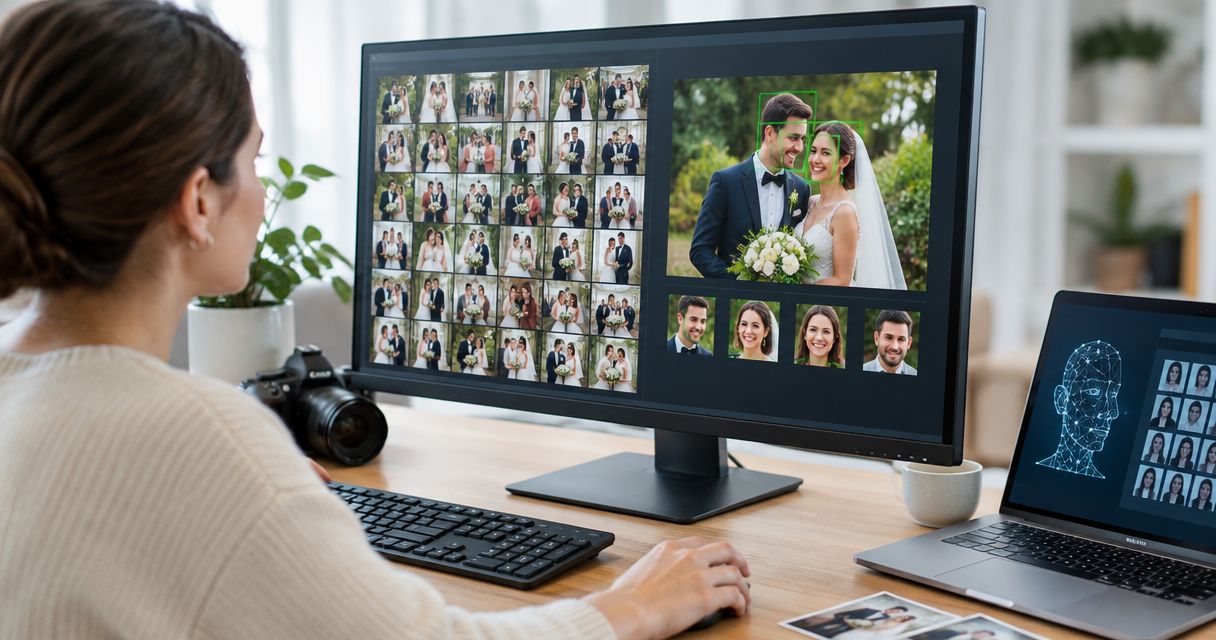
AI face recognition groups wedding photos by person, but a promise to sort thousands in minutes requires a timed test on your actual gallery. Uploading, processing, checking matches and delivering the gallery are separate tasks; a fast search result does not prove that the whole job finished quickly. For your 2026 wedding workflow, use face recognition to organise access to photographs—not to replace culling, editing or final approval.
TL;DR
- For “ai face recognition sort photos fast”, test upload, processing and review separately before promising a delivery time.
- Fotoowl provides face recognition galleries for professional wedding and event photographers; review results before delivery.
- Face recognition finds people; culling selects frames; client proofing records favourites. These are different jobs.
- Test portraits, group photographs and difficult lighting from your own weddings, not just a clean demonstration gallery.
Can AI face recognition sort thousands of wedding photos in minutes?
Face recognition can organise photographs by person; an exact completion time needs a measured workload. A gallery containing thousands of photographs is not a speed benchmark unless you also know what the timer includes.
Separate the process before judging the result:
- Upload: Move your selected files into the gallery.
- Processing: Allow the system to analyse faces and prepare matches.
- Review: Check whether returned photographs contain the intended person and whether expected images are missing.
- Delivery: Confirm that the approved gallery works for its intended recipients.
Your practical starting point is how to use face recognition to sort wedding photos. Build the workflow around the photographs you deliver, rather than treating every camera file as ready for guests.
The useful question is not simply whether a system runs quickly. Ask whether it produces a usable, checked result quickly enough for your agreed delivery schedule.
Why this matters for wedding photographers
At a multi-function Indian wedding, you need several ways to organise the same coverage: by ceremony, by sequence and by person. Those views serve different requests. A guest searching for their photographs is not asking for the same collection as a couple choosing their album story.
Face recognition addresses the person-finding task. It does not decide whether a photograph deserves delivery, whether the colour treatment is finished or whether a private moment belongs in a shared gallery.
For a 2026 delivery plan, define the output first. A preview collection, a complete edited gallery and an album shortlist should have separate approval criteria, even when they start from the same wedding coverage.
Which sorting approach fits your wedding workflow?
Choose the method according to the decision you need to make. Use face recognition for identity-based retrieval and human judgement for photographic selection. Neither task substitutes for the other.
| Approach | Best for | Main advantage | Main limitation |
|---|---|---|---|
| Manual organisation | Ceremony structure and editorial decisions | You control the meaning and sequence of each collection | You must inspect and organise the photographs yourself |
| Face recognition | Finding photographs containing a particular person | It provides a person-based route through the gallery | Returned matches still need checking; identity does not establish image quality |
| Combined workflow | Checked wedding delivery | It keeps person-based retrieval alongside your editorial decisions | You still need a defined review and approval process |
The combined workflow is the best fit when you need both searchable photographs and an intentional wedding story. Keep ceremony collections intact, then evaluate person-based retrieval within that structure.
Do not call a photograph “selected” merely because face recognition found someone in it. Selection implies a separate decision about quality, relevance or client preference.
How should you prepare wedding photos for face recognition?
A useful workflow starts before face processing. Decide which files belong in the client-facing collection and preserve the organisation you will need if a search misses an expected image.
Prepare the files
Back up the original coverage before reorganising or exporting delivery files. Keep a clear distinction between camera originals, working edits and approved exports so your team does not confuse processing readiness with delivery readiness.
Use a consistent naming and folder approach across photographers. Preserve ceremony and sequence information; person-based search should add another route to the images, not erase your existing structure.
Cull and edit
Review duplicate frames, technical problems and photographs you do not intend to deliver. Complete the editing required for the collection you are publishing. A correctly matched photograph is still the wrong delivery file if it is unfinished or unapproved.
Treat previews explicitly as previews. Do not let a face-search demonstration become an accidental release of the entire shoot.
Upload and process
Upload the approved collection and record when transfer finishes. Then record when face-based results become usable. Keeping those stages separate tells you whether a delay belongs to transfer or processing.
Check the actual gallery after processing. The presence of uploaded files alone does not demonstrate that person-based retrieval is ready.
Review matches
Search for people whose photographs you have already identified manually. Compare the returned set with those known images, checking both incorrect inclusions and missing photographs.
Include posed portraits and candid coverage. A review based only on clear, front-facing portraits does not represent the whole wedding.
Approve delivery
Check the recipient experience before distributing access. Confirm that the collection contains only approved images and that your access arrangements match the client's instructions.
Keep a manual route for handling missing-photo requests. Your delivery process needs an answer when a guest knows a photograph exists but cannot find it through face search.
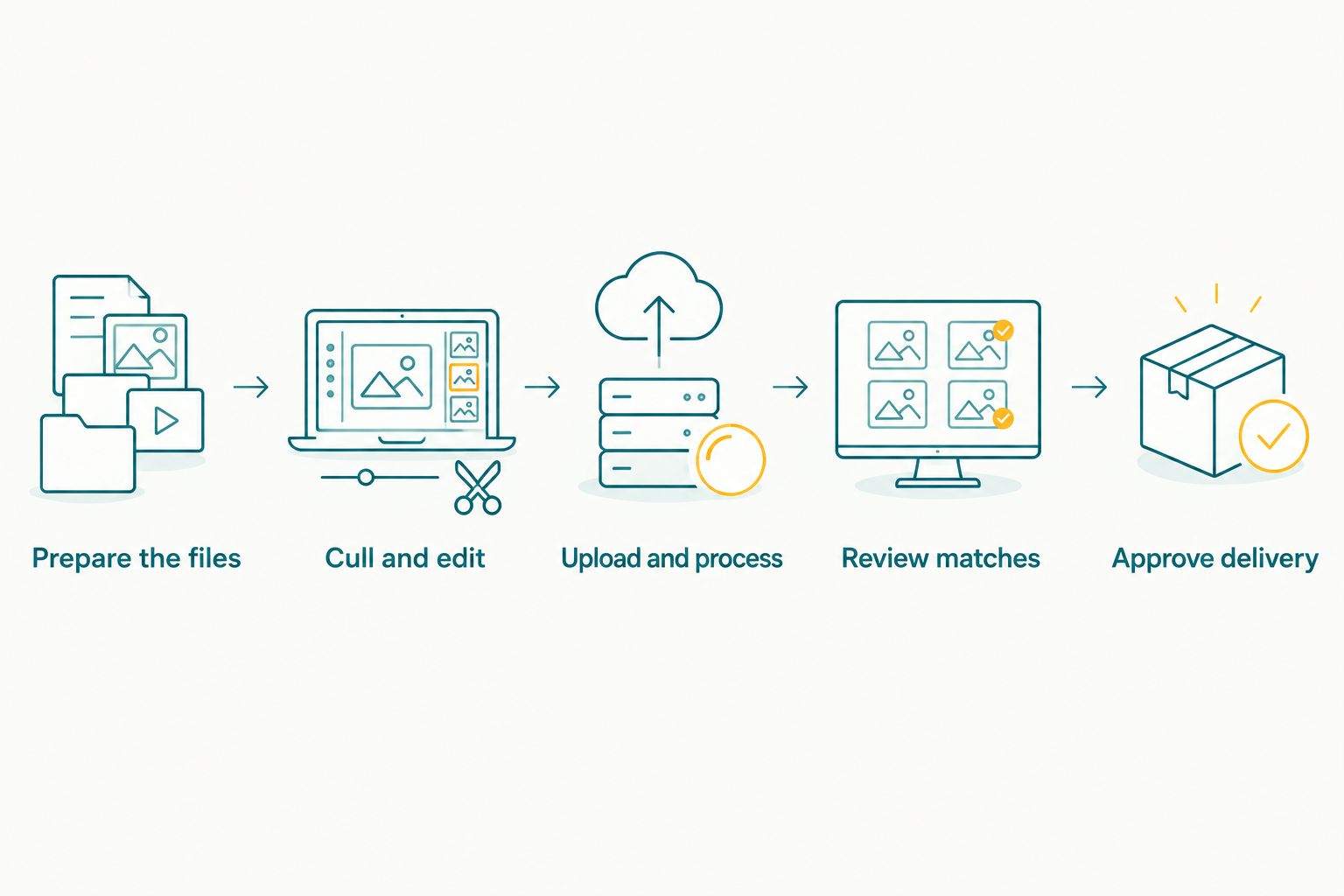
Face recognition belongs between file preparation and checked delivery, not in place of either.
Assign responsibility for approval, not just uploading. A team member should know who checks the searchable results, who approves the image collection and who handles requests after release.
Why face recognition sorting time varies
Your 2026 timing test should distinguish the work being measured. These factors describe the workload and review process; they are not a substitute for a platform-specific benchmark.
- File transfer: A timer that starts after upload excludes the time spent getting photographs into the gallery. Record that transfer separately.
- Collection size: Record the number of files submitted. Comparing differently sized collections without identifying the workload does not establish processing speed.
- Photographic conditions: Blur, obscured faces and changes in pose are recognised challenges for face recognition. Include them when evaluating results.
- Review scope: Checking selected examples is a different task from checking every proposed match. State which review you completed.
- Delivery scope: A searchable preview is not the same finished output as a complete, edited and approved wedding gallery.
Keep file preparation consistent when comparing runs. If you change the collection, export settings and review method together, you lose the ability to identify which change affected the result.
Measure the workflow you sell, not just the fastest stage inside it. That keeps a processing demonstration from becoming an unsupported client promise.
How do you test whether sorting is fast enough?
Run a rehearsal before attaching a turnaround commitment to a live wedding. Use an approved collection from your own work, with permission for the intended processing and access.
Define “finished” before starting
Write down the endpoint. For example, your test can end when files finish uploading, when face search returns results or when a reviewer approves the gallery. These endpoints answer different questions.
For a delivery commitment, use the approved-gallery endpoint. Record intermediate milestones as well so you can identify where the work takes place.
Build a known reference set
Manually identify photographs containing selected people before running the search. Include different ceremonies and shooting conditions from the collection you are evaluating.
Compare search results against that reference set. Check photographs that should appear but do not, as well as photographs that appear under the wrong person. Neither problem is captured by timing alone.
Record a useful test log
Keep the record simple:
- Collection name and file count.
- File preparation and export settings.
- Upload start and completion.
- Processing readiness and search response.
- Review work and corrections required.
- Final approval time and unresolved issues.
A useful 2026 benchmark reports workload, elapsed time and result quality together. Do not report only the quickest search while leaving upload and checking outside the claim.
Repeat the rehearsal when your workflow changes materially. Results from a different collection or preparation method are context, not a guaranteed deadline for the next wedding.
Where Fotoowl fits in this workflow
Fotoowl is built for professional wedding and event photographers who need face recognition galleries for client delivery. Its AI Gallery supports photo and video uploads and face recognition galleries, placing it in the delivery stage of your workflow.
The benefit is a person-based way to organise access to your coverage. The boundary is equally important: finding a face does not establish that a photograph is edited, approved or suitable for sharing.
Evaluate Fotoowl face recognition with your actual wedding files and the review process described above. Use the result to decide whether it fits your studio's delivery requirements, rather than treating a feature description as a turnaround guarantee.
Keep your approval decisions outside the speed claim. Even when processing finishes quickly, your studio remains responsible for the collection it releases.
Does face recognition replace photo culling?
Face recognition does not replace photo culling. Face recognition asks which person appears in a photograph; culling asks which photographs belong in your working or delivery selection.
A burst can contain several photographs of the same person while still requiring a choice between expressions, composition and technical quality. Grouping those photographs by identity does not make that choice for you.
Keep these decisions distinct in your studio's 2026 workflow. Cull and review for photographic quality, then use face recognition to support retrieval from the approved collection.
Can face recognition find every guest in group photographs?
Do not promise that face recognition will find every guest in every group photograph. A visible face in a clear portrait presents a different recognition problem from a small, blurred or partly hidden face in crowded coverage.
Test group photographs against people you can identify manually. When an expected result is missing, retain ceremony browsing or a studio-assisted request process rather than telling the guest the photograph does not exist.
A missed search result is not proof of missing coverage. Separate retrieval problems from questions about what your team photographed.
Should guests receive a gallery as soon as processing finishes?
Processing completion is not delivery approval. Before sharing access, check the photographs, the search results and the intended audience.
Recognition and permission answer different questions. A system identifying someone in a photograph does not, by itself, establish who should be allowed to view that photograph.
For your 2026 studio checklist, include access arrangements, client instructions and a route for correction or removal requests. Describe only the controls you have verified; do not assume that face search automatically creates private access.
FAQ
Can AI face recognition sort thousands of wedding photos in minutes?
Face recognition can organise wedding photographs by person, but a minutes-based claim needs a timed test on the actual collection. Measure upload, processing, review and delivery readiness separately.
What's the best way to check whether face sorting is fast enough for my studio?
Test your complete delivery workflow using an approved wedding collection and a defined endpoint. Record the workload, elapsed time, incorrect matches and expected photographs that search misses.
Is face recognition better than organising photos by wedding ceremony?
Face recognition serves a different purpose from ceremony organisation. Keep ceremony collections for the event story and use person-based retrieval to help locate individuals within the coverage.
Does Fotoowl offer face recognition galleries for wedding photographers?
Fotoowl offers face recognition galleries for professional wedding and event photographers. Evaluate the results with your own files before setting a delivery commitment.
Will face recognition remove duplicate wedding photos?
Face recognition is not a substitute for duplicate review or culling. Finding the same person across several frames does not determine which frames you should keep.
Can I promise same-day delivery after testing face recognition?
A face recognition test alone does not establish a same-day delivery commitment. Include file preparation, editing, upload, checking and approval in the workflow you evaluate.
Does face search make a wedding gallery private?
Face search alone does not establish gallery privacy. Verify access controls and the intended audience separately before distributing the collection.
One last thing
A photograph can belong to several people's search results without belonging in several separate folders. That is the useful distinction between organising access by person and duplicating your wedding archive.
Keep one approved delivery collection and evaluate the routes people use to find photographs inside it. Start with clear portraits, then test crowded groups and candid coverage. The difficult examples tell you where your studio still needs a manual fallback—and what you can responsibly promise clients.