

Edit in Lightroom.Deliver in Foto Owl — Instantly.
Publish edited photos straight from Lightroom to your Foto Owl gallery. No exports to disk, no uploads to manage — guests see new shots in real time as you edit and cull.
- Direct publish from Lightroom Classic — never leave LR
- Real-time delivery as edits are saved
- Free to use with any Foto Owl plan
Works with Adobe Lightroom Classic on macOS & Windows. No card required.
One Continuous Workflow
Import → Edit → Upload
Stay inside Lightroom from the first cull to the final upload. The Foto Owl plugin removes the export-and-upload step entirely.
Step 1 · Lightroom
Import
Bring RAW captures from your camera or card into Lightroom Classic — exactly as you do today.
Step 2 · Lightroom
Edit & Cull
Cull, develop, and color-grade with the full power of Lightroom. No external tools required.

Step 3 · Foto Owl
Upload
Hit Publish — the Foto Owl plugin pushes edited photos straight to your event gallery in real time.
Why Photographers Love It
One plugin. Three big wins.
Built for studios that already live inside Lightroom Classic and need a frictionless way to deliver photos to clients and guests.
Never Leave Lightroom
Skip exports, ZIPs, and manual uploads. The plugin lives inside Lightroom Classic so you publish from the same screen you edit on.
Real-Time Photo Delivery
Every published photo appears in the guest gallery within seconds. Couples and clients see edits as they happen — no batch waits.
Free Edit & Cull. Period.
Use Lightroom's full culling and editing power, then upload to Foto Owl at no extra cost. Yes, the plugin is included with every plan.
Inside Lightroom ClassicEarly AccessA native publish service —not another export dialog.
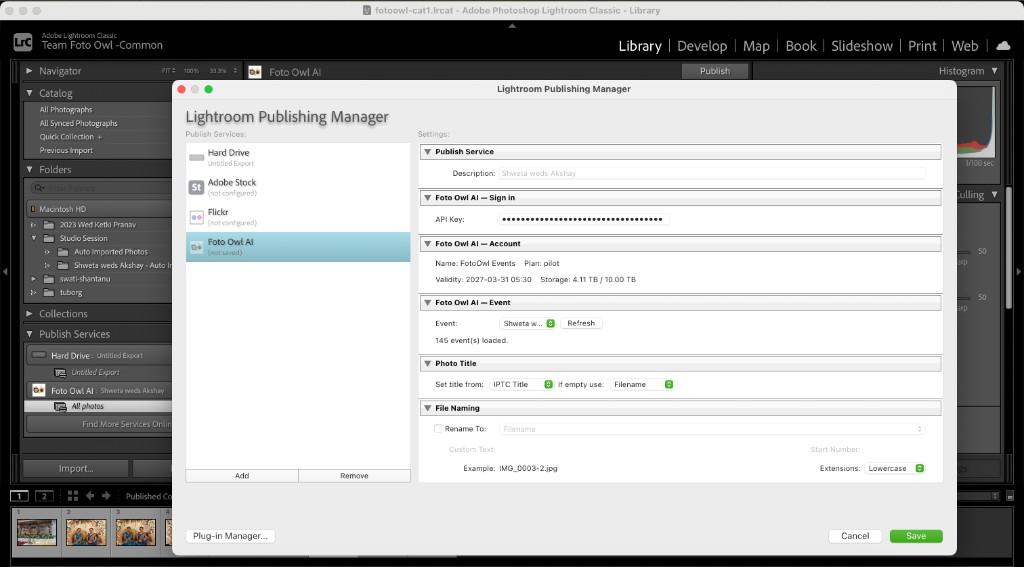
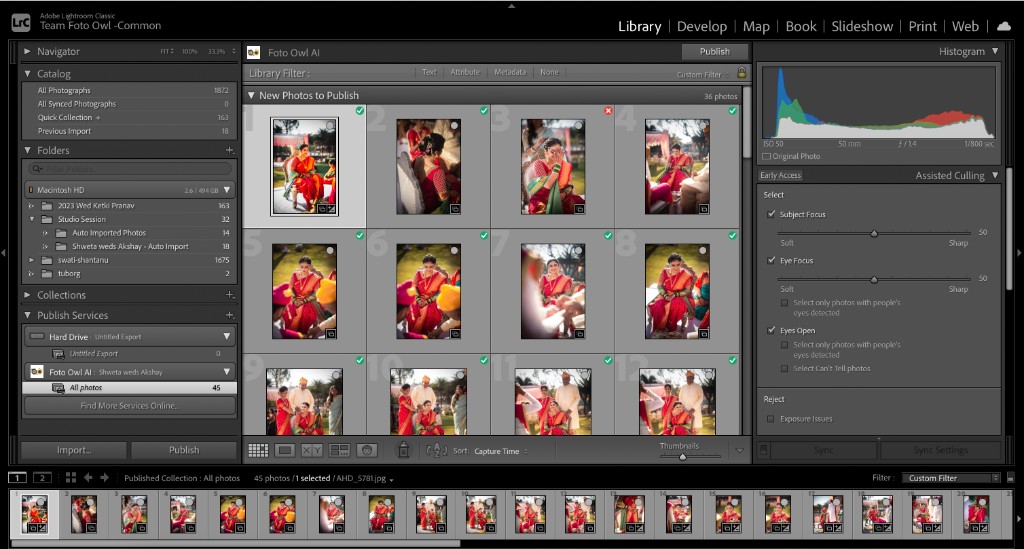
The Foto Owl plugin installs as a Publish Service in Lightroom. Pick an event, drag in photos, and Publish. Every edit you save is sent straight to your gallery — no exports, no zips, no FTP.
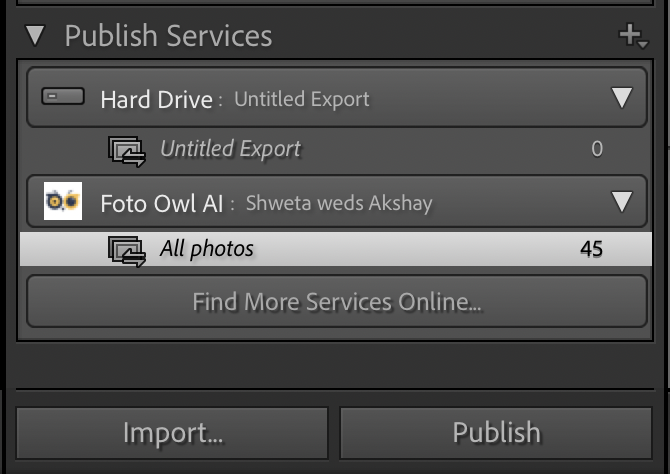
Native Publish Service — Foto Owl AI shows up alongside Hard Drive, Flickr and Adobe Stock — exactly where Lightroom photographers expect publishing tools to live.
Per-Event Collections — Every Foto Owl event maps to a publish collection in LR. Drag photos in, hit Publish, done.
Smart Re-Publish — Re-edit a photo after publishing? Lightroom marks it as modified and the plugin re-uploads only what changed.
API Key Sign-In — Sign in once with your Foto Owl API key — your account, plan and storage usage live right inside Lightroom.
 Setup in Minutes
How It Works
Get the plugin running and publishing your first batch in under five minutes. No technical setup, no servers, no FTP.
- 1
Install the Plugin
Download the Foto Owl plug-in for Lightroom Classic and add it via Lightroom's Plug-in Manager.
- 2
Sign In with API Key
Open Publishing Manager → Foto Owl AI and paste your API key from the Foto Owl dashboard.
- 3
Pick an Event
Select a Foto Owl event from the dropdown. The plugin auto-loads up to your latest 145 events.
- 4
Drag & Publish
Drop photos into the publish collection, hit Publish, and watch them appear in your gallery in real time.
Better Together
Lightroom uploads unlock these in one click
Every photo you publish from Lightroom is instantly ready for AI face matching, auto reels and client photo selection — no extra setup, no extra steps.
AI Face Recognition
Personal galleries from a single selfie
Once your Lightroom edits land in Foto Owl, AI Face Search instantly creates a private, personalized gallery for every guest.
ReelIt
Auto-generated reels for every guest
Turn published photos into branded, music-synced video reels — no editing required. Guests share, you grow.
Photo Selection
Couples shortlist from their phone
Send Lightroom-edited previews and let clients shortlist favorites on mobile. Edit only what's selected — finish faster.
Connect Lightroom once and unlock the full Foto Owl AI suite for every event.
Start FreeFrequently Asked Questions

Foto Owl + Adobe Lightroom Classic
Stop exporting. Startpublishing in real time.
Install the Foto Owl plugin for Lightroom Classic, sign in with your API key, and publish edited photos straight to your event galleries. Free to use with every Foto Owl plan.