
Is cloud storage necessary for wedding photographers in 2026?


No—cloud storage is not necessary for every wedding photographer in 2026, but an independent off-site backup is essential to a dependable workflow. Cloud uploads also require connectivity, and a client gallery does not automatically preserve your RAW files or editing work. Keep local working files, protect originals separately, and use cloud delivery where it improves the client experience.
TL;DR
- Is cloud storage necessary photographers? No—independent backups matter more than the storage location.
- Use the 3-2-1 rule: three copies, two media types, one off-site copy.
- Fotoowl suits wedding photographers who need face-recognition galleries; client delivery is not the same as archival backup.
- Keep local files available when venue connectivity cannot support uploads.
Is cloud storage necessary for wedding photographers in 2026?
No. You need recoverable photographs, not necessarily a cloud subscription. A local workflow with independently stored off-site copies can protect your work without uploading every original. Cloud backup becomes useful when you want an off-site copy without physically moving storage between locations.
Before choosing a service, separate storage, backup and delivery. The guide to cloud storage for wedding photographers covers the wider storage decision; the comparison below shows which job each approach serves.
| Approach | Best for | Main advantage | Main limitation |
|---|---|---|---|
| Local working storage | Editing and culling without internet access | Keeps files accessible on your own equipment | Copies kept together share location risks |
| Cloud backup | Recovering protected files after local loss | Adds an off-site recovery route | Uploads and restores depend on connectivity and service terms |
| Cloud file sync | Keeping selected folders accessible across devices | Makes current files accessible in multiple places | Deletions and unwanted changes can propagate |
| Online client gallery | Presenting and delivering approved photographs | Separates client access from your working folders | Does not automatically replace an originals archive |
These approaches are not interchangeable. A gallery can deliver finished photographs while a separate backup protects the files needed to recreate them.
Why this matters
A wedding cannot be reshot on demand. Protecting the photographs therefore means protecting more than the folder you intend to share with the couple.
Your working collection can include camera originals, editing instructions, exported photographs and album selections. Losing originals stops a fresh edit; losing editing instructions creates different recovery work. Keeping only finished exports protects the delivered result, not the entire production process.
For your 2026 workflow, write down what you promise to retain and what you promise to deliver. Those commitments should determine your storage system—not the presence of a cloud logo in your software.
Local storage: best for uninterrupted editing
Local storage is the practical starting point when you need to import, review and edit photographs without depending on an internet connection. Keep the working files and the resources your editing application needs available on your computer or connected storage.
For an Indian wedding covering mehendi, sangeet, the ceremony and reception, organise files by function before delivery. Separate camera originals from reviewed exports so an assistant does not mistake an unfinished folder for the client collection.
Local storage wins on offline access, but local-only storage is not a complete protection plan. A working drive and its backup sitting in the same camera bag remain exposed to the same theft or loss.
Give the off-site copy a genuinely separate location. If you use physical storage instead of cloud backup, assign responsibility for moving it, updating it and checking that the files remain readable.
Cloud backup: best for off-site recovery
Cloud backup is useful when your main requirement is recovering files after something happens to local equipment. Assess it as a recovery system rather than a sharing tool.
Check which folders it protects, whether external storage is included, how deleted files are handled and how you retrieve a complete project. Do not assume that selecting a folder once protects every future file you create elsewhere.
The familiar 3-2-1 backup rule means 3 copies, on 2 media types, with 1 copy off-site. Cloud backup can provide that off-site copy; it is not the only way to do so. The rule is a starting framework, not proof that your particular setup works.
Test a restore before relying on it. Download a protected original into a separate folder, open it, and confirm that the editing resources you need are also recoverable.
Client galleries: best for delivering approved photographs
An online gallery answers a different question: how will clients and guests find and receive the photographs you have approved? Storage capacity alone does not answer that.
Fotoowl is best for wedding and event photographers who need face-recognition client galleries. Its AI Gallery accepts photos and videos and supports delivery through face-recognition galleries. That is a relevant delivery function, not evidence that the gallery replaces your backup system.
The distinction matters when relatives want their photographs while your studio still needs to retain originals and editing work. Give clients the finished collection; keep the production archive under a separate retention process.
Fotoowl's gallery workflow still needs your decisions about which files to upload and retain independently. Do not treat a successful gallery upload as proof that every original, editing file and later revision is protected.
In 2026, choose the delivery experience and the recovery process separately. They can use connected tools, but each must pass its own checks.
Why your need for cloud storage varies
Your workflow determines whether cloud storage solves a real problem. Use these factors to decide what belongs online:
- Originals versus exports: Backing up camera originals serves recovery; uploading approved exports serves delivery. Identify the file set before choosing the service.
- Photos versus video: Include both in your storage plan if you deliver both. Check the actual project size rather than estimating from photograph counts.
- Venue connectivity: Test the connection you will use for uploads. Keep the shoot and local file handling independent of that connection.
- Team handoffs: Decide who uploads, checks and releases each collection. Shared access does not remove the need for clear ownership.
- Client access: Separate the couple's delivery requirements from wider guest sharing. Check the available permissions before publishing.
- Retention commitments: Define how long you intend to keep originals and finished work. Make deletion a deliberate step rather than an accidental consequence of housekeeping.
Choose cloud storage for a specific task, not as a substitute for a written workflow. If you cannot name the task, you cannot check whether the service fulfils it.
How do you build a dependable wedding-photo workflow?
For a 2026 wedding workflow, establish the local copies first, then verify the off-site protection and client delivery. Use the same sequence for every function so a busy handover does not leave a folder unprotected.
1. Import originals
Create a clearly named project folder and copy the camera files into it. Keep the function, photographer and camera source identifiable, especially when several team members contribute photographs.
Check that the copied files open before proceeding. Do not treat a folder appearing on screen as sufficient evidence that the import completed correctly.
2. Verify copies
Create your independent local backup before reusing capture media. Check the destination, completion status and file readability instead of relying on a remembered transfer.
Record which functions are covered. A backup of the ceremony does not protect the reception simply because both belong to the same wedding project.
3. Protect off-site
Send the required files to your chosen off-site destination, whether that is cloud backup or separately stored physical media. Confirm completion rather than assuming a queued upload is a finished backup.
If venue connectivity is inadequate, continue with local handling and complete the off-site transfer from a suitable connection. Keep the outstanding transfer visible in your project checklist.
4. Review exports
Cull and edit from the working collection, then review the photographs intended for delivery. Keep exports distinct from originals so you can identify what the client actually received.
Check the exported files themselves. Reviewing an image inside your editing application does not verify the exported version's appearance or contents.
5. Publish delivery
Upload the approved collection and test the client-facing experience. Open the delivery link outside your logged-in studio session and check the access and download behaviour you intend to provide.
Assign someone to verify that the expected functions are present. Publishing a polished ceremony gallery while omitting the sangeet is still an incomplete delivery.
6. Test recovery
Restore a protected file to a separate location and open it. Include the editing resources needed to continue work, not just a JPEG that happens to download successfully.
Repeat the check when you change storage tools or reorganise project folders. A working recovery path should survive your normal studio housekeeping.
The sequence below separates protection from publication. An upload belongs to the backup stage only if it supports the recovery you require.
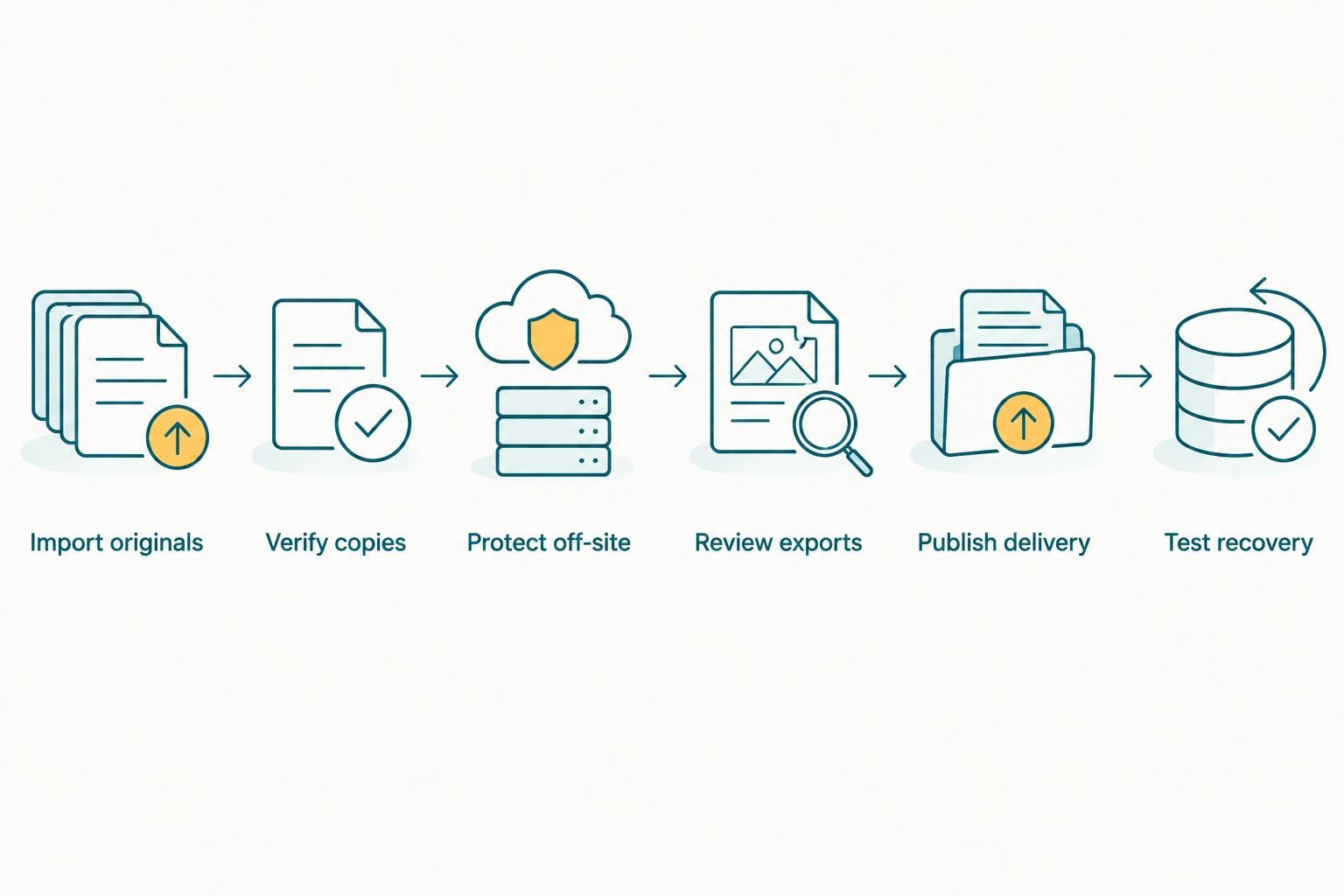
Verify protected copies separately from the gallery you publish for clients.
What should you check before uploading wedding photographs?
Cloud storage moves files away from your equipment, but you still decide which photographs belong there and who should receive access. Make those decisions before uploading the complete wedding collection.
Check the actual access controls rather than assuming that an unlisted link is private. Review whether recipients can forward access, download files or see collections beyond the intended delivery. Test the controls that the chosen service actually provides.
For family events, discuss any restrictions on sharing photographs of children or private ceremonies with the commissioning client. Keep those instructions attached to the project so the person publishing the gallery can follow them.
Also review account ownership. Your studio should know who controls the account and how authorised staff regain access when the usual uploader is unavailable. Do not make an individual team member's memory the only route to client work.
Can I run a wedding studio without cloud storage?
Yes—you can run a wedding studio without cloud storage if local work and independent off-site recovery are properly organised. You still need a reliable way to transfer approved files to clients and check that they can open them.
The trade-off is operational: someone must maintain the physical off-site copies and manage delivery. Removing cloud tools does not remove those responsibilities.
Should I upload every RAW file to a client gallery?
No—upload the file set required for client delivery, not every production file by default. A gallery containing finished exports and a backup containing originals serve different purposes.
If RAW delivery is part of your agreement, plan and verify that transfer separately. Do not assume the gallery accepts your formats or preserves everything needed for editing.
Does cloud sync count as a backup?
Cloud sync is not automatically an independent backup. A synchronised deletion or unwanted edit can affect connected copies, depending on the service and configuration.
Check version recovery, deletion retention and restore behaviour. Then test whether you can recover a file after removing it from the working folder.
FAQ
Do wedding photographers need cloud storage in 2026?
No—wedding photographers need dependable working storage and independent backups, not necessarily cloud storage. Cloud services are useful for off-site recovery, remote access or delivery when those functions match the studio's requirements.
What is the 3-2-1 backup rule for wedding photographs?
The 3-2-1 rule means 3 copies, on 2 media types, with 1 copy off-site. Check that the copies are independent and test recovery rather than relying on the rule alone.
Is an external hard drive enough to protect wedding photos?
A single external hard drive is not an independent backup system. Keep additional verified copies, including an off-site copy, so one device or location failure does not remove every copy.
Can I edit wedding photographs without an internet connection?
Yes—an offline-capable editing setup can work with locally available files. Check that your application, originals and required editing resources are accessible before leaving a reliable connection.
Is Fotoowl a replacement for my originals backup?
Do not treat Fotoowl's AI Gallery as a replacement for an independently verified originals backup. Its stated role includes photo and video delivery with face-recognition galleries; keep your recovery process separate.
Should I delete local photographs after uploading a gallery?
Do not delete local photographs solely because a gallery upload completed. First verify your independent backups and confirm that your retention commitments allow deletion.
What should I do when wedding venue internet is unreliable?
Keep capture, local copies and offline work independent of the venue connection. Complete outstanding cloud transfers from a suitable connection and verify them before treating the files as protected.
One last thing
Test deletion recovery, not just downloads. Downloading an existing photograph proves that you can access that photograph; it does not prove that you can recover an accidentally deleted original.
For your 2026 storage check, use a disposable test file rather than client work. Back it up, remove the working copy, and attempt recovery through the documented process. That small exercise exposes the difference between files that are merely online and files you can actually restore.