
Guest Photo Uploads Bar Mitzvah: 2026 Setup Guide

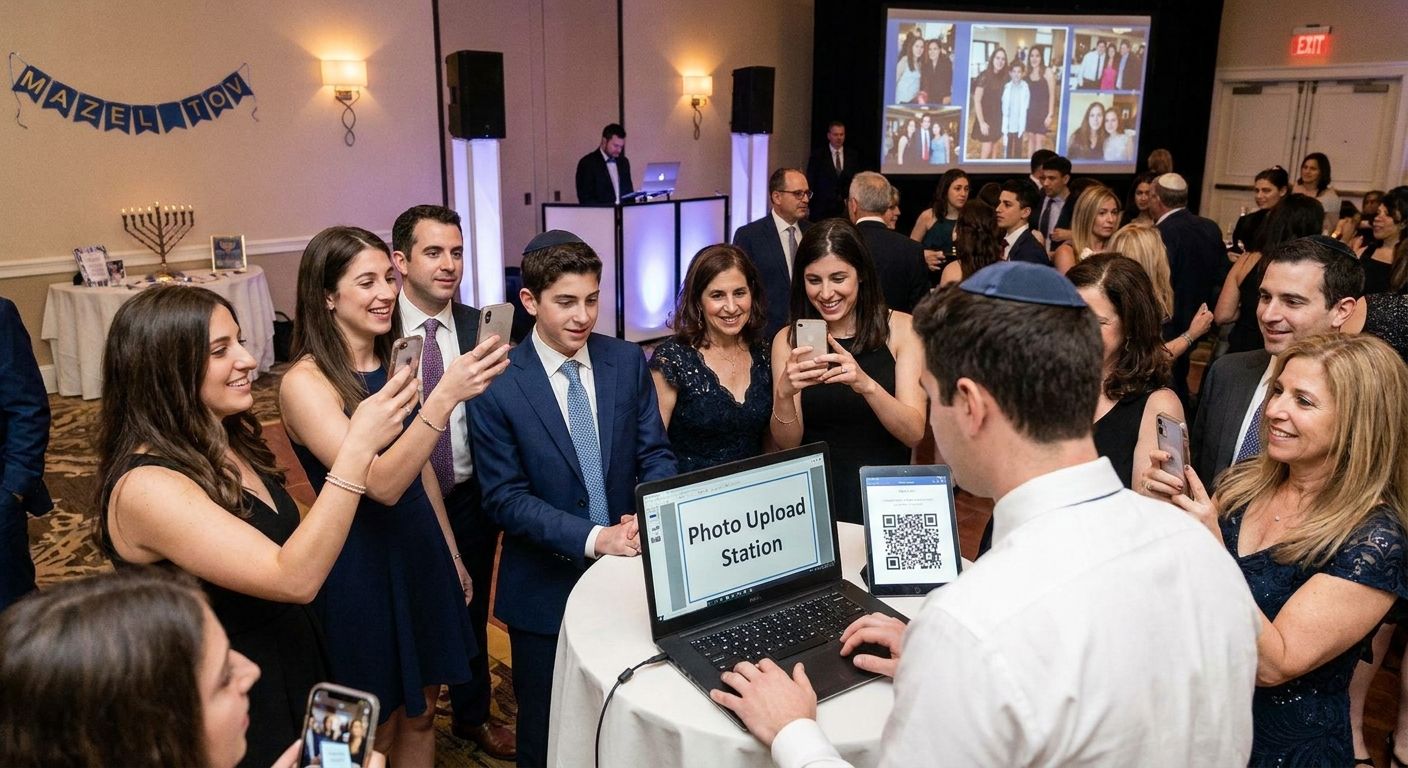
Guest photo uploads for a bar or bat mitzvah run through three channels working at once: a QR code guests scan to upload straight from their phones, a WhatsApp or Beam link for zero-app uploads, and a face-recognition search so relatives find their own shots in a shared gallery without scrolling through hundreds of strangers' photos. Set up all three before the candle-lighting ceremony starts, because most guests upload during the reception, not after, and a single overloaded link stalls the moment wifi at a hotel ballroom or synagogue social hall gets congested. The hidden cost this setup skips: someone still has to moderate the gallery, screening duplicates and unflattering candids before the family sees them live.
TL;DR
- Guest photo uploads bar mitzvah setups need three channels: QR code, WhatsApp/Beam link, and face search.
- Fotoowl runs all three in one gallery so guests upload from phones or cameras without an app download.
- Test the upload flow on venue wifi a day before 2026 events - congestion, not link design, causes most failed uploads.
- Face recognition search cuts the time out-of-town relatives spend hunting for their own photos in a shared album.
Why this matters
A bar or bat mitzvah gallery isn't a wedding gallery with a different name on it. Guests split across a service, a kiddush lunch, and a reception with a DJ and candle-lighting - three separate photo moments in one afternoon, often shot by a hired photographer, a videographer, and forty guests with phones at the same time.
Without a structured upload system, those photos scatter across text threads, AirDrop, and three different group chats. A single shared gallery with QR code and WhatsApp upload channels solves that in real time, not two weeks later when someone finally exports their camera roll.
How to set up guest photo uploads for bar and bat mitzvah events
Follow these steps in order, ideally starting the week the invitations go out:
- Create the event gallery first. Set it up before invitations are finalized so the QR code can go on the invite itself, not just a table card.
- Generate a QR code and print it everywhere guests will see it - invitation insert, welcome table, photo booth backdrop, and the DJ booth.
- Turn on WhatsApp or Beam upload so guests shooting on their phone cameras can send photos with one tap, no app install.
- Enable face recognition search so relatives and out-of-town guests can pull up only their own photos instead of scrolling the full gallery.
- Set access permissions - decide whether vendors (photographer, videographer, photo booth operator) upload directly, and whether the full gallery is visible to all guests or family-only until the event ends.
- Test the entire flow on-site the day before, on the venue's actual wifi, not your home network. Synagogue social halls and hotel ballrooms are the two most common wifi bottlenecks for mitzvah events in 2026.
| Step | Who does it | When |
|---|---|---|
| Gallery creation | Photographer or family lead | 1-2 weeks before |
| QR code placement | Event planner or family | Day of, setup |
| WhatsApp/Beam activation | Photographer | Before doors open |
| Face search enrollment | Guests, on arrival | During event |
| Venue wifi test | Photographer | Day before |
QR code uploads for the reception and photo booth
The QR code is the workhorse channel. Guests scan it once, land on an upload page in their browser - no app, no login wall - and their photos join the shared gallery within seconds. Place it at the photo booth, on table cards, and on a screen near the DJ so it stays visible after the lighting drops for dancing. For any event running a physical booth alongside phone uploads, the mechanics match what's covered in QR code photo booth setup, applied to a mitzvah reception instead of a general event floor.
WhatsApp and Beam uploads for camera photos
Not every good photo comes from a phone. The hired photographer or a relative with a mirrorless camera needs a way to push shots into the same gallery without manually exporting a card at midnight. Beam-style upload connects a camera directly to the cloud gallery, so professional shots and phone shots land in one place instead of two. This matters most during the ceremony, where phones are often asked to stay off, leaving the professional camera as the only capture source until the reception opens up.
Face recognition search for family and out-of-town guests
A 150-guest bar mitzvah generates thousands of photos across a few hours. Nobody's grandmother wants to scroll all of them to find the six with her in them. Face recognition search lets each guest match a selfie against the gallery - the same mechanism used to enable guests to find their own photos using face search at weddings and corporate events. For a mitzvah, this cuts the "can someone send me that photo" text thread down to almost nothing.
Why guest photo upload setups vary
No two mitzvah events need an identical setup. What changes it:
- Guest count - an 80-guest kiddush lunch needs one upload channel; a 300-guest reception with a separate ceremony needs all three running simultaneously.
- Venue wifi quality - older synagogue buildings and historic hotel ballrooms often cap bandwidth, which is why testing on-site the day before matters more than testing at home.
- Ceremony vs. reception split - if phones are off during the service, the photographer's camera is the only capture source for that segment, making camera-to-cloud upload non-negotiable.
- Multi-vendor uploads - photographer, videographer, and photo booth operator may each need separate upload permissions into one gallery instead of three disconnected folders.
- Privacy preference - some families want the full gallery visible to every guest immediately; others keep it family-only until the photographer curates it.
- Out-of-town guest share - events with many relatives who couldn't attend should prioritize face search, since those guests rely entirely on remote gallery access.
The same logic carries over to other milestone family events. Setting up photo galleries for milestone birthday celebrations follows nearly identical guest-count and vendor-permission tradeoffs, minus the ceremony-to-reception split unique to a mitzvah.
Set up your mitzvah photo gallery
See how QR uploads, WhatsApp delivery, and face search run in one gallery.
Do guests need an app to upload bar mitzvah photos?
No - guests upload through a browser link after scanning the QR code, or through WhatsApp and Beam without installing anything. That removes the biggest friction point in guest uploads: older relatives and out-of-town guests who won't download a one-time-use app for a single event in 2026.
How do guests find their own photos in a shared bar mitzvah gallery?
Guests find their own photos through face recognition search, matching a selfie against the gallery. This replaces the alternative - scrolling 2,000+ images looking for the six with a specific relative in them.
Can guests upload photos directly from a DSLR or mirrorless camera?
Yes - camera uploads route through a Beam-style direct connection from camera to cloud gallery, separate from the phone-based QR and WhatsApp channels. This is the channel that matters most during the ceremony portion of a mitzvah, when phones are frequently asked to stay off.
FAQ
What's the best way to set up guest photo uploads for a bar mitzvah?
The best setup runs a QR code for phone uploads, a WhatsApp or Beam link for camera photos, and face recognition search so guests find their own shots. Running all three together in 2026 covers phone guests, camera-based photographers, and out-of-town relatives in one gallery.
Is a QR code better than a WhatsApp link for guest uploads?
Neither replaces the other. A QR code works best for on-site guests near a photo booth or table card, while WhatsApp and Beam links work better for photographers pushing camera photos or guests who prefer messaging over scanning.
How much does it cost to set up guest photo uploads for an event?
Costs vary by platform and guest count. Check current pricing directly with the provider rather than relying on an estimate.
Do guests need to create an account to upload photos?
No. Upload links work through a browser or WhatsApp without requiring an account, which is why they see higher guest participation than app-gated galleries.
Can family members access the gallery after the event ends?
Yes. A shared gallery link stays accessible after the event, letting relatives who couldn't attend browse or search for their tagged photos later.
How do you stop random guests from seeing private family photos?
Access permissions control this. The gallery owner sets whether uploads are visible to all guests immediately or restricted to family until the photographer curates the set.
What happens if the venue wifi is weak during the event?
Weak wifi is the most common cause of failed guest uploads. Test the upload flow on the actual venue network the day before, since a home network test proves nothing about a crowded ballroom.
Can the professional photographer and guests upload to the same gallery?
Yes. Professional camera uploads through Beam-style connections and guest phone uploads through QR or WhatsApp can both feed one shared gallery instead of staying in separate folders.
One last thing
The upload channel guests actually use isn't the most technical one - it's the one with zero steps between seeing the QR code and their photo landing in the gallery. Mitzvah receptions run on momentum. Any flow that asks for a login or an app install loses half its potential uploads before the DJ finishes the next song.
Related guides
- Guest photo uploads for school events
- WhatsApp photo delivery for wedding photographers
- How to manage photo access permissions for event stakeholders
If one QR code link is the only upload channel, it stalls the moment thirty guests hit it at once during the horah.