
Can clients select their own photos from a phone gallery link?


Yes, clients can select their own photos from a phone gallery link when the gallery supports client proofing, not just viewing or downloading. The important caveat is that browsing a gallery does not automatically create a usable selection: you need saved choices tied to identifiable images and a clear final approval. This guide explains how to set up that handoff without relying on screenshots or scattered messages.
TL;DR
- Client photo selection from phone needs a proofing gallery that records choices against identifiable images.
- Fotoowl supports client proofing, with selections reused for albums and printing.
- Keep favourites, final selections and album approval separate so your studio knows what to produce.
- Test the complete phone workflow before sending the client link.
Can clients select their own photos from a phone gallery link?
Yes—provided the link opens a selection workflow rather than a view-only gallery. Your client needs a way to choose images, retain those choices and tell your studio when the selection is ready.
The distinction matters when choosing photo selection software for photographers. A gallery that looks good on a phone still needs to pass the selection test.
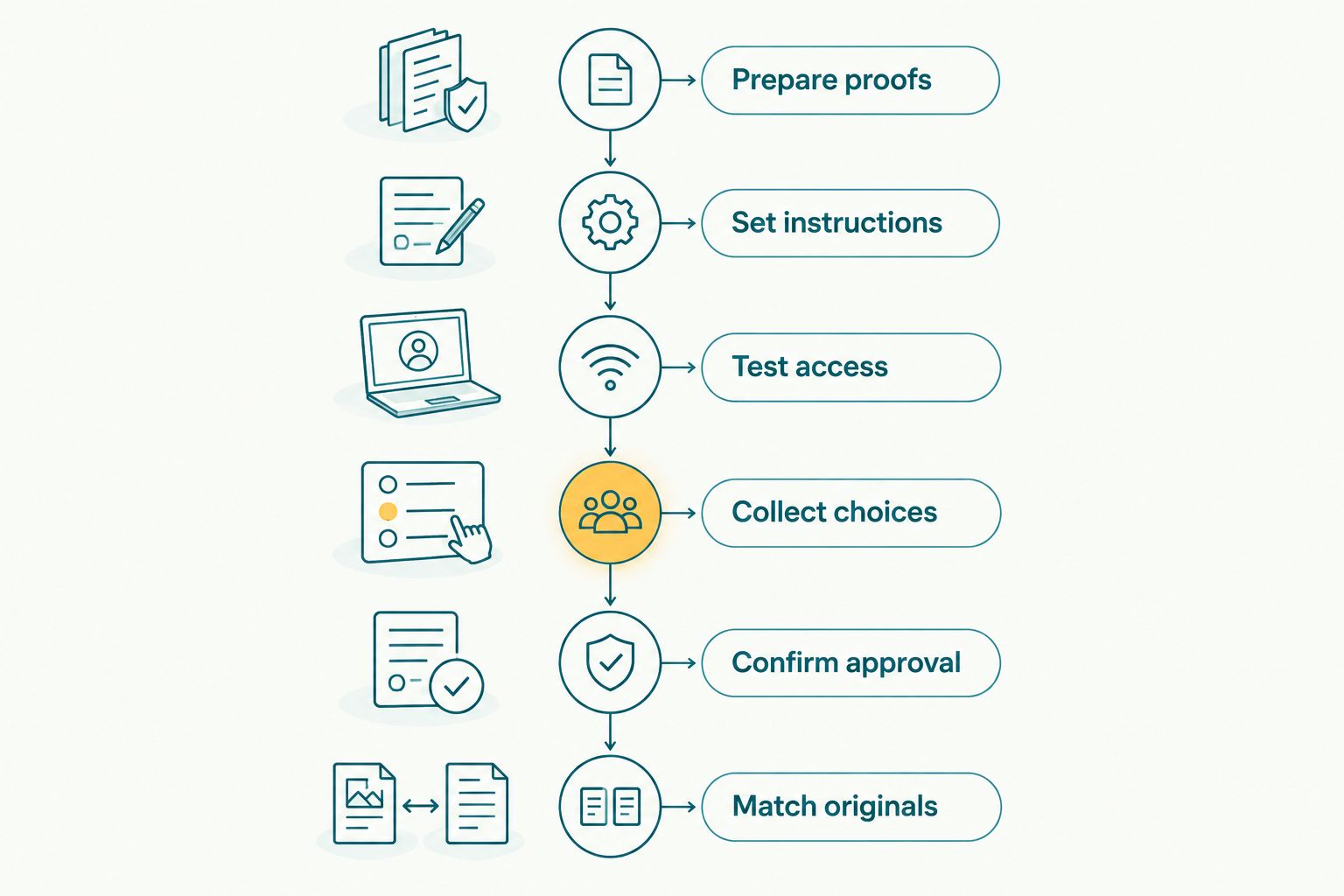
Use this 6-step workflow for your 2026 bookings:
- Prepare proofs. Remove technical rejects and organise the images before sharing.
- Set instructions. Explain what the selection is for, who approves it and when it is due.
- Test access. Open the client-facing link on a phone and complete a sample selection.
- Collect choices. Ask the client to select inside the proofing workflow rather than send screenshots.
- Confirm approval. Obtain an explicit final confirmation before starting the next production stage.
- Match originals. Check that every approved image maps back to the correct source file.
The final step is essential. A list of favourites is useful only when your editor, album designer or printing team can identify the corresponding photographs without guessing.
Why this matters
Phone selection puts the review where your client wants to do it. Your studio still needs a dependable record of the decision. Convenience for the client and clarity for production are separate requirements.
For an Indian wedding studio, that means distinguishing between preferences from different family members and the final instruction from the person authorised to approve. Establish that responsibility before sharing the gallery, not after competing selections arrive.
The goal is not simply to collect favourites. It is to collect a selection your studio can act on.
Which selection workflow should you use?
Choose the method according to the decision you need to record. The table compares workflows, not claims about particular software features.
| Workflow | Best for | Advantage | Limitation |
|---|---|---|---|
| Proofing gallery with recorded selections | Album and print shortlists | Keeps choices associated with gallery images | You must verify saving, retrieval and final approval |
| View-only gallery plus a filename list | A simple fallback when proofing is unavailable | Gives your studio identifiable references | Requires manual checking and reconciliation |
| Screenshots sent through messages | Explaining a visual detail | Shows what the client is referring to | A screenshot alone does not reliably identify the source file |
| Photographer-led review | Resolving disputed or unclear choices | Lets you clarify preferences directly | Requires a scheduled conversation and a written record afterward |
Use recorded proofing selections for the main shortlist. Keep screenshots for explanations, with the image identifier included, rather than making them your production record.
A photographer-led review remains useful when the client is unsure. Record the decisions in the same final selection record afterward so the conversation does not become a separate source of instructions.
How do you prepare a phone-friendly selection workflow?
Prepare proofs
Curate the set before asking the client to choose. Remove accidental frames and obvious technical rejects, while retaining meaningful variations in expression, pose and moment.
Keep image identifiers consistent with your working files. If you rename photographs during preparation, maintain a reliable mapping before the client starts selecting; changing identifiers afterward creates an avoidable reconciliation task.
For a multi-function wedding, organise the review by recognisable functions such as the engagement, mehendi, sangeet, ceremony and reception. Use the functions actually covered by your studio rather than imposing a template that does not match the booking.
Set instructions
Tell the client whether the selection is for retouching, an album, prints or another agreed deliverable. A favourite portrait is not automatically an instruction to print it or place it across an album spread.
Include the selection allowance from the client's actual agreement. Do not introduce a new limit in the delivery message, and distinguish any optional requests from the work already agreed.
For your 2026 selection brief, write down:
- The purpose of the selection.
- The agreed selection allowance, if applicable.
- The person responsible for final approval.
- The submission deadline.
- What your studio does after approval.
Test access
Open the link from the client's position, not only from your studio account. Check the actual access requirements and explain them accurately; do not promise account-free access unless you have verified it.
Select an image, leave the page and return. Confirm whether the choice remains recorded and whether your studio can retrieve it. Test enlarging images and distinguishing similar frames as well as opening the initial gallery.
Collect choices
Direct the client back to the same selection workflow when changes arrive through messages. This keeps the production record separate from the conversation around it.
If the software does not provide a particular control, use a documented manual process instead of implying that it does. Your instructions should describe the workflow you have tested, including any confirmation the client must send separately.
Confirm approval
Ask the authorised client to confirm that the selection is final for its stated purpose. A saved favourite does not tell you whether the client has finished reviewing the gallery.
Recommend 1 final approver per deliverable. Other family members or stakeholders can contribute, but your studio needs an agreed person to resolve conflicting preferences before production starts.
Match originals
Check selected image identifiers against the originals before retouching, designing or preparing print files. Resolve missing references and duplicate instructions before handing work to another team member.
Keep the approved selection record with the project. Your production team should not need to search a personal chat history to discover which version the client approved.
Approval belongs before the production handoff, not after it.
Why does client photo selection from phone vary?
The workflow depends on the gallery's actual selection behaviour and your studio's approval rules. Check these factors before standardising your 2026 client instructions:
- Selection purpose: An album shortlist, a retouching request and a print selection need different instructions.
- Gallery organisation: Clear event sections help clients understand what they are reviewing.
- Access requirements: Explain any authentication or access steps the chosen workflow requires.
- Choice persistence: Verify what happens when the client closes the page or returns later.
- Approver responsibility: Establish whose decision takes priority when several people contribute.
- Production mapping: Confirm that selected references identify the correct working files.
Do not judge a proofing workflow only by its opening screen. Follow a selection all the way from the client's phone to the editor's source file.
Where does Fotoowl fit in client proofing?
Fotoowl is best for wedding and event photographers who need client proofing with selections reused for albums and printing. Photo Selection is the product built for that task.
That fit does not remove your studio's responsibility to define the brief, verify the phone experience and obtain approval. Treat those checks as part of implementation, not as assumptions about a feature list.
The benefit is a selection process connected to the work that follows. The limitation is equally important: a client's chosen images do not, by themselves, approve an album layout, a crop or a finished print.
Keep the discussion focused on what you need to deliver. If the immediate problem is collecting an album shortlist, test that exact journey before expanding the workflow to other studio tasks.
Can clients choose album photos without approving the album design?
Yes, choosing album photographs and approving an album design are different decisions. The shortlist identifies the images to consider; design approval confirms their arrangement and presentation.
Plan for 2 approval stages when your workflow includes both image selection and album design. This is a recommended process, not a claim about a software limit or a required number of revisions.
For your 2026 album jobs, label each request clearly. Ask for image-selection approval first, then request layout approval after the design is ready.
Can several family members help select wedding photos?
Yes, several family members can contribute preferences, but appoint 1 final approver per deliverable. This is a studio process recommendation, not a promise that every gallery supports separate contributor accounts or lists.
Agree on how suggestions reach that approver. If your chosen software cannot distinguish contributors, consolidate their requests before recording the final instruction.
Avoid treating every forwarded message as an authorised change. Ask the final approver to confirm which requests belong in the production selection.
What should you check before handing selections to your editor?
Use 1 approved selection record for each production handoff. Confirm the image identifiers, the requested work and the approval status before the editor begins.
If a client changes the selection after approval, record the replacement instruction clearly. Do not leave the editor to decide whether the earlier shortlist or the later message takes priority.
FAQ
Can my client select wedding photos directly from a phone link?
Yes, if the linked gallery supports client proofing and records selections against identifiable images. Test the complete client-facing workflow before sharing it, including saving choices and retrieving them in your studio.
Does a gallery download link also work as a photo selection link?
Not necessarily: downloading images and recording a shortlist are different functions. Verify that the workflow gives your studio a usable selection record rather than assuming downloads indicate approval.
Do clients need to install an app to select their photos?
Installation requirements depend on the chosen platform and workflow. Test the actual link and give clients accurate access instructions rather than promising that no app or account is required.
Can clients send screenshots of their favourite photographs instead?
Screenshots can communicate preferences, but they should not be the only reference for production. Ask clients to include the image identifier and reconcile the request with the final approved selection.
Is client photo selection the same as photographer culling?
No: client photo selection records client preferences, while photographer culling determines which images are suitable to present. Prepare the proof set before inviting the client to choose.
Can selected photos be reused for albums and printing in Fotoowl?
Yes, Fotoowl supports client proofing with selections reused for albums and printing. Keep image selection separate from approval of the finished album layout or print preparation.
How many people should approve the final photo selection?
Use 1 final approver per deliverable as a studio process rule. Others can contribute preferences, but the authorised approver should resolve conflicts before your team starts production.
One last thing
A final selection is not a final deliverable. The client has chosen the photographs; your studio must still complete the agreed editing, design or print preparation and obtain any further approval required by the job.
For your next 2026 booking, test the handoff backwards: start with an approved image reference and locate its original file. Then repeat the journey from the client's phone. Fotoowl belongs in that evaluation where client proofing and reuse for albums or printing match your studio's needs.