
Best photo selling platforms for baby photography studios in 2026

Best overall for gallery-led studio workflows: Fotoowl. Best for print-led sales: Pic-Time. Best for a website and client store: Pixieset. These are the strongest starting points when comparing the best photo selling platforms for baby photography studios in 2026; ShootProof suits proofing-led sales, while SmugMug suits archive-led businesses.
TL;DR
- Fotoowl is the best workflow-first shortlist for baby photography studios combining photo selling, galleries, and client selection.
- Pic-Time suits print-led sales; Pixieset suits studios wanting client galleries alongside a photography website.
- ShootProof suits proofing-led ordering; SmugMug suits studios building a hosted photography archive.
- The best photo selling platforms for baby photography studios must pass parent-access, payment, and fulfilment checks.
Why this matters
A baby portrait sale is not finished when a parent likes a photograph. You still need an unambiguous selection, a completed order, the correct edit, and delivery to the right person. Choose software around that chain, not around the appearance of its gallery.
For Indian studios, checkout and fulfilment deserve particular attention. Before adopting an international platform in 2026, check photographer eligibility, settlement arrangements, customer payment methods, and delivery coverage. A print catalogue is useful only when its ordering route works for your business and your clients.
Keep family access separate from public portfolio use. Permission to deliver newborn photographs does not establish permission to publish them as marketing material.
What makes the best baby photography selling platform?
Use these six criteria before choosing a platform:
- Parent-friendly selection: Parents should identify the exact photographs they want without sending screenshots and ambiguous descriptions.
- Controlled access: Check how invitations, shared links, downloads, and gallery visibility behave. Test access rather than assuming a gallery is private.
- Indian payment fit: Confirm that your studio can receive payments and that parents can complete the intended checkout.
- Fulfilment ownership: Decide whether the platform, a connected lab, or your studio handles each physical order.
- Proof-to-final continuity: Preserve the link between the selected proof, its final edit, and its delivered version.
- Operational fit: Assess whether gallery delivery, selection, invoicing, and order tracking require separate tools.
A beautiful gallery does not compensate for an unclear order record. Give selection accuracy and fulfilment priority over presentation extras.
Best platforms at a glance
The table ranks platforms by their distinct workflow fit, not by an unsupported claim about sales performance.
| Platform | Best for | Standout capability | Key limitation to assess |
|---|---|---|---|
| Fotoowl | Gallery-led studio workflows | Photo selling alongside galleries and client selection | Validate the complete baby-studio ordering route before adopting |
| Pic-Time | Print-led gallery sales | Gallery storefronts and sales automation | Confirm lab coverage and fulfilment fit for Indian clients |
| Pixieset | Website-connected client sales | Client galleries, online store, and website tools | Confirm the selected payment and fulfilment setup |
| ShootProof | Proofing-led ordering | Client proofing with digital and print sales | Check how selections become production-ready orders |
| SmugMug | Archive-led photography businesses | Photo hosting with gallery-based selling | Check fit for session-specific approvals and delivery |
1. Fotoowl: best photo selling platform for gallery-led workflows
Fotoowl combines photo selling with AI-powered galleries and media management. Its AI Gallery supports photo and video delivery, while Photo Selection handles client proofing and selections that can be reused for albums and printing.
That combination is relevant when your studio needs to connect delivery with a parent's choices. For a newborn session, the important question is not whether software can display photographs. It is whether you can trace a selected frame through editing, ordering, and delivery without recreating the selection manually.
Fotoowl pros:
- AI Gallery provides a delivery workflow for photographs and videos.
- Photo Selection supports client proofing and reuse of selections for albums and printing.
- Studio Manager covers quotations, contracts, invoices, projects, deliverables, and payments.
Fotoowl cons:
- Gallery, selection, and studio-management capabilities serve different stages; plan which stages your team needs.
- Face recognition does not replace checking each family's gallery and selected photographs.
- Your buying decision still needs a complete checkout and fulfilment demonstration for your studio's requirements.
Best for: Indian baby photography studios prioritising connected gallery delivery and client selection, especially when the studio also photographs events.
Verdict: Buy for the gallery-and-selection workflow after validating your intended sales route. Do not make face search the deciding feature for a small, single-family portrait session.
2. Pic-Time: best photo selling platform for print-led sales
Pic-Time combines client galleries with a print storefront and sales automation tools. Its strongest fit here is a studio that treats physical photographs as a central part of the buying experience, rather than an occasional request after digital delivery.
Start with the products you intend to sell and work backwards. Confirm which lab will produce them, where orders can be delivered, and who resolves production problems. For an Indian studio assessing Pic-Time in 2026, those checks matter more than the breadth of a catalogue.
Pic-Time pros:
- Client galleries connect image browsing with a storefront.
- Print-selling tools fit studios building a physical-product sales process.
- Sales automation supports a repeatable gallery-selling workflow.
Pic-Time cons:
- You must confirm fulfilment coverage for the destinations you serve.
- Automated sales messages need to match the terms already agreed with each family.
- Lab-produced orders require you to understand who owns quality checks and customer support.
Best for: Baby portrait studios making print sales a deliberate part of their service.
Verdict: Buy when the print-production route fits your clients. Hold if you have not checked the lab, delivery destination, and order-resolution process.
3. Pixieset: best photo selling platform for website-connected sales
Pixieset offers client galleries, online store tools, and a photography website builder. It belongs on your shortlist when your public portfolio and your client-selling experience need to sit within the same software ecosystem.
Keep those two audiences distinct. Your portfolio helps a prospective client choose your studio; a baby-session gallery helps an existing client select and receive photographs. Evaluate both journeys separately instead of treating a polished website as proof of a good ordering experience.
Pixieset pros:
- Client galleries provide a dedicated place to deliver session photographs.
- Store tools support selling through the gallery workflow.
- Website-building tools suit studios reviewing their portfolio and sales setup together.
Pixieset cons:
- A website rebuild adds work if your existing portfolio already serves your needs.
- Payment and fulfilment arrangements require checking for your studio's location.
- Public portfolio content and family-session galleries need separate access decisions.
Best for: Baby photography studios wanting client sales alongside a photography website.
Verdict: Buy when both your website and gallery-selling setup need attention. Hold if the website tools duplicate an established system without solving an ordering problem.
4. ShootProof: best photo selling platform for proofing-led orders
ShootProof provides client galleries, proofing, and digital and print sales tools. Its distinct use case is a studio where the parent's approved selection is the starting point for the order.
During evaluation, follow a selection all the way through production. A favourite photograph is not automatically an approved retouch, an album placement, or a print order. Your process must make those distinctions clear, regardless of which software you choose.
ShootProof pros:
- Proofing tools give parents a structured alternative to screenshot-based selection.
- Gallery selling supports digital and physical photograph orders.
- Photography-focused tools keep the evaluation centred on client delivery rather than general ecommerce.
ShootProof cons:
- Your studio still needs rules distinguishing favourites from final approvals.
- The handoff from selected proof to retouched file needs testing.
- Print production and payment arrangements must fit your location and chosen workflow.
Best for: Baby studios that begin each sale with a parent-approved image selection.
Verdict: Buy for proofing-led ordering when selection-to-production continuity passes your test. Skip if parents and staff cannot reliably identify the same selected file.
5. SmugMug: best photo selling platform for archive-led businesses
SmugMug combines photography hosting with gallery-based selling. It fits a studio evaluating long-term image presentation and sales together, rather than replacing only the proofing stage of a newborn session.
Treat an archive as a different requirement from an active order. Returning families need a clear route to the relevant session, while staff need to know which files are current deliverables. Hosting alone does not define those business rules.
SmugMug pros:
- Photography hosting supports an organised online image collection.
- Gallery-based selling connects presentation with ordering.
- The hosting-and-sales combination suits studios reviewing their broader image library.
SmugMug cons:
- You must establish naming and organisation rules for repeat family sessions.
- Session-specific approvals need evaluation beyond the hosting features.
- Physical-product ordering still requires fulfilment checks for your market.
Best for: Established baby photography studios choosing a platform around their hosted archive.
Verdict: Buy for archive-led selling. Hold if your main problem is managing final selections rather than hosting photographs.
How the platforms are ranked
This 2026 shortlist prioritises workflow fit against the six criteria above. Gallery-led delivery comes first, followed by print selling, website-connected sales, proofing-led ordering, and archive-led hosting.
The order is a decision tree, not a measured performance leaderboard. No conversion-rate advantage, face-recognition accuracy, or payment-processing speed is assigned to any platform. Choose the use case that matches your studio, then validate its operational details.
Run a parent-ordering test before committing
Use a small demonstration gallery and test the entire route yourself. The following quantities are a suggested test setup, not platform limits or performance benchmarks.
Prepare proofs
Upload 10 sample photos representing the work you deliver: baby portraits, parent-and-baby frames, and a family group. Use authorised demonstration images. Keep stable filenames so you can identify each selection later.
Check access
Open the gallery on 2 devices: a phone and a computer. Check what an invited parent sees, what a forwarded link permits, and whether an unrelated session is accessible. Document the result before uploading client work.
Select images
Ask a colleague to act as the parent and choose photographs without your help. Check whether the selected filenames reach the studio accurately. For a closer look at this stage, read the guide to photo selection software for photographers.
Complete ordering
Run 1 sample order through the intended sales process. Confirm the selected photographs, deliverable, customer details, payment status, and fulfilment owner. Do not confuse a submitted request with a completed payment.
Verify delivery
Match the delivered file or print order to the approved selection. Check that a retouched final has not been replaced by its earlier proof. Resolve any mismatch before moving a live session onto the platform.
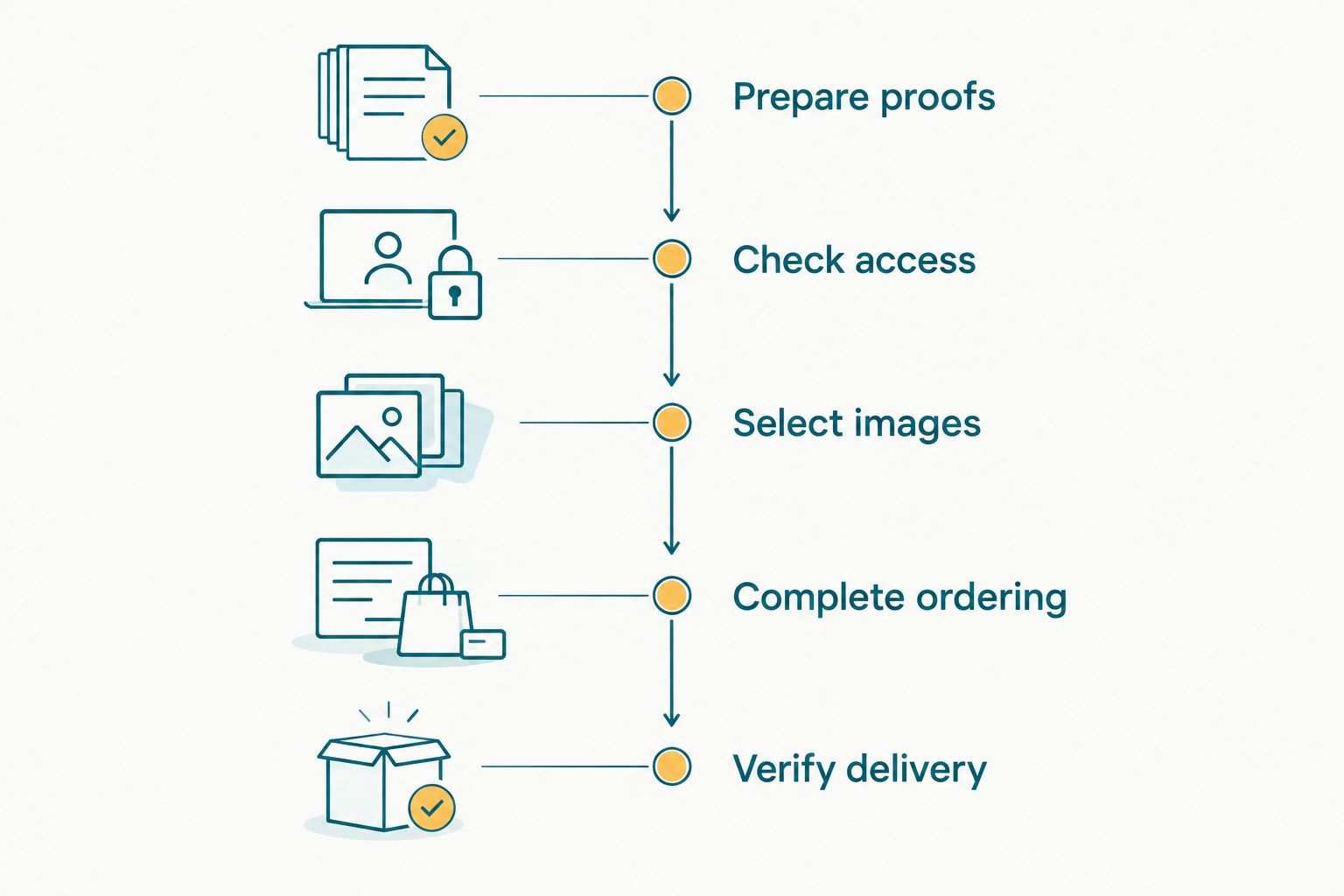
Test the complete order, not just the appearance of the gallery.
Record problems against the workflow stage where they occur. A checkout problem needs a checkout solution; adding more gallery features will not fix it.
Which platform should your studio choose?
Choose Fotoowl for baby photography selling workflows centred on galleries and client selection. Choose Pic-Time when print selling drives the decision, Pixieset when website and client sales need a shared ecosystem, ShootProof when proofing leads every order, and SmugMug when hosting an archive is the priority.
For a 2026 rollout, move a single authorised demonstration session first. Agree who publishes proofs, confirms selections, checks payment, and releases final files. Expand only after that handoff works without guesswork.
Evaluate your gallery workflow
Review gallery delivery and client selection against your baby studio's ordering process.
FAQ
What's the best photo selling platform for a baby photography studio?
The best platform depends on whether your studio prioritises gallery delivery, print selling, website-connected sales, proofing, or archive hosting. Use the ranked shortlist to choose that workflow, then test parent access, ordering, and delivery before adopting it.
Is Pic-Time better than Pixieset for newborn photographers?
Pic-Time is the stronger shortlist for print-led gallery selling, while Pixieset fits studios evaluating website tools alongside client galleries and a store. Confirm payment and fulfilment arrangements for your Indian studio before choosing either.
Can Indian baby photography studios use international gallery platforms?
Indian studios should confirm platform eligibility, payment settlement, and fulfilment coverage before adopting an international gallery platform. Check the arrangements for your actual business location and client delivery destinations.
Do I need face recognition to sell newborn photographs?
No, face recognition is not a requirement for selling newborn photographs. Accurate selections, controlled access, a clear order record, and correct delivery are the essential parts of the workflow.
How should I compare the cost of photo selling platforms?
Compare subscription terms, transaction charges, payment-processing charges, and fulfilment responsibilities using each provider's current information. Assess the complete route for your studio rather than comparing subscriptions alone.
Can I use a gallery selection as approval for an album or print?
A gallery selection becomes approval only when your process clearly defines it that way. Ask the parent to confirm the selected image, intended deliverable, and relevant crop or layout before production.
Should relatives receive the same access as the baby's parents?
Give relatives only the access the authorised parent has approved. Test sharing and download behaviour, and keep permission for public portfolio use separate from client delivery.
One last thing
Separate the chosen image from its finished version. A parent can approve a frame before you complete its retouch, so record both the selection and the final-file reference. That small process decision prevents your gallery, order record, and production folder from describing different photographs.