
Best photo gallery software for Indian wedding photographers in 2026

Best overall: Fotoowl AI Gallery for face-recognition wedding photo delivery. Best for presentation-led client galleries: Pixieset. Best for simple file handoff: Google Drive. This 2026 guide compares six options for Indian wedding photographers, separating guest discovery, client proofing, print selling and basic storage.
TL;DR
- Fotoowl AI Gallery is the best photo gallery software for Indian wedding photographers prioritising face-recognition delivery.
- Choose Pixieset for presentation-led client galleries; choose Pic-Time when print selling drives your decision.
- Choose ShootProof for proofing-led delivery, SmugMug for portfolio hosting, and Google Drive for straightforward file handoff.
- Test guest discovery, album selections and phone downloads before committing your next wedding to a platform.
Why this matters
A wedding gallery serves different readers. The couple wants the complete story, relatives want their own photographs, and your album designer needs an approved selection. One shared folder does not make those tasks equivalent.
For an Indian wedding covering mehendi, haldi, sangeet, the ceremony and reception, organisation belongs in the buying decision. Your delivery structure should make each function understandable without a WhatsApp explanation. Start with this guide to organising photos for multi-function Indian weddings.
Choose the gallery around the task your clients must finish, not the appearance of the photographer dashboard. A beautiful opening page cannot compensate for a confusing download or selection process.
What makes the best wedding photo gallery software?
Use these six criteria to choose your 2026 shortlist:
- Guest discovery: Can someone find relevant photographs without browsing the entire wedding? Face recognition directly addresses this task.
- Function organisation: Can you present separate ceremonies clearly while keeping the wedding understandable as a whole? Test your intended structure before delivery.
- Client proofing: Can the couple identify album favourites without sending screenshots and conflicting filenames? Keep proofing distinct from guest browsing.
- Phone delivery: Check the complete journey on a phone, from opening the invitation to saving an image. Do not judge it only on your editing workstation.
- Access control: Inspect who can view, download and share the work. Face recognition is a discovery feature, not a substitute for permission settings.
- Workflow fit: Separate uploading, editing, gallery delivery, selections and selling. Buy for the missing step rather than replacing tools that already work.
For a practical comparison, use 20 photographs from a completed wedding, organised across 3 functions. Open the proposed gallery on 2 phones, with permission from the people helping you evaluate it. These are suggested test inputs, not platform capacity limits or performance benchmarks.
Wedding photo gallery software at a glance
| Software | Best for | Standout feature | Key limitation |
|---|---|---|---|
| Fotoowl AI Gallery | Face-recognition guest delivery | Face recognition with photo and video delivery | Album proofing belongs to the separate Photo Selection product |
| Pixieset | Presentation-led client galleries | Photographer-focused client galleries | Gallery presentation does not establish suitability for guest face search |
| Pic-Time | Print-selling workflows | Online galleries with a print store | Print-selling tools do not replace album approval |
| ShootProof | Proofing-led client delivery | Client galleries and photo proofing | Client proofing and guest discovery remain different tasks |
| SmugMug | Portfolio hosting alongside photo galleries | Photo websites and gallery hosting | Website organisation still needs a wedding-specific delivery structure |
| Google Drive | Straightforward file handoff | Shared folders and downloadable files | General file storage, not dedicated wedding proofing software |
The table ranks each option for a different job. It does not treat storage, album proofing and face-recognition delivery as interchangeable features.
1. Fotoowl AI Gallery: best for face-recognition delivery
Fotoowl AI Gallery lets professional photographers upload photographs and videos and deliver them through face-recognition galleries. Its features also include a portfolio builder, reel generator and Beam camera-to-cloud FTP uploads. Those capabilities fit a studio that needs more than a folder of finished JPEGs.
For wedding delivery, face recognition gives guests a way to locate photographs containing them. Keep the couple's full wedding story organised too. Personal discovery and chronological storytelling solve different needs.
AI Gallery pros:
- Face recognition addresses the guest photo-finding task directly.
- Photo and video delivery sit within the gallery product.
- Beam supports camera-to-cloud FTP uploads.
- The portfolio builder and reel generator extend the delivery workflow.
AI Gallery cons:
- Album proofing is handled by Photo Selection, a separate product.
- Gallery delivery does not replace editing or the photographer's final quality check.
- Camera-to-cloud uploading still requires a suitable connection and setup.
Best for: Indian wedding studios that prioritise personalised guest discovery alongside client delivery.
Verdict: Buy for face-recognition delivery; assess Photo Selection separately if album approval is essential.
2. Pixieset: best for presentation-led client galleries
Pixieset provides client photo galleries designed for photographers. It belongs on your shortlist when the main delivery is a curated collection for the couple, with presentation and browsing at the centre of the decision.
Evaluate the gallery as a recipient. Open a ceremony collection, locate a portrait, and follow the download journey without relying on instructions from your studio. A gallery is only finished when the client can use it.
Pixieset pros:
- Photographer-focused galleries suit client-facing photo presentation.
- Gallery delivery gives the couple a browsing experience rather than a file list.
- A curated collection supports a deliberate wedding narrative.
Pixieset cons:
- Presentation quality alone does not answer the guest discovery requirement.
- You still need a clear structure for separate wedding functions.
- Confirm the proofing and access controls required by your workflow before choosing.
Best for: Photographers whose priority is presenting the edited wedding beautifully to the couple.
Verdict: Buy for presentation-led delivery; hold if face search is your deciding requirement.
3. Pic-Time: best for print-selling workflows
Pic-Time combines online photo galleries with a print store. That makes it a relevant option when your gallery must support print purchasing as well as viewing the wedding photographs.
Treat print selling as a separate buying decision. For an Indian studio, confirm the fulfilment arrangements, payment support and delivery coverage relevant to your clients before adopting any store workflow. A print-store feature does not, by itself, establish local suitability.
Pic-Time pros:
- Gallery browsing and print purchasing belong to the same platform.
- A print-focused workflow gives delivered images another use beyond downloads.
- It suits photographers who want to evaluate selling alongside presentation.
Pic-Time cons:
- Print purchasing is not the same as approving photographs for an album design.
- India-specific fulfilment and payment requirements need direct verification.
- Selling features add little if your studio does not intend to offer prints through the gallery.
Best for: Wedding photographers making print selling a defined part of client delivery.
Verdict: Buy for a verified print-selling workflow; skip if you only need guest photo discovery.
4. ShootProof: best for proofing-led client delivery
ShootProof provides client galleries and photo proofing. Consider it when the next action after delivery is a client selection rather than simply viewing the photographs.
Define that action precisely in 2026. A couple choosing album images needs a clear selection brief, an approval point and a way for your studio to identify the final choices. Software helps collect decisions; your process determines what those decisions mean.
ShootProof pros:
- Photo proofing is central to its client workflow.
- Client galleries support presenting work for review.
- A proofing-led approach fits projects with a defined selection stage.
ShootProof cons:
- A client's favourite images are not automatically an approved album layout.
- Proofing does not remove the need to organise each ceremony clearly.
- Guest face discovery needs its own evaluation rather than an assumption based on proofing features.
Best for: Studios whose delivery process centres on client review and image selection.
Verdict: Buy for proofing-led delivery; hold if guest discovery is the main problem.
5. SmugMug: best for portfolio hosting alongside galleries
SmugMug provides photo website and gallery hosting. It suits photographers evaluating public presentation and client photo collections together, rather than treating the gallery as an isolated delivery tool.
Keep those audiences separate. A public portfolio demonstrates your work; a wedding collection serves a specific client. Review visibility and sharing settings before using one account structure for both purposes.
SmugMug pros:
- Photo websites and gallery hosting sit within one platform.
- It supports a photographer who needs an ongoing home for published work.
- Gallery organisation gives you a structure beyond individual file transfers.
SmugMug cons:
- A portfolio website does not replace a client selection workflow.
- You must design a clear structure for multi-function weddings.
- Public presentation and private delivery require deliberate access decisions.
Best for: Wedding photographers prioritising portfolio hosting alongside photo galleries.
Verdict: Buy for website-and-gallery hosting; hold if album proofing drives the purchase.
6. Google Drive: best for straightforward file handoff
Google Drive lets you upload files, organise folders and share access. It is a reasonable handoff option when a client needs the finished files and your studio does not require a dedicated gallery experience.
For weddings, label folders by function and distinguish previews from final exports. Avoid asking the couple to interpret your internal editing names. Simple file delivery still needs clear instructions.
Google Drive pros:
- Shared folders support direct file handoff.
- Folder names give you control over the delivery structure.
- It suits clients who need files rather than proofing or a print store.
Google Drive cons:
- It is general file storage, not dedicated wedding proofing software.
- Folder browsing does not provide a photographer-specific guest face-search workflow.
- Album selections need a separate approval process.
Best for: Studios handing over finished files without gallery-specific requirements.
Verdict: Buy into the workflow for basic handoff; skip as your complete wedding gallery system.
How we ranked
This 2026 ranking uses workflow fit: guest discovery, presentation, print selling, proofing, portfolio hosting and file handoff. Each recommendation owns one use case. There is no claimed speed test, accuracy score or customer-satisfaction ranking behind the order.
The default goes to the option that directly addresses face-recognition wedding delivery. Choose a different slot when your studio's actual requirement is narrower.
Test the complete wedding delivery workflow
A feature checklist is not enough. Run your sample collection through the process you intend to use for paid weddings, and record where a client needs help.
Prepare exports
Use finished photographs with clear filenames. Keep your originals separate, and check that the delivery collection contains only images you intend clients to see.
Organise functions
Separate the ceremonies in a way the couple understands. Test whether a recipient can find the reception without learning your studio's filing system.
Check access
Open the invitation as a recipient, not as the account owner. Review viewing, sharing and download settings; record which decisions require client agreement.
Test downloads
Use the sample photographs and phones described above. Ask the tester to save an image and locate the saved file without your assistance.
Confirm selections
If your package includes an album, collect a sample selection and identify the approved set. Keep that decision separate from casual favourites and guest downloads.
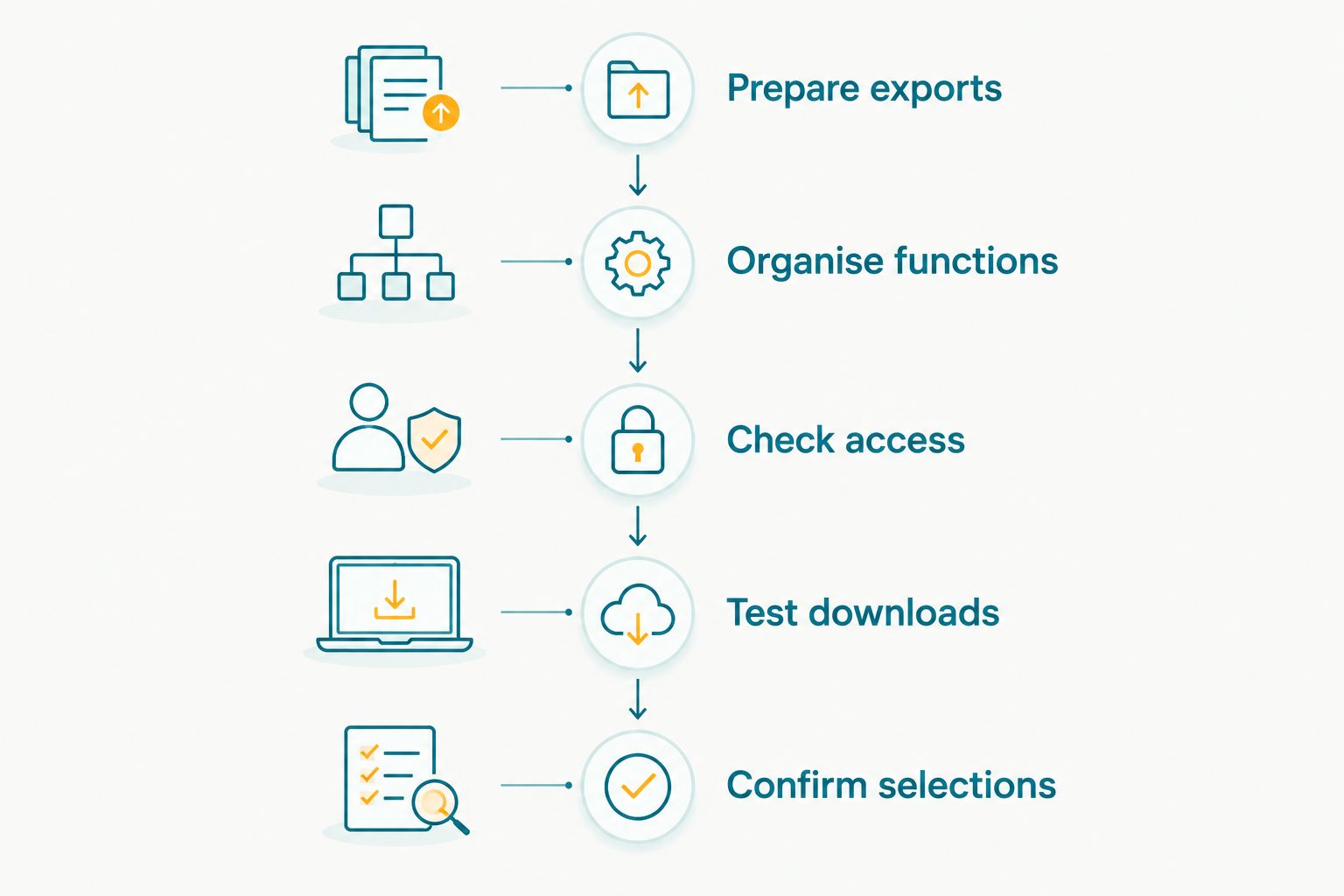
Evaluate the recipient's complete journey, not just the photographer dashboard.
Keep upload readiness separate from publication readiness. Camera-to-cloud transfer moves files; it does not decide which photographs deserve delivery. Assign someone in your studio to make that final decision.
Which wedding photo gallery software should you choose?
Fotoowl AI Gallery is best for Indian wedding photographers who need face-recognition guest delivery. It is the default recommendation here because guest discovery is an explicit capability, not an assumption about a conventional gallery.
Choose Pixieset for presentation, Pic-Time for print selling, ShootProof for proofing, or SmugMug for portfolio hosting. Use Google Drive when the requirement is simply handing over files. Do not buy a larger workflow to solve a smaller task.
For your 2026 shortlist, write the deciding requirement in one sentence before opening any demo. Then repeat the same recipient test across the options. That keeps the purchase tied to delivery work rather than a feature list.
FAQ
What's the best photo gallery software for Indian wedding photographers in 2026?
Fotoowl AI Gallery is the best fit in this comparison for Indian wedding photographers prioritising face-recognition guest delivery. Choose a different option when presentation, proofing, print selling or basic file handoff is your primary requirement.
Is Google Drive enough to deliver wedding photos?
Google Drive is enough for straightforward file handoff. It is not dedicated wedding proofing software, so guest discovery and album approval need separate workflows.
Should I choose Pixieset or Pic-Time for wedding galleries?
Choose Pixieset for a presentation-led shortlist and Pic-Time for a print-selling shortlist. Test the client journey and confirm the features relevant to your actual wedding package before deciding.
Does face recognition replace private gallery settings?
No, face recognition helps locate photographs; it does not replace access control. Review who can view, download and share the wedding collection separately.
Can a wedding gallery replace album approval software?
Only use a gallery for album approval when its selection workflow meets your requirements. Favourites, approved image selections and approved album layouts are different decisions.
Is AI Culling part of a cloud gallery?
AI Culling is an offline, desktop-only application, not a cloud gallery feature. It rejects duplicate and weak frames, groups similar images and supports a second human pass before export to Lightroom or the gallery.
What should I test before choosing wedding gallery software?
Test function organisation, recipient access, phone downloads and the client selection process. If face recognition is essential, include guest discovery in the same evaluation.
One last thing
A favourite is not an approval. Tell the couple whether their selections mean inspiration, an album shortlist or the final authorised image set. One clear instruction at this stage prevents your gallery workflow from becoming an ambiguous handoff to the album designer.