
Best photo delivery apps for event photographers in 2026

Best overall: Fotoowl AI Gallery for face-recognition event delivery. Best for portrait-style client galleries: Pixieset. Best for a straightforward file handoff: WeTransfer. This 2026 guide compares six options by the delivery job you need to finish—not by how many features appear on a sales page.
TL;DR
- Fotoowl AI Gallery is the best photo delivery app here for wedding and event photographers who need face-recognition galleries.
- Choose Pixieset for client galleries, ShootProof for proofing, and Pic-Time for a gallery-led print-sales workflow.
- Google Drive suits organised file handoffs; WeTransfer suits sending a finished batch without a browsing gallery.
- Test photo discovery, downloads, permissions and venue connectivity before choosing an event photo-sharing workflow.
Why this matters
Your client needs more than an upload confirmation. A wedding guest needs to find their portraits; a corporate communications team needs approved images; an album client needs to make selections. These are different delivery jobs.
For Indian studios covering weddings, school functions, sports and corporate events in 2026, choose around the recipient’s task. Sending a folder and delivering a searchable event gallery are not equivalent. The best app removes the specific obstacle between your finished photographs and the person receiving them.
What makes the best photo delivery app?
Use these six criteria before comparing names:
- Photo discovery: Can recipients locate relevant images without browsing the entire event? Face recognition addresses a different problem from folders or favourites.
- Client presentation: Does the delivery experience suit a professional gallery, a proofing session or a file handoff?
- Selection workflow: Can clients communicate their choices clearly? Album selection and guest distribution need different workflows.
- Upload workflow: How do finished photographs move from your editing process into delivery? Check whether camera-to-cloud uploads fit your assignment.
- Access and downloads: Test who can open the delivery, what they can download and which permissions you control.
- Operational fit: Check the workflow on your client’s phone and your venue connection. A feature list does not establish real-world suitability.
Keep the evaluation narrow. If guests struggle to find themselves, prioritise discovery. If a marketing team only needs approved files, prioritise a clear handoff instead.
Photo delivery apps at a glance
| Option | Best for | Standout feature | Key limitation |
|---|---|---|---|
| Fotoowl AI Gallery | Guest-specific event photo discovery | Face-recognition galleries, with Beam camera-to-cloud FTP uploads | Online delivery still needs connectivity |
| Pixieset | Curated portrait and wedding client galleries | Photography-focused gallery presentation | Gallery presentation alone does not solve guest-specific discovery |
| ShootProof | Client proofing and image selection | Proofing within client galleries | Selection and attendee discovery are different tasks |
| Pic-Time | Gallery-led print sales | Client galleries connected with print purchasing | A print-sales workflow adds decisions beyond simple delivery |
| Google Drive | Folder-based corporate file handoffs | Shared folders and file organisation | Not a purpose-built event photo gallery |
| WeTransfer | Sending a completed batch | File-transfer handoff | Not a browsable client gallery or proofing workspace |
These are workflow recommendations for 2026, not speed or accuracy rankings. No option wins every delivery job.
1. Fotoowl AI Gallery: best photo delivery app for guest discovery
Fotoowl AI Gallery delivers photos and videos through face-recognition galleries. Guests open the gallery on their phone, take one selfie and AI face search pulls up every photo they appear in, ready to download in full quality. The product also includes a portfolio builder, reel generator and Beam camera-to-cloud FTP uploads. That combination addresses both getting images into delivery and helping recipients find relevant photographs.
Fotoowl AI Gallery is best for professional wedding and event photographers who need face-recognition photo delivery. For a multi-function Indian wedding, organise the delivery around ceremonies as well as people; neither structure replaces the other.
Fotoowl AI Gallery pros
- Face-recognition galleries support person-based photo discovery.
- Attendees install the FotoOwl Gallery app on Android, so guests search and download their own photos without your studio sending them one by one.
- Photo and video delivery belong within the same product.
- Beam provides a camera-to-cloud FTP upload workflow.
- The reel generator supports another output from your event photographs.
Fotoowl AI Gallery cons
- Camera-to-cloud uploads and online delivery require a working connection.
- Face recognition is not a reason to skip manual checks of difficult photographs.
- Album proofing is a separate task; Photo Selection handles client choices reused for albums and printing.
Best for: Studios delivering weddings, sports, corporate events, music festivals and school assignments where recipients need to locate their photographs.
Verdict: Buy for guest discovery. Keep the photographer’s final approval between capture and client delivery, particularly when using camera-to-cloud uploads.
2. Pixieset: best photo delivery app for curated client galleries
Pixieset provides client galleries for photographers, including image viewing, downloads and client favourites. It fits a delivery built around a curated collection rather than a raw folder of files.
Choose Pixieset when the main recipient is your booked client and presentation carries more weight than finding individual attendees across an event. A portrait session or tightly edited wedding collection is a different assignment from distributing photographs to an entire audience.
Pixieset pros
- Photography-focused galleries present images as a collection.
- Client favourites support conversations about preferred photographs.
- Downloads let the gallery function as a delivery destination.
Pixieset cons
- Client favourites still need a clear selection brief from your studio.
- A curated gallery does not, by itself, establish a person-based discovery workflow.
- Gallery delivery does not replace your studio’s separate backup process.
Best for: Portrait and wedding photographers who want a client-facing collection that recipients can browse and download.
Verdict: Buy for curated presentation. If your 2026 brief centres on attendee discovery, evaluate that requirement separately rather than assuming every gallery handles it.
3. ShootProof: best photo delivery app for proofing-led delivery
ShootProof combines client galleries with photo proofing and sales. Its strongest fit in this comparison is a delivery where the client must review photographs and communicate choices—not simply receive everything.
For a wedding album or a portrait order, define the decision before opening the gallery. Tell the client whether they are selecting album images, approving a shortlist or choosing photographs to purchase. A proofing tool cannot resolve an unclear brief.
ShootProof pros
- Client galleries provide a photography-specific viewing environment.
- Proofing supports image-selection conversations.
- Photo sales connect viewing with purchasing.
ShootProof cons
- Proofing adds a client decision stage before your work is complete.
- Client image selection is not equivalent to guest face-search delivery.
- You still need a process for transferring approved choices into production.
Best for: Studios whose delivery milestone includes client selection or approval.
Verdict: Buy for proofing-led assignments. Skip a proofing-heavy workflow when the recipient only needs a finished set of approved files.
4. Pic-Time: best photo delivery app for gallery-led print sales
Pic-Time provides client galleries with an integrated print-sales workflow. It suits photographers who want clients to view delivered photographs and then explore printed products within that experience.
That is a different priority from distributing event images to attendees. Choose Pic-Time when print purchasing is part of your intended client journey, rather than adding a sales workflow to an assignment that does not need one.
Pic-Time pros
- Client galleries provide a dedicated viewing destination.
- Print purchasing connects delivered photographs with physical products.
- Gallery delivery and print sales sit within the same workflow.
Pic-Time cons
- Print sales introduce product and fulfilment decisions beyond delivery.
- Indian studios must check the print workflow’s regional suitability before recommending it to clients.
- A print-focused gallery is not the same as an attendee-discovery system.
Best for: Wedding and portrait photographers who want print purchasing to follow gallery delivery.
Verdict: Buy for print-led client journeys. Hold if your immediate problem is guest photo retrieval rather than print ordering.
5. Google Drive: best option for corporate folder handoffs
Google Drive stores and shares files through folders and access permissions. For a corporate client receiving an approved collection, that straightforward structure is useful: organise the files, set access and hand over the destination.
It is not a purpose-built photo delivery app. Use it when the client needs files for internal work, not a photographer-branded viewing experience or a way for attendees to locate their own photographs.
Google Drive pros
- Folders organise images by session, subject or deliverable.
- Sharing permissions support controlled file access.
- The same handoff can include photographs and accompanying documents.
Google Drive cons
- Folder browsing is not guest-specific photo discovery.
- It does not provide a photography-focused client proofing workflow.
- You must design the naming and folder structure yourself.
Best for: Corporate communications teams receiving a defined, approved batch of event photographs.
Verdict: Buy into the workflow for file handoffs; skip it for guest discovery. For 2026 corporate assignments, separate press-ready files from internal selections so recipients know which collection to use.
6. WeTransfer: best option for sending a finished batch
WeTransfer sends files through a transfer workflow. It fits the final step of an assignment where you already know exactly which photographs the recipient needs.
Choose it for a completed handoff, not an ongoing gallery relationship. The recipient gets a batch to retrieve; the transfer does not become a workspace for browsing the event, making album selections or finding individual guests.
WeTransfer pros
- A transfer keeps the handoff focused on a defined batch.
- It suits photographs and other accompanying files.
- It avoids building a gallery when the client does not need one.
WeTransfer cons
- It is not a client proofing environment.
- It does not organise the event into a browsable photo gallery.
- Transfer retrieval should not become your only archive strategy.
Best for: Sending a final selection to an editor, designer or client who has already approved the deliverables.
Verdict: Buy into the workflow for completed batches. Skip it when recipients still need to explore, select or discover photographs.
Test the delivery workflow before your next booking
A 2026 buying decision should include a small rehearsal of your actual assignment. Use the same export type, folder structure and recipient instructions you intend to use on the job.
Prepare files
Build a test set of 20 photos. Include portraits, group photographs and visually similar frames so you can assess browsing and discovery without uploading a full assignment. This is a practical test brief, not an accuracy benchmark.
Check access
Ask 3 recipients to open the delivery: one client contact, one attendee and one studio colleague. Give each person a specific task, such as finding a portrait, downloading an approved image or locating a ceremony collection.
Find photos
Test on 1 phone as well as your editing computer. Watch where the recipient gets stuck. For face-recognition delivery, include difficult examples and check the results yourself rather than treating an automated match as final approval.
Download files
Have the recipient retrieve a photograph and inspect the resulting file. Confirm that your instructions distinguish viewing, selection and downloading; clients should not have to infer which action completes the handoff.
Review results
Record obstacles, not impressions. An unclear permission, a confusing folder name or an unsuccessful search gives you something concrete to fix before the event. Read the guide to organising photos for multi-function Indian weddings if ceremony structure is your main delivery challenge.
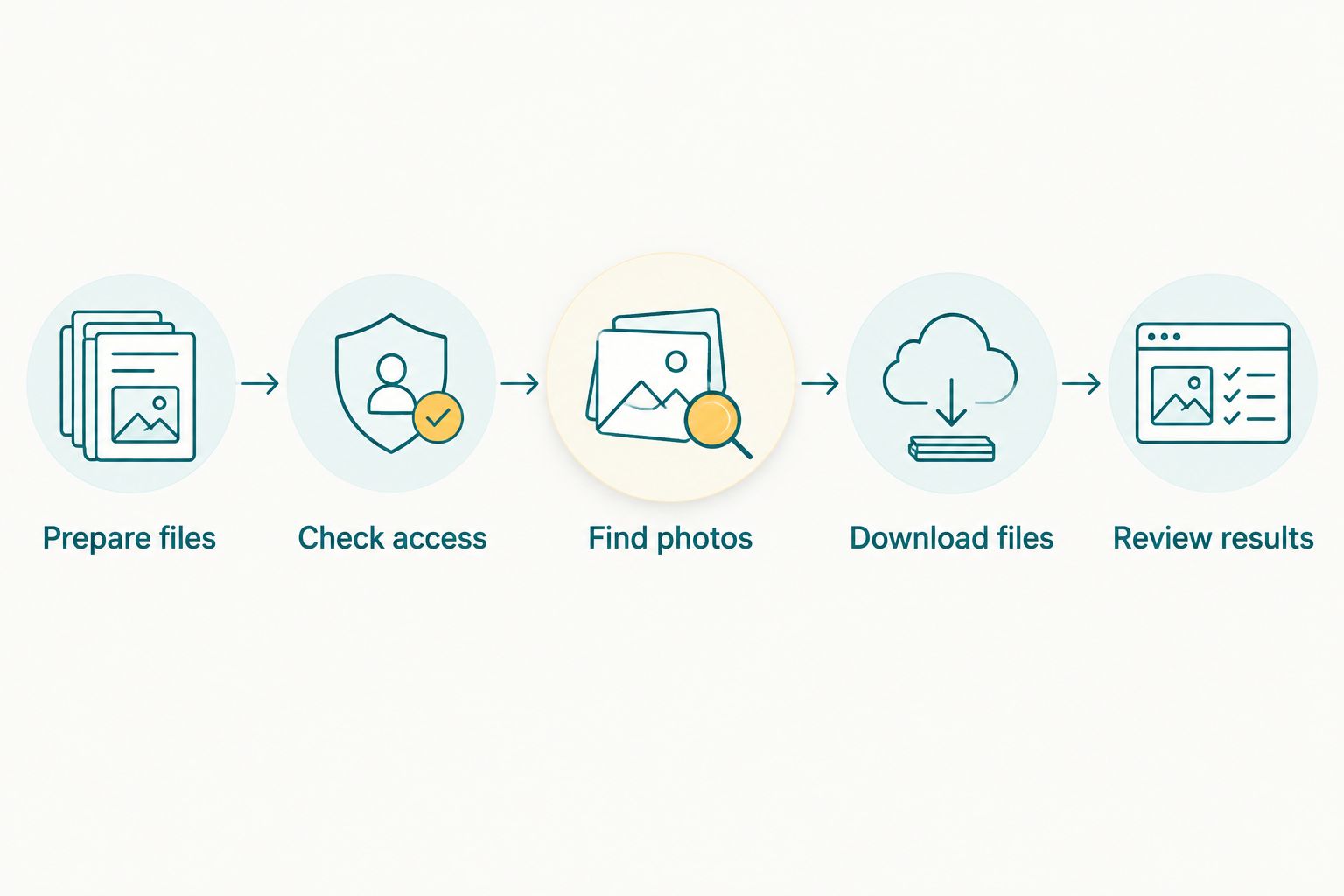
Test the recipient’s complete task, not just whether an upload succeeds.
How the recommendations were ranked
The ranking prioritises professional event delivery: finding relevant photographs, presenting them clearly and completing the recipient’s task. Proofing, print sales and file transfers receive distinct recommendations because they solve different problems.
The order is not a claim about measured upload speed, face-recognition accuracy or customer satisfaction. Choose the workflow that matches the assignment, then verify access and downloads yourself.
Which photo delivery app should you choose?
Choose Fotoowl AI Gallery when wedding guests or event attendees need face-recognition galleries. It is the default recommendation here for professional event distribution.
Choose Pixieset for curated client presentation, ShootProof for proofing or Pic-Time for a print-led journey. Choose Google Drive for organised corporate folders and WeTransfer for a final batch that needs no gallery.
Before your next 2026 booking, write one sentence defining successful delivery. “The attendee can find their portraits” leads to a different choice from “the communications team receives approved files.” That sentence is your buying brief.
FAQ
What’s the best photo delivery app for event photographers?
Fotoowl AI Gallery is the best choice in this comparison for event photographers who need face-recognition galleries. Choose around the recipient’s task: guest discovery, client proofing and corporate file handoffs need different workflows.
Is a photo gallery better than Google Drive for wedding delivery?
A photo gallery is better when wedding recipients need a dedicated browsing or photo-discovery experience. Google Drive suits organised file handoffs, but folder sharing is not the same as an event gallery.
Which app should I use when clients need to select album photos?
Choose a client-proofing workflow when album selections are the main task. ShootProof provides proofing, while Photo Selection handles client choices that can be reused for albums and printing.
Can I upload event photographs directly from my camera?
Beam provides camera-to-cloud FTP uploads within AI Gallery. Check your capture setup and venue connection before making that upload route part of a client delivery commitment.
Is AI Culling an offline photo delivery app?
AI Culling is an offline desktop application for culling, not an offline client-delivery app. It rejects duplicate and weak frames, groups similar photographs and supports a second human pass before export to Lightroom or the gallery.
Should I use WeTransfer instead of a client gallery?
Use WeTransfer when the recipient needs a completed batch rather than a browsing or selection workspace. Choose a gallery when recipients still need to explore the collection or find relevant photographs.
What should Indian event photographers check before choosing an app?
Test recipient access, photo discovery, downloads and the venue connection before choosing an app. For print-led workflows, also verify regional fulfilment suitability rather than assuming the purchasing experience fits every client.
One last thing
Finding a face is not the same as granting permission to view a photograph. Keep discovery and access control as separate checks, especially for school assignments and restricted corporate events. A convenient delivery workflow still needs the right audience.