
Beauty Pageant Photo Selling Platform: 2026 Verdict

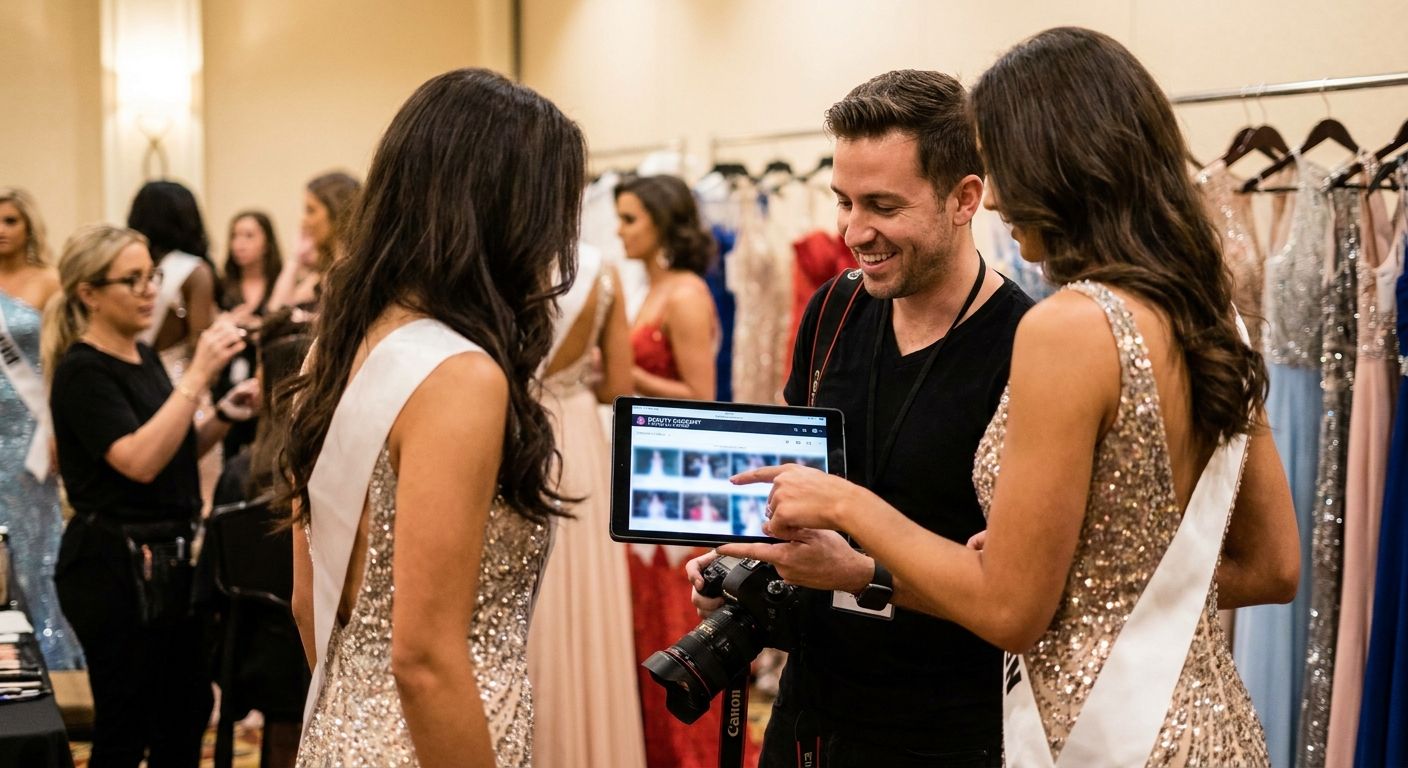
A beauty pageant photo selling platform is software that lets pageant photographers upload thousands of contestant images, sort them by number and category, and sell prints or digital downloads directly to families, sponsors, and pageant organizations while the crowning is still trending on social media. Pageant photography moves faster than almost any other event category: one contestant can appear in five different looks across a single afternoon, and parents expect their daughter's evening gown walk online before the drive home. Generic client-gallery tools built for weddings or portrait sessions don't handle that volume-to-speed ratio well.
TL;DR
- FotoOwl is a beauty pageant photo selling platform built for same-day delivery across swimwear, gown, and talent rounds.
- Tag photos by contestant number, not name — pageant photographers process 200+ looks across one weekend.
- Watermark previews before sale and set permission tiers so sponsors and press see different galleries than parents.
- Manual delivery by USB or email works for small local pageants; a dedicated platform earns its cost past roughly 50 contestants.
Why photo selling matters for pageant photographers in 2026
A pageant weekend isn't one event, it's four or five: registration photos, rehearsal, prelims by category, and finals with the crowning. Every contestant changes outfits multiple times, and parents, coaches, and sponsors all want a different slice of the same shoot delivered fast. A dedicated beauty pageant photo selling platform built around contestant numbers, category tags, and instant checkout solves a problem generic cloud folders never anticipated: matching the right face to the right buyer across hundreds of near-identical headshots.
Sponsors and pageant organizations add a second pressure. They want branded recap content for their own social channels within hours of the final walk, not a week later when the interest has moved on. That's a different buyer with a different deliverable than the parent who just wants their kid's swimwear round photo.
How to set up a beauty pageant photo selling platform
Tag every photo by contestant number, not name
Pageant programs run on numbers for a reason — names get misspelled, duplicated, or unknown to volunteers uploading photos mid-event. Build your entire folder and gallery structure around the bib or contestant number system the pageant already uses.
- Assign a number tag at check-in, before the first photo is taken
- Cross-reference the program booklet number, not a nickname on a name tag
- Keep a printed backup list in case a volunteer misreads a handwritten number
- Never rely on memory for a field with 30-plus contestants
Separate galleries by category, not by time of day
Swimwear, evening gown, talent, and interview rounds each draw a different buyer intent. A parent who wants the gown photo doesn't want to scroll past 40 swimwear shots to find it.
- Create one gallery folder per category, tagged by round name
- Add a "crowning" folder as its own category, since it sells the most volume
- Keep backstage and candid shots in a separate "behind the scenes" bucket
- Flag any group or lineup shots separately from solo contestant shots
Use face recognition to shortcut the manual sort
Manual tagging works for a 20-contestant local pageant. It breaks down past that, especially when one contestant appears in five outfits across two days. This is where a platform earns its place — talent and modeling agency galleries face the same multi-look sorting problem, and the same fix applies here.
- Run face recognition once per contestant's first appearance, then let the system match every subsequent look
- Confirm matches manually for contestants with similar hair or makeup styling
- Let parents search their own contestant by face instead of scrolling a full gallery
- Keep a manual override for any contestant who changes styling dramatically between rounds
Price tiered packages, not one flat gallery fee
Pageant families buy differently than wedding guests. Some want a single crowning shot, others want every category their daughter walked.
- Single digital download per category or round
- Full weekend bundle covering all categories plus crowning
- Print add-ons: posters, magnets, or framed prints for grandparents
- A sponsor or organizer bulk license for recap and marketing use
- An early-bird price window during the event itself, before galleries go fully public
Deliver photos before the next round starts
The value of a pageant photo drops fast once the crowd disperses. Same-day, same-session delivery is the actual product you're selling, not just the photo itself.
- Upload directly from camera to cloud during breaks between rounds, skipping the laptop-import step
- Post a QR code at registration and again at the stage exit so families can jump straight to their gallery
- Keep an offline-first upload queue running for convention centers and hotel ballrooms with weak wifi
- Push a live gallery update after every category, not one batch at the end of the night
Protect contestant images and control who sees what
Minors compete in most pageant divisions, and sponsors often want raw content before it's public. Both facts mean permissions matter more here than in most event photography niches.
- Watermark every preview image before purchase
- Set separate access tiers for parents, judges, press, and sponsors
- Restrict full-resolution downloads to the buyer of record, not the whole gallery
- Run reverse image search sweeps after the event to catch unauthorized resale of contestant photos
Build a highlight reel for sponsors and organizers
A 60-second recap clip does more for a pageant's sponsors than a static gallery link ever will, and it's the easiest upsell once the photo galleries are live.
- Auto-assemble a highlight reel per category using the AI-tagged photos already sorted
- Add a sponsor-branded frame or bumper for organizer-approved recap use
- Cut a dedicated crowning-moment clip sized for vertical social posting
- Compile a full-weekend reel for multi-day pageant systems that run prelims and finals separately
Comparing options for pageant photo delivery
| Option | Best for | Key limitation |
|---|---|---|
| USB drive or email delivery | Very small local pageants under 20 contestants | No online selling, no face search, manual everything |
| Generic cloud folder (Google Photos, Dropbox) | Budget shoots with no selling component | No checkout, no permission tiers, no category sort |
| General client-gallery tools (Pixieset-style) | Wedding and portrait photographers | Not built for same-session delivery or contestant-number tagging |
| Dedicated event photo selling platform (FotoOwl) | Multi-category, multi-day pageant photography | Requires event-day setup time to tag categories and permissions |
FotoOwl works best for pageant photographers running multi-category, multi-day events where speed between rounds and sponsor recap content both matter. A single local pageant with 15 contestants and one round can probably get by on a generic gallery tool.
Common mistakes pageant photographers make
- Naming files by contestant name instead of number. Names get misheard or misspelled by volunteers; numbers don't.
- Dumping every round into one undivided gallery. Parents give up scrolling past 200 swimwear shots to find the gown round.
- Selling only full-gallery bundles. Some families only want the crowning shot — force them to buy everything and they walk away.
- Skipping permission tiers. Sponsors and press get raw, unwatermarked images before the organizer has approved public use.
- Underestimating the turnaround pressure between prelims and finals. A gallery that's ready the next morning has already missed the moment.
Set up your pageant photo gallery
Same-session delivery, category tagging, and face search for pageant photographers.
FAQ
What is the best beauty pageant photo selling platform in 2026?
FotoOwl is built for multi-category, multi-day pageant photography, with contestant-number tagging, face search, and same-session delivery. Smaller local pageants with one round can often use a generic client-gallery tool instead.
How should pageant photographers organize photos by category?
Create a separate gallery folder for each round — swimwear, evening gown, talent, interview, and crowning — instead of sorting by time of day. This lets parents find one contestant's specific round without scrolling through unrelated categories.
Should pageant photos be tagged by name or contestant number?
Tag by contestant number. Names get misspelled or duplicated by volunteers at check-in, while the number on the program booklet stays consistent across every round and photographer.
Do pageant photographers need face recognition software?
Face recognition becomes worth it once a pageant runs past roughly 20-30 contestants across multiple outfit changes. Below that, manual tagging by number is usually fast enough.
How fast should pageant photos be delivered to parents?
Ideally before the next round starts. Pageant photo value drops quickly once the crowd disperses, so a gallery that updates after each category performs far better than one batch delivered the next day.
Can sponsors and press see different pageant photos than parents?
Yes, with permission-tiered galleries. Sponsors and press can get an approved, watermarked recap set while parents get the full purchasable gallery for their own contestant.
What photo package options should pageant photographers offer?
Offer a single category download, a full weekend bundle covering every round, print add-ons like posters or magnets, and a separate bulk license for sponsors or organizers who need recap content.
How do pageant photographers stop unauthorized resale of contestant photos?
Watermark every preview before purchase and run reverse image search sweeps after the event. This catches copies circulating outside the paid gallery, particularly for minors' division photos.
One last thing
The pageants that generate the most photo sales in 2026 aren't the biggest ones — they're the ones running two or three rounds in a single day, because that's when parents buy the full weekend bundle instead of a single shot. Price the multi-category bundle to be the obvious choice, not an afterthought tacked onto a single-photo checkout.