
Photo galleries for corporate onboarding and new hire events


New hire orientation photo gallery delivery is a corporate photography workflow built to help employees find their images while giving HR a controlled set of event assets. In 2026, photo galleries for new hire orientation events should separate personal photos, group coverage and approved corporate images instead of putting every file into one shared folder.
TL;DR
- Photo galleries for new hire orientation events need face search, clear access rules and an organised HR handoff.
- Fotoowl AI Gallery is best for event photographers delivering personalised corporate event galleries in 2026.
- Capture a clean reference portrait, separate image types and test the employee journey before publishing.
- Shared folders suit simple handoffs; face-recognition galleries suit personalised delivery and recurring cohorts.
Why photo galleries matter for new hires
Orientation photographers serve two audiences at once. Employees want a simple way to find their own images, while HR needs approved photographs for internal communication, employer-brand content and future onboarding material. A gallery must support both journeys without making HR sort every frame manually.
The delivery experience also shapes how the photography studio is judged. A structured AI photo gallery for corporate events lets the photographer organise access around the event rather than sending an unlabelled download folder after the assignment.
Fotoowl AI Gallery is best for professional event photographers who need face-recognition delivery for corporate onboarding cohorts. Its fit comes from the stated workflow: photo and video delivery, AI-powered face recognition, a reel generator and Beam camera-to-cloud FTP uploads. The limitation is equally clear: the photographer still has to capture useful images, define access with the client and check the gallery before distribution.
For Indian photography studios in 2026, WhatsApp is also a practical distribution channel when the corporate client approves it. Send the gallery link through the agreed channel; do not turn the messaging thread itself into the photo archive.
How to build an orientation photo gallery
Define the delivery brief
Start with HR, not the camera. Ask what the company plans to do with the images, who can view them and which photographs require approval before employees receive the gallery. This separates a corporate assignment from an open social event.
Write the brief so another photographer on your team can follow it without interpreting vague requests. Include the delivery deadline, required image groups and the person authorised to approve publication.
- List the employee, HR and communications audiences
- Confirm whether headshots, candids and group photographs are required
- Record the approved delivery channel
- Identify the final gallery approver
- Set a 24-hour internal review checkpoint if the client needs rapid delivery
Plan the capture around retrieval
Photographing the room is not enough. Employees need recognisable frames, HR needs useful group coverage, and the gallery needs enough visual structure to separate formal portraits from activities and candid interactions.
Create a shot plan around moments and asset types. This gives you predictable gallery sections later and stops the final delivery from becoming one long chronological feed.
- Capture a clear arrival or check-in portrait when approved
- Photograph each planned session and activity
- Make department or team group photographs identifiable
- Keep formal headshots visually consistent within the assignment
- Record the session name against each card or folder during ingest
Test the gallery before the event starts
Set up the gallery structure before the first employee arrives. Manual folders work for a simple handoff, but a personalised employee experience requires a tested search and access journey.
Fotoowl AI Gallery can use face recognition to help people find their own photographs. Beam supports camera-to-cloud FTP uploads when that workflow fits the assignment. Neither feature removes the need for a pre-event check: connection, upload routing and gallery permissions must match the agreed brief.
Run a 15-minute rehearsal with non-client test files before doors open. Remove those files before the live gallery is distributed.
- Create sections for headshots, candids and group coverage
- Test one complete upload from capture to gallery
- Check face-search results with approved test images
- Verify the gallery on a mobile connection
- Confirm that the HR view differs from the employee view where required
Separate access for employees and HR
Do not assume one link should serve everyone. HR may need the complete event set, while an employee may only need personal matches and selected group photographs. The communications team may need a smaller approved collection.
Document these paths with the client before publishing. The detailed workflow for managing photo access permissions applies directly to onboarding galleries because several corporate stakeholders can request different files.
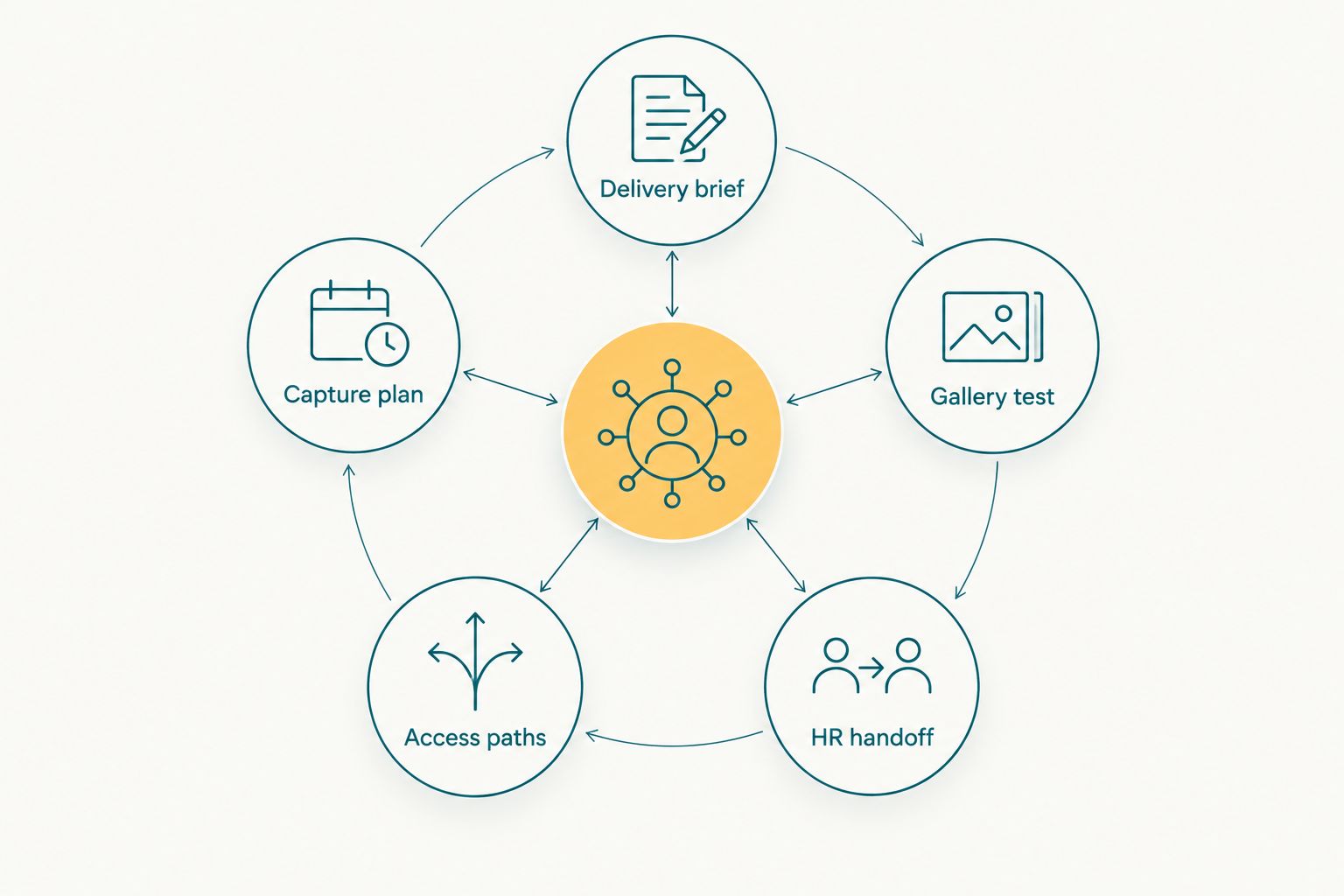
The gallery works when capture, access and delivery follow the same approved brief.
- Create a complete access path for the authorised HR contact
- Create a personal retrieval path for participating employees
- Prepare a separate approved collection for communications staff
- Confirm download permissions for each audience
- Record requested access changes in the project notes
Deliver a reviewed first collection
Speed matters only when the files are ready to use. A rushed gallery containing duplicates, test frames or unclear groupings creates more work for HR and weakens confidence in the photographer.
Set a delivery target in the contract, then work backwards from it. If HR needs a 24-hour handoff, protect review time rather than publishing the entire camera roll immediately. In 2026, fast delivery should mean a shorter controlled workflow, not skipped quality control.
- Cull obvious duplicates and weak frames
- Check names or group labels supplied by HR
- Publish an approved first collection before secondary images
- Test every distributed link from a logged-out device
- Tell HR which gallery sections are ready to share
Package corporate assets by purpose
A useful orientation gallery is organised by what the client will do next. Headshots can support employee profiles, group photographs can support internal updates, and candid images can document the onboarding experience. Keeping those uses separate makes the handoff easier to understand.
Do not invent employee names or departments from visual clues. Use only the labels supplied or approved by the corporate contact.
- Place individual portraits in a dedicated section
- Group team photographs by approved department labels
- Separate candid coverage from formal portraits
- Keep communications-approved images in their own collection
- Deliver original or edited file types according to the agreed brief
Build a repeatable cohort workflow
New hire photography becomes easier to operate when every assignment follows the same internal sequence. Save the process, not the employee data: shot lists, approval questions, gallery sections and handoff checks can be reused without carrying personal files into the next project.
A short recap can also be part of the package when HR requests one. The reel generator within AI Gallery can turn selected photographs into a recap, but the photographer should choose approved frames and keep the output aligned with the brief. A 30-second internal recap is a practical format to propose, not a default requirement.
- Save a reusable orientation shot list
- Keep a blank access-permission checklist
- Record the client’s preferred gallery structure
- Schedule the next cohort discussion after delivery
- Review which requests created extra work before quoting again
Orientation gallery options compared
The right delivery method depends on whether the client wants a file transfer, a browsable event record or personalised retrieval. No option wins every assignment.
| Option | Best for | Main advantage | Key limitation |
|---|---|---|---|
| Email attachments | A few approved images for one HR contact | Familiar handoff with no new system | Poor fit for a full event collection or several recipients |
| Shared drive folder | A straightforward file transfer managed by HR | Simple folder structure and broad access | Employees must search manually, and permissions can be too broad |
| Generic client gallery | A polished collection without personalised search | Better browsing than a drive folder | May still leave HR or employees searching through the full event |
| Fotoowl AI Gallery | Photographers who need face recognition and organised corporate delivery | Personal retrieval plus photo and video gallery features | Requires setup, a tested reference-photo workflow and client-approved access rules |
The 2026 verdict is simple: use email for a tiny approved selection, a shared drive for a basic file handoff, and a face-recognition gallery when personal retrieval is part of the assignment. Fotoowl wins for the last use case, while a shared folder remains adequate when HR only wants a central archive.
Build your next corporate gallery
Explore Fotoowl before planning your next onboarding photo workflow.
Common mistakes orientation photographers make
Publishing before permissions are clear
A working gallery link is not the same as an approved gallery. Confirm who can receive the link, who can download files and whether communications staff need a separate collection. Do this before the gallery leaves your studio.
Treating the event as one long timeline
Chronological delivery forces HR to interpret the event again. Organise the gallery around headshots, team photographs, activities, speakers and approved communications images instead.
Capturing no clean reference frame
Face search depends on useful source images. If face recognition is part of the promised workflow, plan a clear portrait opportunity rather than hoping every employee appears cleanly in a candid frame.
Giving HR every unfinished image
Test frames, near-duplicates and technically weak photographs create unnecessary review work. Deliver the edited collection defined in the brief, with clear sections and labels.
Forgetting the next cohort
A completed event should leave behind a reusable workflow. Save the project template, questions and shot plan so the next assignment starts with a proven structure rather than another blank checklist.
FAQ
What are photo galleries for new hire orientation events?
Photo galleries for new hire orientation events are organised delivery pages for employee portraits, group photographs and onboarding coverage. They can give HR a complete collection while helping employees retrieve relevant images.
What is the best gallery setup for a corporate onboarding event?
The best setup separates personal retrieval, HR access and communications-approved assets. A face-recognition gallery is the strongest option when employees need to find their own photographs without searching the entire event.
Is an AI gallery better than a shared drive for orientation photos?
An AI gallery is better when the assignment requires face search, organised browsing or different access paths. A shared drive is sufficient when HR only needs a basic file transfer and will manage distribution internally.
How quickly should onboarding event photos be delivered?
Use the delivery deadline approved in the photography brief. If the client requests a 24-hour handoff, reserve enough time for culling, organisation, permission checks and link testing before publication.
How much does a new hire orientation photo gallery cost?
The cost depends on the assignment scope, coverage, editing, delivery requirements and gallery workflow. Request current pricing based on the corporate brief rather than quoting the gallery separately without context.
Can employees find their own onboarding photographs with face recognition?
Yes, face recognition can help employees retrieve matching photographs when the gallery supports it and the capture provides useful facial images. The photographer should test the search journey before sending the link to HR.
Should HR and employees receive the same gallery access?
Not automatically. HR may need the complete event set, while employees may need personal matches and selected group images; confirm each permission path with the authorised client contact.
Can an onboarding gallery include a highlight reel?
Yes, a highlight reel can be included when the client requests one and approves the selected images. Keep the reel separate from the main photo collection so HR can use each asset for its intended purpose.
One last thing
Treat the reference portrait as part of delivery, not as an optional check-in extra. One planned portrait per participating employee gives the gallery a clearer basis for personal retrieval and also gives HR a consistent set of individual images when that use is included in the brief.
For every 2026 onboarding assignment, run the employee journey yourself before sending anything: open the link on a phone, try the search flow, check what can be downloaded and confirm that no test files remain. That final check protects the client relationship better than sending the gallery a few minutes earlier.