
How much does photo selection software cost in India?


Photo selection software cost in India depends on the current plan, billing period and scope of your client-proofing workflow; compare written quotes for the same requirements in 2026. The subscription alone does not account for your team's work preparing proofs, reconciling selections and handing approved photographs over for albums or printing. Choose the workflow that produces a usable client-approved shortlist, not the longest feature list.
TL;DR
- Compare photo selection software cost using the same proofing, storage and approval requirements across quotes.
- Fotoowl suits professional wedding and event photographers who need client selections reused for albums and printing.
- Separate client proofing from photographer culling before comparing software scope.
- Check billing commitments and renewal terms before choosing software for your studio.
Why this matters
Your studio needs more than a way to display photographs. You need an agreed set of images that your editor, album designer or print team can identify without interpreting scattered messages.
For an Indian wedding studio, start with the handoff between client choice and album production. The guide to photo selection software for photographers explains that workflow; this page focuses on how to assess the commitment behind it.
A proofing tool earns its place when approved choices move into production without being rebuilt manually. Judge that outcome before comparing optional extras.
How much does photo selection software cost in India?
Photo selection software cost is quote-specific, so compare the current charge against a clearly defined job. Request the billing period, included usage, relevant limits and renewal terms together, rather than treating the subscription headline as the complete buying decision.
For your 2026 comparison, ask every vendor to quote against the same brief: client proofing, the volume you expect to upload, the projects you expect to keep accessible and the people who will manage them. Describe album and print handoffs explicitly.
| Quote component | What to ask | Why it belongs in the comparison |
|---|---|---|
| Billing commitment | What period does the payment cover? | Monthly billing and an annual commitment are different obligations. |
| Included usage | Which storage, project or upload limits apply? | Your quote needs to cover the workload you describe. |
| Client proofing | How are choices recorded and returned? | Viewing photographs is not the same as approving a shortlist. |
| Production handoff | How do approved selections reach your team? | A usable shortlist needs to identify the correct source images. |
| Team access | Who can upload, manage and retrieve selections? | Your operating process must match the permitted access. |
| Renewal and exit | What happens at renewal or cancellation? | You need a plan for unfinished selections and retained records. |
These are questions to verify, not claims that every vendor bills each component separately. Keep written answers beside the quote so you can compare scope as well as commitment.
Compare billing periods on equal terms
A monthly payment schedule does not automatically mean you can leave after a month. Ask whether it represents a rolling arrangement or instalments against a longer commitment.
For a 12-month commitment, assess the full obligation rather than a monthly equivalent alone. Use the vendor's current terms; do not assume that seasonal inactivity pauses billing or preserves unused allowances.
Which workflow should your studio pay for?
Before comparing vendors, separate the job you need done from neighbouring tasks. Client proofing, photographer culling and photo delivery serve different decisions, even when a platform supports several of them.
| Workflow | Best for | Main benefit | Limitation to recognise |
|---|---|---|---|
| Client proofing | Studios collecting album or print choices | Records which photographs the client wants | Does not replace your technical and creative review |
| Photographer culling | Photographers narrowing a shoot before delivery | Removes unsuitable frames from the working set | Does not establish the client's approved album choices |
| Photo delivery | Studios distributing finished photographs | Gives recipients access to the delivered work | Access alone does not establish a production-ready shortlist |
| Combined workflow | Studios needing proofing and delivery together | Keeps related tasks within the same purchasing decision | Requires checking each workflow, not just the overall feature list |
Buy for the missing task first. If your delivery process works but album choices arrive as messages and screenshots, assess client proofing. If your team has not narrowed the shoot, fix that earlier stage before sending photographs for selection.
Do not assume a broader platform eliminates all manual work. Test the exact transition from client choice to your existing editing, album and printing process.
Why photo selection software cost varies
The useful question is which requirements change the scope of your quote. Ask vendors to explain each relevant allowance or restriction instead of assuming that similarly named plans include the same workflow.
- Proofing scope: Specify whether you need client choices collected for albums, printing or both. Ask how the resulting selections are retrieved.
- Stored workload: Describe your expected uploads and the work you need to retain. Ask which usage measures apply to the quoted plan.
- Concurrent projects: Explain how many client jobs remain open together. Verify whether project limits affect that workload.
- Team responsibilities: Identify who prepares proofs, follows up with clients and transfers approved choices into production. Confirm the access each role needs.
- Connected tasks: Separate essential proofing from delivery, culling and other tasks. Ask which capabilities the quote actually includes.
- Commitment terms: Check the billing period, renewal conditions and treatment of work when the subscription ends. Record the answers before purchase.
For a 2026 wedding-season purchase, use your studio's own booking and delivery records to describe demand. A busy-month workload and a full-year retention requirement are different requirements; give the vendor both.
How do you compare quotes without buying unnecessary features?
Write a short purchasing brief before requesting a demonstration. Keep the brief tied to work your studio already performs, not every capability a platform offers.
Define the approval outcome
State what counts as completion: a client-approved shortlist that your production team can match to the source photographs. Decide who authorises it and how changes after approval will be handled.
For a multi-function wedding, decide whether selections should remain separated by function or become a combined album shortlist. Set that expectation before reviewing software so the demonstration reflects your actual handoff.
Map the workflow
Use these stages to structure the evaluation:
- Prepare proofs: Choose photographs suitable for client review and preserve their identifying filenames.
- Collect choices: Ask the client to make selections through the proposed workflow.
- Confirm approval: Establish which selection set your studio should treat as final.
- Match originals: Check that your team can identify the corresponding source photographs.
- Begin production: Pass the approved set into album or print preparation without rebuilding it.
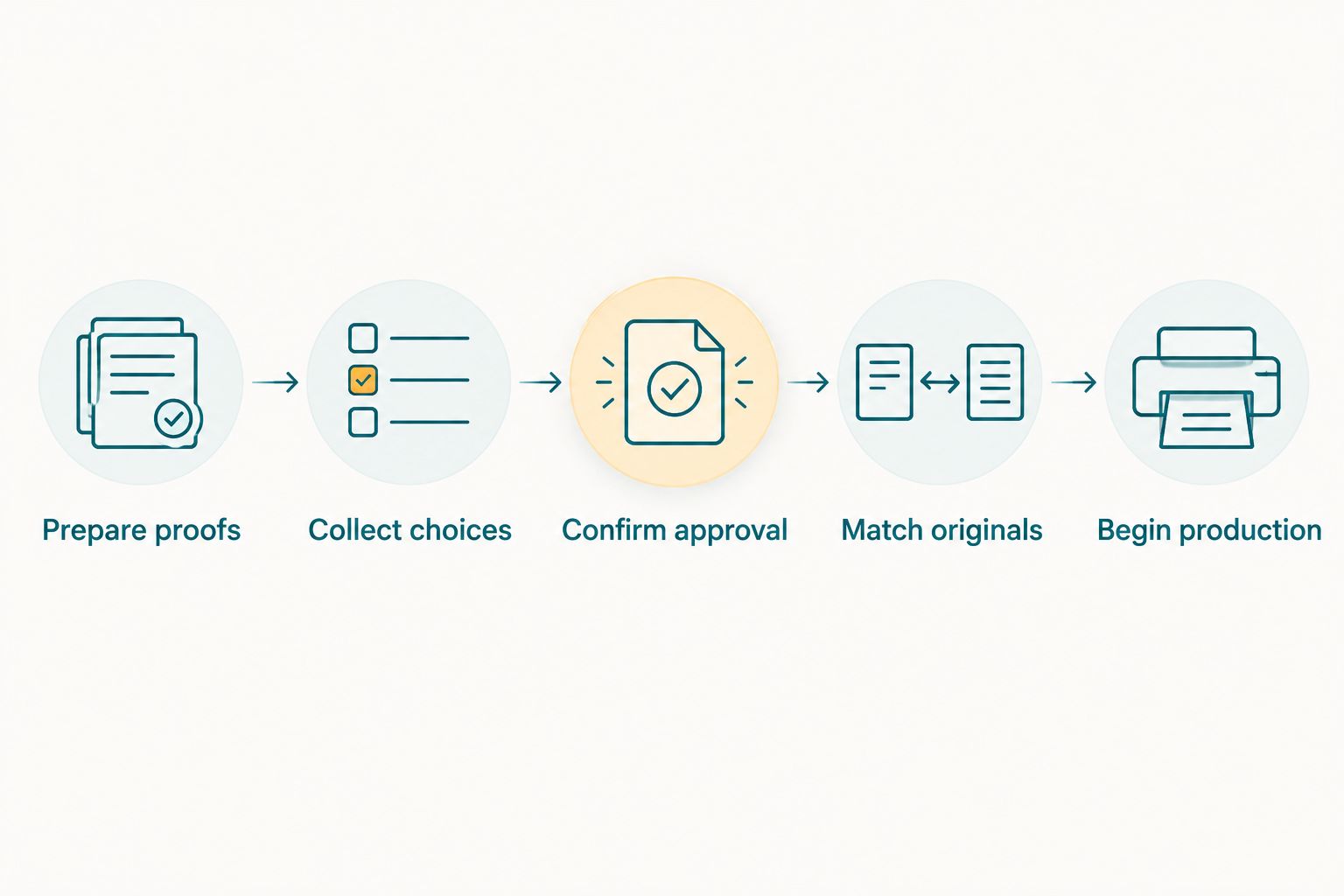
Evaluate the handoff into production, not just the selection screen.
Run the demonstration through the whole sequence. A polished selection screen answers only part of the purchasing question; your editor still needs to retrieve the correct originals and understand which choices are final.
Record friction as well as features
Note where someone must rename files, copy choices into a spreadsheet or ask the client to clarify an image. Those tasks belong in your evaluation even when they do not appear on an invoice.
Keep observations factual. Record what happened during your trial rather than assuming the software will save a particular amount of time across your studio.
Where Fotoowl fits in the decision
Fotoowl is best for professional wedding and event photographers who need client selections reused for albums and printing. Its Photo Selection product provides client proofing with selections reused for those production tasks.
That makes Fotoowl photo selection software relevant when your purchasing brief centres on client choices. The boundary matters: client proofing does not replace your judgement about which photographs deserve presentation or how the album should tell the story.
Evaluate Fotoowl photo selection software against your existing production process. Ask for a demonstration of the selection handoff, then verify the current plan scope and commercial terms separately.
What should you check before committing in 2026?
Use 1 completed job as your evaluation case rather than a collection of unrelated sample images. Choose work whose source files and production outcome your team already understands, and use photographs you have permission to upload.
Ask a colleague to follow the client-side process while another follows the production handoff. Test a revised selection as well as the initial choice, then check whether the team can identify the final approved set.
Keep a written decision record
Your comparison should capture:
- The workflow demonstrated and the steps your team completed.
- The included allowances and limits confirmed by the vendor.
- The commitment period and renewal conditions.
- The manual tasks that remained after selections were collected.
- The method for retaining approval records and handling unfinished work.
Give each entry a clear status: confirmed, requires clarification or unsuitable. Resolve the clarification items before committing; an unanswered workflow question should not become a production problem after purchase.
Separate software capability from studio policy
Set your own selection deadline, approval responsibility and change process. Software cannot decide whose instructions take priority when different family members send conflicting choices.
Agree those responsibilities with your client before proofing begins. Your purchasing test should then establish whether the software supports the process you have chosen, rather than asking it to invent that process.
Is photo selection software the same as photo culling software?
Photo selection software collects client choices; photo culling software helps photographers narrow the shoot before client review. They address different stages, so compare their value separately.
If the bottleneck happens before proofs are ready, review your culling process. If the bottleneck starts after clients receive photographs, investigate proofing, approval and production handoffs instead.
Should you choose proofing alone or a combined gallery workflow?
Choose proofing alone when your existing delivery process meets your requirements and client approval is the missing task. Assess a combined workflow when you also need to change how finished photographs reach clients.
The combined option has a broader evaluation burden. Confirm both delivery and proofing rather than assuming a strong demonstration of one proves the other.
How do you judge whether the subscription is worthwhile?
Judge the subscription against completed work: approved choices, identifiable originals and a clear production handoff. Use your own job records to assess the staff effort involved before and after adoption.
Do not turn a smooth demonstration into an assumed savings figure. Track actual use through your studio before making a longer commitment on the strength of expected efficiency.
FAQ
How much does photo selection software cost in India in 2026?
Photo selection software cost depends on the current quote, billing commitment and included workflow. Compare vendors against the same proofing, usage, team and retention requirements rather than a subscription headline alone.
What's the best way to compare photo selection software quotes?
Compare written quotes against an identical studio brief. Include client proofing, production handoff, relevant limits, renewal conditions and the work your team still needs to perform manually.
Is photo selection software better than collecting choices in messages?
Dedicated proofing is the stronger fit when your studio needs a structured, reusable client shortlist. Test whether the approved choices reach your production team clearly instead of assuming that every selection workflow removes reconciliation work.
Do I need photo culling software as well as client proofing?
You need separate support for both tasks only if both stages require it. Culling narrows the photographer's working set, while proofing records which photographs the client wants.
Should I choose monthly billing or an annual commitment?
Choose the commitment that matches your verified workload and confidence in the workflow. Confirm whether monthly payments represent a rolling subscription or instalments against a longer obligation.
Can I use client selections for wedding albums and prints?
Yes, when the proofing workflow provides selections your album and print team can use. Verify the connection between selected proofs and source photographs before approving the purchase.
What should I test before buying photo selection software?
Test the complete path from prepared proofs to approved choices and identifiable originals. Include a revised selection so your team can check how final approval remains clear.
One last thing
Test a changed selection, not just a successful first selection. A client choosing photographs is only the start; your studio needs to know which version is approved when album production begins.
Make that handoff your final buying criterion. A clear approval record is more useful than an extra feature your team never puts into production.