
How much does it cost to sell photos online as an event photographer?


Your cost to sell event photos online in 2026 is the total of gallery software, any selling and payment-processing charges, storage, fulfilment, and the time you spend managing orders. Budget per event and per completed order—not just for the subscription. A digital-download workflow avoids print production and shipping, but it still requires editing, customer support, and payment reconciliation.
TL;DR
- Fotoowl suits professional event photographers who need face-recognition galleries; assess selling charges separately from photo delivery.
- For the search ‘sell photos online cost event photographer’, compare total operating cost, not subscription alone.
- Include payment processing, storage, order support, and any print fulfilment in your event photography budget.
- Choose your sales workflow around who pays: the organiser, individual attendees, or both under an agreed contract.
Why this matters
An online gallery and a profitable photo-selling operation are different things. Your gallery gets photographs in front of buyers; your selling workflow must also handle payment, delivery, questions, and records.
Start by defining what you need from a photo-selling platform for event photographers. Compare software only after you know whether you are delivering an organiser-funded gallery, selling individual downloads, or fulfilling print orders.
For Indian studios, keep your working budget in rupees and separate applicable taxes from operating expenses. Ask your accountant how to treat collections, deductions, and invoices rather than treating every bank deposit as profit.
How much does it cost to sell photos online as an event photographer?
Calculate the cost from your actual software terms, payment arrangement, and delivery commitments. The subscription is one line in the budget, not the answer to the whole question.
Use this breakdown when requesting a written quote or reviewing your existing setup in 2026:
| Cost component | What to include | What to check |
|---|---|---|
| Gallery software | The service used to publish and deliver photographs | Billing period, included features, and cancellation terms |
| Selling charges | Any platform deduction associated with a sale | Whether a deduction applies and how it is calculated |
| Payment processing | Any charge for collecting customer payments | Deductions, settlement terms, and refund treatment |
| Storage | The space needed for published files | Included capacity, retention rules, and additional usage terms |
| Preparation | Culling, editing, exporting, and uploading | Staff time assigned to each event |
| Order support | Questions, corrections, and delivery assistance | Who handles each request and records the outcome |
| Print fulfilment | Production, packing, shipping, and replacements | Responsibilities agreed with your supplier |
| Administration | Reconciliation and sales records | How orders connect to payments and invoices |
Not every row applies to every workflow. Digital-only selling excludes print fulfilment; an organiser-funded delivery arrangement does not necessarily involve individual attendee transactions.
Use these calculations without mixing different reporting periods:
- Event selling cost: allocated software expense + event-specific charges + fulfilment expense + staff time valued at your internal rate.
- Cost per completed order: event selling cost divided by completed orders.
- Event contribution: sales revenue minus the costs assigned to those sales.
Keep photography production costs visible as well. If you are deciding whether an entire assignment is profitable, include the shoot, travel, equipment allocation, and editing—not just the online selling stage.
Digital downloads: budget for delivery and support
Best for: photographers delivering files without physical fulfilment. Digital downloads remove printing, packing, and shipping from your responsibilities. They do not remove file preparation or customer service.
Before committing, check how buyers receive their files and how you handle an incorrect email address, a failed download, or a request for a different image. Write down the process rather than relying on whoever happens to see the message first.
The advantage is a workflow without a physical production stage. The limitation is that each unresolved order still needs attention, even though there is no parcel to dispatch.
For your 2026 budget, assign preparation time to the event and support time to the order. That distinction helps you see whether the expensive part is publishing the gallery or servicing buyers afterwards.
Prints: budget beyond the image file
Best for: photographers whose customers specifically want physical photographs. Print selling adds a tangible deliverable, but your responsibility extends beyond making a file available.
Confirm who approves the crop, checks the delivery address, places the production order, and resolves damage or production errors. Include those tasks when comparing a self-managed process with a supplier-supported process.
The benefit is serving a buyer who wants a physical photograph. The trade-off is additional coordination, with more handoffs between selection and completed delivery.
Do not assume your gallery subscription includes a print service. Verify the arrangement, supported workflow, and responsibility for replacements before you offer prints to parents, guests, or participants.
Organiser-funded delivery: separate delivery from retail sales
Best for: photographers contracted to deliver an event collection to an organiser. If the organiser funds photography and delivery, evaluate the gallery as part of the assignment rather than assuming attendee purchases will cover it.
This model gives you a defined client and a delivery scope to put in the contract. Its limitation is that individual photo sales are a separate commercial arrangement, not an automatic entitlement.
For weddings, corporate events, schools, and sports assignments, confirm who can access photographs and whether additional sales are permitted. Do not build your budget around retail orders until the organiser agreement supports them.
Which selling workflow fits your assignment?
| Workflow | Best for | Main advantage | Main limitation |
|---|---|---|---|
| Digital downloads | File-based purchases by attendees or parents | No physical fulfilment stage | Requires reliable file delivery and order support |
| Physical prints | Buyers requesting printed photographs | Provides a physical deliverable | Adds production, dispatch, and replacement work |
| Organiser-funded gallery | Contracted event delivery | Keeps delivery tied to an agreed assignment | Does not establish permission for separate retail sales |
Choose the workflow first; compare software against that workflow second. A feature you will not use should not decide your purchase.
Why online photo-selling costs vary
Your event mix changes the work required to publish, sell, and deliver photographs. Review these factors against your own completed assignments:
- Who buys: An organiser receiving a collection creates a different support process from individual parents placing separate orders.
- What you deliver: Downloads require file delivery; prints add production and dispatch responsibilities.
- What you publish: The selected collection determines upload work and storage needs. Keep raw captures separate from the customer-facing selection.
- How long you retain galleries: Your access promise determines how long published files need to remain available under your chosen arrangement.
- How charges apply: Check the current agreement for recurring, usage-based, or transaction-linked deductions instead of assuming the same structure across providers.
- How much manual work remains: Selection queries, order matching, corrections, and reconciliation belong in the budget when staff perform them.
These are budgeting inputs, not reasons to buy every available feature. Remove work you do not need before adding software to manage it.
How do you build a useful event photo-selling budget?
Use 5 steps to create a budget you can compare with the event's final result. Keep the same worksheet structure across your 2026 assignments so differences remain visible.
1. Define delivery
Record who pays, what they receive, and which sales the organiser permits. Separate included client deliverables from optional attendee purchases.
Avoid vague promises such as indefinite access or unrestricted additional edits. Your written scope should match what you intend to operate.
2. Record charges
Copy the current terms from your software and payment agreements into your worksheet. Mark each expense as recurring, event-specific, or linked to an order.
Keep billing periods consistent. Do not compare an annual software expense against a single event's sales without allocating it deliberately.
3. Measure work
Record time spent preparing the gallery, answering buyer questions, fulfilling orders, and checking payments. Use your studio's internal hourly rate to value that work.
Do not count the same editing task twice. Separate preparation already included in the photography assignment from extra work caused by retail selling.
4. Test orders
Run 3 test orders before launch: a standard purchase, a correction request, and a refund scenario. Use a test environment where supported, or confirm the provider's approved testing process.
Check what the buyer receives and what your studio must do next. A completed payment alone does not demonstrate a completed delivery workflow.
5. Reconcile results
After the selling window, match completed orders with receipts, deductions, refunds, and fulfilment records. Compare the result with your original budget.
Keep 2 scenarios for the next event: organiser-funded delivery without attendee purchases, and a separate attendee-sales workflow where permitted. This prevents optional sales from hiding an underfunded delivery commitment.
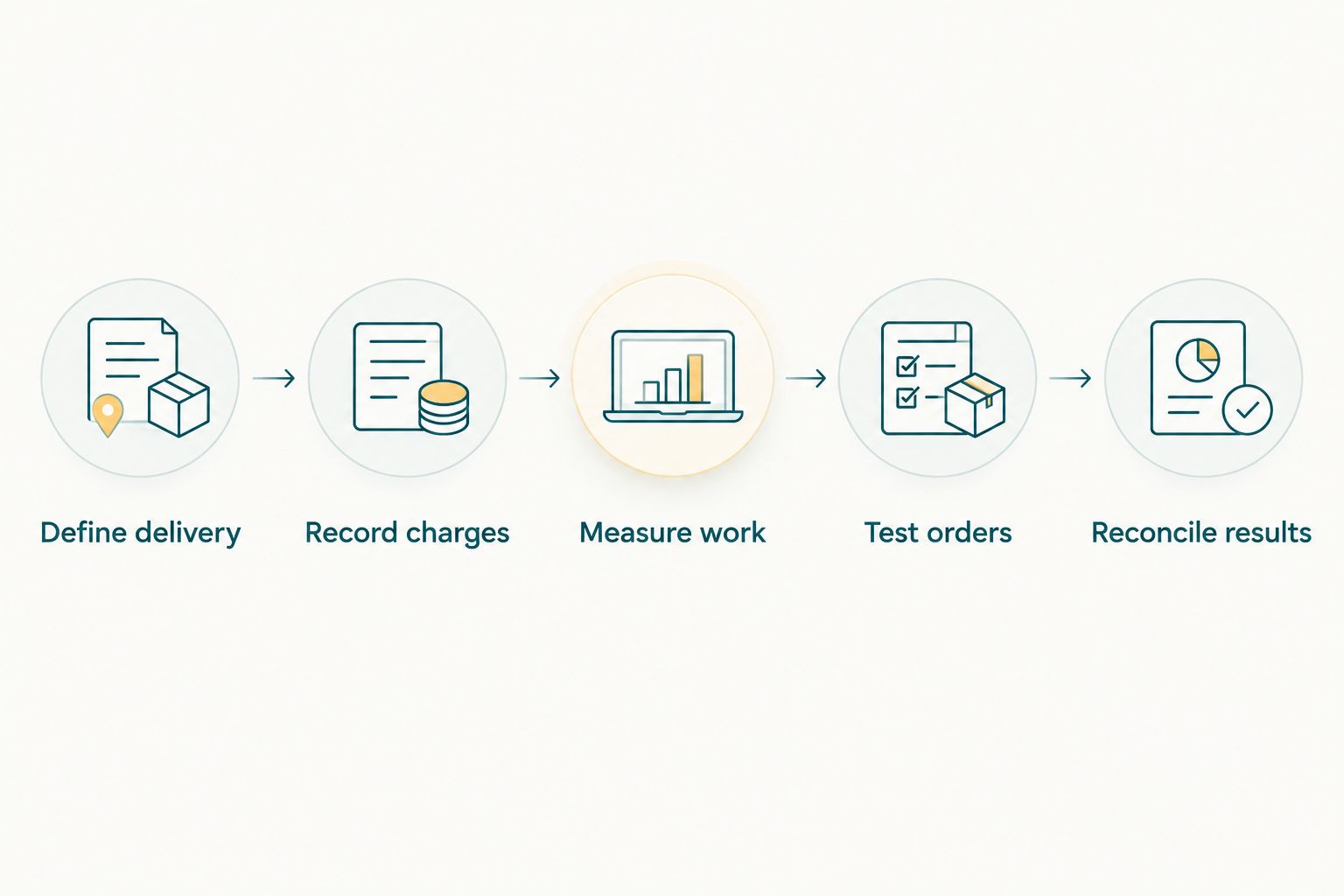
Test the complete order journey before opening the gallery to buyers.
Where Fotoowl fits in the budget
Fotoowl is best for professional event photographers who need face-recognition galleries for client delivery. Its AI Gallery supports photo and video delivery with face recognition, alongside a portfolio builder, reel generator, and Beam camera-to-cloud FTP uploads.
The relevant benefit is the delivery workflow. The limit is equally important: those capabilities alone do not establish your selling deductions, payment-processing terms, print arrangements, or overall operating cost.
Evaluate Fotoowl as event photography software against your actual assignment. Ask for the current terms that apply to your intended photo-selling process, and confirm what remains your studio's responsibility.
Do not treat a delivery feature as proof of a particular checkout or fulfilment arrangement. Verify the complete buyer journey before you make promises to an organiser or open orders to guests.
Is a subscription or a transaction-based arrangement better?
Compare both against the same event workload. A recurring commitment remains an expense during periods when you keep the service active; a transaction-linked deduction follows the terms attached to sales.
Neither structure determines your total cost by itself. Compare the services included, any additional deductions, storage commitments, and manual work before deciding.
For your 2026 review, use completed assignments wherever possible rather than projected buyer demand. Keep forecasts clearly separate from recorded results.
Should you sell wedding guest photos separately?
Sell wedding guest photos separately only when the client agreement permits it. First establish what the couple or commissioning client has already purchased and how guest access fits that commitment.
A multi-function Indian wedding also needs a clear delivery structure. Keep functions and collections organised so your team can answer selection questions without reconstructing the assignment from chat messages.
Do not treat guest purchases as guaranteed income. Budget the contracted photography and delivery work on its own terms.
FAQ
How much should I budget to sell event photos online in India?
Build your budget from gallery software, applicable selling and payment charges, storage, staff time, and any print fulfilment. Use current written terms and your own workload rather than a generic subscription figure.
Is digital photo selling cheaper to operate than selling prints?
Digital photo selling removes printing, packing, and shipping from the workflow. Compare the remaining software, payment, preparation, and support expenses before deciding which model fits your assignment.
Does a photo gallery subscription include payment processing?
Check the current agreement rather than assuming payment processing is included. Confirm which charges are separate and how deductions and refunds appear in your records.
Can I sell school event photographs directly to parents?
Confirm that the school agreement permits parent purchases before opening orders. Establish access rules, permitted use, delivery responsibilities, and the process for resolving order questions.
Does Fotoowl provide face-recognition galleries for event photographers?
Fotoowl provides AI Gallery for photo and video delivery with face recognition. Assess the current selling and payment arrangements separately before budgeting for an online photo-selling workflow.
How do I know whether online photo sales are profitable?
Subtract the costs assigned to photo selling from the revenue recorded for those sales. For assignment-level profitability, also account for the shoot, travel, editing, and other production expenses.
One last thing
A sales report and a bank settlement answer different questions. One records order activity; the other records money transferred under your payment arrangement.
Before renewing your selling setup in 2026, trace a completed order from purchase through delivery and settlement. Record every deduction and every staff action. That order-level view gives you a practical starting point for your next event budget.