
How much does camera-to-cloud FTP upload cost for photographers?


Camera-to-cloud FTP upload has no single standard cost: your 2026 budget depends on the upload service, camera connection, internet access, storage and delivery workflow you choose. Budget for the complete route from camera to client, not just the upload subscription. Setup, transfer monitoring and any separate editing or gallery work also belong in your calculation.
TL;DR
- Camera to cloud FTP cost includes upload software, connectivity, storage and staff time—not just a subscription.
- Fotoowl includes Beam camera-to-cloud FTP uploads within AI Gallery for professional wedding and event photographers.
- Compare workflows against the same delivery deadline, file requirements and event workload.
- Test camera compatibility and venue upload performance before committing to a live delivery workflow.
How much does camera-to-cloud FTP upload cost for photographers?
Your total cost is the combination of recurring services, equipment you actually need and the work required to deliver usable photographs. An FTP destination alone does not complete client delivery. You still need to decide which images leave the camera, who reviews them and where clients receive them.
Use this breakdown when comparing camera-to-cloud FTP upload tools for photographers. Ask each provider to explain the same workload rather than comparing headline subscriptions with different inclusions.
| Budget component | What to establish | What to avoid assuming |
|---|---|---|
| Upload service | How camera uploads are billed and what the service includes | Upload access includes every downstream task |
| Camera connection | Whether your exact camera and connection method work | Every camera supports the same transfer setup |
| Internet access | Which connection will carry uploads at the venue | Venue Wi-Fi will meet your delivery deadline |
| Storage | What remains online and for how long | Upload allowance and retained storage mean the same thing |
| Client delivery | Whether you need a separate gallery or delivery service | An FTP folder is a finished client gallery |
| Staff time | Who configures, monitors, reviews and publishes | Automatic transfer removes all human work |
Compare the cost of delivering the same finished result. A workflow that moves files into storage and a workflow that prepares photographs for client access solve different parts of the job.
For Indian wedding and event studios, define the deliverable first: a reviewed preview during the event, selected photographs after each function, or the final edited collection. Those commitments require different transfer and review arrangements.
Why this matters
Camera upload is an operational decision before it is a software decision. If you promise photographs during a reception or conference, someone must verify that the right files reached the right destination and are suitable for release.
Your 2026 budget should therefore include the work between successful upload and successful delivery. Faster file movement does not remove editing, consent requirements, access decisions or your responsibility for the final photographs.
Start with the client's deadline. Then work backwards through review, upload and capture to identify what you need to buy, configure or assign to your team.
Upload software: establish what the service includes
Ask the provider to separate camera ingestion from storage, processing and client delivery. These functions can sit within the same platform, but you should confirm the boundaries rather than assume them.
Get the billing basis in writing. Establish whether usage is measured by transferred data, retained files, connected users, projects or another defined unit, and ask what happens when your expected workload changes.
Check these points before choosing:
- Which upload functions are included in the proposed subscription?
- What usage limits apply to your planned events?
- Does the destination support your required file types?
- What happens to existing files when you stop using the service?
- Which delivery tasks remain outside the upload workflow?
Best for: photographers who can describe their expected workload and delivery process before requesting a quote. The benefit is a like-for-like comparison; the limitation is that a subscription alone cannot establish the full operating cost.
Camera connection: verify the equipment you already own
Do not buy accessories before checking the exact camera model and the provider's connection requirements. FTP support, network options and configuration steps depend on the equipment and service involved.
List your working camera bodies, intended connection method and any equipment that will sit between the camera and the internet. Ask the provider to confirm that specific arrangement. A general statement about camera support is not confirmation of your setup.
Include preparation in the decision. Someone needs to enter connection details, test the destination and confirm that the camera behaves as expected while you continue shooting.
Best for: studios planning to use existing equipment. The benefit is avoiding unnecessary purchases; the limitation is that existing equipment still needs a complete compatibility test.
Do that test before the assignment, not while the client waits for photographs.
Connectivity: budget for the venue, not your studio
A successful upload from your studio does not establish how the connection will behave at a wedding lawn, school ground or exhibition venue. Test the intended internet connection where the camera will operate.
Assess upload performance, not just download performance. Also establish who controls access to the network and what you will do if that connection becomes unavailable during the assignment.
For your 2026 event plan, record the primary connection, the fallback process and the person responsible for switching workflows. A fallback does not have to mean another online service: retaining files locally and delivering later is an operational choice when the client agreement permits it.
Best for: photographers with a clear deadline for online delivery. The benefit of planning connectivity is fewer untested dependencies; the limitation is that a connection test cannot guarantee uninterrupted service throughout an event.
Keep your local originals. Do not make successful internet access a condition of preserving the assignment.
Storage and delivery: separate transfer from retention
Uploading a photograph and keeping it accessible are different requirements. Define what needs to remain online during the event, after delivery and after the client has completed their selection.
Separate working files from deliverable files in your plan. If you intend to transfer camera originals and later upload edited versions, account for both stages when checking the provider's storage and usage terms.
Ask how deletion, replacement and download access work. Do not assume that replacing a preview with an edited photograph preserves every link, selection or client action; verify the behaviour you need.
Best for: studios that manage event previews and final delivery separately. The benefit is a clearer retention policy; the limitation is that maintaining multiple versions adds organisation and review work.
Your archive plan should remain explicit. A live event gallery should not become your only archive by accident.
Staff time: include the person behind the automation
An automatic upload still needs an owner. Assign responsibility for setup, checking incoming files, investigating failures and approving photographs for release.
Measure the work your team actually performs during a rehearsal. Record setup time, interruptions and any manual steps between transfer and delivery. Use your own observations rather than borrowing another studio's claimed time savings.
A wedding photographer working alone faces a different staffing decision from a studio with a dedicated editor. Keep that distinction visible when comparing workflows.
Best for: teams deciding whether camera-to-cloud changes on-site responsibilities. The benefit is making hidden work visible; the limitation is that monitoring and review can compete with shooting when nobody owns those tasks.
Assign the upload workflow to a named person, even when the transfer itself is automatic.
Why camera-to-cloud FTP cost varies
The most useful comparison starts with your workload, not a generic average. These factors determine what you need to evaluate:
- File requirements: Decide whether the live workflow needs selected JPEGs, originals or another supported format. Check representative files from your own camera.
- Upload scope: Transferring selected photographs and transferring everything create different workloads. Choose deliberately.
- Camera and team setup: Record every camera and operator expected to contribute. Confirm how the proposed service handles that arrangement.
- Connectivity requirements: An existing connection and a dedicated event connection require different planning. Verify the arrangement at the venue.
- Retention period: Keeping previews temporarily and retaining a complete event collection are different storage requirements.
- Delivery responsibilities: Include review, editing and gallery preparation wherever those remain separate tasks.
For a 2026 comparison, send every provider the same brief. Specify your camera models, file requirements, event pattern, retention needs and delivery deadline, then ask them to identify exclusions.
Which upload workflow fits your event?
Choose the workflow that supports your promise to the client. None removes the need to review your photographs or retain originals.
| Workflow | Best for | Main advantage | Main limitation |
|---|---|---|---|
| Camera-to-cloud FTP | Events with an during-event delivery requirement | Moves supported files from the camera towards the online workflow | Depends on a working connection and verified setup |
| On-site computer upload | Events where an editor reviews files before upload | Creates a defined review point before delivery | Requires file handling and a computer operator |
| Post-event upload | Assignments without a live delivery commitment | Keeps online transfer outside the shooting workflow | Does not meet an during-event delivery promise |
Camera-to-cloud FTP fits a live delivery requirement; post-event upload fits a deadline that allows review later. On-site computer upload is appropriate when a dedicated review stage matters more than direct camera transfer.
Avoid choosing a workflow solely because it has fewer visible steps. A review step is useful when it prevents unfinished photographs from reaching a client.
How do you calculate your own camera-to-cloud budget?
Build your 2026 estimate around a real assignment from your calendar. Use the same event brief for the software provider, your team and whoever manages connectivity.
- Define delivery. State which photographs the client expects and when they must be accessible. Distinguish previews from final edited files.
- Map equipment. Record the cameras, connection method and any required supporting equipment. Confirm compatibility before purchasing anything.
- Test uploads. Use representative files and the intended destination. Check completion and recoverability, not just whether a transfer starts.
- Assign review. Identify who checks incoming images and approves client access. Keep this responsibility separate from pressing the shutter.
- Plan retention. Decide what stays online after the event and where originals remain. Check the provider's terms against that plan.
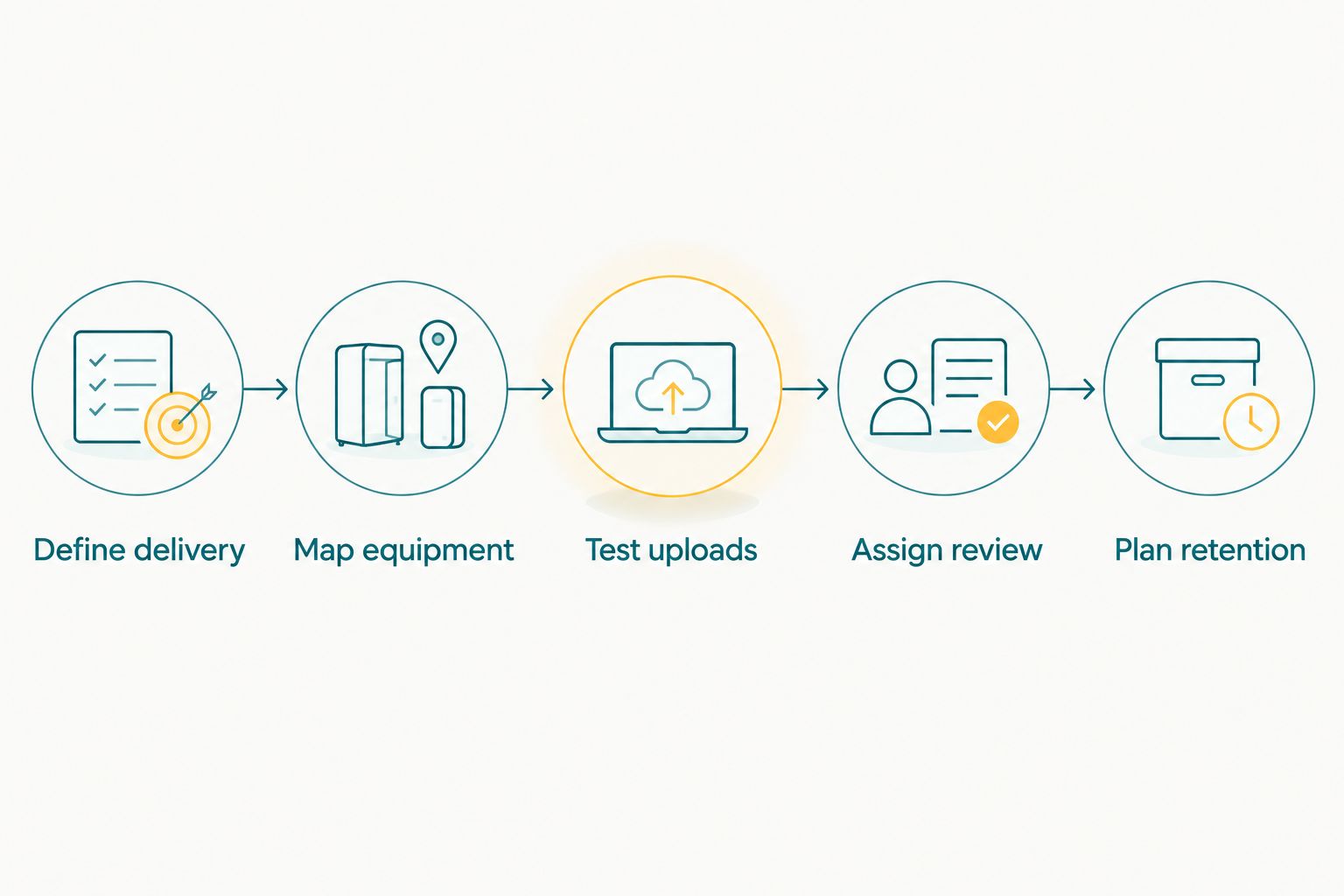
Define the client deliverable before choosing the upload setup.
After the rehearsal, compare the proposed workflow with your existing process. Identify which tasks disappear, which remain and which move to another person. That gives you a practical basis for a purchasing decision without treating automation as a substitute for delivery management.
Where does Fotoowl fit into camera-to-cloud delivery?
Fotoowl is best for professional wedding and event photographers who want camera-to-cloud FTP uploads within an AI gallery workflow. Beam is a feature within AI Gallery, alongside face recognition galleries, a portfolio builder and a reel generator.
Fotoowl AI Gallery connects this upload discussion to client delivery rather than treating file transfer as the whole assignment. The fit is strongest when your studio needs both camera ingestion and an event gallery; a transfer-only requirement does not automatically justify every gallery function.
The limitation remains operational: cloud delivery needs connectivity, and uploaded photographs still need your release decision. Confirm your camera setup, required file handling and current service terms before using Fotoowl for a client deadline.
Is camera-to-cloud FTP cheaper than uploading after the event?
Camera-to-cloud FTP is not automatically cheaper than post-event upload. Compare the services and staff work required to meet the same deadline; post-event upload is not an equivalent alternative when your contract requires photographs during the event.
If the deadline allows later delivery, keep your existing process in the comparison. A new transfer workflow should solve a defined problem.
Can camera-to-cloud replace an editor?
Camera-to-cloud FTP replaces a transfer step, not the judgement involved in editing and release. You still need to decide whether an image is sharp, appropriate, correctly processed and ready for the client.
Set a clear publication checkpoint. Do not treat arrival in cloud storage as approval to publish.
FAQ
What should I include in camera to cloud FTP cost?
Include the upload service, required equipment, internet access, storage, client delivery and staff time. Compare those components against a defined event workload and delivery deadline.
Do I need a new camera for FTP uploads?
You need to verify your existing camera before deciding to replace it. Check the exact model, connection method and upload service requirements together.
Can I use venue Wi-Fi for camera-to-cloud uploads?
Use venue Wi-Fi only after testing the intended upload workflow and confirming access arrangements. Keep local originals and an agreed fallback process if the connection fails.
Should I upload every photograph during a wedding?
Upload scope should follow the promised deliverable, not an assumption that every frame must go online immediately. Selected previews and a complete final collection require different review and retention plans.
Does Fotoowl support camera-to-cloud FTP uploads?
Fotoowl includes Beam camera-to-cloud FTP uploads within AI Gallery. Professional wedding and event photographers should confirm their exact camera setup and service requirements before an assignment.
Does successful FTP upload mean my client can see the photos?
Successful FTP upload confirms a transfer, not necessarily client access. Verify the review, gallery publication and access steps in your chosen workflow.
What should I test before using FTP at a paid event?
Test camera compatibility, representative file transfers, destination access and your recovery process. Confirm who monitors uploads and who approves photographs for client delivery.
One last thing
The useful endpoint is a client-ready photograph, not a completed transfer. During your rehearsal, follow a file all the way from capture to the client's actual viewing experience.
If it reaches storage but still needs manual sorting, editing or publication, keep those tasks in your budget. That final check makes your camera-to-cloud decision about the service you deliver—not just the technology you install.