
How much does an AI photo culling app cost in 2026?


Your AI photo culling app cost in 2026 is the current software charge plus the work required to review and export your selections. Compare the total cost of a finished, checked shortlist—not just the subscription. Keep human review, editing and client delivery in your budget unless the current offer explicitly includes them.
TL;DR
- Compare ai photo culling app cost against the complete review and export workflow, not the advertised software charge alone.
- Fotoowl suits wedding and event photographers seeking offline desktop culling with a human review before export.
- Measure active review time separately from unattended processing when assessing photo culling software.
- Check current billing terms, included functions and export requirements before committing.
How much does an AI photo culling app cost in 2026?
The useful cost breakdown separates what you pay for software from what you spend completing the job. Use the same event workload and review standard for every option. Otherwise, you are comparing different outputs.
Start with the workflow requirements in this guide to photo culling software for photographers, then check each shortlisted app’s current terms against your studio’s needs.
| Budget component | What to check | How to assess it |
|---|---|---|
| Software access | Current billing period, included functions and renewal terms | Record the commitment for the period you are comparing |
| Usage conditions | Any stated processing limits or usage charges | Apply the terms to your actual shooting workload |
| Human review | Time spent checking selections and rejected frames | Measure hands-on work on a completed event |
| Export and handoff | Work needed to move the shortlist into editing | Include corrections and repeated transfers |
| Separate workflow tools | Editing, backup, proofing and delivery requirements | Count only expenses that the culling app does not replace |
Do not assume that a combined platform includes every function under the same purchase. Equally, do not count an existing editing subscription as a new culling expense unless adopting the app changes that expense.
Your comparison needs a consistent boundary: from backed-up source photos to a reviewed shortlist ready for editing. Client delivery belongs in a separate assessment unless you are deliberately comparing the whole studio workflow.
Why this matters
For an Indian wedding studio, a purchase decision must fit the work between shoots, not just a product demonstration. A culling tool needs to handle your creative choices, your review process and your handoff to the editor.
A technically strong frame is not automatically the right frame to deliver. A gesture, a family relationship or a moment within a ceremony can matter more than a tidy composition. Your final selection must preserve that context.
For your 2026 software budget, separate financial savings from scheduling benefits. Finishing sooner can help your delivery schedule, but it becomes a financial saving only when it reduces paid work or creates capacity you actually use.
Compare manual culling with an assisted workflow
Manual and assisted culling both need a clear selection standard. The difference is where you spend your attention: reviewing the entire shoot yourself or checking an initial machine-generated selection.
| Approach | Best for | Main advantage | Main limitation |
|---|---|---|---|
| Manual culling | Photographers who want direct control over every initial decision | You assess technical quality and storytelling together | You perform the initial review yourself |
| Assisted culling with human review | Studios seeking help with the initial sorting stage | Software handles an initial pass before your final decisions | You still need to inspect selections and relevant rejected frames |
Manual culling remains a valid choice when it fits your workload and delivery commitments. Do not buy software merely because it produces a shortlist; judge whether that shortlist reduces the work needed to reach your standard.
Assisted culling deserves the same scrutiny. A fast initial pass loses value if you spend the next stage correcting groups, restoring important photographs or rebuilding the export.
Choose the workflow that reduces total hands-on work without weakening the final selection. That is a stronger purchasing rule than choosing the app with the quickest processing demonstration.
Measure the workflow before you commit
Use a completed assignment with a known final selection. An Indian wedding assignment can provide ceremony sequences, group portraits, changing light and repeated frames; choose material that reflects what your studio actually shoots.
Keep the original files backed up and work on a separate evaluation copy. The purpose is to assess the app, not to risk your only copy of a client assignment.
- Choose an event. Use a representative job, not only your cleanest portrait session. Keep the source set consistent throughout the comparison.
- Record manual review. Note the hands-on work needed to reach a shortlist you would send to editing. Include checking repeated frames and resolving uncertain choices.
- Run assisted culling. Record setup and processing separately. Check what happens to similar photographs and technically weak frames.
- Check the shortlist. Inspect selected photographs and revisit rejected sequences that contain important moments. Record corrections rather than relying on your first impression.
- Verify the export. Open the result in your next workflow stage. Confirm that the intended photographs arrived and that no manual rebuilding is necessary.
The comparison ends after export, not when the progress indicator finishes. Keep notes on where attention was required and which corrections affected the final result.
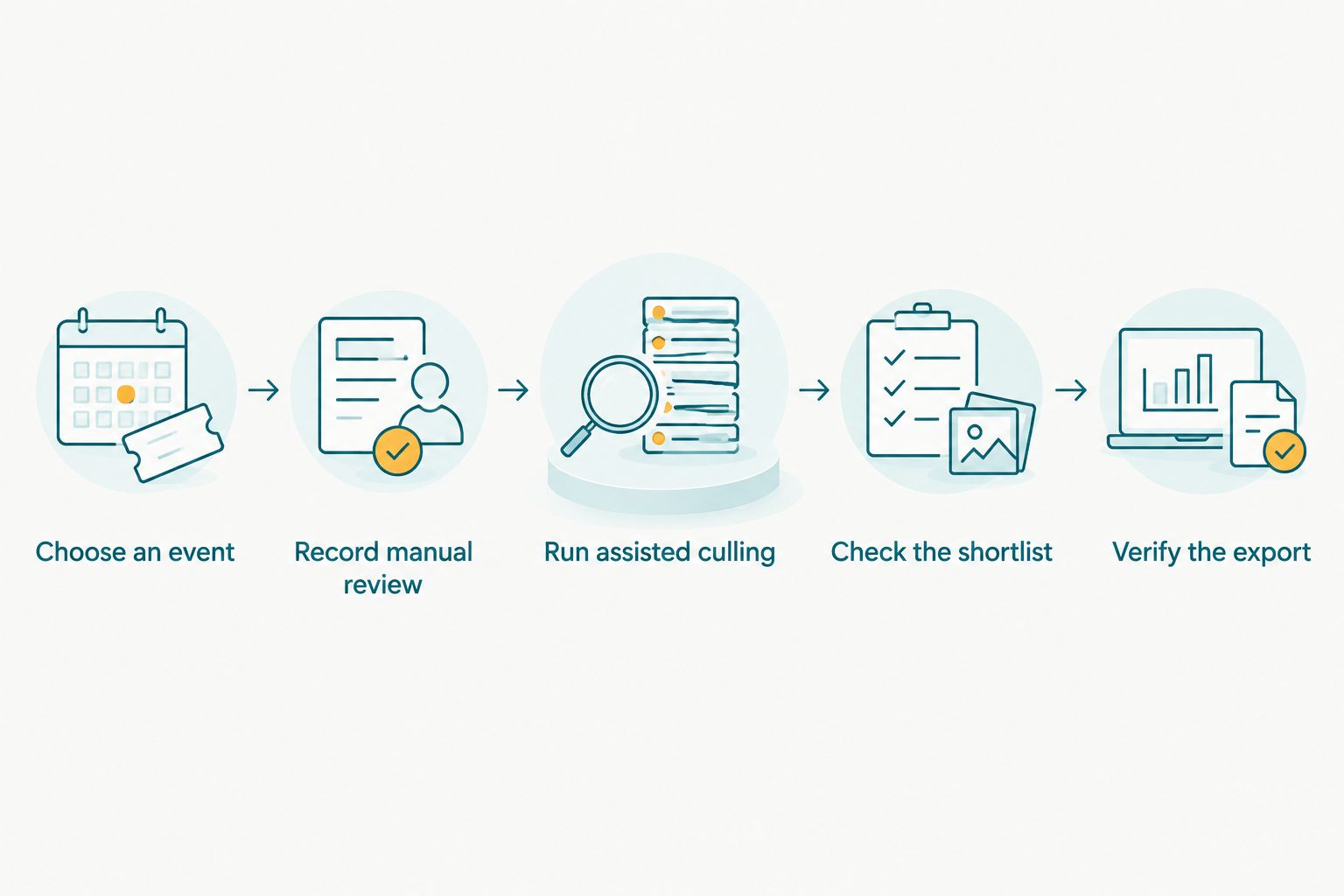
Evaluate the complete route to an editing-ready shortlist, not processing alone.
Repeat the assessment when your work differs substantially between assignments. A result from posed portraits does not establish how well the same workflow handles sports sequences or a crowded wedding ceremony.
Calculate value using your own studio records
Build your 2026 decision around measured work rather than a promised saving. Record active review time, correction work and export handling for both workflows. Treat unattended processing separately because elapsed time and paid attention are different costs.
Use this calculation without inserting assumptions:
Net labour value = measured hands-on time saved × your applicable labour rate.
Then compare that value with the additional software commitment and any other expenses introduced by the change. Use consistent time units and the same accounting period on both sides.
For a studio with salaried editors, reduced review time does not automatically reduce payroll. Record it as released capacity unless staffing costs actually change. For outsourced work, use the terms of your real editing arrangement rather than assuming every saved minute changes the invoice.
Also record selection quality. A workflow that requires less attention but omits important images has not met the same standard as your existing process.
Keep these costs separate
- Existing expenses: tools and equipment you already need regardless of the culling decision.
- Additional expenses: commitments introduced specifically by the new workflow.
- Transition work: setup, learning and changes to your studio’s review process.
- Recurring work: checking selections, resolving errors and completing the handoff on each assignment.
Separating these categories prevents you from overstating either the saving or the expense. It also makes the decision easier to revisit after real client work.
Why your total culling cost varies
The same software decision can produce different results across assignments because the work around the initial selection changes. Track these factors in your own studio rather than assigning a generic saving to every shoot.
- Repeated frames: Similar sequences require decisions about which expressions, gestures and compositions to retain. Check both grouping and your correction effort.
- Technical conditions: Exposure and blur are part of a technical assessment, but a technically unusual photograph can still matter to the story. Review those exceptions deliberately.
- Event context: Ceremony coverage, group photographs and sports sequences have different selection priorities. Define those priorities before evaluating the shortlist.
- Human review depth: Checking only selected frames is a different task from also reviewing important rejected sequences. Compare like with like.
- Editing handoff: The result needs to reach the next stage correctly. Include any repeated exporting, searching or selection rebuilding in your assessment.
These factors explain why a universal cost-per-event estimate is a poor purchasing shortcut. Your actual workload is the right basis for the decision.
Where Fotoowl AI Culling fits
Fotoowl AI Culling is best for wedding and event photographers who want offline desktop culling with a human review before export. The application rejects duplicate and weak frames, groups similar photographs, and ranks images by composition, exposure and blur.
That makes the product relevant when your initial review involves repeated sequences and technical sorting. The workflow includes a second human pass before export to Lightroom or the gallery. Keep that review in your schedule and your cost assessment.
The boundary is clear: Fotoowl AI Culling is an offline desktop application, not a browser or cloud culling feature. It does not suit a requirement to perform culling entirely in a browser, and it does not remove the photographer’s final selection responsibility.
For your 2026 evaluation, test the application against your normal shortlist standard. Inspect how much work remains after the initial pass, then verify the export destination you intend to use. Make the purchase decision on that complete result.
Is AI culling worth it for a small photography studio?
AI culling is worth considering when it reduces measured hands-on work while preserving your selection standard. A small studio should assess the commitment against actual assignments, not an assumed full calendar.
Check quieter periods as well as busy periods. A workflow that helps during a wedding backlog still needs to fit the billing terms you accept for the rest of your working schedule.
Does offline culling remove the need for gallery storage?
Offline culling and gallery storage serve different purposes. A desktop shortlist still needs an appropriate editing, backup and delivery process.
Do not remove storage or delivery from your budget simply because the culling stage runs locally. Assess which existing tasks the software actually replaces before changing those commitments.
Should you choose a culling app before choosing editing software?
Choose a culling app that fits the editing workflow you intend to use. Test the export before committing, particularly when another editor or studio team member receives the shortlist.
A useful initial selection is only part of the job. The handoff must preserve the intended photographs without making the editor reconstruct your decisions.
FAQ
How do I compare AI photo culling app cost in 2026?
Compare the current software commitment plus measured review, correction and export work over the same period. Use the same source photographs and selection standard for each workflow.
What is Fotoowl AI Culling best for?
Fotoowl AI Culling is best for wedding and event photographers seeking offline desktop sorting with a human review before export. It groups similar photographs and ranks images by composition, exposure and blur.
Can I use an offline culling app entirely in my browser?
An offline desktop culling application is not a browser workflow. Check the deployment requirements before choosing an app for your studio.
Does AI culling replace my final photo selection?
AI culling does not replace your responsibility for the final selection. Check storytelling, expressions and important rejected sequences before passing photographs to editing.
Should I count processing time as staff time?
Count active staff attention separately from unattended processing. Setup, corrections, review and export handling belong in your hands-on work assessment.
Does a culling purchase include photo editing and client delivery?
Treat editing and client delivery as separate requirements unless the current offer explicitly includes them. A culling function alone does not establish what else a purchase covers.
What should I check before committing to a culling app?
Check current billing terms, included functions, usage conditions and the complete export workflow. Evaluate the app on representative event photographs before making the commitment.
One last thing
Inspect rejected photographs before deciding that a culling app saves work. A clean-looking shortlist reveals what the software kept; it does not reveal whether an important moment was left behind.
Make that inspection part of your 2026 evaluation. The strongest result is not the smallest shortlist or the fastest initial pass—it is a checked selection that reaches editing with less hands-on work.