
How much does AI generative photo editing cost for photographers?

AI generative photo editing cost is the software charge, any paid generation usage, and the time you spend reviewing and finishing results. For your 2026 budget, compare cost per approved photograph, not cost per generated image; retries, corrections and client revisions belong in the total.
TL;DR
- Calculate AI generative photo editing cost per approved photograph, including retries and human finishing.
- Fotoowl AI Studio fits wedding and event photographers creating generative edits from their own photographs.
- Separate photo editing from image-to-video when comparing usage terms and deliverables.
- Approve a creative brief before generating variations; review identity, event details and output quality before delivery.
How much does AI generative photo editing cost for photographers?
Your working budget should combine the provider's current charges with the labour needed to turn generated results into client-ready photographs. A subscription or usage allowance is only part of that calculation.
Use this breakdown when reviewing an offer in 2026. Treat each row as something to verify, not a charge that every provider applies.
| Budget component | What to check | How to include it |
|---|---|---|
| Software access | What the subscription or licence actually includes | Allocate the relevant share to each project |
| Generation usage | Whether edits consume credits or another usage allowance | Count all billable attempts, including rejected results |
| Human finishing | Selection, masking corrections, colour matching and export checks | Record active editing and review time |
| Client revisions | What changes the agreed brief permits | Include the work needed to reach approval |
| Delivery preparation | File preparation and any separate delivery service | Keep this distinct from generation usage |
Project editing cost = allocated software charges + billable usage + human finishing + agreed revision work. Divide that total by the number of approved photographs to calculate cost per keeper.
For tool-selection criteria beyond billing, use the guide to AI photo editing tools for event photographers. Start with the work you need completed, then compare how each tool charges for completing it.
Why this matters
A wedding photographer does not deliver a generation history. You deliver photographs that meet the client's brief and your studio's standard. A result that needs extensive repair still consumes your time, even when the software charge looks attractive.
For an Indian studio, build the project budget in rupees and keep the billing currency visible beside it. Check the checkout total, applicable taxes and payment terms before approving software expenditure. Do not treat a foreign-currency headline as the final amount your studio pays.
The useful question is not simply whether generative editing is affordable. It is whether the approved output justifies the full production cost without weakening the photographs you promised to deliver.
Separate routine editing from generative work
Exposure correction and colour matching do not have the same purpose as generating new image content. Keep those jobs separate in your estimate so that a request for consistent colour does not become an open-ended creative task.
The following are workflow choices, not software tiers. Each has a different role and a different limitation.
| Workflow | Best for | Main advantage | Main limitation |
|---|---|---|---|
| Routine correction | Consistent colour and exposure across an event | Keeps the task focused on the captured photograph | Does not fulfil a brief requiring newly generated content |
| Targeted generative editing | Selected creative photographs with a defined change | Lets you develop a specific visual treatment | Requires checks for unintended changes and visible defects |
| Manual retouching | Precise corrections with direct editor control | Gives the editor control over the correction | Adds hands-on production work |
| Image-to-video | A separately agreed motion deliverable | Creates a different output from a still photograph | Needs its own brief, review and delivery checks |
Use routine correction for consistency and targeted generative editing for an agreed creative purpose. Neither replaces the other. A corporate conference gallery and a stylised pre-wedding portrait require different decisions about what changes are appropriate.
Keep image-to-video separate in your 2026 estimate. Confirm its usage terms rather than assuming that a still-image editing allowance covers motion generation.
Why AI generative photo editing cost varies
Your own production records reveal which part of the job consumes the budget. Track these factors rather than assuming every photograph requires the same effort:
- Approved scope: A specific requested change gives you a clear stopping point. An undefined creative brief leaves approval unresolved.
- Selected photograph count: Budget for the photographs assigned generative work, not automatically for every captured frame.
- Billable attempts: Check whether unsuccessful attempts and alternative versions consume the provider's allowance.
- Human finishing: Include inspection, corrections, colour matching and preparation of the final file.
- Revision boundaries: Separate a correction to the agreed brief from a request for a new creative direction.
- Output type: Confirm whether still images and image-to-video have different usage terms and technical requirements.
These factors belong in the estimate before production starts. After delivery, compare the estimate with the actual work so your next quotation reflects your studio's experience.
Build your budget with a 5-step editing test
Use a small, representative test before committing a whole event to a generative workflow. The purpose is to measure your own process, not to establish a universal performance benchmark.
1. Define scope
Write down the intended change, where the photograph will appear and what must remain unchanged. For a wedding portrait, that can include the subjects' identity, clothing, jewellery and meaningful ceremony details.
Choose photographs from the kinds of assignments you actually shoot. A test based only on an uncomplicated portrait does not answer how you will handle a crowded group photograph or a complex stage background.
2. Record usage
Log the task, the attempts made and the usage recorded by the provider. Mark which result you accepted and which results you rejected.
Do not divide usage only by the number of source photographs. A source photograph and an approved output are different accounting units. Your worksheet needs both to explain where the production effort went.
3. Track labour
Record active minutes spent preparing the source, reviewing results, correcting defects and exporting the approved file. Keep unattended processing time separate from hands-on labour.
That distinction matters when scheduling your team. A process that runs unattended and a process that occupies an editor require different production planning, even if their elapsed durations look similar.
4. Review quality
Inspect the result against the original and the agreed brief. Check the full composition, then inspect faces, hands, edges, text and any details that matter to the client.
Use 3 checkpoints: identity, event accuracy and output quality. For album work, review the intended print output as well as the screen preview. Do not approve a photograph solely because it looks convincing as a small thumbnail.
5. Calculate keepers
Add the software allocation, billable usage and active labour for the test. Divide by the approved photographs, then retain the underlying records with the project estimate.
Use that result as your studio's planning evidence. Do not present a test result as a guarantee for every assignment; update it when the brief, tool or production process changes.
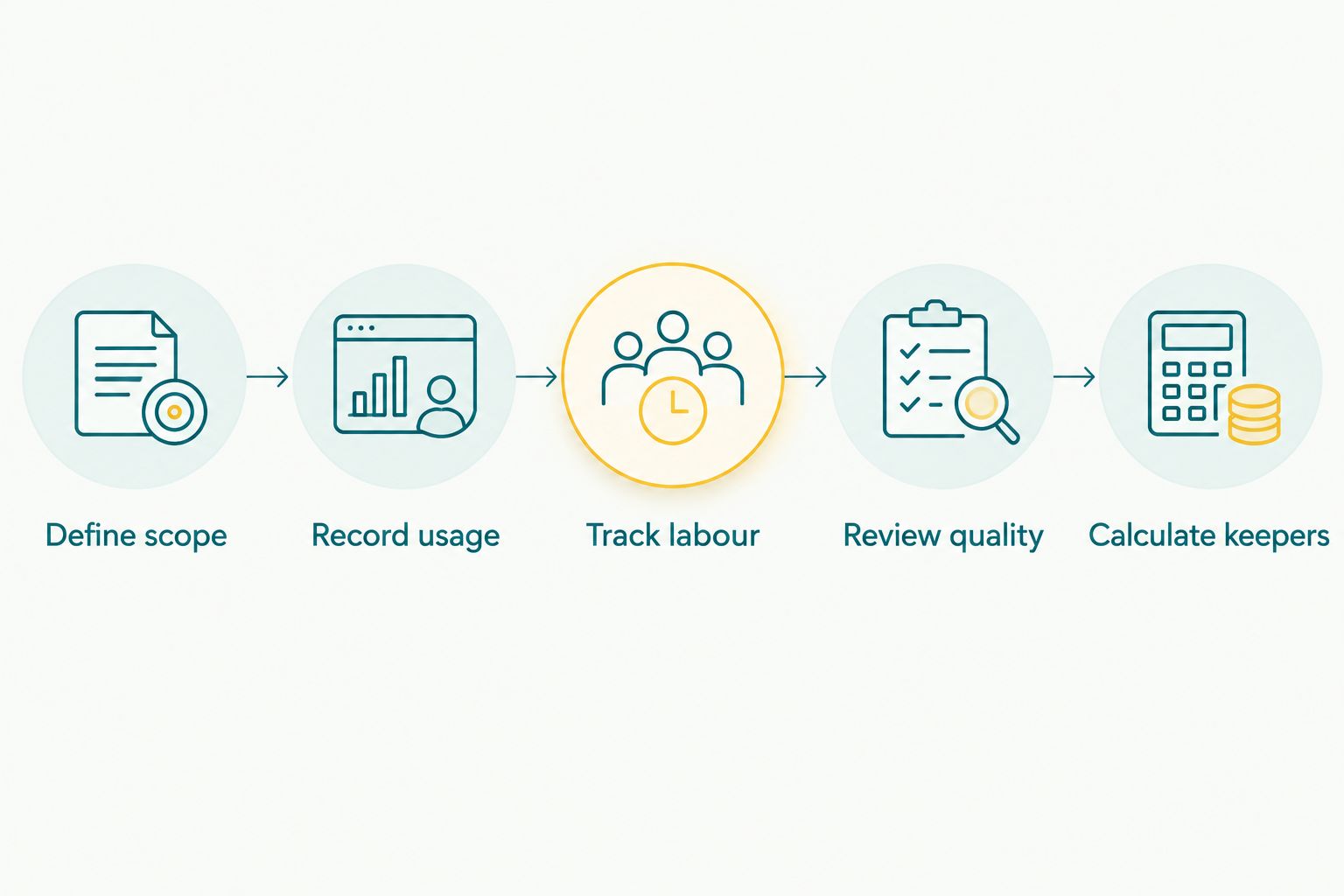
Measure the work required to reach approval, not just the generation attempt.
Where Fotoowl fits in a photographer's workflow
Fotoowl AI Studio supports generative edits and image-to-video using the photographer's own photographs. Fotoowl is best for wedding and event photographers who want generative edits based on their own photographs.
That fit does not remove the need for a defined brief or human approval. Treat AI Studio as the creative production step, then assess the resulting photograph against your intended use. Keep its editing budget distinct from selection, gallery delivery and other studio work.
For your 2026 evaluation, ask what the current offer includes, how usage is measured and how still-image work differs from image-to-video. Confirm the terms before allocating the tool to a client project. Do not infer a billing model from the product's feature list.
How do I stop revisions from expanding the job?
Define approval before generating alternatives. Your brief should identify the selected photographs, the intended treatment and the details that must remain faithful to the source.
Show a representative treatment before applying the direction more widely. Ask the client to approve that direction, rather than inviting unrelated visual experiments across the full event collection.
Keep these boundaries in your project documentation:
- Which photographs receive generative work.
- Which changes the client has requested.
- Which subjects and event details must remain unchanged.
- Who approves the treatment.
- What constitutes a correction versus a new request.
Keep 2 separate folders: originals and approved outputs. Preserve a clear connection between the source photograph and the delivered version so your editor can trace a revision without guessing which file the client means.
Is generative editing cheaper than manual retouching?
Generative editing is cheaper only when its full cost for an approved result is lower than the manual alternative. Compare equivalent deliverables, including review and finishing, rather than comparing a generation attempt with a completed retouch.
For a defined task, record the hands-on work each approach requires. Choose manual retouching when precise control is the requirement; use generative editing when the agreed creative change suits that process. Neither approach wins every assignment.
Should I generate edits for every wedding photograph?
Assign generative work to selected photographs with a clear purpose, not automatically to the entire wedding collection. Begin with the delivery brief and distinguish creative treatments from the documentary record.
For Indian wedding assignments, explicitly discuss changes affecting attire, jewellery, ritual objects and venue details. The issue is not whether an edit looks attractive. It is whether the delivered photograph still represents what your client expects.
FAQ
How do I calculate AI generative photo editing cost for a wedding?
Calculate AI generative photo editing cost by adding allocated software charges, billable generation usage, human finishing and agreed revision work. Divide the total by approved photographs to compare production cost per keeper.
Does a photo editing subscription include every generation?
Do not assume a subscription includes every generation. Check the current usage allowance, what consumes it and what happens when your planned work exceeds it.
Should I budget per source photo or per approved photo?
Budget per approved photo when comparing completed work. Keep source-photo and attempt counts in the worksheet so you can explain the usage behind each accepted result.
Can I use the same budget for photo editing and image-to-video?
Keep photo editing and image-to-video separate until you confirm their usage terms. They also need distinct output requirements and approval checks.
Is Fotoowl AI Studio relevant to wedding photographers?
Fotoowl AI Studio is relevant to wedding photographers creating generative edits or image-to-video from their own photographs. Define the creative brief and review the result before client delivery.
What should an Indian photography studio check before paying?
Check the billing currency, checkout total, applicable taxes, usage terms and renewal conditions before paying. Record the project budget in rupees so the software expense and your labour use the same accounting basis.
How do I know whether generative editing saves money?
Compare the total cost of reaching the same approved result with and without generative editing. Include rejected attempts, human review and finishing rather than counting only the software charge.
One last thing
A rejected generation belongs in the cost of the accepted photograph. Leaving it out makes your editing estimate look better without changing what the project consumed.
For your next 2026 assignment, agree the creative scope before opening the editing tool. Then record usage and labour through approval. That gives you a defensible budget for the next job, rather than another estimate based on the subscription alone.