
How long does AI reel generation take for a wedding highlight video?


AI reel generation for a wedding highlight has no universal completion time; use a timed run of your actual wedding workflow before promising a deadline. Generation time alone excludes source preparation, uploads, review and corrections, so a finished draft is not the same as a client-ready video.
TL;DR
- For ai reel generation time wedding planning, measure the complete workflow, not just the generation stage.
- Fotoowl includes reel generation within its photo-delivery workflow for professional wedding and event photographers.
- Separate a first draft from an approved wedding highlight before setting a delivery deadline.
- Test representative wedding media and record preparation, upload, generation, review and delivery separately.
How long does AI reel generation take for a wedding highlight video?
The useful answer is your measured time from approved source media to a checked, deliverable reel. A generator’s completion message answers a narrower question: whether that generation job has finished. It does not establish whether the wedding highlight tells the right story or is ready to send.
For your 2026 bookings, record the following stages separately. Use the same start and finish points each time so your timings remain comparable.
| Stage | Start the clock when | Stop the clock when | What the measurement tells you |
|---|---|---|---|
| Preparation | You begin choosing source media | The selected media is ready | Photographer effort before generation |
| Upload | You start transferring selected files | Required files are available | Transfer time before the generation job |
| Generation | You submit the job | The first result is ready | The generator’s processing interval |
| Review | You open the result | You approve it or request changes | Time spent checking the actual output |
| Delivery | You begin the final handoff | The intended recipient can access it | Whether the deliverable is ready to receive |
For the creative workflow behind the timing, see personalized highlight reels for wedding photographers. Keep creative scope and turnaround attached to the same deliverable.
Why this matters
A wedding studio needs a deadline it can keep, not an isolated processing result. If you promise a highlight before the reception ends, preparation, connectivity and your own review must fit inside that commitment too.
For an Indian wedding covering a mehendi, sangeet, ceremony and reception, specify which function the reel covers. A reception recap and a complete wedding story are different briefs. Do not leave that distinction for the editor to discover after generation.
In 2026, write the delivery commitment around a clear milestone: first draft, photographer-approved reel or client-approved final. Promise the milestone you have measured. Calling all of them a finished highlight creates avoidable confusion.
First draft versus client-ready wedding highlight
A first draft gives you something to evaluate. A client-ready highlight has passed the checks your studio requires before delivery. Neither label establishes a duration by itself.
| Output milestone | Best for | Advantage | Limitation |
|---|---|---|---|
| First generated draft | Internal creative review | Gives the photographer a result to assess | Still needs checks for selection, sequence and presentation |
| Photographer-approved reel | A studio-controlled handoff | Has passed your editorial review | Client approval remains separate when your agreement requires it |
| Client-approved final | Completing an approval-based assignment | Matches the agreed approval milestone | Depends on receiving and resolving client feedback |
Choose your timing endpoint before testing. If your contract includes client approval, do not describe the photographer-approved version as completion of the entire assignment.
Also separate a photo-based reel from a filmed wedding highlight. Establish whether the brief calls for selected photographs, recorded footage, original sound or generated motion. Confirm that the chosen tool supports the intended output rather than treating every short wedding video as the same task.
How to measure your wedding reel workflow
Use a completed wedding assignment as a rehearsal for your 2026 delivery process. Choose media that represents the work you actually sell, rather than a specially simplified demonstration.
1. Fix the brief
Write down the function, intended audience, source material and approval endpoint. Include the moments that must appear, such as the couple’s entrance, a ceremony detail or a family interaction relevant to the assignment.
Keep the test brief unchanged while measuring. Changing from a reception recap to a full wedding story halfway through produces a different job, not a reliable timing comparison.
2. Prepare the source
Choose the photographs or footage you intend to use. Remove accidental duplicates and obvious rejects before submitting the material, then confirm that the selection contains the story’s essential moments.
Record preparation as its own interval. This keeps the photographer’s selection work visible instead of hiding it inside a broad claim about generation speed.
3. Record generation
Note when you submit the generation job and when the first result becomes ready. Keep upload time separate if the files must transfer before submission.
Record any failure or retry alongside the result. A successful run and a run requiring resubmission are different operational outcomes; your studio needs to understand both before offering a deadline.
4. Review the result
Watch the complete output. Check the opening, image selection, order, crops, repeated moments and ending against the brief, then record whether it passes or needs changes.
Do not stop the review at the first attractive sequence. The delivery decision applies to the whole reel, including its final frame and any audio you intend to publish.
5. Confirm delivery
Open the final deliverable through the route your client will use. Check that you have sent the approved version and that the intended recipient can access it.
Record the finish time only after this check. Save your timings with the brief so you can reuse the result when planning a genuinely similar assignment.
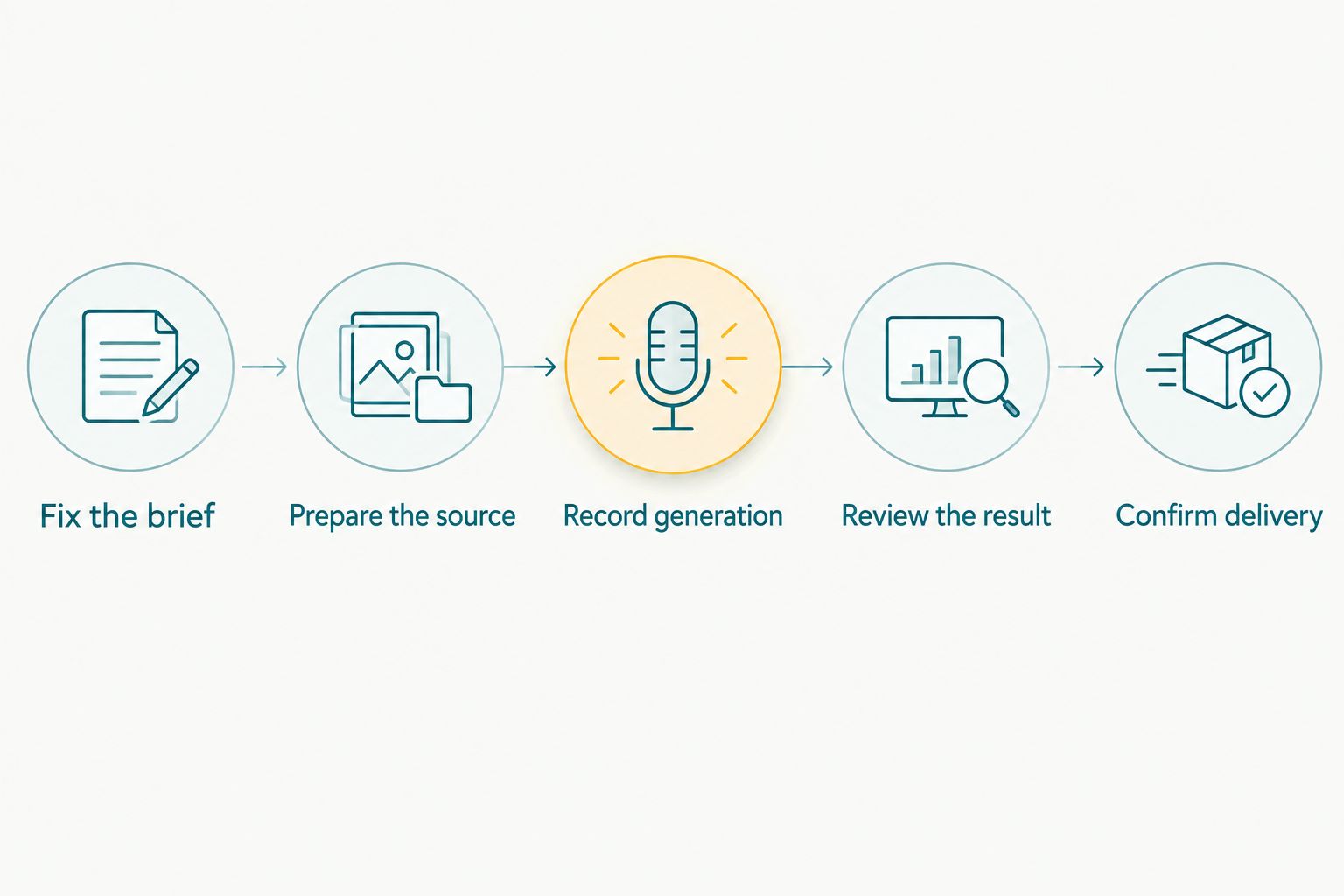
Measure the complete handoff separately from the generation job.
The record should distinguish active work from elapsed waiting. Your team’s workload and the client’s delivery deadline answer different questions, even when they come from the same assignment.
Why wedding reel turnaround varies
A useful timing record explains what happened, not just when the job finished. Keep these factors beside your measurements so you know whether a previous result applies to the next wedding.
- Source readiness: Record whether you started with an approved selection or still needed to choose the media. These are different starting points.
- Transfer requirements: Note whether the source files were already available or required an upload. Do not count an already-uploaded test as a complete venue-to-delivery rehearsal.
- Deliverable scope: Distinguish a single-function recap from a highlight spanning several wedding functions. Record the required moments and source types.
- Editorial corrections: Record selection changes, unwanted repetitions, crop corrections and other work requested after the first result.
- Approval process: State whether the photographer alone approves the reel or whether the client must respond before delivery is complete.
- Final handoff: Include the work needed to check the approved output and send it through the agreed delivery route.
These factors describe the whole production workflow. They are not a claim about the internal processing behaviour of any particular generator.
For 2026 scheduling, reuse a timing result only when the brief, starting conditions and approval endpoint match. If they change, test the changed workflow instead of carrying over the old promise.
Where Fotoowl fits in the workflow
Fotoowl’s AI Gallery includes a reel generator alongside photo and video delivery. Fotoowl is best suited to wedding photographers who want reel generation within their gallery-delivery workflow. The relevant advantage is that combination of functions, not an unverified completion-time claim.
The boundary matters: a reel generator does not establish that every wedding brief is satisfied. You still need to check the selected moments, narrative and final presentation before sending the result under your studio’s name.
For your evaluation, use a real wedding selection and the same delivery checks described above. Judge the workflow against your assignment rather than assuming that the presence of a reel feature establishes a turnaround guarantee.
A gallery reel and a commissioned wedding film should also remain distinct in your brief. If the assignment requires recorded speeches, original ceremony audio or specific footage, verify that the intended workflow meets those requirements before committing.
How should you set a deadline for a 2026 wedding booking?
Start with the output you owe, then work backwards through the measured stages. Name the source-readiness requirement, the approval owner and the delivery endpoint in the assignment record.
Use plain operational language rather than a blanket promise of instant results. State whether the commitment covers a preview or a final deliverable, and clarify what happens when the client requests a changed selection or a different story.
Your internal checklist should establish:
- Which wedding function or functions the reel covers.
- Who confirms that the source selection is ready.
- Who reviews the generated result.
- Whether client approval is required before completion.
- How the approved version reaches the recipient.
Assign responsibility for every handoff. If the photographer assumes an editor is reviewing the output while the editor assumes it has already been approved, the workflow is incomplete regardless of generation speed.
Keep the rehearsal record with the booking workflow. That gives your team a concrete basis for discussing delivery without turning one successful test into a universal performance promise.
Can you deliver an AI wedding reel on the same day?
Same-day delivery is a commitment to test, not a property established by the words AI reel generator. Rehearse the complete process under the conditions you expect at the assignment before offering it to a client.
If your plan depends on uploads from the venue, test that transfer stage too. A rehearsal using files already available to the generator does not demonstrate the same starting conditions.
Define a fallback before the shoot. Agree internally whether an unfinished reel remains pending or whether a separately agreed preview is delivered instead; do not quietly substitute a different deliverable.
Is generation time the same as editing time?
Generation time is the interval for producing the generated result; editing and review cover the decisions needed to accept or change it. Keep those intervals separate in your timing record.
That separation shows where your team spends attention. If the source selection or approval process needs work, changing the generator does not by itself resolve those tasks.
Does a longer highlight always take longer to generate?
A longer highlight does not establish a specific processing duration without a measured run of the chosen workflow. Runtime alone is not enough to quote a completion deadline.
For your 2026 planning, record output length alongside source material, submission time and review work. Compare like-for-like assignments before drawing a timing conclusion.
FAQ
How many minutes does an AI wedding reel take to generate?
There is no universal minute count for an AI wedding reel. Time your chosen workflow from submission to the first result, then measure preparation, upload, review and delivery separately.
Can I promise a wedding highlight before the reception ends?
Promise that deadline only after testing the complete workflow under the conditions your assignment requires. Define whether the promise covers a first draft or an approved final reel.
Does Fotoowl include a wedding reel generator?
Fotoowl includes a reel generator within AI Gallery for professional wedding and event photographers. Evaluate the result against your brief and time your actual workflow before setting a delivery commitment.
Should I include upload time in my wedding reel deadline?
Include upload time when the required media must transfer before generation. A test using media already available to the generator measures a different starting point.
Can I send the first AI-generated wedding reel straight to my client?
Review the first generated reel before sending it under your studio’s name. Check selection, sequence, crops, repeated moments and any audio against the agreed brief.
Is an AI photo reel the same as a wedding highlight film?
An AI photo reel and a wedding highlight film are not interchangeable briefs. Specify the required source material, recorded sound, narrative and approval process before choosing the workflow.
One last thing
Stop your delivery clock when the recipient can access the approved reel, not when generation finishes. That final check connects your timing measurement to the actual service your client receives.
Keep the first-draft timing too. Together, those records tell you both how the generator performs in your workflow and what it takes to deliver work you are prepared to sign off.