
Can photo selection tools reduce client back-and-forth?


Yes—photo selection tools reduce client back-and-forth by keeping image choices tied to the photographs instead of scattered across screenshots, filenames and messages. They do not replace a clear brief or final sign-off: you still need to define what the client is approving, who decides and when selection ends.
TL;DR
- A photo selection tool client approval workflow needs clear deliverables, identifiable images and explicit sign-off.
- Fotoowl Photo Selection supports client proofing, with selections reused for albums and printing.
- Separate image selection from editing instructions and album layout approval.
- Keep WhatsApp for reminders; keep the agreed image selection in one authoritative record.
Why this matters
An unclear approval creates work after the conversation appears finished. Your editor needs identifiable images, your album designer needs an agreed selection, and your client needs to understand what happens next. For your 2026 workflow, treat approval as a production handover—not just a friendly acknowledgement.
Start with the distinction between browsing and deciding. A client viewing photographs has not necessarily approved an album selection; the guide to photo selection software for photographers covers the selection stage specifically.
Can photo selection tools reduce client back-and-forth?
Yes, when you use the tool to collect a defined decision rather than simply share another gallery. The useful change is that the selection identifies the actual photographs, while your approval process explains what those choices authorise.
Use this sequence:
- Define the deliverable. State whether the client is choosing album photographs, print images or photographs for further editing.
- Prepare the review set. Remove unsuitable frames and organise the photographs before asking for decisions.
- Collect selections. Ask the client to choose from the agreed review set, rather than sending cropped screenshots separately.
- Resolve exceptions. Clarify replacement requests, editing instructions and conflicting preferences.
- Obtain explicit approval. Confirm which selection is final and what production work it authorises.
- Hand over the approved record. Give the editor, designer or print coordinator the same agreed selection.
This is a recommended process, not a promise that every proofing platform provides every step automatically. Check the tool's actual controls before you build your studio procedure around them.
The goal is not fewer messages at any cost. It is fewer messages needed to establish the same decision. Keep questions that clarify creative intent; remove the repeated work of identifying which photograph a message refers to.
What changes compared with approving photos through messages?
Messages remain useful for discussion. The problem starts when you treat a conversation as the production record without reconciling its decisions.
The comparison below describes workflow choices, not a feature checklist for any named platform.
| Approval approach | Best for | Useful strength | Limitation to manage |
|---|---|---|---|
| Message-based selection | A brief clarification about an identified photograph | Keeps the conversation close to the client | You must reconcile screenshots, filenames and later corrections |
| Shared folder with a separate list | A client comfortable maintaining exact file references | Gives you a written list to review | The list and review set need consistent filenames |
| Dedicated photo selection workflow | An album or print selection that needs a clear handover | Keeps choices associated with the photographs | You still need an agreed approver and explicit sign-off |
Use a dedicated selection workflow when the final image set must pass to another person. A small clarification can stay in a message, provided you transfer the resulting decision into the approved record.
Do not turn this into a ban on WhatsApp. Tell the client which channel handles conversation and which record controls production; otherwise, adding a new tool leaves the old ambiguity intact.
Build an approval workflow your client can follow
For 2026, write your selection instructions before sending the review invitation. Keep the process short enough to explain without a demonstration, and make the final action unmistakable.
Define the task
Tell the client what the selection is for. Album photographs, print orders and retouching choices are different decisions, even when they involve the same images.
Include the agreed selection allowance from your booking terms, where applicable. Do not introduce a new limit halfway through proofing or assume that opening the gallery explains the assignment.
Name the approver
Ask the client to identify the person who will submit the final decision. Other people can contribute preferences, but your team needs a clear instruction about whose confirmation authorises production.
For an Indian wedding covering a haldi, sangeet and ceremony, ask the client to consolidate family preferences before final submission. Do not make your editor resolve disagreements between relatives.
Collect selections
Ask the client to select from the agreed review set. Preserve a reliable connection between each choice and its source photograph throughout the handover.
Keep review filenames consistent. If your team changes names or replaces files, maintain the mapping rather than expecting a client or designer to recognise every frame visually.
Resolve requests
Separate an image choice from an instruction about that image. Selecting a portrait does not tell your editor whether the client wants a crop, a particular edit or simply its inclusion in the album.
Ask for each request to identify the photograph and the desired change. Confirm the request's scope before treating it as approved production work.
Confirm approval
Ask for confirmation that the selection is final for the named deliverable. Record that confirmation alongside the selection, even if the confirmation itself arrives through a separate channel.
Avoid interpreting a casual acknowledgement as approval of everything discussed. State exactly what you will begin next and which unresolved requests remain outside that approval.
Hand over
Give the production team the approved selection and its relevant instructions together. Identify the approved version so that an earlier shortlist does not become the working reference.
When a client changes a choice after handover, document the replacement and notify the person doing the work. Do not leave the correction buried in a different conversation.
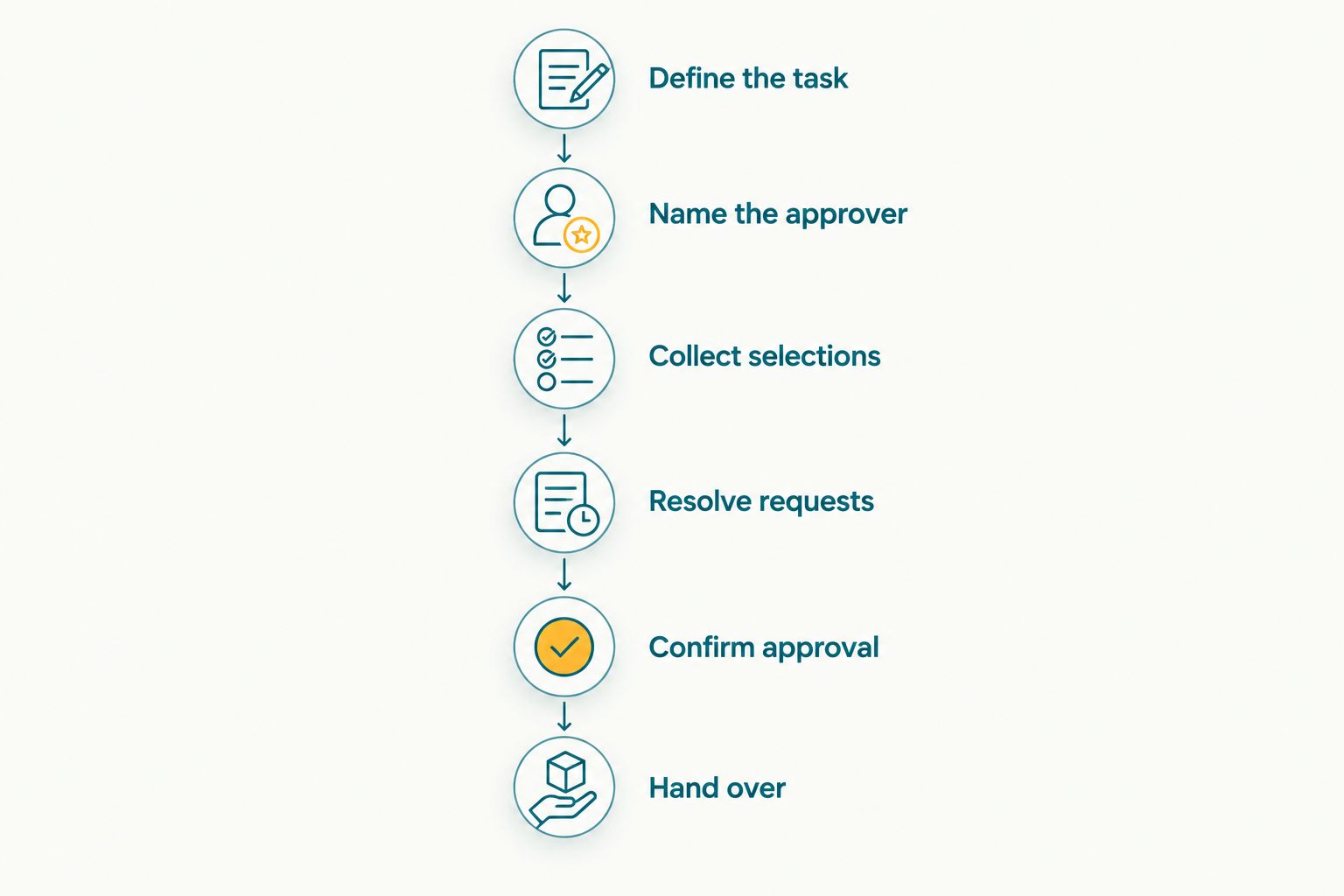
Confirm the decision before handing the selection to production.
Where Fotoowl Photo Selection fits
Fotoowl Photo Selection is best for wedding and event photographers who need client proofing selections for albums and printing. Its stated role is client proofing, with selections reused for those downstream deliverables.
That connection is relevant when your studio needs to carry the client's image choices into album and print work. It gives you a defined place for the selection task within the wider photography workflow.
Fotoowl Photo Selection does not remove your responsibility to define approval. Distinguish choosing photographs from approving an album layout, and verify any required controls before relying on them for your process.
For a 2026 evaluation, walk through a representative job from review to production handover. Check how you identify the chosen photographs, obtain the client's confirmation and pass the agreed choices to the person preparing the deliverable.
Choose Fotoowl for its stated photo selection purpose, not for approval controls you have not verified. Keep any studio-side confirmation procedure explicit rather than assuming the software enforces it.
Why the reduction in back-and-forth varies
The value comes from removing ambiguity. These factors determine how much ambiguity your approval workflow leaves behind:
- Selection scope. Choosing images for an album is different from choosing images for a print order. State the purpose before review begins.
- Review-set quality. Present a prepared set rather than asking the client to perform your initial quality check.
- Decision ownership. Identify who consolidates preferences and who authorises the final selection.
- Image identification. Keep each request attached to an identifiable photograph, including after internal handover.
- Approval boundaries. Explain what the current decision covers and what requires a separate review.
- Change handling. Record replacements and tell production which approved choice they supersede.
A selection tool addresses only part of this list. If the brief remains unclear, a more organised interface still contains an unclear task.
When a client asks a follow-up question, classify the reason before changing your process. A question about creative preference needs discussion; a question about which file was chosen points to a recordkeeping problem.
How should wedding and corporate studios handle approval differently?
Keep the approval principles consistent, but change the decision you ask the client to make. Do not reuse an album-selection brief unchanged for a corporate communications assignment.
Wedding album selections
Ask the client to review coverage across the functions included in the album brief. Keep the photographer's creative recommendations separate from the client's final image choices.
Then request layout approval as its own decision. An approved image selection is not an approved album design. The same selected photographs can appear in different sequences, crops and layouts.
Corporate event selections
Identify the person authorised to approve the intended deliverable. Ask that person to consolidate feedback from the relevant stakeholders before returning a final selection.
Separate image choice from intended use. Selecting a photograph does not, by itself, establish permission for every publication or resolve an organisation's internal review requirements.
School and sports selections
Define who chooses photographs and for which deliverable. A parent's print choice and a school's selection for an event report are separate tasks.
Keep those decisions distinguishable in your records. Do not treat every viewer's preference as an instruction to the studio.
Does photo selection approval include album layout approval?
No—photo selection approval confirms the chosen photographs, while album layout approval confirms how those photographs appear in the design. Ask for separate confirmation before treating a design as ready for production.
Make that distinction part of your 2026 client instructions. It prevents a selection-stage acknowledgement from carrying a meaning the client never intended.
Can I keep using WhatsApp for client communication?
Yes—use WhatsApp for reminders and clarification while maintaining an authoritative record of the approved photographs. If a message changes a selection, update that record and confirm the change before production continues.
Give the client a simple rule: discuss questions in the conversation, but confirm final choices against identifiable images. Your team should not need to reconstruct the selection from chat history.
How do I tell whether the approval process is improving?
Track the administrative work around comparable jobs: clarification messages, selection corrections, time spent reconciling choices and changes received after approval. Compare like-for-like deliverables rather than mixing a wedding album with a small corporate shortlist.
For your 2026 review, use your own job records rather than an assumed time-saving percentage. Improvement means a clearer decision reaches production with less reconciliation—not merely that the client sends fewer messages.
FAQ
Can a photo selection tool stop all client revisions?
No—a photo selection tool organises image choices, but it does not eliminate creative revisions or changes of mind. Define what approval covers and how you handle later changes.
What's the best way to stop clients sending photo screenshots?
Ask clients to make their final choices against the photographs in your agreed selection workflow. Explain that screenshots are useful for discussion but do not replace the approved selection record.
Is choosing favourite photographs the same as giving final approval?
No—favourites can represent a shortlist rather than a final decision. Ask the client to confirm which selection authorises the named deliverable.
What is Fotoowl Photo Selection used for?
Fotoowl Photo Selection provides client proofing, with selections reused for albums and printing. Photographers still need to define the approval task and obtain clear confirmation.
Should I let several family members send wedding album choices?
Ask the client to consolidate family preferences through a named final approver. Your studio needs an agreed selection rather than conflicting instructions from separate conversations.
Should I start album design before the client approves the photographs?
Obtain the agreed image selection before treating it as the basis for album production. If you prepare an exploratory design earlier, make clear that its image choices are not yet final.
Does an approved photo selection authorise printing immediately?
Not automatically—image selection and approval of a print deliverable are different decisions. Confirm the relevant print instructions and authorisation before sending work to production.
One last thing
Do not make the final approval request another vague message. Name the deliverable, identify the selection and state the next production action in the same request.
Before your next handover, ask whether someone outside the conversation could identify exactly what the client approved. If the answer is no, fix the record before your editor or designer starts work.