
Can AI generate a wedding highlight reel without a videographer?


Yes, you can create an AI wedding highlight reel without a videographer by using photographs, existing video clips, or generated motion from still images. The result is a visual recap—not a substitute for recorded vows, speeches, live sound, or wedding moments nobody captured.
TL;DR
- An AI highlight reel without videographer coverage works as a photo-led wedding recap, not a documentary film.
- Fotoowl supports personalised reel generation for professional wedding and event photographers.
- Generated motion illustrates a photograph; it does not recover the movement or sound of the original moment.
- Review people, rituals, sequence, music permissions, and client expectations before delivering a wedding reel.
Why this matters
For your 2026 wedding bookings, define what a highlight reel includes before promising one. A couple asking for a reel might mean a moving photo montage, a reception recap, or a film containing their actual vows. Those are different deliverables.
As the photographer, you control the promise. Explain the source material, show a representative sample, and separate the reel from documentary video coverage. That prevents a photo-based deliverable from carrying expectations it cannot meet.
Start with an organised photo collection rather than an unfiltered wedding folder. The guide to organising photos for multi-function Indian weddings addresses the preparation that comes before selecting a coherent recap.
Can AI generate a wedding highlight reel without a videographer?
Yes—AI can help create a wedding recap without a videographer, but it cannot turn unrecorded events into authentic footage. The deciding factor is what your studio captured, not simply which editing tool you choose.
Use this comparison to match the deliverable to the available material. These are production approaches, not promises that every reel generator supports every input or editing control.
| Approach | Best for | Main advantage | Main limitation |
|---|---|---|---|
| Photo-led reel | Photography-only wedding assignments | Builds a recap from selected photographs | Does not preserve continuous movement or original sound |
| Existing-footage edit | Weddings with usable recorded clips | Uses movement that actually happened | Depends on the coverage and quality of those clips |
| Generated-motion reel | Clearly identified creative treatments | Adds interpreted motion to still photographs | Generated movement is not a factual recording |
| Videographer-led film | Clients who want vows, speeches, and unfolding action | Plans capture around movement and sound | Requires dedicated capture work rather than editing alone |
Choose the approach before selecting music or transitions. If the client expects to hear a parent's speech, a collection of portraits does not satisfy that requirement—even when the finished reel looks polished.
What does “without a videographer” actually mean?
Without a videographer does not necessarily mean without any video. Your studio might have recorded clips, or the client might supply footage that you have permission to use.
However, photographing an event and documenting it in motion are separate responsibilities. Do not promise comprehensive video coverage simply because your camera records video or a tool can generate a moving image.
Photo-led reels: best for photography-only coverage
A photo-led reel presents selected still images as a moving sequence. It suits an assignment where your deliverable starts with photographs rather than dedicated video coverage.
For an Indian wedding, build the selection around the functions you actually photographed. A haldi, sangeet, ceremony, and reception can each contribute a distinct chapter; include only the functions covered by the assignment.
The strength is editorial control. You can choose photographs that communicate relationships, setting, emotion, and important rituals without pretending to have filmed them.
The limitation is equally clear: a photograph captures an instant. A sequence of stills cannot reproduce the complete exchange around that instant or supply the original spoken words.
Recommend a photo-led reel when the client wants a shareable photographic recap. Describe it that way in your proposal, sample, and delivery message.
Existing-footage edits: best for captured movement
An existing-footage edit uses recorded clips rather than inventing movement. It is the better fit when the brief depends on dancing, entrances, reactions, or other action that was actually filmed.
Review the material before accepting the assignment. Check whether the clips show the requested moments, whether important subjects remain visible, and whether any required speech is intelligible.
The advantage is authenticity of captured action. The drawback is that editing cannot supply missing camera coverage or restore an unrecorded conversation.
If you combine photographs and clips, keep their roles clear. Use photographs to support the story, not to disguise a gap in a promised documentary sequence.
Recommend an existing-footage edit when usable recordings support the brief. If they do not, revise the deliverable before production starts.
Generated-motion reels: best for labelled creative treatments
Image-to-video tools generate a moving interpretation of a still photograph. This is different from arranging photographs into a montage and different again from editing authentic video footage.
The benefit is creative flexibility. The limitation is factual reliability: generated movement is not evidence of how someone moved, how a ritual unfolded, or what happened outside the photograph.
For your 2026 workflow, treat generated motion as an optional creative treatment requiring review. Check faces, hands, jewellery, clothing, and interactions between people before including a generated sequence.
Do not use generated motion to imply that an uncaptured ritual was documented. Keep the original photograph available, and explain the treatment when presenting the deliverable to the client.
Recommend generated motion only when the client understands that it is synthetic. Use captured material when the purpose is to preserve what actually happened.
How do you make an AI wedding reel from photographs?
Use this production sequence for a photography-led recap. The steps describe your studio's responsibilities; they do not assume that a particular platform supplies every editing control.
- Define the deliverable. Agree whether the output is a photo montage, an edit of recorded clips, or a creative treatment. State whether original speech and event sound are included.
- Select photographs. Choose images that establish the setting, show the principal people, cover the photographed rituals, and provide a clear ending. Remove unnecessary repetition.
- Build the sequence. Put the selected material into an intentional order. Preserve the event's meaning rather than arranging everything solely around a visual effect.
- Review the draft. Check people, crops, chronology, generated details, text, and music permissions. Review the complete output, not just an attractive preview frame.
- Approve delivery. Confirm the audience and publishing permission with the client. Deliver the reel with a description that accurately identifies what it contains.
A working sequence is easier to judge than a folder of individually strong photographs. Look for a beginning that establishes the wedding, a middle that shows relationships and events, and an ending that feels intentional.
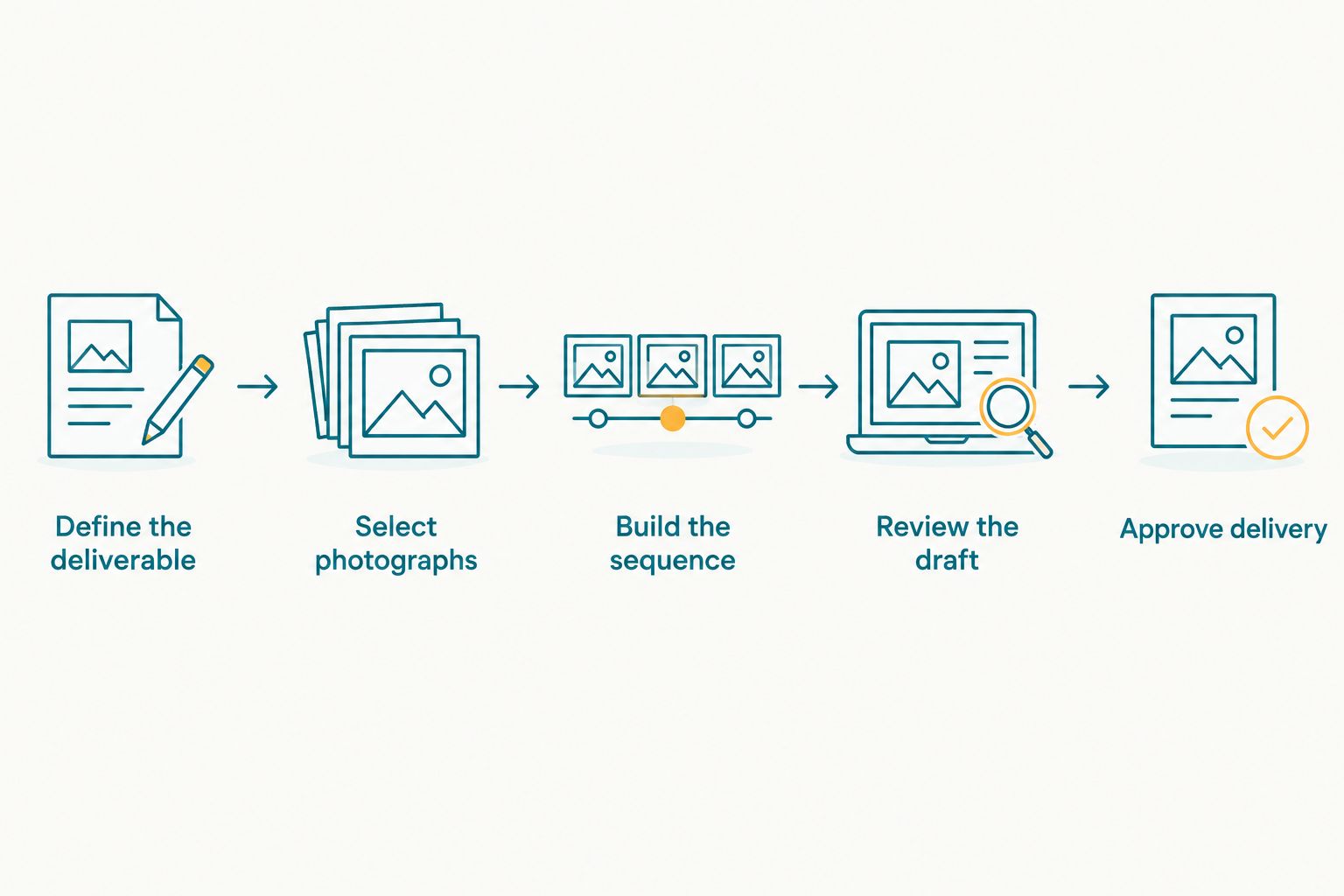
Define the deliverable before selecting images or generating a draft.
Choose the frame before approving the crop
For a vertical delivery brief, a 9:16 aspect ratio corresponds to a frame 1080 pixels wide and 1920 pixels tall. Treat those dimensions as an example of a vertical format, not a claim about any platform's export settings.
Check the actual destination requirements before exporting. A portrait photograph and a wide family group do not behave the same way inside a vertical frame; review who remains visible after cropping.
Your 2026 delivery checklist should include playback on the intended viewing device. Faces, captions, and important gestures need to remain understandable in the finished version, not just in the original files.
Why AI wedding reel results vary
The source material and editorial brief determine what a reel can honestly deliver. Review these factors before committing to an outcome:
- Available media. Photographs support a photo-led recap; recorded clips supply captured movement. Neither provides original sound unless sound was recorded separately or within footage.
- Selection quality. Repeated poses occupy space without adding another part of the wedding story. Select for meaning as well as technical quality.
- Function coverage. A reel spanning several wedding functions needs material from those functions. Do not imply coverage your team did not provide.
- People and ritual context. Identify important relatives and meaningful moments with the client. Visual prominence alone does not establish personal significance.
- Crop and sequence decisions. Check that framing keeps essential people visible and that the order does not misrepresent events.
- Publishing permissions. Confirm permission to use the media and the intended music. Private client delivery and public studio promotion are separate decisions to discuss.
These are production checks, not reasons to promise a guaranteed result. Review the actual wedding material before describing the finished reel's scope.
Where does Fotoowl fit into a photographer's workflow?
Fotoowl is best for professional wedding photographers who want personalised reels alongside photo-gallery delivery. Its platform includes personalised reel generation, while AI Gallery supports photo and video delivery with face recognition.
The relevant benefit is the connection between your event photographs and a client-facing recap. Fotoowl supports a photography-led workflow; its reel capability is not a substitute for capturing live speech, sound, and action.
Evaluate Fotoowl against a representative wedding selection in 2026. Check whether the resulting reel matches your intended story, and confirm the available controls and output settings before making them part of a client promise.
Keep your recommendation narrow: gallery delivery and reel generation address presentation and sharing. Dedicated videography addresses capture. One does not erase the need for the other when the brief requires documentary coverage.
Should photographers stop recommending videographers in 2026?
No—photographers should recommend dedicated video coverage when clients want recorded vows, speeches, ceremony sound, or continuous action. A photo-led reel answers a different brief.
Ask what the client wants to revisit, not merely what file they want to receive. Hearing a speech requires an audio recording; watching a dance requires captured movement if the aim is an authentic record.
Can you create a wedding reel using only photos?
Yes—you can create a wedding reel using only photos when the deliverable is a photographic recap. Select images that tell the story, then review the sequence and crops before delivery.
Present the sample as a photo-led reel. Do not describe it as original wedding footage or imply that it contains recorded moments beyond the still photographs.
Can AI recreate wedding moments that nobody filmed?
No—AI cannot recreate unfilmed wedding moments as authentic recordings. Generated video is an interpretation, not recovered footage.
If a client asks for a missing moment, explain the boundary directly. Offer a clearly described creative treatment only when appropriate, rather than presenting invented motion as documentation.
FAQ
Can I make an AI highlight reel without videographer coverage?
Yes, you can make an AI highlight reel without videographer coverage using photographs or existing recordings. Describe a photo-based result as a recap, not as documentary footage of the wedding.
Will a photo-based wedding reel include the couple's original vows?
A photo-based wedding reel includes the original vows only if a usable recording exists and is incorporated into the edit. Still photographs do not contain recoverable speech.
Is generated wedding video the same as real wedding footage?
No, generated wedding video is not the same as real wedding footage. It creates interpreted motion rather than documenting the movement that actually occurred.
What's the best approach for a photography-only wedding package?
A photo-led recap is the clearest fit for a photography-only wedding package. Show a representative sample and agree on its scope before promising delivery.
Can I include guests' phone videos in a wedding highlight reel?
You can include guests' phone videos when you have the necessary permission and usable files. Review the footage, sound, and coverage before accepting it as part of the brief.
Do photographers still need to review an automatically generated reel?
Yes, photographers need to review an automatically generated reel before delivery. Check the people included, event sequence, crops, text, music permissions, and any generated visual details.
Can I post a client's wedding reel on my studio's social accounts?
Confirm the client's permission before posting a wedding reel on your studio's social accounts. Also check that you have the necessary rights for the photographs, clips, and music used in that public version.
One last thing
A visually strong photograph is not automatically the most important wedding memory. Ask the client which people and moments must appear before approving the final selection.
That check belongs in your 2026 workflow even when generation is automated. A reel should reflect the wedding you were hired to photograph—not just the images that produce the most dramatic opening.