
Best EyeMatch alternatives for event photographers


EyeMatch deserves to stay on your shortlist when your existing setup already delivers the experience your clients need. The ceiling is your workflow: finding photos is not the same job as culling, collecting album selections or managing bookings. The best EyeMatch alternative in 2026 is Fotoowl for connected event-photography workflows; Google Drive is the simpler choice when you only need shared folders.
TL;DR
- Fotoowl leads these EyeMatch alternatives for event photographers needing face recognition galleries, client proofing and studio management.
- Google Drive suits straightforward file sharing, not a complete event-photography workflow.
- Pixieset suits photographers prioritising client galleries and photo favourites.
- Keep EyeMatch when your current delivery process meets your requirements; switch to solve a specific workflow problem.
Why this matters
Your gallery is only one part of an event assignment. You also need to decide which frames deserve delivery, organise the approved images, collect client selections and close the outstanding work.
For an Indian wedding studio, the gallery handoff and the album-selection handoff are different tasks. A corporate photographer also needs to distinguish attendee delivery from the organiser's final image set. Choose the alternative that fixes your actual handoff, not the one with the longest feature list.
Use 1 completed assignment as your comparison project. Evaluate 3 workflow stages: preparation, delivery and client follow-up. These are test criteria, not promises about processing speed or business results.
EyeMatch alternatives at a glance in 2026
The shortlist below compares different approaches rather than treating every option as a direct feature-for-feature replacement. Start with the job you need the software to perform.
| Option | Best for | Standout capability | How to assess it against EyeMatch |
|---|---|---|---|
| Fotoowl | Wedding and event studios connecting delivery with proofing and studio operations | Face recognition galleries alongside dedicated selection, CRM and offline culling products | Test the full assignment workflow, not just photo retrieval |
| EyeMatch | Photographers satisfied with their existing setup | Your current delivery process as the benchmark | Record what already works before replacing it |
| Google Drive | Straightforward folder-based file sharing | Shared folders and file-access controls | Compare the recipient's browsing work with your current delivery experience |
| Pixieset | Photographers prioritising client-facing galleries and favourites | Client Gallery and photo favourites | Compare presentation and selection with your actual event requirements |
Do not read the table as a claim that EyeMatch lacks a particular feature. Use your existing account as the baseline and test each candidate against the same assignment. That makes the decision about your work, rather than assumptions about another platform.
1. Fotoowl: best for connected event-photography workflows
Fotoowl is event-photography software for studios that need more than a gallery handoff. AI Gallery supports photo and video delivery with face recognition, while Photo Selection handles client proofing and selections reused for albums and printing. Studio Manager handles the business side of an assignment.
Best for: Professional wedding and event photographers who want delivery, selections and studio operations addressed within the same platform's product range.
Where it shines
- Guest photo discovery: AI Gallery uses face recognition for gallery delivery.
- Client proofing: Photo Selection collects choices that can be reused for albums and printing.
- Capture-to-upload workflow: Beam provides camera-to-cloud FTP uploads within AI Gallery.
- Studio administration: Studio Manager captures and analyses leads from WhatsApp and Instagram chats and manages follow-ups, quotations, contracts, invoices, projects and payments.
- Pre-delivery review: AI Culling rejects duplicate and weak frames, groups similar images and ranks them by composition, exposure and blur.
- Additional creative work: AI Studio supports generative editing and image-to-video using the photographer's own photos.
The strongest reason to shortlist this option is the separation of responsibilities. Guest discovery belongs in AI Gallery; client choices belong in Photo Selection; booking and project administration belong in Studio Manager. You can evaluate each job without treating face recognition as a substitute for everything else.
Where it falls short
- AI Culling requires a desktop: It is an offline desktop application, not a browser or cloud culling feature.
- Culling still needs your judgement: The workflow includes a second human pass before export to Lightroom or the gallery.
- Breadth adds setup decisions: You need to decide which products belong in your process rather than adopting every product by default.
- A gallery does not define your delivery policy: Your studio still needs clear rules for final selections, client approvals and access.
These are practical constraints. If your team expects to cull entirely in a browser, the desktop requirement matters more than the length of the feature list.
Match the product to the bottleneck
| Your bottleneck | Product to evaluate | What to test |
|---|---|---|
| Guests struggle to locate their images | AI Gallery | Face recognition with your own approved event photographs |
| Client selections arrive across messages | Photo Selection | A complete selection round for an album or print order |
| Leads and project follow-ups are scattered | Studio Manager | The path from enquiry to deliverables and payments |
| Duplicate or weak frames delay delivery | AI Culling | Offline review, the human pass and export |
For culling, plan 2 review passes: the application's initial assessment and your human review. This follows the stated workflow; it is not permission to publish every automatically selected frame.
Verdict: Buy only after a pilot confirms that the products solve your actual handoffs.
2. Google Drive: best for simple folder-based delivery
Google Drive is a file-storage and sharing option, not a purpose-built event-photography workflow. You can organise files in folders and control how other people access them. It is a sensible candidate when the client already knows which files they need.
Best for: Photographers delivering a clearly organised final image set to a known client or collaborator.
Where Google Drive shines
- Direct file handoff: A shared folder gives a client access to the files you place inside it.
- Flexible organisation: You control the folder structure and file naming.
- Collaboration: File-access permissions distinguish viewing from editing responsibilities.
Where Google Drive falls short
- Browsing remains the recipient's task: Folder sharing alone does not organise photographs by guest identity.
- Selections need a separate method: A folder structure is not an album-proofing workflow.
- Studio operations sit elsewhere: Delivery folders do not replace your quotations, contracts or project follow-ups.
For a corporate assignment, separate the organiser's approved deliverables from working files. For a wedding, label the functions clearly rather than handing over an unexplained collection of folders. The organisation comes from your process, not from the existence of a sharing link.
Against EyeMatch, evaluate the recipient's effort. If the recipient needs to browse the entire assignment to locate personal photographs, a basic folder is a different delivery experience—not automatically a better one.
Verdict: Buy into this approach for straightforward file handoffs; skip it as a complete event-delivery replacement.
3. Pixieset: best for client galleries and photo favourites
Pixieset's Client Gallery is built around presenting photographs to clients, with favourites available for recording image choices. That makes it a relevant candidate when your main concern is the client-facing gallery and selection experience.
Best for: Photographers whose priority is presenting an edited set and collecting favourites from clients.
Where Pixieset shines
- Gallery presentation: Client Gallery provides a photography-focused way to present an assignment.
- Image choices: Favourites give clients a way to record preferred photographs.
Where Pixieset falls short
- Favourites still need a delivery rule: You must define whether a favourite means an album choice, a print request or simply an image the client likes.
- Presentation does not prove every workflow requirement: Test your face-search, upload and project-management needs separately before choosing it as an EyeMatch replacement.
Use a finished wedding or portrait assignment to assess the gallery experience. Ask the client to complete a real selection task, then check whether you can interpret the result without another explanatory conversation.
Verdict: Buy for a gallery-and-favourites brief; hold if your essential requirements extend beyond that brief.
How to compare alternatives using your own event
A useful 2026 evaluation starts with a completed assignment, not a demonstration gallery. Your own photographs expose the decisions that matter: repeated faces, similar frames, different functions and multiple recipients.
Preparation
Choose an assignment representative of the work you want more of. For an Indian wedding studio, include photographs from different functions; for a school photographer, use only an appropriately authorised set.
Keep the original files unchanged. Create a separate evaluation set and document which images you expect to deliver.
Delivery
Test the candidate with the same approved images you use for your existing workflow. Ask a recipient to complete the intended task: find personal photographs, browse the final set or choose album images.
Observe the task itself. A polished gallery is useful, but it does not answer whether the recipient can complete the job you promised.
Client follow-up
Take the process beyond the initial link. Retrieve the selections, identify outstanding approvals and check how your team records the next action.
This is where a gallery comparison becomes a workflow comparison. If your main problem is unfinished album selections, another attractive delivery page does not solve it.
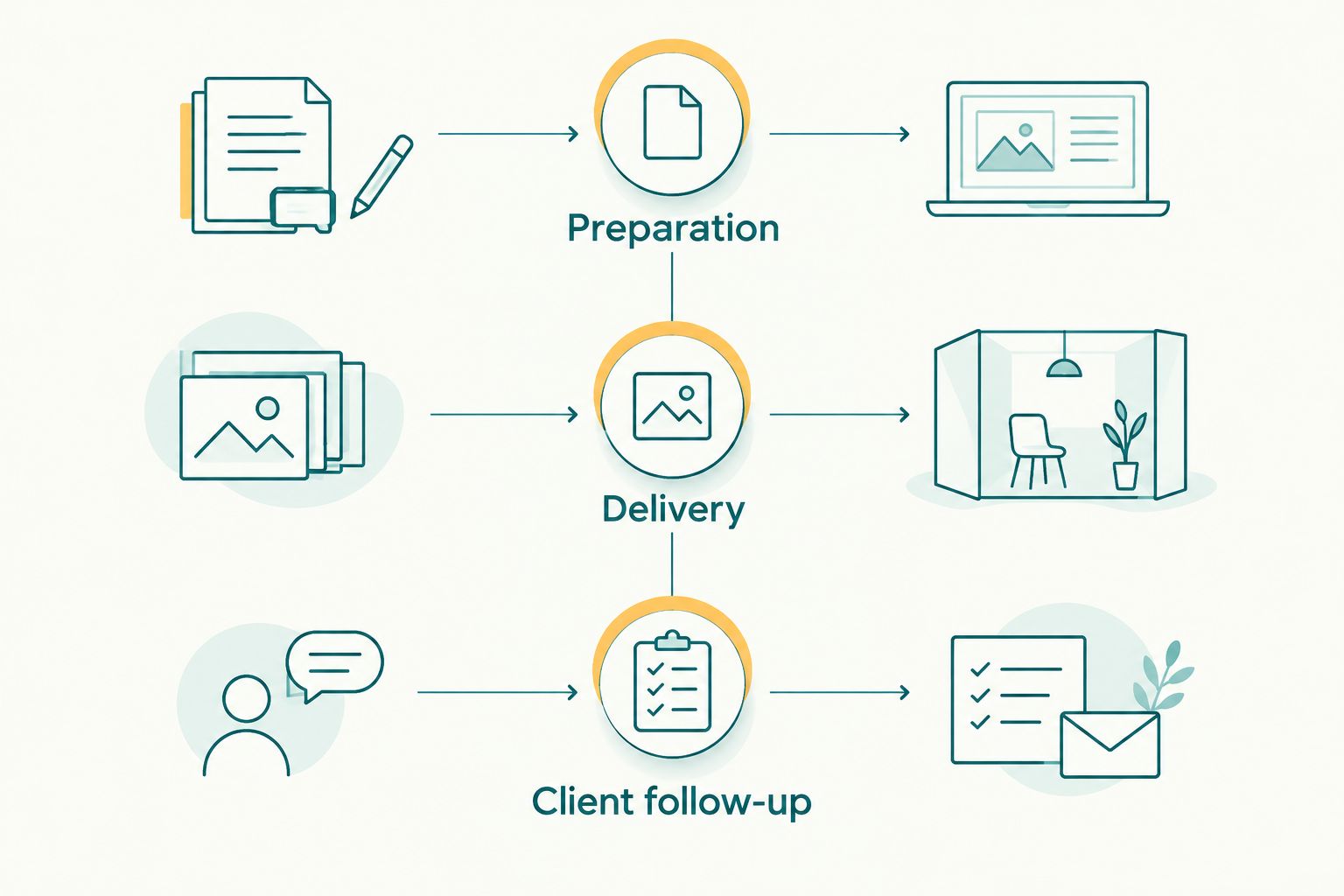
Test the complete assignment handoff, not just the gallery's appearance.
Keep your evaluation notes specific. Record where the recipient stopped, what your team had to explain and which step required manual reconciliation. Do not turn impressions into invented speed or accuracy scores.
Why people switch from EyeMatch
Switching should follow a demonstrated requirement. There is no reason to replace a working system merely because another platform offers more products.
For your 2026 shortlist, distinguish a platform problem from a studio-process problem. A missing selection deadline is a process issue; a requirement for offline desktop culling is a software-selection issue.
You need delivery and client proofing
Guest photo retrieval and album selection serve different audiences. A guest wants personal images; the commissioning client needs to approve the photographs used for final deliverables.
Evaluate a dedicated proofing workflow when those choices are difficult to track. Keep EyeMatch in place if your existing selection process already works.
You need better pre-delivery review
Face recognition and culling answer different questions. Recognition helps associate photographs with people; culling helps decide which frames deserve further attention.
If selection is the bottleneck, start with the process described in how to speed up photo culling before client delivery. Changing the gallery alone does not remove duplicate or weak frames from your approved set.
You need studio administration
Lead follow-ups, contracts, invoices and project schedules sit outside the recipient's gallery experience. Evaluate Studio Manager when those are the problems you need to address.
Do not replace a delivery tool solely to solve an administrative issue unless the broader workflow also fits. Changing software should reduce a named problem, not create a larger migration project.
When staying with EyeMatch is the right call
Stay with EyeMatch when your current workflow meets your requirements and the alternatives do not solve a specific unresolved problem. A functioning delivery process has value, even when another platform has a broader product range.
In 2026, keep the decision tied to your next assignment. Retain your existing setup if clients complete their tasks, your team can track approvals and the delivery arrangement matches your commitments.
Switch when a pilot demonstrates a better fit. Before moving an active assignment, confirm how you will preserve originals, retrieve selections and explain the new process to the client. Never assume that gallery data or client choices transfer automatically between platforms.
FAQ
What's the best EyeMatch alternative for event photographers?
Fotoowl is the best fit on this shortlist for event photographers needing face recognition galleries alongside proofing and studio-management products. Evaluate AI Gallery for delivery and add other products only where your workflow needs them.
Is Google Drive an alternative to EyeMatch?
Google Drive is an alternative for basic file sharing, not a complete event-photography workflow. Choose it when a clearly organised folder meets the recipient's needs rather than assuming folder delivery replaces guest photo discovery.
Is Pixieset better for client photo selections?
Pixieset is a relevant choice when client galleries and photo favourites are your main requirements. Define what a favourite means in your studio before treating it as an approved album or print selection.
Can I use AI Culling in a browser?
No, AI Culling is an offline desktop application. Its workflow includes a second human review before export to Lightroom or the gallery.
Which option should an Indian wedding studio evaluate first?
Evaluate the option that addresses your wedding studio's biggest handoff problem first. AI Gallery addresses face recognition delivery, Photo Selection addresses proofing, and Studio Manager addresses leads and project administration.
Does face recognition replace photo culling?
No, face recognition and culling perform different jobs. Recognition helps associate images with people, while culling helps review duplicate, weak and similar frames before delivery.
Should I move existing client galleries immediately?
No, test a completed assignment before moving active client work. Preserve your originals and confirm how selections, approvals and access will be handled before changing the delivery process.
One last thing
The best EyeMatch alternative is not necessarily the platform you use for every task. Keep a working gallery if your real problem is culling, proofing or booking administration.
For your next 2026 assignment, write down the first handoff that fails. Test the replacement against that handoff, then decide whether the improvement justifies changing the rest of your process.