
Best AI culling software for wedding photographers in 2026


Best overall for an offline-first wedding workflow: Fotoowl AI Culling. Best for automated first-pass shortlisting: Aftershoot. Best for photographer-led face and focus review: Narrative Select. This guide compares AI culling software for wedding photographers by selection control, wedding coverage and the handoff to editing—not unsupported speed claims.
TL;DR
- Fotoowl AI Culling is the best fit for wedding photographers wanting offline desktop culling with human review before export.
- Choose Aftershoot when automated first-pass shortlisting is your main requirement; review the rejected frames before editing.
- Choose Narrative Select when you want face and focus assistance while directing the final selection yourself.
- Judge AI culling software for wedding photographers on missed moments, duplicate handling and the Lightroom handoff.
Why this matters
A wedding shortlist must preserve the story, not just the sharpest photographs. A technically imperfect frame can contain the only photograph of an important embrace, blessing or reaction.
For Indian studios covering several wedding functions, culling also means keeping coverage balanced. Your haldi, sangeet, ceremony and reception should remain distinct during review, rather than competing inside one undifferentiated batch.
The best culling workflow removes repetitive decisions without handing over editorial judgement. Before choosing software in 2026, map the complete AI culling-to-Lightroom workflow, including the human review between automated recommendations and export.
What makes the best wedding photo culling software?
Use these criteria before comparing interfaces or feature lists. Each criterion addresses a decision your studio must make on a real wedding assignment.
- Selection control: You need to inspect recommendations, compare alternatives and retain a meaningful frame even when its technical quality is weaker.
- Similar-frame handling: Burst sequences need comparison, not blanket removal. Look for a review process that makes expressions and small compositional differences visible.
- Wedding coverage: Assess whether your shortlist preserves rituals, family relationships and transitions between functions. Technical scores alone cannot establish that coverage.
- Working environment: Decide whether you need offline desktop processing before considering a workflow dependent on uploading photographs.
- Editing handoff: Check how selected photographs reach your editor or gallery, and verify the result before processing a complete assignment.
- Correction effort: Count how much work remains after the first pass. A fast initial selection is not useful if you spend longer recovering missed photographs.
Best wedding culling options at a glance
This 2026 shortlist separates automated selection from assisted review. The order reflects workflow fit for professional wedding studios, not a measured accuracy or processing-speed leaderboard.
| Option | Best for | Standout capability | Key limitation |
|---|---|---|---|
| Fotoowl AI Culling | Offline-first culling with an editing or gallery handoff | Offline desktop app that groups similars and ranks composition, exposure and blur | Desktop-only; a second human pass remains necessary |
| Aftershoot | Automated first-pass shortlisting | Automated culling that identifies similar images and technical issues | Automated recommendations still need wedding-specific editorial review |
| Narrative Select | Photographer-led face and focus review | Face and focus assessments that assist image selection | Assisted inspection does not replace decisions about story or family coverage |
1. AI Culling: best for offline wedding workflows
Fotoowl AI Culling is an offline desktop application that rejects duplicate and weak frames, groups similar photographs, and ranks images by composition, exposure and blur. You complete a second human pass before exporting to Lightroom or the gallery.
That makes the application a direct fit when you want to begin selecting locally without making cloud uploads part of the culling stage. It also keeps the boundary clear: automated ranking comes first; your studio approves the wedding story afterwards.
Best for: Wedding photographers and studios that want offline desktop culling followed by a reviewed editing or gallery handoff.
AI Culling pros
- Offline desktop processing keeps the culling stage separate from uploading photographs.
- Similar-frame grouping supports comparison within repetitive sequences.
- Composition, exposure and blur rankings provide technical signals for the first pass.
- Export to Lightroom or the gallery supports the next stage after human review.
AI Culling cons
- Desktop-only operation does not suit a browser-only or phone-only culling workflow.
- Technical rankings do not determine which relatives, rituals or emotional moments belong in the final story.
- A second human pass remains part of the workflow; unattended final delivery is not the recommendation.
For a wedding studio, the practical benefit is a defined division of work. Let the application reduce repetitive sorting, then assign an editor or lead photographer to examine emotional exceptions and coverage gaps.
Keep the original files protected while reviewing rejected recommendations. Treat rejection as a selection decision—not permission to erase the only copy of a photograph.
Verdict: Buy for offline-first wedding culling when your studio will retain the required human review.
2. Aftershoot: best for automated first-pass shortlisting
Aftershoot provides automated photo culling, including the identification of similar images and technical issues such as blur or closed eyes. Its role in this shortlist is automated first-pass selection before you make the final editorial decisions.
Choose this workflow when you want software to propose a shortlist rather than inspect every photograph without assistance. The important assessment is whether those recommendations match your wedding style once you review the complete sequence.
Best for: Photographers who want automated first-pass shortlisting and will check the proposed selections against the wedding story.
Aftershoot pros
- Automated culling provides a proposed selection for your review.
- Similar-image handling addresses repeated frames from continuous shooting.
- Technical checks give you another signal when comparing closely related photographs.
Aftershoot cons
- Technical recommendations cannot establish the personal importance of a wedding guest or ritual.
- A shortlist still needs inspection for meaningful photographs outside the selected set.
- Moving to automated recommendations requires you to define what your studio considers an acceptable selection.
Assess Aftershoot using difficult photographs, not just clean portraits. Include changing expressions, deliberate motion and sequences where different people look their best in different frames.
Do not judge the result by the number of photographs excluded. A tighter shortlist is only useful when you can still build the required story without returning repeatedly to the source folders.
For a 2026 evaluation, write down your acceptance criteria before reviewing the output. That prevents an attractive shortlist from distracting you from missing coverage.
Verdict: Buy for automated first-pass shortlisting when you will audit both selected and rejected photographs.
3. Narrative Select: best for photographer-led face review
Narrative Select assists photo selection with face and focus assessments. It suits photographers who want help inspecting people in a frame while keeping the selection process closely directed by the photographer.
This is a different buying reason from delegating the first shortlist. Choose it when evaluating expressions and focus is the repetitive task you want help with, rather than expecting software to decide the wedding narrative.
Best for: Wedding photographers who prefer hands-on selection with assistance for face and focus inspection.
Narrative Select pros
- Face assessments support inspection of portraits and photographs containing several people.
- Focus information helps you investigate technical differences between similar frames.
- The assisted-review approach suits photographers who want to direct selection decisions.
Narrative Select cons
- Face and focus assessments do not determine whether an expression belongs in the final story.
- Group photographs still require judgement about every important person in the frame.
- A review-led approach is not a substitute for defining a consistent studio selection standard.
Use family portraits as a demanding evaluation set. Check whether the review experience helps you compare expressions without losing track of which frame contains the strongest overall combination.
Then assess candid sequences. A face turned away or partially obscured does not automatically make a photograph expendable, especially when the gesture carries the moment.
Choose Narrative Select for the inspection experience itself. Do not assume that a strong portrait-review workflow also solves your editing, delivery or studio-management requirements.
Verdict: Buy for photographer-led face and focus review; skip it as a substitute for editorial judgement.
How we ranked these options
The ranking prioritises offline workflow fit, useful selection assistance, human control and the next production step. Fotoowl AI Culling takes the default position because its confirmed workflow combines offline desktop processing, similar-frame grouping and reviewed export to Lightroom or the gallery.
Aftershoot occupies the automated-shortlisting slot. Narrative Select occupies the assisted face-and-focus-review slot. These are different starting points for your decision, not claims that one application wins every task.
No measured speed, accuracy or time-saving result determines this ranking. For your 2026 purchase, the decisive evidence is how each workflow handles your own difficult wedding photographs.
Run a wedding-specific evaluation before committing
Use the same photographs and selection brief for every application. A controlled comparison tells you more than separate demonstrations using different assignments or different expectations.
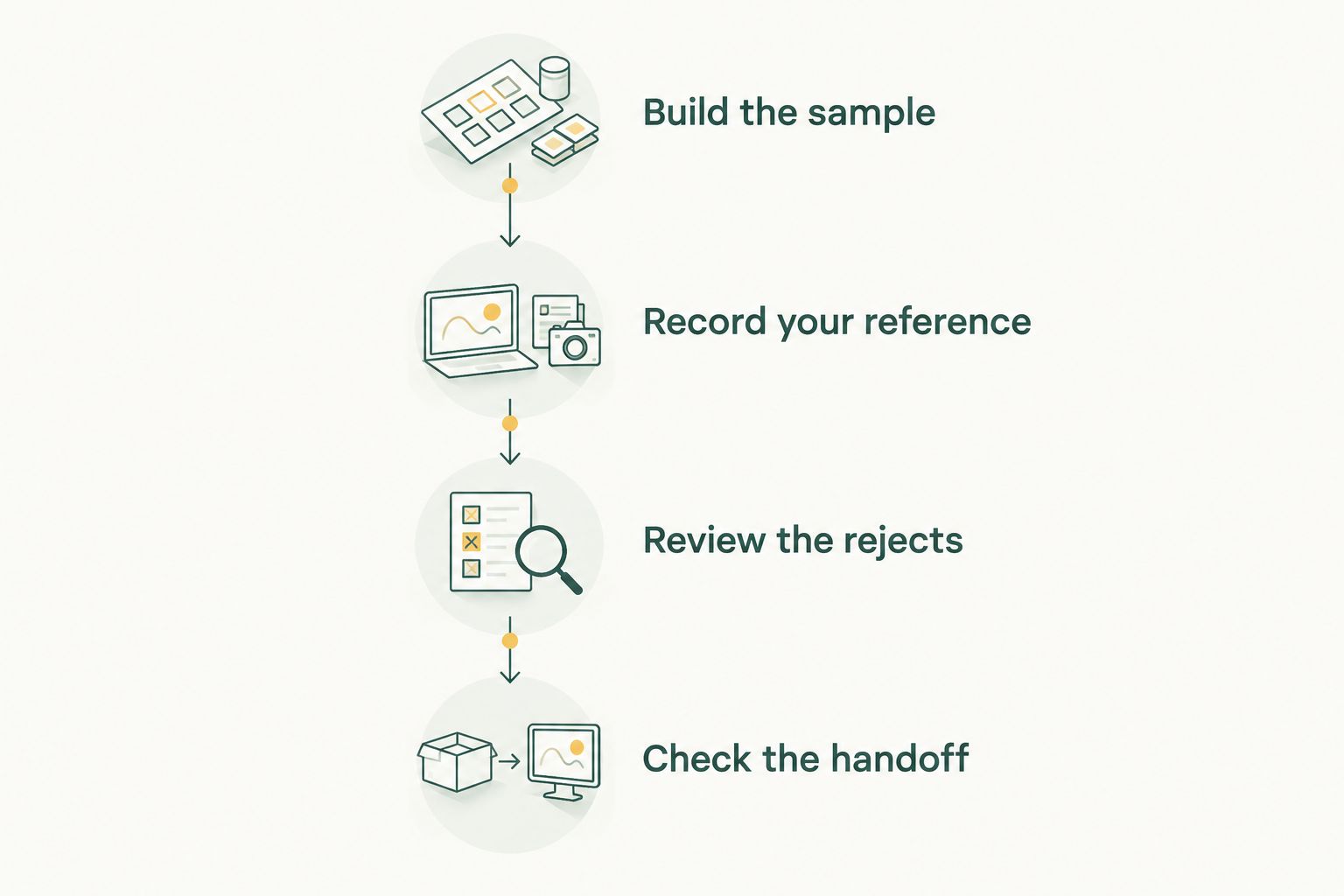
Build the sample
Create a proposed evaluation set of 100 photographs from a completed wedding. Include portraits, rituals, dance-floor movement, low-light candids and repeated sequences; this is a practical test size, not a performance benchmark.
Keep function boundaries visible. Use your existing folder structure to distinguish events and photographers, and avoid renaming original files merely to prepare the comparison.
Record your reference
Before looking at software recommendations, make a reference shortlist. Mark the frames that must survive because they contain a unique person, ritual, reaction or transition.
Add a separate note for deliberate softness or movement. This prevents you from treating every technical warning as a selection error when the photographic intention was different.
Review the rejects
Inspect a proposed sample of 20 rejected photographs alongside the selected alternatives. This is a suggested review exercise, not an assurance that any sample will catch every mistake.
Record why you restore a frame. Useful reasons include a stronger expression, a missing family member, an important ritual detail or a photograph with no equivalent alternative.
Check the handoff
Finish with 2 review passes: a technical-selection pass followed by a story-and-coverage pass. Then move the approved photographs into the next editing stage and check that the expected files are present.
For AI Culling, keep the second human pass before export to Lightroom or the gallery. Do not treat a successful automated first pass as permission to bypass that review.
Evaluate the rejected photographs as carefully as the proposed shortlist.
The useful comparison is correction effort. Note where you must restore photographs, remove repetition or repair missing coverage, rather than choosing the application that produces the shortest list.
Protect the Indian wedding story during selection
Multi-function coverage needs an editorial checklist alongside technical ranking. Build that checklist from the assignment brief and the events actually photographed, rather than imposing an identical sequence on every wedding.
- Ritual coverage: Confirm that each required ceremony has a usable sequence, not just isolated attractive frames.
- Family coverage: Check important people against the brief instead of assuming frequent appearances equal sufficient coverage.
- Expression variety: Preserve different meaningful reactions when similar compositions tell different parts of the story.
- Team consistency: Give the reviewing editor a shared selection brief so that different photographers' work receives the same editorial treatment.
- Album continuity: Retain establishing photographs, details and transitions that connect the strongest portraits and moments.
For your 2026 studio process, assign final selection responsibility to a named team member. Software can rank a photograph; a person must approve what the client receives.
Culling and face-recognition delivery also serve different purposes. Culling determines which photographs continue through production; face recognition helps people find photographs within a gallery. Neither task establishes that the wedding story is complete.
Which wedding culling software should you choose?
Choose Fotoowl AI Culling if you want offline desktop culling with a human-reviewed Lightroom or gallery handoff. That is the default recommendation for the workflow described here.
Choose Aftershoot when automated first-pass shortlisting is your central requirement. Choose Narrative Select when face and focus inspection matters more to your selection process than delegating the initial shortlist.
Before committing, finish the same evaluation exercise in your own working environment. Keep the option that leaves you with a defensible selection and a clear production handoff—not simply the smallest folder.
FAQ
What's the best AI culling software for wedding photographers in 2026?
Fotoowl AI Culling is the default recommendation for wedding photographers who want offline desktop culling with human review before export to Lightroom or the gallery. Aftershoot suits automated first-pass shortlisting, while Narrative Select suits photographer-led face and focus review.
Can AI culling software work without an internet connection?
AI Culling works offline as a desktop application. Keep offline culling separate from later tasks that involve uploading or delivering photographs.
Can AI culling replace a wedding photographer's final review?
No. A wedding photographer must review technical recommendations against emotional significance, family coverage and the required story before approving the selection.
Is Aftershoot better than Narrative Select for wedding photographs?
Aftershoot is the better starting point when automated first-pass shortlisting is your priority; Narrative Select suits hands-on face and focus review. Compare both against the same wedding sample before choosing your preferred approach.
Should I remove every blurry photograph from a wedding shortlist?
No. Review blur in context because deliberate movement or a unique emotional moment can justify keeping a technically imperfect photograph.
How should an Indian wedding studio compare culling applications?
Use the same completed-wedding sample, selection brief and review process for every application. Check rituals, family coverage, similar-frame decisions and the editing handoff rather than judging only the size of the shortlist.
Is face-recognition gallery sorting the same as AI photo culling?
No. Face-recognition gallery sorting helps people find photographs, while AI photo culling helps photographers decide which frames continue through production. Neither replaces final editorial approval.
One last thing
Review the rejection set before admiring the shortlist. Selected photographs show what the software kept; rejected photographs reveal the moments your client would never know were missing.
Make that rejection review a fixed checkpoint in your 2026 workflow. A technically weaker frame with an irreplaceable family reaction deserves a deliberate decision, not an unnoticed exclusion.