
AI photo gallery for wellness retreats: complete 2026 guide


Wellness retreat photo gallery software is a delivery system that organises retreat images so your photography clients and participants can find the right photographs without browsing the entire shoot. Choose a workflow that separates participant delivery from promotional use, keeps sensitive sessions out of general circulation, and supports face search without making it the only way to find photos.
TL;DR
- Choose photo gallery software for wellness retreats around consent, participant access and organiser approvals—not storage alone.
- Fotoowl AI Gallery suits professional retreat photographers who need face-recognition galleries for participant photo discovery.
- Keep participant photographs, organiser deliverables and approved promotional images in separate delivery sets.
- Retain session browsing and manual assistance alongside face search.
Why photo gallery software matters for wellness retreat photographers
A retreat assignment can include yoga, outdoor activities, instructor portraits and quiet personal moments. Those images need different handling: a participant receiving a portrait is not the same as an organiser receiving photographs for advertising.
Your gallery workflow must distinguish permission to photograph from permission to publish. Put that distinction into the brief before choosing software. For a 2026 retreat assignment in India, confirm the delivery language with your client and write participant instructions in language the intended audience understands.
Start with a written access plan. The guide to managing photo access permissions for event stakeholders covers the wider delivery problem: deciding which audience receives which photographs.
The practical goal is clear. Give participants a useful collection, give the organiser approved business assets, and avoid turning your full working archive into a shared gallery.
Build your retreat photo delivery workflow
Define the photography boundaries before arrival
Start manually with a brief and an approval sheet. Ask the organiser which sessions welcome photography, which require a separate introduction, and which should remain camera-free. Do not interpret a general event photography clause as permission to photograph every activity.
Discuss private consultations, treatment spaces, changing areas and emotionally sensitive activities explicitly. These are planning questions, not assumptions about what your client permits. Establish how participants can decline photography without having to explain themselves during a session.
Name 1 organiser approver for release decisions. That is a recommended responsibility, not a software requirement; its purpose is to prevent conflicting instructions from several staff members.
- Mark camera-free sessions on your shooting schedule.
- Record how participants communicate a photography refusal.
- Separate participant delivery permission from promotional permission.
- Name the organiser responsible for approving public-use images.
- Agree how removal requests reach your studio.
Organise the shoot around sessions and audiences
Use folders and a spreadsheet before adding automation. Group photographs by the retreat's actual programme, then identify the intended audience for each delivery set. Session names provide a useful route to images that do not contain a recognisable face.
Create 3 delivery sets: participant photographs, organiser deliverables and approved promotional images. These are workflow categories, not a claim about any platform's permission controls. If your chosen software cannot enforce the required separation, use separately managed collections or a different delivery method.
For a multi-day retreat, keep the day and session visible in your folder names. Avoid including health details or personal disclosures in filenames, captions or collection titles.
- Use the programme's session names consistently.
- Separate working files from deliverable exports.
- Keep participant and promotional selections distinct.
- Preserve original filenames for corrections and requests.
- Assign one person to maintain the delivery register.
Cull and review photographs before uploading
Begin with a manual review in your existing editing workflow. Remove technical failures, repeated frames and images outside the agreed photography boundaries. Then assess expression, context and whether the image is appropriate for its intended audience.
Fotoowl AI Gallery is best for professional retreat photographers who need face-recognition photo delivery. Its discovery features belong after editorial review, not instead of it. Uploading a photograph does not establish permission to distribute it.
For larger shoots, Fotoowl AI Culling provides an offline desktop path for rejecting duplicate and weak frames, grouping similar images and ranking composition, exposure and blur. Keep the second human pass before export to Lightroom or the gallery. Offline culling does not make the online delivery workflow offline.
Use 2 review passes: a technical pass followed by a context-and-permission pass. This is a recommended process for your studio, not a measured performance claim.
- Remove blur and unnecessary near-duplicates.
- Check expressions rather than relying only on sharpness.
- Exclude photographs from camera-free sessions.
- Inspect background participants as well as main subjects.
- Approve the export set before gallery upload.
Test face search alongside ordinary browsing
Build a small, manually organised test collection first. Include individual portraits, group photographs, profiles and activity images from the approved selection. Check whether a participant can locate relevant pictures through both session browsing and face search.
Fotoowl AI Gallery supports AI-powered face-recognition galleries for photo and video delivery. That makes it relevant to participant discovery, but face recognition is not a substitute for access controls or a guarantee that every photograph will be found.
For your 2026 test, use images you have permission to process and explain the discovery method to the people testing it. Check the platform's current access settings directly rather than assuming that a face-search result limits what else a visitor can see.
- Test portraits and group images separately.
- Include photographs with faces turned away.
- Check the participant journey on a phone.
- Provide a session-based browsing alternative.
- Write a manual help route for missing photographs.
Separate client approval from participant delivery
Start with a contact sheet or numbered preview collection. Ask the organiser to approve the images intended for its business use, and record exactly what that approval covers. A selection for an internal presentation is not automatically a selection for a public campaign.
Where structured client proofing fits the assignment, Photo Selection supports client selections that can be reused for albums and printing. It addresses selection, while AI Gallery addresses delivery and discovery. Neither product name establishes the permissions attached to a photograph.
For your 2026 handover, match approval records to filenames. If the organiser changes a selection, update the delivery set rather than leaving rejected versions alongside the approved ones. Keep generative edits out of documentary deliverables unless the agreed brief explicitly calls for them.
- Send the organiser a clearly labelled approval collection.
- Record approved filenames and intended uses.
- Keep participant delivery separate from campaign selection.
- Remove superseded exports from the delivery set.
- Confirm whether albums or prints require further selection.
Release the gallery with clear support instructions
A manual release works: send each intended audience the correct delivery instructions, explain how to browse, and provide a contact for help. Do not send the whole archive simply because that is the easiest link to copy.
Use a release sequence of Approval, Access check, Delivery, Support, Closure. Each stage answers a different question: is the content approved, is the audience correct, can recipients use it, who handles problems, and what happens when the assignment ends?
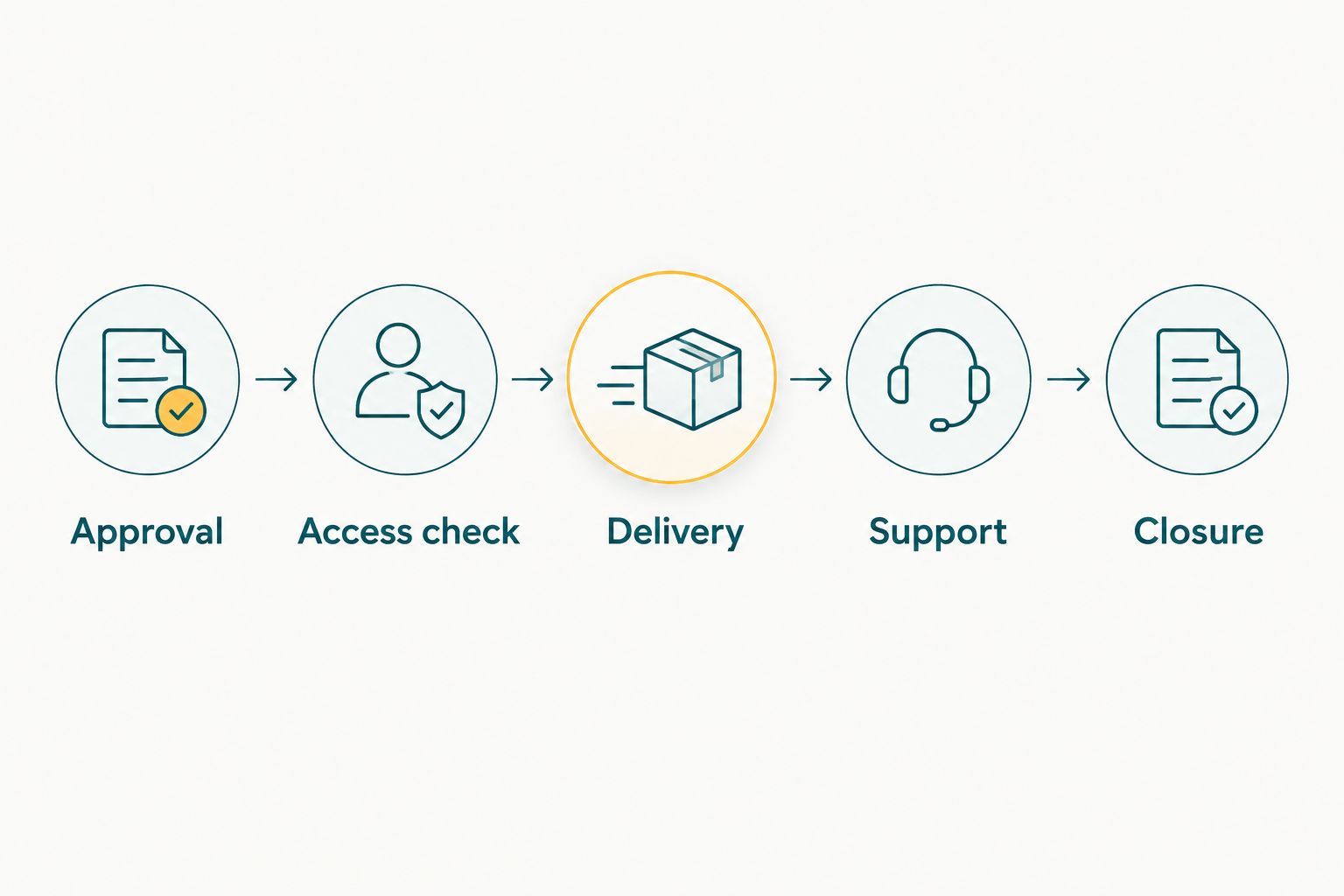
Check the content and its audience before sending delivery instructions.
In 2026, test the actual delivery message as carefully as the gallery. A working link is not enough if the recipient cannot understand what to do next. Promise only the handover schedule your studio has agreed with the client.
- Approval: confirm the final release set.
- Access check: test the intended recipient's view.
- Delivery: explain browsing and photo discovery.
- Support: name the contact for corrections or removal.
- Closure: document the agreed end-of-assignment handling.
Compare delivery options for retreat photography
Choose the delivery method according to the assignment, not the longest feature list. An organised manual workflow remains useful when a small, curated selection meets the brief. Face-recognition galleries address discovery; proofing addresses selection; neither replaces your editorial decisions.
| Option | Best for | Main advantage | Key limitation |
|---|---|---|---|
| Fotoowl AI Gallery | Professional photographers delivering participant photos through face recognition | Combines photo and video delivery with face-recognition galleries | Requires approved uploads, access checks and an alternative discovery route |
| Manually curated folders | Small assignments with distinct recipient groups | You can organise exports around the agreed brief | You must maintain selections and handle photo-finding requests manually |
| Session-based online gallery | Retreats where participants know the activities they attended | Session labels provide a browsing route for portraits and atmosphere images | Participants still need to search through the relevant collection |
| Photo Selection | Organiser proofing and album or print selections | Captures client selections for later production | Selection does not establish publication permission or replace participant delivery |
Before committing a live assignment, test the required access behaviour and recipient journey. Ask how the service handles deletion, retention and face-processing information; verify the answers against your client agreement. Do not infer those policies from a feature name.
Keep your existing method if the test exposes a delivery requirement the proposed system cannot meet. Software is an operational choice, not a reason to weaken the brief.
Common mistakes retreat photographers make
Treating the retreat organiser as the audience for every image
The organiser commissions the assignment, but participants appear in the photographs. Delivering every frame to the organiser can undermine the boundaries agreed before the shoot. Send the selection appropriate to the recipient and intended use, not a complete export by default.
Assuming face search creates private access
Finding a face and controlling access are separate functions. Test whether visitors can browse beyond their search results and whether that behaviour matches your agreement. Do not describe a delivery method as private solely because it includes face recognition.
Uploading intimate moments because the frames are technically strong
A sharp, well-composed photograph can still be unsuitable for distribution. Use the context-and-permission review to exclude images that breach the brief. Ask the designated approver when the agreed boundaries do not resolve a specific image.
Making face search the only route to photographs
Retreat coverage includes landscapes, food, details and activity images without a clear face. Give those photographs session or subject labels. A participant who cannot find an image through face search still needs a useful browsing or support route.
Reusing participant photographs for promotion without separate approval
Delivery and promotion serve different purposes. Keep a distinct approved promotional set and check permission before sending it for campaigns, portfolios or social posts. A participant downloading a photograph does not, by itself, document permission for your studio's advertising.
FAQ
What's the best photo gallery software for wellness retreat photographers?
Choose software that supports your agreed access boundaries, participant discovery and organiser approval workflow. Fotoowl AI Gallery fits professional photographers who need face-recognition delivery, but test access settings and the recipient journey before a live assignment.
Can face recognition find every photograph of a retreat participant?
Do not promise that face recognition will find every photograph of a participant. Keep session browsing and manual assistance available for profiles, obscured faces and photographs without a visible face.
Can I send the retreat organiser the same gallery as the participants?
Use the same collection only when its content and access match both audiences' agreed permissions. Otherwise, prepare separate delivery sets for participants, organiser deliverables and approved promotional images.
Do I need permission to use retreat photographs in my portfolio?
Get explicit approval for portfolio use rather than treating participant delivery as permission to advertise. Record the approved images and intended use in your client workflow.
Does AI Culling work offline at a retreat venue?
AI Culling is an offline desktop application. It rejects duplicate and weak frames, groups similar images and ranks technical qualities, with a second human pass before export to Lightroom or the gallery.
How should I deliver photographs when venue connectivity is unreliable?
Keep local copies and complete the review process before uploading when a suitable connection is available. Do not promise live gallery delivery unless you have tested the venue connection and the full upload workflow.
Is client photo selection the same as a delivery gallery?
No: client selection records which images a client chooses, while a delivery gallery distributes the approved photographs. Photo Selection supports proofing and selections for albums and printing; AI Gallery supports photo and video delivery with face recognition.
One last thing
Make the no-photo decision visible to your editing team, not to the entire gallery audience. A participant's request is useful only if it survives the handoff from photographer to editor to delivery manager.
Before your next 2026 retreat assignment, trace that request through your workflow. Confirm who records it, who checks the exports and who removes a photograph if it slips through. That operational check matters more than adding another discovery feature.