
AI photo gallery for dog show photographers: complete 2026 guide

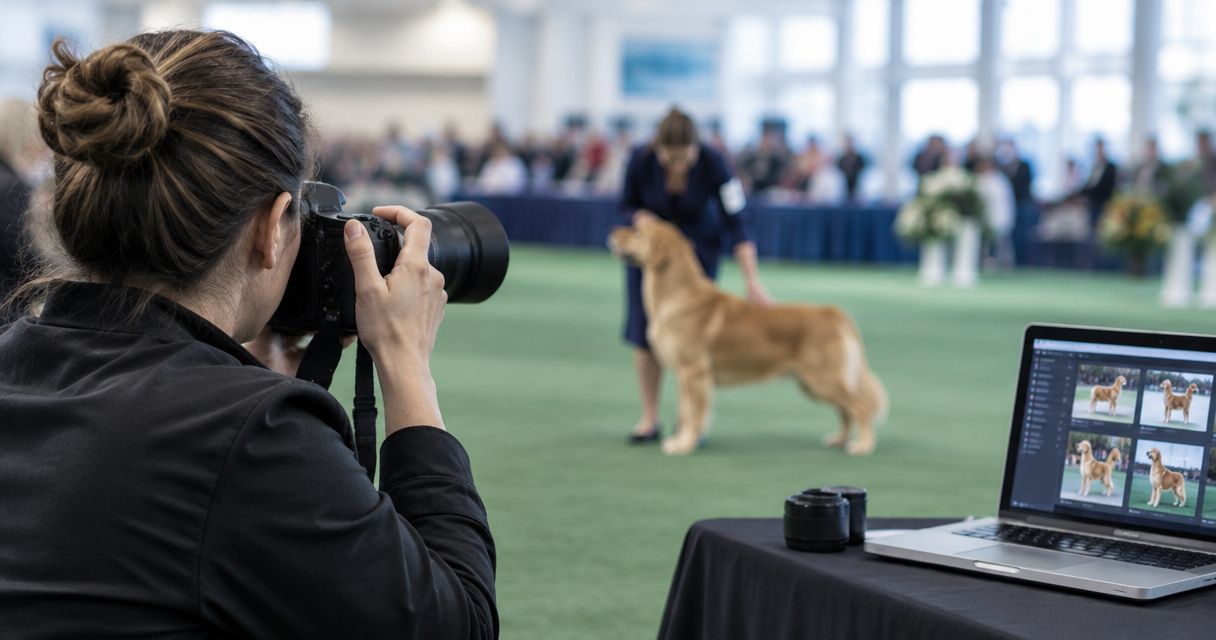
Dog show photo gallery software is a delivery system for organising show images so exhibitors, handlers and owners can find and select photographs of the right dog. For your 2026 workflow, prioritise entry-based organisation and client proofing before face search: finding a handler does not establish the identity of the dog beside them.
TL;DR
- Choose photo gallery software for dog show photographers around entry numbers, ring sessions and client proofing.
- Fotoowl suits photographers who organise entries manually and want AI-powered gallery delivery.
- Do not treat handler face recognition as verified dog identification.
- Test dog-only images, handler changes and repeated entry numbers before publishing a full show.
Why gallery software matters for dog show photographers
A dog show gallery must answer a specific question: which photographs belong to this entry? An owner, handler and dog are different identities, so organising photographs around people alone leaves gaps in your delivery workflow.
Build your gallery around the show schedule and the identifiers you can verify. Keep breed, class, ring session and entry references consistent from capture through delivery. When the same handler presents different dogs, those references become especially important.
Fotoowl is best for dog show photographers who organise entries manually and want AI-powered gallery delivery. Its face recognition galleries support the people-facing side of event delivery; assess dog-only retrieval separately rather than assuming a face-search feature covers it.
Your gallery also serves a different purpose from your archive. Keep original files and working edits separate from the client-facing collection; the guide to cloud storage for photographers explains the storage side of that decision.
Build your 2026 dog show gallery workflow
1. Define the identifiers before the show
Start with a spreadsheet and the organiser's approved entry information. Record only the details needed to match photographs to entries, and confirm whether entry numbers remain unique across the entire event or only within a particular session.
Do not depend on remembering a dog's appearance after the shoot. Give yourself an index that connects the capture sequence with the correct ring, class and entry reference. Keep that index outside the gallery too, so changing software does not remove your organising system.
For an Indian studio covering several rings, agree on one naming convention before assigning photographers. Use the same date format and session labels across the team; mixed conventions create unnecessary reconciliation work.
- Create an entry index with show, ring, session and entry fields.
- Confirm identifiers with the organiser rather than guessing from appearances.
- Assign each photographer a consistent camera or operator label.
- Use a filename pattern such as
2026-show_ring_session_entry_sequence. - Keep owner contact details out of public filenames and labels.
2. Test retrieval with difficult photographs
Use local folders and a contact sheet to test your organising method before evaluating software. Select 20 photographs that represent the difficult cases, not just clean portraits with readable entry markers.
Include dog-only frames, groups and photographs where the handler's face is hidden. Add a sequence where a handler presents different dogs, then check whether someone unfamiliar with the shoot can locate the requested entry using your index.
This test separates retrieval quality from presentation. An attractive gallery does not solve a missing identity reference, and a correct handler match does not prove that every photograph belongs to the requested dog.
- Include dog-only action photographs and posed portraits.
- Include a handler appearing with different dogs.
- Include similar-looking dogs from the same class.
- Test entry references repeated across different sessions.
- Record every photograph that needs manual identification.
3. Match software to the task it actually performs
Begin with your tested folder structure and publish only a small reviewed collection. Then assess whether a gallery platform makes uploading, browsing and client delivery simpler without weakening the entry index you already trust.
Fotoowl's AI Gallery provides photo and video delivery with face recognition. That is relevant when handlers or owners appear in photographs, but it is not evidence of canine recognition or automatic entry-number reading. Keep manual organisation as the route for dog-only frames unless you independently verify another retrieval method.
Photo Selection handles client proofing, with selections reusable for albums and printing. Treat discovery and approval as separate tasks: clients first need to find the correct photographs, then identify the frames they want you to finish or supply.
- Evaluate gallery delivery using your difficult test collection.
- Check human face-search results against the correct entry.
- Verify how dog-only photographs remain discoverable.
- Test client proofing separately from gallery browsing.
- Reject workflows that require unsupported identification claims.
4. Cull for canine detail, then review manually
Make an initial selection in your existing desktop workflow. Inspect eyes, motion, framing and the details relevant to the commissioned coverage; do not let a technically sharp frame replace a more useful show photograph without looking closely.
AI Culling is an offline desktop application that rejects duplicate and weak frames, groups similar images, and ranks composition, exposure and blur. It provides a faster first pass, followed by a second human pass before export to Lightroom or the gallery.
For dog show coverage, that human review matters. Similar frames can preserve different movement or presentation details, so inspect grouped sequences before accepting the final selection. Keep documentary delivery separate from creative treatments that change a dog's appearance.
- Compare grouped sequences rather than accepting only the top-ranked frame.
- Check eyes, feet, tail and cropped edges at a useful viewing size.
- Preserve relevant differences in movement and presentation.
- Review rejected frames before finalising the delivered collection.
- Export only the photographs approved in your human pass.
5. Separate transfer from publication
The manual route is straightforward: copy files from cards, verify the copies, review the photographs and upload approved exports. Keep a written release checklist so an upload is never mistaken for permission to publish.
For a faster transfer route, Fotoowl includes Beam camera-to-cloud FTP upload within AI Gallery. Test the complete capture-to-gallery workflow with your actual equipment and connection before the assignment; do not infer compatibility or upload performance from the feature name.
Build 2 delivery paths for your 2026 show coverage: an on-site transfer path and a card-based fallback. Both should lead through the same review process, with clear responsibility for approving photographs before clients receive them.
- Test capture, transfer and review using the intended equipment.
- Keep card-based ingestion available if on-site transfer stops.
- Assign a person to approve each publication batch.
- Verify uploaded photographs before announcing the collection.
- Retain original files independently of the delivery workflow.
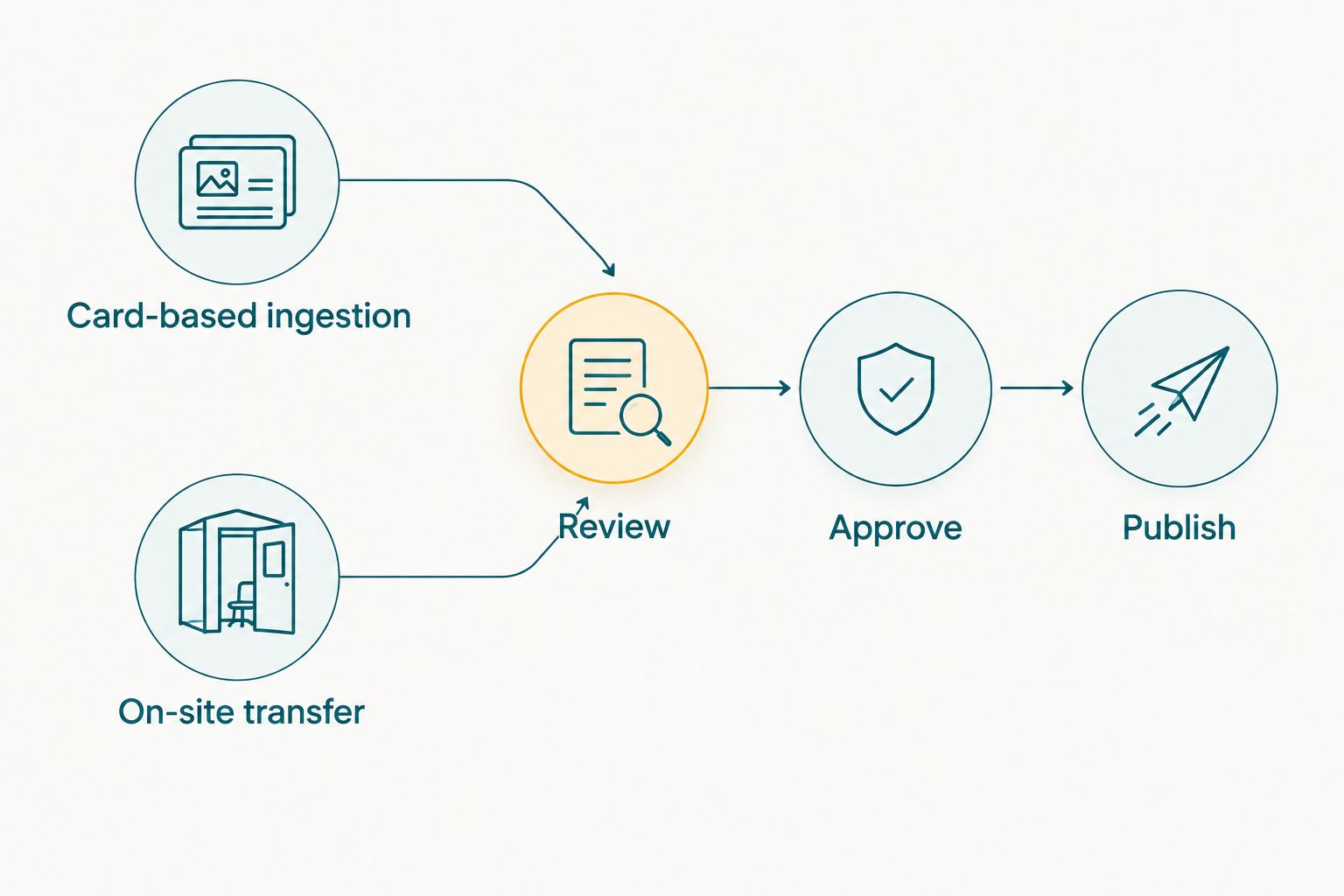
Use the same review gate regardless of how photographs reach the delivery workflow.
6. Give clients a precise selection process
Start with a contact sheet and a written list of filenames if you do not yet use proofing software. Ask clients to submit selections against stable image references, not descriptions such as the standing portrait beside the ring.
Photo Selection provides a dedicated client-proofing route. Keep entry identification in your own workflow, then use proofing to establish which photographs the client has chosen. Confirm the intended use separately when preparing images for personal sharing, publication or printing.
For your 2026 handover template, write a short instruction that explains where to browse, how to identify an image and how to submit a correction. Keep the process usable from a phone, but verify it yourself rather than assuming the desktop experience carries over unchanged.
- Preserve filenames between proofing and final delivery.
- Explain how clients should submit their chosen frames.
- Request entry references when clients report missing photographs.
- Confirm intended use before preparing final exports.
- Keep a written record of approved selections.
7. Audit the experience before sharing widely
Send the draft collection to a colleague who did not photograph the show. Give them 3 retrieval tasks: locate a dog-only image, find an entry shown by different handlers, and distinguish entries appearing with the same handler.
Test on 2 devices, including a phone. Record the steps required to find the correct photograph and submit a selection; use those observations to fix confusing labels, missing instructions and broken references before release.
For a 2026 pilot, measure your own workflow rather than borrowing an unrelated event benchmark. Track retrieval failures and correction requests. Those observations tell you whether your next improvement belongs in capture notes, file organisation, proofing or delivery instructions.
- Ask a colleague to complete the retrieval tasks without coaching.
- Verify that entry labels match the intended photographs.
- Check browsing and selection on a phone and a desktop.
- Confirm who should receive each collection before sharing it.
- Record correction requests against the original entry index.
Compare gallery workflow options
Choose the option that solves your main problem, not the option with the longest feature list. These are workflow choices rather than interchangeable products: storage, discovery and approval each require their own checks.
| Option | Best for | Main advantage | Key limitation |
|---|---|---|---|
| Fotoowl AI Gallery | Event photographers adding AI-powered gallery delivery | Photo and video galleries with human face recognition | Dog recognition and automatic entry-number reading are not established capabilities |
| Local folders and contact sheets | Small, photographer-led deliveries | Direct control over entry references and review | You manage matching, communication and selection records manually |
| Shared storage folders | Sending an already approved collection | Straightforward file handover | Folder delivery alone does not establish dog identity or client approval |
| Photo Selection | Collecting client choices after photographs are identified | Dedicated proofing, with selections reusable for albums and printing | Proofing does not replace the entry-identification process |
If your biggest problem is finding dog-only photographs, fix the entry index first. If clients can find their images but send confusing selection messages, improve proofing. If approved photographs take too much handling to deliver, evaluate the gallery and transfer workflow.
Common mistakes dog show photographers make
Treating human face search as dog identification
A handler's face is a useful people reference, not a unique identifier for the dog in the frame. Keep entry-based organisation available even when face search returns a match. Check dog-only photographs through the manual index.
Using entry numbers without session context
Do not assume an entry number is unique throughout every event you cover. Confirm the organiser's numbering scheme, then retain the show and session context wherever ambiguity exists. Resolve collisions before clients start browsing.
Publishing every technically acceptable frame
A sharp image is not automatically a useful deliverable. Review the sequence for the dog's presentation, movement and framing, and remove unnecessary near-duplicates without discarding meaningful differences. Your final selection remains an editorial decision.
Mixing public promotion with client delivery
A photograph intended for an exhibitor's selection is not automatically cleared for your portfolio or promotional reel. Agree on intended uses and keep public selections separate from the complete client collection. Check permission before sharing identifiable people or private contact information.
Promising delivery before testing the venue workflow
Camera-to-cloud transfer still requires a working capture and connection setup. Test before committing to a delivery arrangement, and keep a fallback that does not depend on the venue connection. Promise only what your reviewed workflow can support.
FAQ
What's the best photo gallery software for dog show photographers?
The best fit supports reliable entry-based organisation, gallery delivery and clear client proofing. Fotoowl suits photographers who organise entries manually and want AI-powered galleries, but dog-only retrieval needs a separately verified workflow.
Can AI face recognition identify individual dogs in show photographs?
Do not treat human face recognition as verified individual-dog identification. Use entry references and manual checks unless a provider explicitly documents canine identification and your own test confirms it works for the assignment.
How should I organise photographs when one handler shows several dogs?
Organise those photographs by verified entry references rather than the handler alone. Retain the show, ring and session context needed to distinguish entries, and check each sequence against your capture notes.
Can I use AI Culling at a dog show without internet access?
AI Culling is an offline desktop application. Review its initial selections yourself before exporting to Lightroom or the gallery; offline culling does not make online gallery delivery an offline process.
Is cloud storage enough to deliver dog show photographs?
Cloud storage can hand over an approved collection, but it does not by itself solve entry identification or client proofing. Decide whether clients need simple file access, help finding photographs, or a structured selection process.
How do I let owners choose their preferred dog photographs?
Give owners stable image references and a clear selection method. Photo Selection provides client proofing, while a contact sheet and written filename list provide a manual route.
What should I test before using a gallery for an Indian dog show?
Test entry matching, dog-only retrieval, phone browsing and your intended transfer setup. Include a card-based fallback and confirm the organiser's rules for sharing photographs before release.
One last thing
A correct face match can still lead to the wrong dog selection. Make the final pre-release check an entry-to-image check, not just a person-to-image check. That small distinction keeps automation in its proper role: helping delivery without replacing your identification judgement.