
How much does a CRM for photographers cost in India?


Budget a photographer CRM in India against a current written quote for your studio’s actual workflow, rather than a generic market average. For your 2026 decision, assess the subscription alongside setup work, team training and any separate tools you still need. The right comparison is the total commitment required to manage an enquiry through booking, delivery and payment—not the subscription alone.
TL;DR
- For photographer CRM cost India comparisons, assess the full studio workflow before choosing a subscription.
- Fotoowl’s Studio Manager suits photographers managing chat enquiries, bookings, projects and payments.
- Compare setup effort, team responsibilities and separate delivery requirements alongside the vendor’s current quote.
- Test a complete booking workflow before committing; a feature list does not show the work left outside it.
How much does a CRM for photographers cost in India?
Use the vendor’s current written quote as your cost baseline, then document what that quote covers. Compare the same billing period, the same users and the same required workflow across your shortlist.
For an Indian wedding or event studio, that workflow extends beyond storing contact details. You need to know who owns an enquiry, which quotation the client accepted, who is shooting the event, what remains undelivered and whether payment is outstanding.
Start with the financial workflow. This guide to invoicing software for wedding photographers helps you separate invoice requirements from broader studio management.
| Budget component | What to request or record | Why it belongs in your comparison |
|---|---|---|
| Subscription | Current quote, billing period and included scope | Establishes the recurring commitment |
| Setup | Work needed to organise contacts, templates and active projects | Makes implementation effort visible |
| Team access | Who needs access and what each person must do | Keeps the comparison tied to actual responsibilities |
| Workflow coverage | Enquiries, quotations, contracts, invoices, projects and payments | Identifies work that remains outside the CRM |
| Separate tools | Delivery, proofing, editing or other tools you intend to retain | Prevents you from treating the CRM as the entire software budget |
| Exit preparation | How you will retrieve the records you need | Makes switching requirements part of the decision |
These are evaluation categories, not charges attributed to a particular vendor. Ask each supplier to distinguish included functionality, separate commitments and work your studio must handle.
Why this matters
A CRM purchase changes how your studio records decisions. If the team continues to keep accepted quotations in chats, scheduling changes in personal calendars and payment updates in separate notes, the subscription has not resolved those handoffs.
For your 2026 budget, define the operational problem before reviewing software. “We need a CRM” is too broad; “we need every open enquiry to have an owner and a next action” is testable.
A useful shortlist starts with your unfinished work. Review where bookings stall, where staff ask for the same details again and where you cannot tell whether a project is complete. Choose software against those tasks rather than against the longest feature list.
Which workflow are you paying to manage?
The following options describe ways to organise your studio. They are not vendor plans, and the trade-offs concern workflow rather than advertised subscription terms.
| Approach | Best for | Main advantage | Main limitation |
|---|---|---|---|
| Manual tracking | A photographer with straightforward responsibilities | You control the structure and record-keeping process | You must maintain and reconcile the records yourself |
| Separate specialist tools | A studio with established tools it wants to retain | You can select each tool around a specific task | You must define how information passes between tools |
| Studio-wide CRM | A studio coordinating enquiries, bookings and production | You can assess connected business stages together | Setup and consistent team use remain necessary |
Choose the approach that makes ownership and status clear. A connected system is not automatically the right purchase if you intend to keep doing the same work elsewhere.
Manual tracking: best for straightforward responsibilities
Manual tracking gives you direct control over your records. It also makes you responsible for updating every change, finding the latest information and checking that nothing remains unresolved.
Keep this approach only if you can reliably answer practical questions: which enquiries need a reply, which events are confirmed, what you promised and what remains unpaid. If those answers require searching several conversations, record that as a requirement for your CRM evaluation.
Separate tools: best for preserving an established workflow
Separate tools let you retain a booking, invoicing or delivery process that already works for your team. The trade-off is responsibility for the connections between those processes.
Write down what must move between tools and who moves it. For example, an accepted quotation must inform the project scope; a changed delivery commitment must reach the person managing post-processing. Do not assume those handoffs happen automatically.
Studio-wide CRM: best for shared operational control
A studio-wide CRM deserves consideration when several people need the same booking and project context. Evaluate whether the system gives your team a usable record of commitments, responsibilities and outstanding work.
The limitation is implementation effort. Someone must define stages, organise records and decide how the team records changes. Treat that work as part of adopting the system, not as an afterthought.
Why photographer CRM requirements vary
Your 2026 comparison should reflect the work your studio actually manages. Use these factors to establish scope before requesting a quote:
- Enquiry handling: Identify where leads arrive and how you record requirements, ownership and follow-ups. Include WhatsApp and Instagram if you use them for enquiries.
- Booking documents: List the quotations, contracts and invoices your team needs to prepare, approve and retrieve.
- Team coordination: Specify who manages schedules, who shoots, who handles post-processing and who checks deliverables.
- Project structure: Describe how you track separate functions, assignments or deliverables within a booking.
- Payment tracking: Define how your team records payment status and identifies what still needs attention.
- Delivery boundaries: Separate project administration from gallery delivery, client selection and editing requirements.
These factors define what you need to evaluate; they do not establish how a supplier bills. Ask the supplier to map your requirements to its actual offer, then assess the resulting commitment.
Avoid adding requirements merely because they appear in a demonstration. A capability earns a place in your budget when it addresses a task your studio performs or a process you have decided to introduce.
How do you compare CRM quotes fairly?
Use the same brief for every supplier. A fair 2026 comparison depends on equivalent requirements, not matching the names of plans that contain different things.
1. Map your workflow
Write your process from first enquiry to completed delivery and recorded payment. Include the decisions that change a booking: a revised shoot date, an altered quotation or an additional deliverable.
Keep the map practical. Record the information needed at each stage, who acts on it and what signals completion. This becomes your demonstration checklist and your implementation brief.
2. Define responsibilities
List the people who need to create, update or review records. Distinguish the studio owner’s responsibilities from those of a coordinator, photographer or post-processing team member.
Assign 1 accountable owner per active enquiry as a working rule. Other people can contribute, but your evaluation should establish who is responsible for the next action and where that responsibility is recorded.
3. Compare scope
Ask suppliers to show how your required tasks work. Separate a feature being present from your team being able to complete the process it needs.
For quotations, inspect how you will identify the accepted version. For projects, inspect how you will find unfinished deliverables. For payments, inspect how you will distinguish a recorded payment from an outstanding commitment.
4. Test handoffs
Use 1 representative project to follow information across the workflow. Choose a familiar event structure so your team can judge the process against real responsibilities.
Trace an enquiry into a quotation, booking, schedule, project and payment record wherever those functions are offered. At each transition, ask what carries across, what requires re-entry and what your team must check.
5. Record commitments
Compare monthly and annual offers over a 12-month period, while keeping the payment schedule separate. A monthly equivalent is a comparison aid; it does not change when the supplier requires payment.
Record the billing currency, applicable tax treatment, renewal terms and cancellation conditions from the supplier’s documents. For an Indian studio, ask your accounts professional to review any tax or foreign-currency questions rather than assuming every quotation is directly comparable.
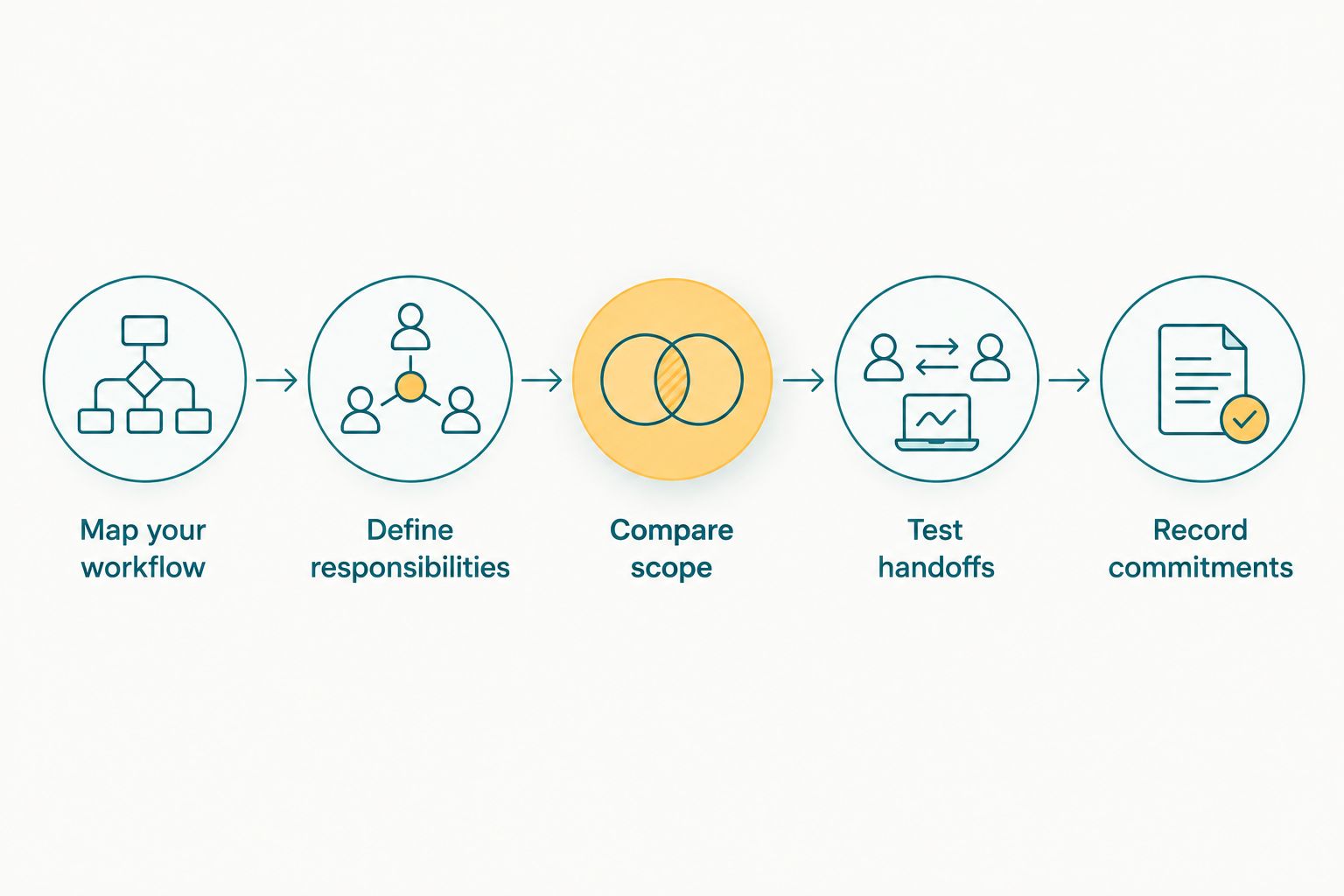
Define the workflow before comparing the commitment.
Where does Fotoowl’s Studio Manager fit?
Fotoowl’s Studio Manager is best for wedding and event photographers who need CRM coverage from chat enquiries through projects and payments. It captures and analyses leads from WhatsApp and Instagram chats and manages follow-ups, quotations, contracts, invoices, projects, teams, schedules, post-processing, deliverables and payments.
That scope makes the product relevant when your buying problem crosses booking administration and production coordination. Evaluate it using your own enquiry and project process, rather than treating a feature description as proof of fit.
The boundary matters: CRM administration is not the same task as delivering a gallery or collecting client photo selections. Assess those requirements separately, and confirm the commercial scope before assuming they belong to the same subscription.
The practical trade-off is breadth versus adoption work. A studio evaluating connected business functions must decide how staff will use them, who maintains records and which existing processes will change. Do not purchase broad coverage without assigning responsibility for using it.
What should you verify before approving the purchase?
Ask for a written response to questions that affect your daily work. Keep the answers with the quote so the buying decision rests on documented scope rather than a remembered demonstration.
- Can your team find the current enquiry status and next action?
- Can your team identify the accepted quotation and agreed deliverables?
- Can the people responsible see the schedule and project information they need?
- Can your team distinguish completed work from outstanding work?
- Can your team retrieve the business records it needs if you change systems?
Also decide which records you will bring into the new process. Start with information your team needs to operate: active enquiries, confirmed bookings, unfinished projects and outstanding payment records. Check the supplier’s supported setup process before planning any migration.
For a 2026 rollout, establish how you will judge the result before introducing the system. Use observable outcomes—clear ownership, retrievable commitments and current project status—rather than an unsupported promise about hours saved.
Is an annual CRM subscription better for photographers?
A 12-month comparison period helps you compare offers, but it does not make an annual subscription the better choice. Review the actual commitment, cancellation terms and suitability of the workflow before choosing a billing arrangement.
If your team has not established fit, resolve that first through the evaluation process the supplier offers. Do not assume an evaluation period or cancellation right exists unless the supplier confirms it.
Can a solo photographer keep using manual records?
A solo photographer can keep manual records when enquiry ownership, commitments, schedules and payment status remain clear. The decision is about reliable administration, not whether a business has reached an invented booking threshold.
Check whether you can retrieve the latest client agreement without reconstructing a conversation. If you cannot, improve the record-keeping process and assess whether software addresses that specific problem.
Should gallery delivery be part of the CRM budget?
Gallery delivery belongs in your overall software budget, but it is a separate requirement from CRM administration. A CRM tracks business activity; your delivery evaluation must address how you share work with clients.
List the tools you intend to retain and the functions you expect a new purchase to replace. Confirm that replacement in writing before removing an existing tool from your budget.
FAQ
How do I budget for a photographer CRM in India?
Start with a current written quote for your actual workflow, then account for setup effort and separate tools you intend to retain. Compare equivalent scope and billing periods rather than headline subscription figures alone.
What should a wedding photography CRM cover?
A wedding photography CRM should cover the business tasks you need to manage, such as enquiries, follow-ups, quotations, contracts, schedules, projects and payments. Test those tasks using a representative booking before deciding.
Is Fotoowl’s Studio Manager suitable for event photography studios?
Fotoowl’s Studio Manager is suited to event photography studios evaluating CRM coverage across chat leads, booking documents, teams, projects and payments. Confirm how its workflow fits your responsibilities and which functions the commercial offer includes.
Should I compare CRM subscriptions monthly or annually?
Compare subscriptions over the same 12-month period, then review when payment is required. Keep the total commitment, billing schedule and cancellation conditions separate in your decision.
Do I need a CRM if I already use WhatsApp for enquiries?
Using WhatsApp for enquiries does not by itself determine whether you need a CRM. Assess whether you can consistently track the enquiry owner, next action, agreed scope and booking status.
Does buying a CRM replace photo delivery software?
Buying a CRM does not by itself establish that photo delivery is included. Evaluate gallery delivery and client selection separately, and confirm which functions your chosen offer covers.
How can I tell whether a CRM is worth the commitment?
Test whether the CRM makes ownership, commitments and project status clear within your actual workflow. Record what work remains outside the system before approving the purchase.
One last thing
Test the unfinished booking, not just the successful one. Ask your team to find an unanswered enquiry, a revised commitment, an incomplete deliverable and an outstanding payment using the proposed process.
Those checks reveal what your studio will need to act on after the demonstration ends. Approve the CRM when you understand both the subscription commitment and the work required to keep its records useful.