
Can AI culling replace a second human review before delivery?


No—AI culling should not replace a second human review before client delivery in 2026. Use automated selection to identify technical rejects and compare similar frames, then review the shortlist and important rejected sequences yourself: image rankings do not establish whether your gallery fulfils the brief.
TL;DR
- Can AI culling replace human review? No—keep a photographer’s approval before client delivery.
- Fotoowl’s AI Culling suits wedding and event photographers who want offline sorting with a second human pass.
- Review selected photographs for quality and coverage; revisit rejected sequences for missing moments.
- Separate culling approval from final delivery checks: an approved shortlist is not an inspected export.
Why this matters
Your client receives a story, not a ranking. At an Indian wedding, an expressive photograph from a family ritual can deserve a place beside a cleaner portrait; at a corporate event, a required speaker photograph matters even when another frame looks stronger.
The practical aim in 2026 is to remove repetitive sorting without removing editorial responsibility. Start with a clear culling-to-Lightroom workflow, and give the human review a defined purpose rather than repeating every automated decision.
Use 2 selection passes with different jobs: technical sorting first, editorial approval second. Neither pass replaces checking the photographs you actually export and deliver.
Can AI culling replace a second human review before delivery?
No. AI-assisted culling and human review answer different questions: which frames look technically stronger, and which photographs belong in this client’s delivery? Keep both questions in your workflow.
| Review approach | Best for | Strength | Limitation |
|---|---|---|---|
| Automated first pass alone | Building a provisional shortlist | Separates technical selection from later editing | Does not provide your editorial sign-off against the brief |
| Human-only culling | Making contextual decisions from the outset | Keeps the photographer involved throughout selection | Leaves repetitive frame comparison with the reviewer |
| Automated first pass plus human review | Wedding and event delivery | Combines technical sorting with contextual approval | Still requires allocated review time and a responsible editor |
For client delivery, use the combined approach. Treat the automated output as a proposed selection, not permission to publish.
Follow this sequence:
- Read the brief. Identify required people, moments, functions and deliverables before judging the shortlist.
- Run technical sorting. Let the culling stage group similar photographs and propose stronger frames.
- Review the shortlist. Check expressions, focus, composition, repetition and suitability for the client.
- Revisit rejected sequences. Look for missing moments and meaningful alternatives before approving the selection.
- Inspect delivery. Check the edited exports and gallery separately from the original selection.
The second pass does not need to imitate the first. Its purpose is to challenge omissions, approve exceptions and confirm that the selected photographs satisfy the assignment.
What should the second human review actually check?
Give the reviewer 3 decisions: keep, reconsider or exclude. These are editorial instructions, not assumed software controls; record them using the tools already available in your studio.
Keep: photographs that serve the delivery
Approve photographs that meet your quality standard and contribute something useful. That contribution can be a required person, an important action, a distinctive expression or a necessary part of the event sequence.
Inspect group photographs beyond the main subject. A strong expression in the centre does not settle whether the rest of the group is suitable for delivery.
Reconsider: photographs that need context
Revisit frames where technical preference and storytelling preference disagree. Intentional motion, unusual framing or a fleeting reaction deserves a conscious decision rather than automatic acceptance or rejection.
Ask what the photograph adds and whether a stronger alternative preserves the same moment. Do not rescue every weak frame simply because it feels different; make the exception serve the brief.
Exclude: photographs that add no useful coverage
Remove unnecessary repetition and frames that fail your delivery standard without contributing an essential moment. Compare neighbouring images before deciding that a photograph is redundant.
Similar does not mean interchangeable. Two adjacent frames can differ in eye contact, a hand gesture or the relationship between people, even when the composition barely changes.
A practical human-review workflow for your studio
For a 2026 studio workflow, separate reviewing individual photographs from reviewing the completeness of the set. Otherwise, you can approve every selected image and still overlook a missing function or person.
Brief check
Write a short coverage list from the actual assignment. For a multi-function Indian wedding, use the functions you photographed rather than assuming every wedding follows the same sequence.
Include requested family combinations and specific client instructions. Give the reviewer access to those notes; a person who did not attend the event needs context, not just files.
Shortlist review
Inspect the proposed keepers individually and beside their nearest alternatives. Check whether each selected photograph is usable and whether it is the right choice from that sequence.
Avoid reviewing only thumbnails. Inspect detail where the decision depends on focus, facial expression or a small distraction, and assess composition at a view that shows the whole image.
Reject review
Return to rejected sequences wherever the shortlist leaves a coverage question unresolved. Search for the missing moment before assuming it was never captured.
Do not permanently delete rejected originals merely because the first pass excluded them. Keep selection decisions separate from your studio’s retention and backup procedures.
Coverage check
Review the selection as a complete set. Compare it with the brief, then look for unexplained gaps, excessive repetition and weak transitions between parts of the event.
For sports, check the requested athletes or teams against your assignment notes. For school work, check the required subjects and groups rather than treating a polished-looking collection as proof of completeness.
Delivery check
Inspect the edited files that will reach the client. Check for unintended crops, inconsistent treatment, unwanted files and photographs placed in the wrong delivery set.
A culling decision approves a source photograph for further work. It does not approve every later edit or export automatically.
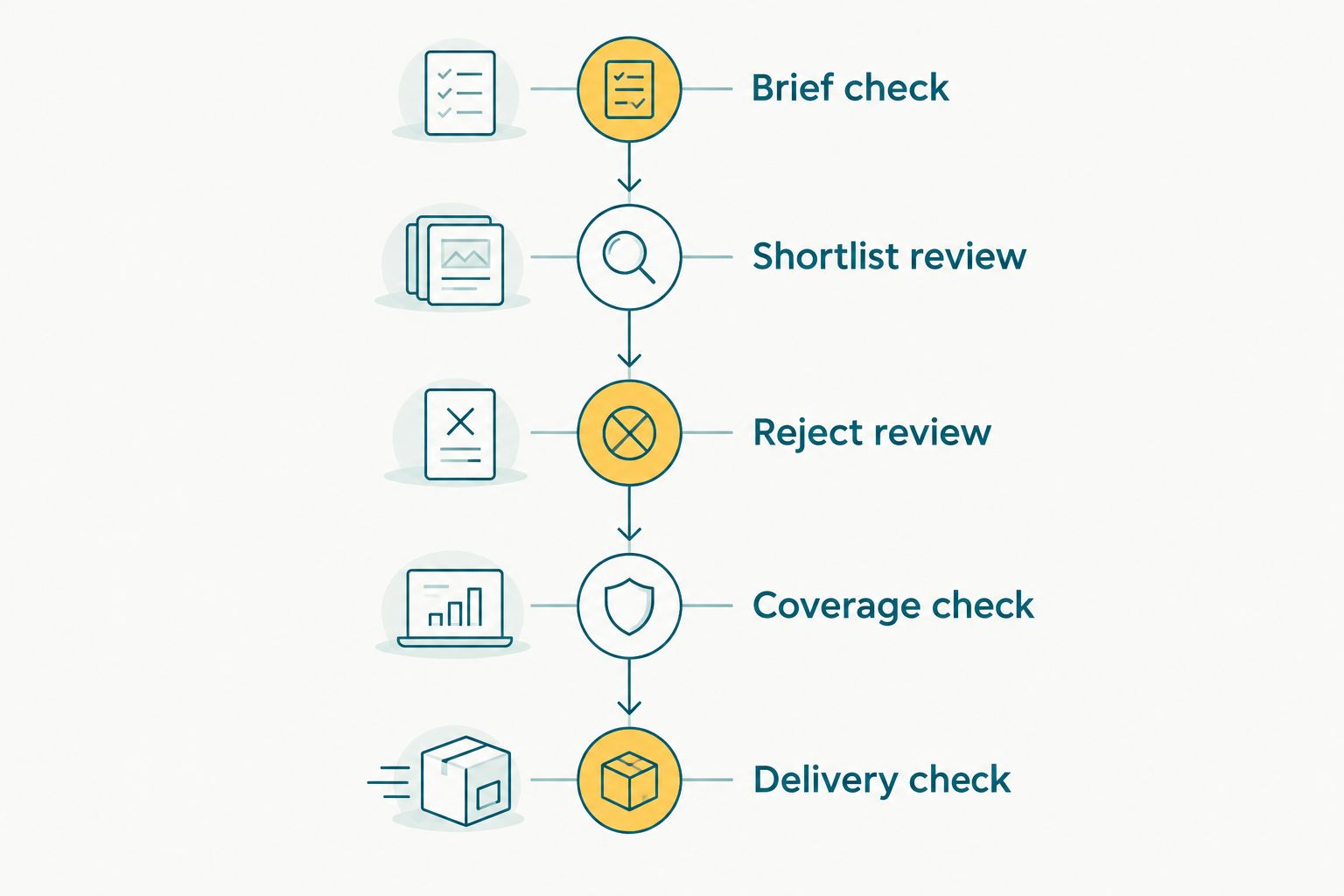
Approve the selection against the brief before checking the files prepared for delivery.
Why the amount of human review varies
Use the assignment to set review priorities, not a fixed quota of photographs. These factors change what the reviewer needs to examine:
- Repeated frames: Similar sequences need comparison, but small changes in expression can justify keeping an alternative.
- Composition: A clean arrangement is useful evidence, not a substitute for understanding why the photograph was taken.
- Exposure and blur: Judge technical weakness alongside intended treatment and the availability of a stronger version.
- Required coverage: Named people, requested groups and promised moments need explicit checks against the brief.
- Event structure: Separate functions, sessions and stages require a completeness review across the whole assignment.
- Delivery purpose: A photograph chosen for an album, a public-facing event set or a client proofing gallery needs approval for that use.
For 2026 bookings, put these priorities in the handover notes before post-production starts. The reviewer should know which decisions require the lead photographer’s judgement and which follow a clear studio standard.
Where Fotoowl fits in this workflow
Fotoowl’s AI Culling is best for wedding and event photographers who want offline technical sorting with human editorial control. It is an offline, desktop-only application that rejects duplicate and weak frames, groups similars, and ranks photographs by composition, exposure and blur.
The Fotoowl AI culling workflow includes a second human pass before export to Lightroom or the gallery. That makes it a sorting stage within your production process, not a replacement for final approval.
The benefit is a defined technical first pass. The limitation is equally clear: Fotoowl’s AI culling does not remove the need to judge coverage, meaningful exceptions or delivery suitability, and the application is not a cloud or browser culling feature.
Use the desktop stage where it fits your studio’s production setup. Keep responsibility for the approved selection with a named photographer or editor.
Do I need to inspect every rejected photograph?
You should review the rejected set before accepting the final selection, with particular attention to required moments and sequences that appear incomplete. Do not make permanent deletion part of an unchecked automated pass.
Start with questions raised by the coverage review. If an important person or moment is absent, inspect the relevant source sequence and its alternatives rather than searching only among approved photographs.
For an unfamiliar event or a new reviewer, use a broader reject review. A targeted check depends on knowing what the assignment required and recognising where the shortlist leaves uncertainty.
Does a second human review require a second photographer?
No—a second human review means a separate approval pass, not necessarily another employee. A solo photographer can perform it after the automated selection, using the brief and source sequences to challenge the proposed shortlist.
A separate reviewer brings another viewpoint but needs the same assignment context. Give that person the required coverage list, client preferences and unresolved selection questions instead of expecting familiarity with the event.
Assign responsibility, not just a task. The person approving the selection should know when to ask the lead photographer about a meaningful but technically weaker frame.
Can I skip human review for same-day delivery?
Do not skip human approval for same-day delivery. Reduce the scope of the release instead: prepare a focused, reviewed highlight set and leave the broader gallery for the full selection process.
For a 2026 same-day workflow, decide which photographs belong in the early release before the event. Review those exports for quality and suitability, then continue the main cull without treating the preview as approval of the entire shoot.
A deadline changes what you deliver now. It should not silently change who approves the work.
How to make the second pass useful, not repetitive
Create a short review checklist that separates technical decisions from assignment decisions. If reviewers simply agree with each selected frame, the second pass adds little scrutiny.
Use these 4 checks at handover:
- Quality: Are the selected photographs suitable for the intended delivery?
- Coverage: Does the set fulfil the actual brief?
- Exceptions: Have meaningful rejected frames received a deliberate decision?
- Release: Have the edited exports been inspected before sharing?
Keep unresolved questions specific. A note such as “confirm the requested family group is included” gives the next reviewer a decision to make; “check everything” does not establish a priority.
Discuss disagreements against the client brief and the available alternatives. This keeps the review focused on the assignment rather than turning every difference in taste into a new selection round.
FAQ
Can AI culling replace human review for wedding photographs?
No—keep a human approval pass before delivering wedding photographs. Check required coverage, expressions and meaningful alternatives as well as technical quality.
What's the best workflow for AI culling before delivery?
Use automated technical sorting followed by human selection approval and a separate delivery check. Review the shortlist against the brief and revisit rejected sequences before accepting the set.
Do I need another employee to do the second review?
No—the second review can be a separate pass performed by the photographer. Another reviewer needs the client brief and event context to make informed decisions.
Should I permanently delete everything the culling software rejects?
No—review rejected photographs before accepting the selection, and keep deletion separate from culling. Follow your studio’s retention and backup procedures rather than treating rejection as a deletion instruction.
Can I send an AI-selected preview without checking it?
Check the preview before sending it. A smaller, approved highlight set is a better release process than sharing an unchecked selection under a deadline.
Is choosing the sharpest frame enough for a group photograph?
No—sharpness alone does not approve a group photograph. Check expressions, visibility and the requested group composition before deciding which frame to deliver.
Does a successful cull mean the gallery is ready to share?
No—an approved cull is a selection decision, not final delivery approval. Inspect the edited exports and confirm that the intended photographs are in the correct delivery set.
One last thing
Review what is missing, not just what survived. A gallery can contain individually strong photographs and still fail the brief because a requested group or important moment never reached the shortlist.
Make the final selection question concrete: “Can I account for every required part of this assignment?” In 2026, that remains the photographer’s decision—not a consequence of a technical ranking.