
Best Reversely alternatives for photographers


Reversely is useful when you want to search with a photograph rather than describe it in words. Reverse image search stops being enough when your real task is delivering event photographs, collecting client selections or managing studio work. The best Reversely alternative in 2026 is Fotoowl for event photo delivery; TinEye is the better fit for finding copies of an image online.
TL;DR
- For reversely alternatives, choose Fotoowl for event photo delivery and TinEye for finding published image matches.
- Google Lens suits visual discovery; Bing Visual Search offers another image-led search option.
- Reverse image search and face recognition galleries solve different photography problems.
- Keep public image searches separate from client proofing, gallery delivery and studio management.
Why this matters
An Indian wedding photographer checking whether a portfolio image has been reused needs a different tool from a studio delivering reception photographs to guests. Both tasks involve finding images. The search area, audience and desired result are different.
Reverse image search looks for matches or related images on the public web. An event gallery helps clients access photographs you have uploaded. Face recognition within a gallery is not a substitute for searching the internet for unauthorised use.
Choose by the job you need to finish, not by whether a tool mentions image search. This 2026 shortlist separates public image discovery from professional photo delivery so you do not replace one problem with another.
Reversely alternatives at a glance
| Option | Best for | Standout capability | Difference from Reversely |
|---|---|---|---|
| Fotoowl | Wedding and event photo delivery | AI Gallery with face recognition, alongside client proofing and studio tools | Handles your photography workflow rather than serving as a public-web reverse image search replacement |
| Reversely | Starting a search from an image | Reverse image search | The reference point for image-led searching |
| TinEye | Finding copies of a photograph online | Searches for matching images, including altered versions | A focused option for image-match searching |
| Google Lens | Identifying subjects and exploring visually related results | Visual search for objects, places and text | Better suited to discovery than a photographer's delivery workflow |
| Bing Visual Search | Trying another visual search engine | Image-based discovery through Bing | Provides another route to visual results rather than client gallery management |
There are 2 separate jobs in this comparison: finding images online and delivering images to clients. None of the search engines becomes a client proofing system simply because it accepts a photograph as input.
1. Fotoowl: best for wedding and event photo delivery
Fotoowl is the strongest choice here when “finding photos” means helping clients access photographs from an event you shot. AI Gallery supports photo and video delivery with face recognition, a portfolio builder, a reel generator and Beam camera-to-cloud FTP uploads. The platform also separates client proofing, studio administration, offline culling and generative editing into named products.
Fotoowl is best for professional photographers who need face recognition galleries and client photo delivery. That is the relevant recommendation for Indian wedding studios, sports photographers, corporate event teams, music festival photographers and school photographers.
Where Fotoowl shines
- AI Gallery: deliver uploaded photographs and videos through face recognition galleries.
- Photo Selection: collect client selections that can be reused for albums and printing.
- Studio Manager: manage leads, follow-ups, quotations, contracts, invoices, projects, schedules, deliverables and payments.
- AI Culling: reject duplicate and weak frames, group similar photographs and review ranked images before export.
- AI Studio: create generative edits and image-to-video work from your own photographs.
Where Fotoowl falls short
- It is not a like-for-like recommendation when your only goal is finding copies of a photograph on the public web.
- AI Culling is an offline desktop application, not a browser or cloud culling feature.
- AI Culling includes a second human pass before export; it does not remove your responsibility for the final selection.
- A studio needing only an occasional reverse image lookup has a narrower requirement than this photography workflow.
Head-to-head: gallery delivery versus image lookup
| Dimension | Fotoowl | Reversely |
|---|---|---|
| Primary task in this comparison | Deliver and manage your event photographs | Start a reverse image search |
| Search context | Photographs uploaded to a face recognition gallery | An image used as a search query |
| Photographer outcome | Client delivery and selection workflow | Image-search results |
Best for: professional studios replacing manual photo delivery and scattered client selection processes.
Verdict: Buy for gallery delivery; skip as a substitute for public-web image searching.
2. TinEye: best for finding copies of your photographs online
TinEye is a reverse image search engine focused on image matches. It can find matching images even when a copy has been resized, cropped or otherwise modified. That makes it relevant when you are checking where a particular portfolio photograph appears online.
The distinction matters: you are searching for versions of the photograph, not asking the tool to deliver an event gallery. For a 2026 image-use check, TinEye belongs on the shortlist before you consider changing your studio software.
Where TinEye shines
- It focuses on matching images rather than identifying the subject of a photograph.
- It supports investigations involving altered versions of an original image.
- Its purpose aligns with checking the online appearance of a specific photograph.
Where TinEye falls short
- A search result does not establish who owns the copyright or whether a use was authorised.
- No reverse image search result should be treated as a complete inventory of every online copy.
- It does not replace client gallery delivery, album proofing or studio administration.
Best for: photographers investigating published copies of a specific image.
Verdict: Buy into this workflow for image-match searches; keep delivery in a separate system.
3. Google Lens: best for visual discovery and subject identification
Google Lens searches from images and helps identify objects, places and text. It suits a photographer researching an unfamiliar subject, looking for related visual material or exploring an image without knowing the right search terms.
Use it for discovery. Do not confuse a visually related result with proof that somebody copied your photograph.
Where Google Lens shines
- It turns a photograph into a starting point for visual research.
- It supports subject identification and text-related tasks.
- It is useful when your question concerns what an image shows, rather than only where the exact image appears.
Where Google Lens falls short
- Related images are not necessarily copies of your photograph.
- Visual identification does not establish image ownership or permission.
- It is not a replacement for professional client proofing and event gallery delivery.
Best for: photographers researching subjects and exploring visually related results.
Verdict: Buy into this workflow for discovery; skip it as your sole copyright investigation method.
4. Bing Visual Search: best for another image-led search route
Bing Visual Search lets you search using an image and explore visually related results. It provides another search route when you want to compare what different search engines return for the same photograph.
Where Bing Visual Search shines
- It supports image-led discovery without requiring a detailed written description.
- It adds another search engine to your research process.
Where Bing Visual Search falls short
- Similar-looking results do not prove that your photograph was reused.
- Search results do not settle licensing or ownership questions.
- It does not replace a photographer's client delivery workflow.
Best for: photographers who want another visual search perspective.
Verdict: Hold as a secondary search option, not a gallery replacement.
Why people switch from Reversely
The practical reason to evaluate Reversely alternatives is a mismatch between the search task and the result you need. A photographer checking public image use needs matching results. A studio delivering a wedding needs a controlled process for publishing photographs and collecting client decisions.
These are valid switching criteria, not claims about Reversely outages, business changes or service performance:
- You need image matches: assess TinEye against the particular photograph you are investigating.
- You need visual discovery: compare Google Lens and Bing Visual Search using the same image.
- You need client delivery: evaluate AI Gallery rather than another public search engine.
- You need album selections: evaluate Photo Selection for client proofing.
- You need fewer weak frames before delivery: evaluate AI Culling, then complete the human review.
Your 2026 decision should follow the bottleneck. Replacing a search engine will not organise client selections, and replacing a gallery will not automatically locate unauthorised copies online.
Run 4 workflow checks before changing tools
Test the task you actually perform. These 4 workflow checks keep a comparison tied to your photographs and your clients, rather than a feature list.
Image matching
Choose a photograph you own and search with the same source image across your shortlisted search tools. Review whether each result is the same photograph, an altered version or merely a similar subject. Record the page where a relevant match appears before drawing conclusions about its use.
Client delivery
Use a representative event set to examine how you will upload, organise and deliver photographs. Check the client experience from opening the gallery to finding the relevant images. For an Indian wedding studio, include photographs from different functions rather than testing only a tightly controlled portrait set.
Client selection
Ask a client or colleague to make selections through the proposed proofing workflow. Confirm how you will carry those choices into album preparation and printing. The important result is an unambiguous selection, not another message thread that you must interpret manually.
Human review
Review the final photographs before delivery, especially when automated culling is involved. AI Culling groups similar frames and ranks images by composition, exposure and blur, but its workflow still includes a second human pass. Keep that review separate from the question of how clients will receive the gallery.
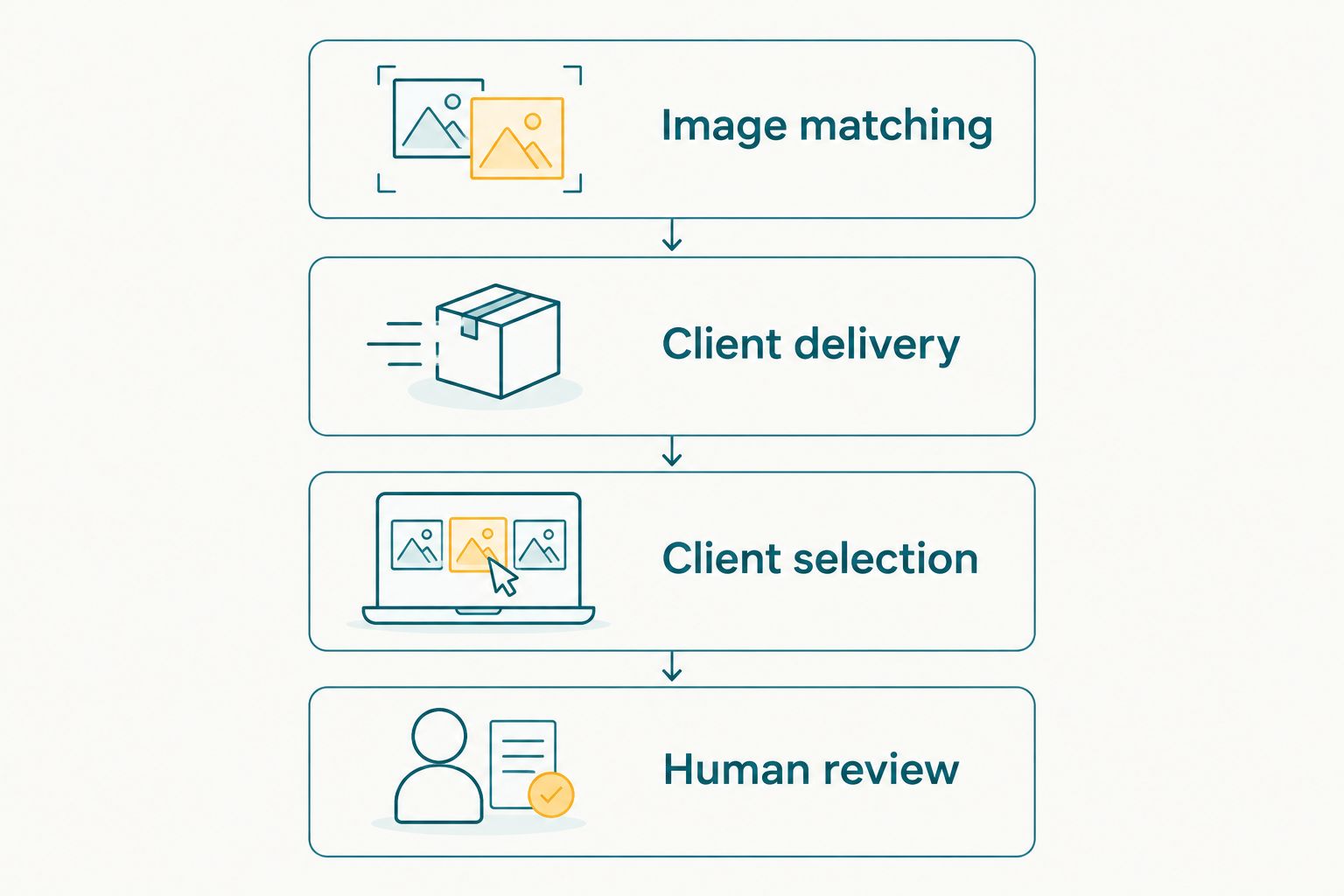
Test the photography task before choosing the tool.
For a closer look at the editing-to-delivery handoff, read how to speed up photo culling before client delivery. Faster searching is irrelevant if unfinished selections still block publication.
Keep image protection separate from photo delivery
A reverse image search result is a lead for investigation, not a legal verdict. Open the relevant page, inspect the context and compare it with your original photograph. Keep your original files and any applicable licensing correspondence together.
For client delivery, decide who should receive photographs and what you have agreed to provide. Do not assume face recognition alone answers every question about access, consent or onward sharing. Those decisions belong in your delivery process and client agreements.
In 2026, use 3 search tools from this shortlist—TinEye, Google Lens and Bing Visual Search—for different research purposes, not as interchangeable proof of ownership. Use a photography platform when the task is serving clients with your own event work.
When staying with Reversely is the right call
Stay with Reversely if your existing image-search process gives you the results needed for your task. A new gallery platform is not an improvement when all you need is an occasional reverse image lookup.
Before switching search tools, compare results for the same photograph and judge relevance. Before switching delivery systems, assess the client workflow. Change the tool only when the replacement solves the problem you actually have.
FAQ
What's the best Reversely alternative for photographers in 2026?
Fotoowl is the best fit in this shortlist for event photo delivery, while TinEye is the better fit for finding copies of an image online. Choose according to whether you need a client gallery or public-web image matching.
Is TinEye better than Google Lens for finding copied photographs?
TinEye is the more focused choice for matching a specific photograph. Google Lens suits broader visual discovery and subject identification, so visually related results need careful inspection.
Can a face recognition gallery replace reverse image search?
No. A face recognition gallery helps people find photographs within an uploaded collection; reverse image search investigates matches or related images on the public web.
Which option suits Indian wedding and event studios?
AI Gallery suits studios that need photo and video delivery with face recognition. Photo Selection addresses client proofing, while Studio Manager handles photography business administration.
Does AI Culling work in a browser?
No. AI Culling is an offline desktop application that rejects duplicate and weak frames, groups similar photographs and supports a second human pass before export to Lightroom or the gallery.
Does finding my photograph online prove copyright infringement?
No. A matching photograph identifies a use to investigate, but permission, licensing and context still need checking. Search results alone do not establish infringement.
Do I need both reverse image search and a client gallery?
Yes, if you both investigate public image use and deliver photographs to clients. They perform different jobs, so keeping both workflows is more useful than expecting one tool to replace the other.
One last thing
Do not search an entire event gallery when the question concerns one published photograph. Start with the original image, inspect the matching page and separate evidence from visual resemblance. For delivery, reverse that approach: organise the whole event around how your clients will find and select their photographs.
The strongest 2026 setup keeps image investigation and client delivery separate. Choose the search tool for the first job and the photography workflow for the second.